
Is it really true that classrooms haven’t changed since the year 1600?
Read MoreChairing discussions online
Is it rude to not respond to people in an online discussion?
Read MoreAchieving stuff straight away in Computing lessons (Updated)
Why shouldn’t you start your course with lots of apparently useless techniques?
Read More
Online, by Terry Freedman
Which online platform?
Google Meet, Zoom and Google Classroom are all viable contenders for the task of teaching your classes online. But which one is best?
Read More10 advantages of touchscreens
This article was published in Teach Secondary magazine, before Covid-19 barged its way onto the scene. I still think everything I’ve written here is relevant, though I would, for obvious reasons, emphasise the need to clean them well, and frequently.
Read MoreA thematic approach to teaching Computing in secondary school
A topic list such as Algorithms, Loops, Flowcharts, Pseudocode and so on is not exactly enticing. Might there be a more interesting alternative approach to teaching Computing? Funny you should ask….
Read More
Book review: How Charts Lie (short version)
We are presented with charts all the time. But are they telling us how things really are?
Read MoreBook review: 100 Top Tips - Microsoft Excel, by Sean McManus
Could this book of 100 top tips for using Excel benefit heads of department or subject leaders?
Read More
Printer error, by Terry Freedman. Things like this happen!
Show me your product in a REAL school
With no distractions, lots of tech support on hand and equipment and software in pristine condition, you could get a really strong idea of what you could do with new ed tech products. But…
Read More4 things I learned about using education technology from a blues harmonica
If you’re playing with a bunch of people and someone shouts out “Solo!”, you have a choice. You can either stop and mumble “Sorry, I’m not quite…., I don’t think…., perhaps we should…” — or you can throw caution to the winds, trust your instinct and enjoy the moment. There’s a lesson for teachers of Computing etc here.
Read More13 Things new teachers need to know about education technology
Just starting out as a teacher? Here are a few things it's useful to know in relation to using education technology. Updated to include online teaching and learning considerations.
Read More
Screenshot by Terry Freedman
Getting kids writing with Story Starters
Stuck for writing ideas for your primary class? This website may help.
Read MoreManual labour: what's your documentation like?
Is your documentation well-written but useless?
Read MoreBinary kittens
Could a kitten be used as a teaching aid in the Computing classroom?
Read MoreA contingency plan for an online course
Losing the connection doesn't mean losing the plot.
Read MoreTerry's top ten tips for tutors using Zoom
The following rules can be adapted (to an extent) by any tutor teaching an online course to adults or young adults.
Read MoreHow to generate random text even if you don't use Word
Need to create an example document quickly? You don’t have to type it out.
Read MoreHow to make online learning more attractive to colleagues

Idea!, by Terry Freedman
If your role in school is to encourage your colleagues to use technology, you might be wondering if you’re needed any more. After all, circumstances have forced schools to adopt some form of online learning to some extent. Even with pupils returning, it’s looking doubtful (in the UK at least) that all pupils will go back all day every day, some degree of online learning will probably be needed for the days pupils are not in school. Therefore hasn’t Covid-19 effectively done your job for you?
I think the answer is that this pandemic has forced the issue, but that for e-learning co-ordinators there are still reasons to be cheerful. You may not have to cajole your colleagues into using the technology, but face it: some will have been dragged kicking and screaming into this new reality! Perhaps the focus of your role could now shift to making it easier and more attractive for them, or at least less daunting. Here are a few suggestions about how you might do that:
Produce some simple how-to guides (“Quick Start” guides) on how to use Zoom, Google Classroom or whatever platform your school uses. At the most basic level, I would say you need only a few simple instructions on how to set up a meeting, possibly a recurring meeting too, and how to invite people to join.
Produce a handy hints and tips sheet. For example, have a look at Mute that mic!, Teach yourself the technology, and Chatting and Messaging.
Run some (online) training sessions. Think about beginning, intermediate and advanced classes.
Set up a Google Classroom sandpit that colleagues can try things out in. (This will involve just setting up a new class called Test or Sandpit, and possibly making your colleagues co-teachers.)
Run a Zoom session in which different colleagues take it in turn to be given the host rights to try out various features such as muting everyone’s mic and putting people in break-out rooms.
Set up a Google Doc on which colleagues can share useful hints and tips.
On the same Google Doc, create a section where colleagues can ask questions, which either you or other colleagues can answer. Use heading styles (Heading 1 etc) for the headings (ie not just bold or bigger text) and the document outline feature. Go to View—>View Document Outline. This is what the document will look like:
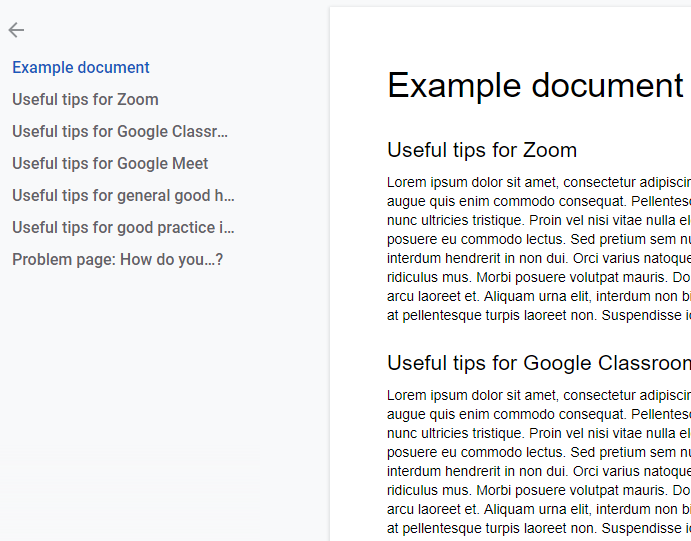
Google Docs Outline, by Terry Freedman
People can click on a heading in the Outline on the left, and they will be taken directly to that section in the document.
Set a time when you can run an online surgery. That will be for colleagues who wish to drop in to ask a quick question. For example, tell staff that you will be online in the “Virtual Surgery” at 4 pm every Tuesday afternoon, and make the link available everywhere. The “hidden” purpose of this suggestion and the preceding one is to save you from being bombarded in an ad hoc manner at all times of the day (and possibly at night as well). If you’ve provided some “Quick Start” guides, an editable Google Doc where colleagues can ask and answer questions and a set time for a drop-in surgery, you’re much more likely to protect your time and blood pressure!
Further reading
Featured






If you enjoyed this article, why not sign up to my free newsletter, Digital Education?
Why use Google Meet?
Google Meet has nowhere near the range and sophistication of the features of other online learning applications, such as Zoom. So why would anyone want to use it?
Read More13 Handy features of Google Classroom, 3 suggestions and 4 cautions
Some handy hints about Google Classroom.
Read More
In my past roles as ICT Co-ordinator or e-learning co-ordinator, I have formed and chaired an ICT or e-learning committee. What are the advantages and disadvantages of having such a body?