Mad Blogger: 2 Tools for the Literacy Classroom

I'm always having ideas for articles. I've got more ideas than time. Somehow, I can often 'write' a story in my mind. Then I have to go through the labourious process of actually producing it. If only there was a way of connecting my brain directly to a word processor....

In the tradition of the kind of comics I consumed in my misspent youth, I have created this 'mad blogger', aka 'mad scientist':

 Mad BloggerThis is how I did it:

  1. I went to Be Funky.
  2. I took a snapshot of myself with my webcam (although I could have uploaded a photo instead had I wished to).
  3. Once the photo had been taken I chose one of the Pop Art special effects - but there are loads of other categories I could have selected instead.
  4. I saved the completed picture to my desktop. All of this was seamless, but it would be nice if Be Funky had an effects preview window, because it's a bit trial-and-error. But hey, it's free: what am I complaining about?
  5. Then I went to Say What?, where I uploaded the picture I'd just saved.
  6. Adding speech bubbles was dead easy, thanks to the brief but accurate guidance on the page.
  7. Once finished, I saved the picture to my desktop once again, and you're looking at the result.

Total time? Maybe 10 minutes at the most.

But I've written this back-to-front. Here's how I should have written it:

I wanted to write something -- anything -- and illustrate it with a Roy Lichtenstein-like drawing. Obviously I couldn't simply use one of Lichtenstein's paintings without probably either landing myself in court or paying a fortune in licence fees. I needed an alternative.

Drawing an original cartoon was out of the question. I can draw cartoon faces, but I don't have the patience to paint in all the dots that give Lichtenstein's paintings that printed comic book effect. (He actually painted scenes from comic books.) I needed a program to do the work for me.

Searching for something like "free online cartoon-making program" led me to Be Funky. Subsequently, searching for "free speech bubble program" steered me towards the Say What? application.

In other words, the two applications helped me solve the problem of: "How can I illustrate my article with a comic-style picture without spending all night on it or ending up bankrupt?"

That is why I think these two applications belong especially in the toolkit of the literacy staff in schools, as well as the more obvious places such as Art and ICT.

Writers I like: Lucy Kellaway

I've been thinking for a while of starting a new series about blogs I like to read or podcasts I like to listen to or watch. I may still do one specifically about podcasts, but for now I have plumped for the title "Writers I like" because that will encompass journalists and others as well as bloggers.

I've started the series with Lucy Kellaway, not because she writes anything about educational technology (as far as I know), but for the following reasons:

  • As the holiday season nears I intend to take a short break and not think about ICT for a day or two. One of the things I hope to be doing instead is catching up with blogs, columns and podcasts I've fallen behind on. Lucy Kellaway's is top of my list.
  • She writes about (bad) management. Bad management is bad management is bad management, wherever it appears. We can learn much from the example of those who get it wrong.
  • She produces a podcast as well as a column (one is a spoken version of the other), thereby straddling two of my categories.

What I especially like about Kellaway's work is that it cuts straight to the quick, and is fearless. I don't know what it's like in other fields, but in education a lot of people are frightened to point out the emperor's new clothes in case it turns out to be, in the memorable phrase of one of my previous line managers, a 'career-limiting statement'.

Whether giving answers in her 'agony aunt' column called 'Dear Lucy', nominating businesses for her annual Twaddle Awards or in her weekly column/podcast, Kellaway slices through the BS in a witty, acerbic style.

Thanks to her, I recently discovered David Thorne's blog, which is hilarious (read the email exchange headed 'Please design a logo for me. With pie charts.', unless you are of a sensitive nature: the language gets a bit fruity).

Business leaders are lucky (although they may not think so) to have Lucy Kellaway. I'm not aware of anybody who performs the same role in education since Ted Wragg died (there's a link to a collection of his articles in my Amazon Books page).

It's slightly frustrating that you have to register on the Financial Times website to be able to read more than 2 articles a month - and slightly bizarre too given that you can subscribe to the feed readers of her column and podcast. You'll find her on the Lucy Kellaway page. I don't think you'll be disappointed.

Web 2.0 For Rookies: What is a Blog?

This series, as explained earlier, is intended to give people a flavour of what Web 2.0 is all about in as non-technical a way as possible. This time we look at blogs.

I think it would be true to say that many people have heard of blogs and have a vague notion of what they are. What a lot of people struggle with, however, is the question: What's the point of them?

First things first. A blog, short for 'web log', is a kind of website where you can do four things very easily:

Firstly, you can write new content without much ado. Sure, you can write new content on an ordinary website, but that usually means thinking about what kind of editor you're going to use to do so, how to link the new page to the rest of the site or how to change the content on an existing page without messing up the formatting. When you set up a blog you can, if you like, not worry about anything like that until you want to start exploring the possibilities. You can often even update the blog by sending an email from a mobile phone, or a picture from a phone or a camera.

Secondly, you can get the word out very easily that you've updated the website. Often, the platform you use will automatically create an RSS feed, which is the means by which people find out there's been an update without having to visit your website itself just on the off-chance in order to check.

Thirdly, and this is key, the default setting in a blog is to allow people to comment on what you've written. That's what turns a website from a repository of content to an area where discussion is positively encouraged.

Fourthly, you can quickly publish your work to a potentially worldwide audience. You can do that through a normal website too, but having an RSS feed plus the commenting facility makes the idea of a global audience much more likely to be realised.

Setting up a blog is easy: just go to http://www,blogspot.com and follow the instructions, and you'll be up and running in less than 10 minutes. In fact, the hardest thing will be to think of a name for your blog.

But let's move on to the question of: so what? There are a number of ways in which blogs can be, and have been, used in education:

As a personal learning journal. If you're doing a course, such as an MA, you could use a blog to record papers you've come across and your thoughts on them. You can then refer to these notes -- which nobody else need see -- when preparing essays. You could do the same on paper, of course, but a blog is accessible from anywhere in the world, more or less, and you can't cut and paste URLs and references using pen and paper.

As a diary of feelings or events. This is, I believe, how blogging started in the first place: with people keeping a diary, a log, of their activities.

As a place to do some creative writing. Or just to think aloud.

As a place to show off, and easily update, your creative portfolio. That could be writing, artwork, photography -- you name it. Next time an editor requests a sample of your work, point them to your blog.

As a place to keep, and update, your CV (Resume). Not necessarily the whole thing, but for the headline roles you've had and skills you possess. Interested parties will ask for the 'real thing' if they like wht they see online.

As a means of keeping a group of students informed. If you have a blog to which you publish new links and assignments every week, students can access that from home, their library or even, potentially, their local shopping mall.

As a means of obtaining students' thoughts and feedback, either by giving them the access rights to write blog posts themselves, or by encouraging them to comment on yours.

As a means of engaging students, either to record what went on in the lesson (see, for example, The Scribe Post by Darren Kuropatwa)or as a means of encouraging kids to write.

If the idea of having your students blog appeals to you, look into ClassBlogMeister from David Warlick.
You'll also want to read the relevant sections in Coming of Age: An Introduction to the NEW Worldwide Web, and browse through the many projects in the Web 2.0 Projects Book, both of which can be found in the 'Free Stuff' area of this website.

And look out for the utterly fantastic updated version of the projects book and, if you're in London in January 2010, my seminar on the subject. You can read all about these wonderful developments in my original article  in this series!

Déjà Vu

It's quite possible that sometimes when you read an article on this website you have the feeling that you've seen it somewhere before. If so, there's a reason for that.

I'm slowly going through the original ICT in Education website and semi-republishing some articles on this new website.

Semi-republishing? Well, things change so rapidly in technology, and in education policy, that I don't want to just republish articles without evaluating their content. Some articles are of their time and would not warrant republishing. Others stand up to scrutiny but require a fresh coat of paint in the form of an update. Others may no longer be apposite, but having been conceived in a particular set of circumstances and at a particular time are of some historical or curiosity value.

All of which is why I haven't simply moved everything to the new website lock, stock and barrel.

If you're wondering why I am doing this at all, it's in order to give some of the more popular articles a new lease of life by exposing them to a new audience. One of the big problems with the original website, one of the main reasons for starting a new one from scratch, is that it's so hard to find anything. Even if I were to write an article pointing people towards some of the older ones it would soon be lost without trace.

Why not add a widget? I think I have already explained my reasons in one of the Wasteful Widgets articles.

It's been interesting to see how many times each semi-republished article has been read. In some cases, thousands of times in a couple of days. You'd think that an article several years old would have no life in it, but you could be wrong.

So what have I learnt from this?

Firstly, it is definitely worth revisiting older articles every so often and seeing if they need updating, need complete rewriting, or should just be left alone. Blogs and websites are not newspapers or magazines: you can change old articles with ease and impunity.

Secondly, it is much more useful, and much more of a service to readers I believe, to review old articles every so often than to simply point people towards them.

Thirdly, looking at articles from a few years ago (or sometimes even more recent than that is quite revealing of either issues going on at the time or one's attitudes towards them -- or both.

So, although you may have a feeling of déjà view occasionally when trawling through this site, rest assured that the previously-published articles have been reviewed for relevance and changed or added to where necessary.

Thus, even an article is exactly the same as it was originally, it has still been subject to scrutiny. (Presumably that means that, in some sense, the two articles -- the original and the new -- are not the same at all. I see no practical value of pursuing this line of thought, but if you have some time you may find it amusing to read 'Pierre Menard, Author of the Quixote', in the Fictions anthology of Borges' short stories (which is listed on my books page. In the story, Menard attempts to make up for the shortcomings of the original Don Quixote story:

"Menard did not want to copy the book; his goal was to write a few pages independently, which would coincide, "word for word, and line for line," with the original version by the author."

This is followed by a comparison of two extracts, one by Cervantes, the other by Menard; the extracts are identical.)

Coming back to the real world, it strikes me that a really interesting exercise would be to ask students to look at a story or an essay they wrote a year ago, and 'correct' it if necessary. Tools like wikis or the revision features in Office suites make this very easy to do without losing the original.

Being able to see, in a very visual way, what changes have been made could be very instrumental in getting a decent discussion going.

Just a thought.

A Touch of Humanity

It is a sad but incontrovertible fact that one of the unfortunate effects of technology is that it provides some people with the excuse they need to abrogate all sense of personal responsibility or discretion. Note that I don't say the rise of technology causes people to behave in particular ways, just that it creates conditions in which such people can thrive.

This was epitomised and satirised by the Little Britain sketches on the theme of 'The computer says 'no'!" (See below for an example.)

Automated menus are another manifestation of this phenomenon. The worst ones are the ones where you end up in a sort of closed time loop, in which, after ten minutes of increasingly 'niche' destinations you end up in the same menu you started at.

Possibly the absolute worst one was the one which, after ten minutes getting me to the extension I wanted, announced that the office was now closed and that I should try again in the morning. I quite like the automated answering machine script in this context.

The Oyster CardYesterday I raced for a bus and placed my Oyster Card against the automated reader. The Oyster Card is a kind of cashless travel ticket that stores details of all your journeys on the Transport for London system. It probably also stores how many cups of coffee you've consumed, the point you're at on your circadian rhythm cycle and details of your DNA.

The wretched machine bleeped twice.

"What does that mean?", I asked.

"It means you haven't got any money left on the card", came the response.

"OK, how much is it then?"

"Two pounds."

"Two pounds?!" I exclaimed. "Good grief."

I rummaged around for some money, but found just a few loose coins.

"Can you change a ten pound note?" I asked.

"Where are you going?"

"The station".

"Forget it", said the driver.

"Really?", I said. "You are a gentleman, Sir."

In times gone by I would have written to the bus company, giving the time and route on which I was travelling, to thank them for such commendable service. If I did that now, he'd probably lose his job for not following some set of rules to the letter.

But it was a pleasant experience to meet someone who could exercise a bit of judgement, and show a touch of humanity.

Web 2.0 For Rookies: What Is Web 2.0?

I think it's all too easy to assume that everyone knows about Web 2.0. Well, I am always coming across intelligent, well-informed people who don't know about it. So, this 'Rookie' series is for two sorts of people: those who don't know about Web 2.0, and those who do know about Web 2.0 (because they can send the articles to those who don't!).

Web 2.0 is so-called to distinguish it from the original experience of the world wide web. Traditionally, the web has been mainly a publishing medium, but in one direction only: from the publisher to the reader. That's great for making a lot of stuff available to a lot of people; not so great for having an interesting interaction, or 'conversation'.

Collaboration is what Web 2.0 is all aboutWeb 2.0 is sometimes referred to as the 'read-write web'. This nicely summarises the new web from the old: now you can write to it, ie contribute, rather than just read what someone else has written. You don't have to look very far to find examples of this: just add a comment to this article and you'll be doing it yourself.

Like many delineations, this one blurs at the edges. After all, long before 'Web 2.0' as such was born we had discussion forums to which anyone could contribute once they'd signed up. For a very good analysis of the different types of tools and interactions available, see the article by Miles Berry and Steve Lee in the free ebook Coming of Age: An Introduction to the NEW Worldwide Web, which is available from the 'Free Stuff' page on this website.

The delineations blur at the edges, too, when you have a practical decision to make, as I had recently, in whether or not to include a submission to a book about Web 2.0 projects. For example, one project involves the use of a cell phone and PowerPoint. Not much Web 2.0 in evidence there, you might say. But if the kids had used their own cell phones, and contributed to a SlideShare presentation, say, then it would have been Web 2.0.

In other words, I decided to take a pragmatic rather than a purist approach, a leaf I've taken out of the economists' book. Faced with endless debates about what money is, and whether X is money, near-money, or not money at all, economists have largely adopted the view that if it acts like money, if people use it as money, if people accept it as money, then it must be money.

In a similar way, my view of Web 2.0 is that if something lends itself to collaborative working and can be worked on over the web, let's call it Web 2.0. I'm sure that will upset the purists, but as far as I'm concerned it's a good practical definition which, hopefully, will make sense to 'rookies'. It makes sense to me, and I consider myself a perpetual 'rookie'.

Examples of Web 2.0 applications include blogs, wikis, online presentation tools, online photograph-sharing sites like Flickr and many, many more. For a good introduction to Web 2.0, download and read the aforementioned Coming of Age.

Also available from the same place is the Web 2.0 Projects Book, which contains around 60 projects undertaken by teachers using Web 2.0 applications. Not all of the links work now, but the ideas are still valid.

A brand new edition will soon be available, containing over 100 amazing projects. In fact, it will be officially launched at my seminar at the BETT Show 2010 entitled Amazing Web 2.0 Projects: Real projects in real classrooms with real kids! That would be a good place to gain an introduction to Web 2.0 if you're at BETT this year, but there are other seminars too as well as the Teachmeet event.

But if you can't get to BETT, not to worry: just follow this series and download the new projects book when it's available!

Big Brother Is Watching You

A weapon in the fight against drink-driving?I thought this an interesting picture. It reminds me of the scene in the 1956 version of the film '1984' in which Winston Smith is stopped by a police vehicle and questioned whilst walking along at night.

The poster itself is quite sinister, though it has a nice poetic touch.

I imagine that this photo could be used as the starting point for some creative writing, or a discussion about the pros and cons of CCTV in public areas.

Interestingly, the position of the poster -- high up on a lamp post, unlit, and facing the wrong way in a one way street -- is such that the only people likely to see it are those sitting in the back row of the upper storey of a double-decker bus looking backwards.

In other words, whilst the poster may well be sinister, it is also pretty pointless.

Comments on Students' Work

Three reasons why this is good news, three reasons it worked for me, and two necessary preconditions.

In one of those all-too-common moments in which the future catches up to the past, Angela McFarlane, revealed recently that audio comments by teachers on their students’ work is proving very effective. So what, if anything, is significant about this? Plenty.

Professor McFarlane was speaking at the Naace 2009 Conference, and by ‘audio comment’ she was referring to a spoken message by the teacher. This worked, apparently, because students interpreted it as showing a lot of interest in them personally. I suspect it also worked because students tend not to read comments unless you specifically ask them to, for instance when you give them their work back.

Useful feedback?Now, I think the news about the audio comment is good, for three reasons. First, the whole point of commenting on a student’s work is to get them to act on it in some way. If they’re not reading your comments, what’s the point? So it’s good that they actually listen to audio comments.

Second, there’s a teacher workload issue. If you can talk faster than you can write, then why not record your comments? Makes perfect sense to me.

Third, it vindicates (after all these years) my own practice when I was a teacher, which was as follows. I took the view that it is difficult to always give copious high quality feedback on 30 pieces of work for each of 10 classes at least once a week. So what I tended to do was write short notes on most of the work most of the time, but I would supplement that by having in-depth discussions with each student during the lessons themselves. I worked on the basis that if I saw 6 students a lesson for these talks, I could see each one twice over the course of a term.

This worked really well, for the following reasons:

1. The students appreciated the fact that they were getting quality attention.

2. The process helped me get to know each student, and their strengths and weaknesses. Twice a term may not sound like a lot, but that equates to 6 quality interactions a year in addition to the normal classroom discussions and comments on their work.

This, as far as I’m concerned, is what assessment for learning, and assessing pupils’ progress, are all about. However, for audio comments to be effective, two things have to be in place:

1. The teacher needs a good record-keeping system in order to be able to remember what she said to whom. There’s no point in an in-depth conversation with a student if the next time you meet you can’t remember what you talked about. You need to be able to say things like, “I can see from this piece of work that you’ve been working on the research side of things that we talked about last time.”

2. The student needs a good way of recording what your feedback was, otherwise it’s ephemeral and all but useless. I used to ask them to write down the key points in their school or homework diaries. In the course of evaluating or inspecting schools’ ICT provision I’ve come across effective variations of this, whereby students are given a template, or a cover sheet, in which they fill out boxes with headings such as “Things I did well”, and “Things I need to improve.”

In other words, I don’t think one can escape the written word entirely when it comes to marking students’ work, but an arrangement in which spoken and written comments support each other can be most effective.

Wordle summary:

Wordle: Feedback


Why Subscribe to Blogs? Survey Results

In my article Why subscribe to blogs? 8 Things to consider, I outlined the characteristics of a blog which would induce me to subscribe to it - or not. I invited readers to take part in a small survey asking the question "Why do you subscribe to blogs?".

I've analysed the results and placed them in rank order. Here they are:

Characteristic

%

Rank

Informative 21% 1
Well-written 19% 2
Consistent quality 14% 3
Easy to subscribe to 10% 4
Updated regularly 9% 5
Provocative 9% 5
Other 8% 7
Humorous 5% 8
Newsworthy 3% 9


Why subscribe to a blog?

I have to say that to some extent these results surprised me. Of course, most of us suffer from the delusion that everyone thinks like ourselves, but I should have thought 'Updated regularly' would have attracted a greater percentage of the 'vote', whilst whether a blog is easy to subscribe to seems not to worry too many people.

What really is strange though is the low ranking of 'Newsworthy', because several people said that they subscribe to blogs which they believe will help them keep up-to-date in technology and education. Perhaps the word 'Newsworthy' was ill-chosen when I framed the survey. Perhaps the word 'Informative' is sufficient in this context.

I was pleased to see that 'Well-written' and 'Consistent quality' came in at positions 2 and 3 respectively. However, I was disappointed to discover that 'humorous' ranks almost bottom.

Other reasons for subscribing to a blog, or for not unsubscribing, included supporting people who are friends or who are within one's personal learning network. One person said that the content of a blog should not be too personal or embarrassing.

Unfortunately, because I forgot to include a note on the blog stating that respondents may be quoted unless they requested otherwise, I don't feel able to credit individual people for their comments, but should like to thank everyone who took part.

This was hardly a scientific survey, but hopefully it has provided food for thought and a starting point for discussion. Perhaps a similar kind of survey could be undertaken by a school in relation to what its parents look for in a  school website. It strikes me that we make all sorts of assumptions about what people like or dislike, and one way (not the only way) to find out if such assumptions are justified is to ask our target readership.

If you have any thoughts about this, or if you have run a similar survey yourself, please leave a comment about it below.

8 Reasons to Look at the Books Page

Some time ago I set up a book page on this website, because I thought it would be handy to have all the books I've reviewed in the same place. It would also make it easy for readers to purchase books too.

What I have now done, to give the page additional value, is put a brief extract from each review alongside each book. If you like what you read, you can click on a link to be taken to the complete review; otherwise, you can just skip it and go on to the next one.

I think in due course I will probably have to create more such pages because that page is already starting to look rather long -- the number of books has been set to 25, but I may start a new page before then. I suppose I'll also have to figure out how to put them into alphabetical order, although it may be easier to create an index, or even just to leave it altogether: I have tested the website's search engine for finding books, and it works very efficiently.

I'd be interested in your views on such matters. I've devised a survey that will take about 2 minutes to complete and is anonymous. I hope you will be kind enough to use it to have your say.

Oh, and the 8 reasons referred to in the title of this post? Eight of the books have been reviewed and published on the page so far; there are several more to come.

Looking Back In Wonder (That We Achieved Anything At All)

I was struck by Lisa Nielsen's article, There is Such a Thing as a Free Lunch: 8 Free and Easy Ways to Begin Educating Innovatively, because just a couple of days ago I was ruminating on how things used to be.

And feeling glad that they're not like that any more.

Lisa says "The best tools in life are free…at least for educators. There is such a thing a free lunch.”. And whilst I disagree with the free lunch part, as I've explained in my 'non-review' of Chris Anderson's latest book, Free, I most certainly agree with the statement that there are tons of tools available which are not only fantastic, but free of charge.

Now, I am absolutely not one for nostalgia: I believe that, for the most part, the best thing about the past is that it's past. And technology is a case in point. It's only 12 years since I was in the classroom, and in that time the landscape has changed unrecognisably. But if you weren't teaching then, you might not realise it: people never truly know what life was like before the technology they use was ubiquitous, a point made in a recent article I wrote based on a cartoon.  

To get a feel for how, I'd like to show you what it was like not by discussing changes in technology or economics (although those things are implied) but by sharing with you what my main two concerns were just over a decade ago, as far as resourcing was concerned. The overarching theme here is quite simple: how to make technology accessible to my students.

One of the things I spent many hours doing was looking for a low-cost alternative to Microsoft Office. I have nothing against Microsoft Office. Indeed, of all the tools I've used, I still think Word and Excel are the best. But that was part of the problem. There were  low-cost alternatives to Word and Excel, but the features they cut down on were either essential in curriculum terms, or simply made life difficult, or more difficult than it needed to be.

For example, if you can't remember how a function works in Excel, as you type it in some bubble text appears showing you the syntax. If you still can't figure it out, just press Shift-F3, and a dialog box appears which 'talks' you through it. I don't know about now, but at the time other spreadsheets, especially the cut-price ones, didn't have that.

My philosophy is: why make the tools themselves hard to use, when what you really want the kids to do is use them to solve problems? You know, if I want to measure up my room for a new carpet, I don't want to have to spend a day figuring out how the tape measure works.

Another concern was to increase the amount of kit we had and, crucially, to put it into the students' hands. Thus it was that I found myself spending hours and hours looking through used or discontinued laptops, preferably with adequate software preinstalled.

Unfortunately, even if the software was OK (rarely), the cost of even the cheapest usable laptop was such that, if I was really lucky, I might be able to obtain three or four of them.

I once spent a day driving down to a company in Kent that was getting rid of a whole load of computers, loading them into my car, driving back up, and unloading them, only to discover that they were more or less useless to me. It wasn't a complete waste of time, because the design and technology department took them off my hands, and used them for running some basic word processing and computer aided design programs. But even so....

To summarise, 12 years ago both software and hardware were expensive, and one result of this was that ICT (Technology) Co-ordinators spent half their time looking for ways of increasing their resources to a reasonable level without breaking the bank. Of course, that's exactly the situation now, and it probably always will be.

However, my point is this: in this regard, things are infinitely better than they were even just ten years ago. And the reason for saying that is not to indulge in some sort of inverse one-upmanship about how bad things were in the 'old days', but to suggest that perhaps people, like those two old fossils in Lisa's story, who really cannot see that things are nothing like what they were should be getting their retirement plans in order. As Bob Dylan said:

"Your old road is
Rapidly agin'.
Please get out of the new one
If you can't lend your hand
For the times they are a-changin'."

Cross-posted on the Technology and Learning website.

50 Ways to contribute to a website

This article has been superceded by this one.

Please note:

In view of the implementation of the Online Safety Act in the UK, I am not accepting guest articles until further notice.

I love having guest contributors to this website and the Computers in Classrooms newsletter, because it provides more variety. However, not everyone likes writing. If that applies to you, or your pupils or students, there are several ways in which you – and they – can contribute.

I've written this relatively objectively because these suggestions would apply to contributing to any website or blog I should imagine, not just this one. Indeed, one or two of them don't apply to this one at all at the moment, such as contributing to a forum.

Also, the list is almost certainly not complete. If you have any other suggestions, do let me know.

If you're a website or blog owner, you might find this list useful as a way of suggesting to your own readers how they might contribute to your efforts.

  1. Write an article.

  2. Write a poem.

  3. Write a special type of poem, like a limerick or a haiku.

  4. Write a song.

  5. Write a special type of song, like a rap song or a blues song.

  6. Write a play (but not a full-length one please!).

  7. Write a special type of play, like a play for one person.

  8. Draw a picture.

  9. Draw a special type of picture, like a cartoon.

  10. Design a quiz.

  11. Design a special type of quiz, like a word search or a crossword.

  12. Create a presentation in SlideShare. The beauty of having an online newsletter is that your presentation can be linked to, or even embedded.Create a video.

  13. Create a special kind of video, like a 12 second one .

  14. Make a podcast.

  15. Make a special kind of podcast, like an interview with someone who uses technology in interesting ways.

  16. Review a podcast.

  17. Review a SlideShare presentation.

  18. Review a software application.

  19. Review an item of equipment.

  20. Review a service.

  21. Write a case study of practice you know about.

  22. Write a report on something you've tried out in your classroom.

  23. Write a report on something you're thinking of trying out in your classroom.

  24. Write a lesson plan.

  25. Write a lesson resource.

  26. Review a website.

  27. Write a how-to crib sheet.

  28. If you're representing an organisation, take out an advertisement in the newsletter. 

  29. If you're representing an organisation, place a sponsored article in the newsletter.

  30. If you're representing an organisation, offer a book, some hardware, or some software for review.

  31. If you're representing an organisation, offer a book, some hardware, or some software as a prize in a competition. I've run competitions from time to time, and they always go down well.

  32. Proofread a newsletter issue.

  33. Contribute to a survey (I always try to ensure that they never take more than 10 minutes to do).

  34. Leave comments. Sometimes it feels like nobody is reading anything, especially in the early days. Fortunately, I receive comments through email, Twitter and Facebook, but if someone has just started out, as it were, they need some encouragement to carry on.

  35. Send the author a comment by email. At least s/he will know that someone is listening!

  36. Contribute to a forum on the website, if there is one.

  37. Make suggestions for improvements.

  38. Write an article about something they've written, with a link back to their article.

  39. Offer a White Paper or similar resource for them to review -- as long as you don't make it conditional on a positive recommendation.

  40. Share articles you like via Twitter and other networks.

  41. Suggest a reading list for readers.

  42. Suggest a blog list for readers.

  43. Suggest a podcast list for readers.

  44. Suggest a video list for readers.

  45. Send in a photo or a link to one.

  46. Report on a conference, especially if it's one that the website owner was unable to attend.

  47. Offer to report on a conference session. Parallel sessions are the bane of our lives in some respects! Being able to attend one session and report on two or three is the stuff of dreams.

  48. Take part in an interview, via email or Skype.

  49. Invite the author to take part in a discussion. I love being invited because it means I make contact with people I may not otherwise have come across.

  50. Contribute in a way that I haven't yet thought of.

If any of these suggestions appeal to you as a way of contributing to my efforts (ed tech-related only, please), please look at the notes and terms & conditions.

If you want privacy, start by being private

Derek BluntDerek Blunt is ranting again...

Alexis de Tocqueville said:

"In a Democracy, the people get the government they deserve."

Maybe the same applies to privacy? People seem to be upset about the so-called lack of privacy these days, or about private information going missing, but I don't notice people being that worried about such matters in their everyday lives. In a (definitely not) highly scientific survey I witnessed the following on a recent train journey in which the carriage was packed (that is to say, there was a large audience):

  • Someone yawned, and treated us all to a first class view of his tonsils.
  • Someone was discussing his company's business plan with his business partner on his phone at the top of his voice.
  • Someone else was making her personal arrangements at the top of her voice.
  • Someone else let his friend -- and all of us -- know exactly what he told his boss to do with his job.
  • Someone else spent the entire journey putting her make-up on.
  • Someone else picked his nose without bothering with such niceties as a tissue.

Was I just unlucky in my choice of fellow travellers? Or does all this signify a deeper malaise in our society, characterised by an absence of any sense of what is appropriate behaviour in public?

If enough 'ordinary' people don't care about maintaining their privacy and a sense of decorum, why should any government?

Derek Blunt: Blunt by name, blunt by nature.

Do you know who your 'friends' are?

In the September 2008 edition of Computers in Classrooms, I wrote an article in which I discussed how cartoons and comics could be used to stimulate discussion in a topic. A cartoon doesn't have to be side-splittingly funny to be useful. As long as it causes a smile and is pertinent to matters of concern, you're on safe ground.

The cartoon below is a case in point. You may have to explain who the Grim Reaper is, but apart from that it ticks all the boxes:

  • It's based on a pretty silly premise: I doubt that the Grim Reaper has a page on Facebook or in Twitter!
  • It's not guffaw-inducing, but it's humorous enough to take the edge off what could, if you're not careful, be a 'discussion' in which you find yourself preaching to a bunch of people who are convinced that you just don't 'get it'.
  • Humour is a good way of priming the brain to be more open to new ideas. I have absolutely no scientific basis for saying that, apart from my own experience, both personal and professional.
  • It touches a nerve which is very much raw: who exactly are  the people who ask to be your friends?
  • You can use it as the basis for further discussion, such as: is it OK to 'unfriend' someone in a social network? Is 'unfriending' enough, or should you block them too? Is blocking them enough, or should you click on the 'Report' button?
  • And, of course, you, or your RE or Citizenship colleagues (or all of you) can start to explore the meaning of the word 'friend' itself in a virtual context.


Cavalier Attitudes to Data: 5 Points and 3 Questions

I was inspired by a Westminster eForum event entitled Missing Discs and Mislaid Laptops to write this article.

Why is it that disks, data and laptops appear to go missing with alarming frequency (although, as I say in another article, this appears to have abated recently)? Is it that there is a general lack of understanding about the nature of digital data, and how it is fundamentally different from the old paper-based approach?

You may find it useful to discuss the points made in this article with your students.

We may live in the digital age physically, but mentally many people still exist in the pre-internet era. I say “still”, but this applies as much to children and young people, the so-called “digital natives”, as the rest of us. What I am referring to is the tendency to treat digitised data as merely a more convenient form of paper data. It is this failure to grasp the reality of computerised data that, in my view, underlies the alarming tendency for laptops to be left lying around and disks to be sent through the post. What it comes down to is a lack of understanding, and therefore a lack of respect.

Although people and organisations are often implored, rightly, to make backups of their data in case it is lost or deleted, there is, perhaps, not enough emphasis on the other side of the coin. That is to say, the longevity of data. Incidentally, this is a key issue to try to get across to (young) people in terms of their conduct online, especially in social networking communities. Consider the following five points.

  • Once data is computerised, the cost of duplicating it is pretty much zero, and it is easy to do. I recently read a novel in which someone unearthed sensitive documents from the WW2 era and destroyed them in order to protect people. The possibility of solving the problem in that way may or may not have been viable when the book was written; it is certainly not viable now.

  • Once data is computerised, it can be copied and copied and copied with no loss of quality. It’s not like photocopying, where after making copies of copies a certain number of times it becomes unreadable.

  • Once data is computerised, it can be spread around the world in seconds. Ask anyone who has lost their job or their reputation because of ill-advisedly sending a risqué joke to their friends by email.

  • Once something has been posted to the web, it cannot be unposted. Even if web pages are deleted, archives of them exist on the internet. You can take down a photo you have posted – but someone may have already downloaded it to their own computer and be thinking about sending it to others.

  • Encrypted data may not be as secure as you think.

When you consider these points, it becomes clear that committing data to disk, and then disseminating that information, are not trivial decisions. Organisations (and individuals) need to ask the following three questions before doing so:

1. Do we need this data, in this form? Here is a good example of this way of thinking. Because of the drive to have joined-up databases in the area of children’s services in the UK, it is often taken as read that certain data have to be available to all the professionals concerned with an individual child’s welfare. That is not necessarily true. The goal might be achieved by having a system of flags in the data, ie notes which say things like “Contact the child’s doctor about this”.

2. Have we taken basic precautionary steps to keep data safe? That means giving different people access levels according to their professional needs, as opposed to their level of seniority; making it mandatory for computers to be password-locked when people leave their desks momentarily; making it harder to pass the data on than it is to not do so.

3. What would be the cost, in terms of reputation and litigation, if we get it wrong?

Some of the issues involved can be solved by technical means, such as encryption and other security measures. But on the whole what is needed is a completely different way of looking at computerised data: a different mindset entirely.

Nice VLE, Shame About the Library

My visit to the Online Information Conference recently reminded me, yet again, what a marvellous bunch of people librarians are. If you really want to know about searching for information and making connections, aska  librarian.

I'll be exploring such matters in the (hopefully) near future, but in the meantime I thought I'd reproduce an article I wrote this time last year. Don't worry: although the news referred to is old, the principles are still relevant, and I've updated the article.

Libraries are still relevantLast week it was reported that a school in England has decided to dispense with its library, and its librarian, and have an all-encompassing virtual learning environment (VLE) instead.

It probably isn't the first school to do something like this, and no doubt will not be the last. But is the decision a good one from an educational point of view?

I have to say that, in my experience school librarians are the salt of the earth. Their role is traditionally similar to, but different from, that of their counterparts in public libraries. That is because, as well as being founts of knowledge when it comes to finding stuff, the good ones could save a teacher an incredible amount of time.

For example, in a few schools in which I've taught, the school librarian has invited staff to share their schemes of work with her (they are usually female in my experience) so that she can put together "project boxes" for the teacher.

A typical project box would contain a couple of dozen books on the topic, possibly even a few artifacts, and a list of follow-up reading. It therefore provided a very rich extra resource for the classroom for that half-term.

Now, in case you think I must be harking back to the pre-industrial age, I should tell you that I availed myself of this service several times as Head of ICT in a secondary school. I always felt it important that students know that not everything they want to find out needs to be looked for on the internet.

I also wanted them to understand the concept of triangulation, ie corroborating one set of "facts" with another set found in a different source. When you have in your classroom a box containing twelve or so very different books, as well as access to the web, this idea becomes much more transparent.

But even in traditional terms, you can't beat a good librarian. For a start, I have met very few teachers who are as good at searching for information (and finding it!) as the average librarian: librarians seem to understand the concept of "search" in a much deeper and more innate way than the rest of us.

You also cannot beat a librarian who is really at the top of his or her game. The chief librarian in my local library, some years ago now, was amazing. You could go up to him in at the desk in the reference section and say:

"I'm doing a report on butterflies in history, with particular reference to yellow butterflies in Denmark in the 16th century"

and he would say something like:

"Ah yes, you will need Cooper's History of Scandinavian Insects, but you may also like to check out the November 2001 issue of the Journal of the Moths and Butterfly Research Association".

Interestingly, one of the speakers at the conference, Paul Sonderegger, likened the traditional librarian to an interactive flow chart. This is shown in the illutsration below, which represents how the librarian responds when someone asks "Do you have anything by an Irish writer?".

What the librarian does

Finally, I happen to think that folksonomy isn't everything. Taxonomy is important too, and whilst I cannot claim to know the Dewey Decimal systems, I can claim to understand how it works, and the numbers of the type of book in which I am most interested. Where will students gain that kind of knowledge, easily, once school libraries and their custodians start to disappear.

Look at this blog for an article about the school referred to at the start of this article, along with references to newspaper reports on the matter.

See also: 7 Reasons to have an educational technology library


Review of The Edge of Madness

In What would happen in a national cyber attack? 23 suggestions for tackling this issue in the classroom I looked at ways in which teachers wishing to explore the idea of cyber-warfare, ie the possibility of one country waging war on another by attacking its computer infrastructure, might go about doing so. A terrifying thought, if you think about it, and possibly something that has already happened to Estonia.

Interestingly enough, The Economist ran a story about this subject, and the outlook is not good. The biggest threat comes from small groups or individuals, much like the terrorists threat with which we're already familiar. In such a scenario, there would be no clear target to attack, even if one could, so the best option is to beef up the defence against such an occurrence.

Frankly, the UK's record of even such a simple thing as looking after people's data when it's in a digital form (see Dealing With Data Loss: A Look at the Problem and a Possible Solution for a summary of the problem) is so appalling that I can't imagine there are enough people in the corridors of power who would even to begin to have a sufficient grasp of the issues. The problem isn't necessarily with the people at the top, but the administrators. As I said in a talk I gave at the Westminster Forum:

[There needs to be] ... An insistence that all teachers become computer literate to some extent. Why is it acceptable for people to remain ignorant about technology basics in this day and age?

This is getting to be a hot topic. Information Age ran an article on Gary McKinnon, a hacker fighting extradition to the USA because of his activities. In it he said:

We do need to be prepared for cyber-economic warfare: I know that sounds futuristic and alarmist, but it is coming. There will be attacks on financial centres.

The Edge of Madness is author Michael Dobbs' attempt to explore the cyber-warfare scenario through fiction. Now, I'm not a techie when it comes to what's possible or not in this area, so whilst reading the book I was constantly wondering about that. My worst fears were not much alleviated by the author informing us, after the end of the book, that the stuff in the book was only slightly exaggerated. He states that:

I have taken dramatic licence with much of what they [two experts] have told me, although in truth it seems difficult to exaggerate the potential for cyber skulduggery.

Dobbs has a facility for touching a nerve. Everyone in Britain remembers his House of Cards even if they don't even realise it. The expression "You may say so, but I couldn't possibly comment" has entered the language as the verbal equivalent of the nudge and wink in the world of realpolitik.

This his latest book is no disappointment in that regard. The title might just as well have been "Edge of your seat", because there are two terrifying scenarios unfolding at once. On the one hand, China is in the process of wreaking havoc without sending a single soldier or missile anywhere. On the other hand, the leaders of Russia, the USA and the UK are attempting to devise a solution to the problem when they can't even be in each other's company for five minutes without trying to score points off each other.

In a sense, that's the real worry. When you watch films like Independence Day, you're invited to believe that in the face of a terrible external threat erstwhile mortal enemies would put their differences aside and fight the common foe. Hmm, well, we can but hope.

I think a particularly skilful characteristic of the book is the way Dobbs weaves in real life events, like Chernobyl. So all the time you can't help wondering: does the author know something I don't?

I would definitely recommend this book. Buy it for yourself, and order it for your school library (if there still is one!). If you do decide to explore the possibility of cyber warfare as part of your approach to considering the effects of technology on society, it will be good to make this one of the reference sources. You can order it via this website.

And if the film of the book ever appears, order your students to go see it!


Dealing With Data Loss: A Look at the Problem and a Possible Solution

I once wrote, somewhat flippantly but not entirely jokingly, that if you live in the UK and pick up a newspaper on any particular day there is almost certain to be yet another news report about a government laptop going missing. The very next day another of those articles appeared. My perception is that things have improved since then, but that could be because little has occured for a while on a large enough scale, or frequently enough, to warrant the attention of the mass media.

The sorts of disaster I'm talking about include the occasion when it was reported that the UK's tax website had to be closed temporarily because:

"a memory stick containing confidential pass codes to the system was found in a pub car park."

That was repeated again a few months later, along with another article stating that according to official figures, one official is disciplined over data loss every day. And if that's the "official" figure, there is no doubt in my mind that the actual figure is higher. I wonder what it is when you take into account private companies "losing" data, or Local Authorities "losing" data?

I've even attended a seminar on the subject of missing data and laptops, where a number of experts gave talks on the problem. But it seems to me that the problem could actually be solved very quickly by changing the way we think about data.

One of the aspects of many ICT courses is the effects of IT on society. Perhaps this opinion piece (which, as you will see, is backed up by facts and figures) might be used as the starting point for a debate and other work on the subject.

The phenomenon

For those outside the UK who may not have heard about this phenomenon, these are basically what seem to be the common features of these cases.

1. Someone, for reasons best known to themselves, leaves their place of work with a laptop or memory stick containing personal data details of thousands -- or in one case, 25 million -- people.

2. They leave the laptop or usb stick on a train, back seat of a car or other equally safe places.

3. Someone discovers it and reports it to the authorities or the press.

4. There's a press release assuring us that the data was encrypted, but they've changed everything anyway, so there is no need for anyone to worry.

5. The person who lost the item is reprimanded or fired.

6. There's a lot of wringing of hands, promises of internal inquiries and so on.

7. It all goes quiet as the media focus on the next organisation to lose a load of data.

Terminology

To my mind, there is something wrong with the word "loss" in this context. I'm not sure exactly what the right word would be, but I think of it in much the same way as road accidents. Traffic "accidents" tend not to be called "accidents" these days, because most of them are caused by human error. The word "accident" conveys a sense of "not my fault", when actually most road crashes are someone's fault, as opposed to, say, mechanical failures or acts of God.

In the same way, losing thousands of people's details is not simply accidental, as the term "loss" implies. To leave a laptop lying around or to lose a memory stick in the street surely suggests a lack of attention. We all lose stuff -- I'm always putting things down and then retracing my steps mentally to work out what I did with them -- but I can assure you that when I leave the house with something really valuable, like my passport, I go to absurd lengths to prevent losing it, such as using a bulldog clip to attach it to the inside of my pocket. Or, despite wearing a jacket with zipped pockets, I check that it's still there every 5 minutes.

But wait...

Why do people feel the need to take such huge amounts of data away from the office in the first place? I've been working now for nearly 35 years, and in all that time I have never taken home the kind of data that seems to go missing virtually all the time now in the UK. If I did take data home, it consisted of pupils' names and their exam grades. School registers, which contained pupils' names and addresses and phone numbers, were never allowed off the premises.

These days, if people have to work from home, they should be able to access the data they need over a secure internet or extranet arrangement. I just don't see why there should ever be a need to physically remove the data from the place of work.

What to do about it?

Health and safety

As long as people continue to think of data loss as losing "data", there is never going to be a real appreciation of the possible consequences of the data loss in human terms. There have been cases of armed forces personnel details going AWOL, fugitive criminals' details, financial records going missing . See this article for a summary of this pretty bleak picture as it stood in August 2008, and then this article for more examples from the first few months of 2009. Just last month someone walked into a council office and walked out again carrying a laptop containing over 14,000 people's names and other details.

So surely the first thing we should do is redefine data loss as a health and safety hazard? According to a report last year into identity theft:

"More than 49% of the respondents reported stressed family life, 22% felt betrayed by unsupportive family members and friends, and 23% said their family didn't understand.

The strongest feelings expressed were: rage or anger, betrayal, unprotected by police, personal financial fears, sense of powerlessness, sense they were grieving, annoyed, frustrated, exhausted, sleep disturbances, an inability to trust people, and the desire to give up and stop fighting the system. ITRC long term emotional responses included: 8% felt suicidal (my emphasis), 19% feeling captive, 29% ready to give up and 10% felt that they have lost everything."

When we discuss e-safety with kids we talk about the need to keep their identity secret from strangers. There's an inconsistency if we fail to regard the losing of data, which could clearly lead to identity theft on a massive scale, as a health and safety issue too.

Now, if a company was poisoning its employees or the local populace with toxic waste or a contaminated water supply, they would risk being fined. The directors could even find themselves arrested on a charge of corporate manslaughter. I wonder what effect it would have on data loss if employees and their managers knew that if a memory stick ended up in a rubbish tip or whatever they could end up facing years in prison?

Learning from schools

Schools in the UK are subject to inspection every so often, and are also obliged to undertake self-evaluation. Why shouldn't companies have to do the same, and be expected to show high standards, and improvement over time, on a range of criteria, including data security?

Learning from photo libraries

If you're in the media business in the UK, and you need to hire photographic transparencies from a photo library, don't lose or damage them. Why not? Because you're likely to be fined between 400 GBP (630 USD) and 600 GBP (945 USD) for each one.

What if, applying this principle, companies or government departments were fined for each unit of data they lost? Even if only £1 per item was levied, losing 25 million names would be a costly business. Or do we as a nation think that in principle photos have more value than people?

Over to you

What do you (or your students) think of my suggestions?

This is an updated version of an article which appeared in 2008.

What would happen in a national cyber attack? 23 suggestions for tackling this issue in the classroom

We often hear of companies’ websites becoming inaccessible because of denial of service (DoS) attacks.

What would happen if an entire country were to be subjected to a distributed denial of service (DDoS) attack?

This article looks at ways of approaching this subject in an ICT course.

1 Start with what you know

If a whole country DDoS is too difficult a concept to start with, try asking what might happen in the event of a power cut.

2 Consider actual incidences

We do have some evidence to go by, notably the attacks on Estonia back in April 2007, as recorded here.

3 Explore in your classroom

However, rather than only do research of 3rd party documents and websites, why not explore this issue in your classroom?

In many, if not all, sets of standards of educational ICT, there is a section which states that students should understand the effects of information technology on society.

4 The economist's approach

One way of approaching the topic is to ask: what would be the effects of not having information technology all of a sudden? This is the economist’s approach to things. If it’s difficult to work out the cost of something, you could try working out the cost of not having it.

There’s a good example of this concept in the area of road pricing. Suppose you wanted to calculate the cost of maintaining roads that is attributable to heavy goods vehicles. In Britain, lorries (trucks) are not permitted in the outside lane of a motorway. Therefore it is theoretically possible to see if there is a difference between the wear and tear of that lane compared to the others. If there is, the difference is more or less due to the fact that heavy goods vehicles don’t use it.

So how could you start to get your students to think about what a DDoS would mean in terms of what might happen, and what the consequences would be?

5 Make it personal

One approach would be to get them to consider how a personal lack of internet access would affect them. This would make an interesting topic for a class discussion.

6 Set up a survey

You could set up a survey, for example, using the survey function in Google docs. To get to it, register for Google Docs, and select New->Form.

7 Set up a poll

Polls are usually quicker and easier to set up than surveys. An alternative is Zoho’s Poll feature. Again, it’s free but you have to register. If you don’t want to have to register, you could try Pollcode. That lets you post the poll onto a website of your choice, or to use Pollcode’s, as I have done here. If your school allows students to use Twitter, try this poll instead.

Questions you can ask might include how many hours they spend online in a week, and about what they do online. The results may surprise and even shock you (or perhaps they won’t). In a survey I carried out, teenagers said they spent an average of 9 hours a week online (another survey said 12). That’s over one working day if you think about it.

8 What about the school?

Schools are increasingly being encouraged to operate in a way that they would find it extremely hard to function effectively if their network went down. You could ask the students to brainstorm what systems the school uses computers for. Suggestions are likely to include registration, lesson planning and lesson delivery, contact with parents, and finances.

9 Effects on parents?

Students’ parents would also be affected if the school computer systems were inaccessible. For example, how would they be able to access their child’s details, such as their grades and attendance, which is another objective to be met in England.

10 Discuss the effects on  the local community

Perhaps a local business could send someone along to talk about the likely effects on business, or...

11 Go on a visit

Arrange a visit to a local supermarket: they are utterly dependent on their computer systems and their data collection and storage.

12 Carry out a survey in the town centre

An interesting exercise might be to carry out a survey in the town centre:

  • How do local businesses use information technology? How do local residents make use of it?
  • How are they affected by it? They may not think they are, but how does the local council use technology? For example, it may be possible to obtain information, and pay parking fines, online.
  • How about recording people’s views with a video camera or voice recorder? (Make sure you obtain permission to publish on the the school’s website, of course.)

See below also.

Out and about

As well as surveys, polls and podcasts, don’t forget that a picture tells a story.

13 Use a photo as a starting point for discussion

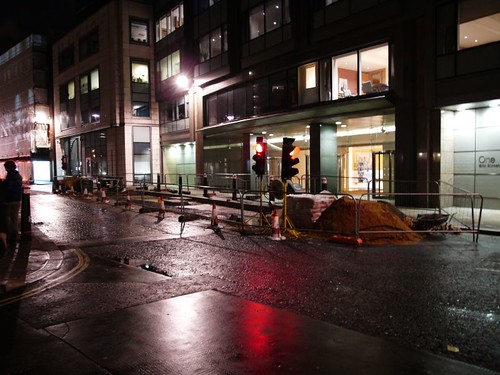
Get the students to look at the photo below, and try and identify how many things in it rely heavily on the use of computers and related technology.

Street scene

With a bit of imagination and common sense, they should be able to come up with quite a few ideas.

14 Use a photo as a starting point for story-telling

The photo below was taken outside the Barbican, in London. It struck me as a good metaphor for all systems being stopped. (For more photos, please look here.)


All systems stop

Use the photo above (or one that the students or you have taken) and weave a story around it.

15 Find a suitable photo...

Alternatively, arm the students with a digital camera each (or let them use their phones) and tell them to spend a lesson looking for and taking a photo which they think conveys what would happen in the event of a cyber attack, or set this for homework.

16 ... And do a presentation to the rest of the class

17 ... Or make a podcast on the subject

How about creating a 'live' news bulletin about it?

18 ... Or shoot a video on the subject

19 ... Or create a Glogster poster on the subject

This is and the photo, video and podcasting suggestions are certainly not mutually exclusive. Indeed, it would make sense to create the Glogster after doing them.

20 Discussion

It would be good to discuss these issues with your students offline as well as online, but there are some great online opportunities.

21 Start a wiki

Wikis are a great way of encouraging discussion and collaboration, and at the time of writing Wikispaces were giving away 250,000 premium ad-free accounts free of charge. See here for details.

22 Start a social networking community

If your school permits social networking, why not set up a free Ning site? You will be able to share photos and videos, and write about issues through the blog feature, and discuss issues through the forum feature.

23 Start a Twitter conversation

Create a Twitter identity for the project, or use your own if you have one, and start a discussion on this subject. Use the hashtag system for keeping track of it. eg end each tweet with #cyberattack.

Conclusion

The key message here is that a topic like “How does technology affect society?” can be treated in an interesting way that engages the students.

An earlier version of this article appeared in the November 2008 issue of the Computers in Classrooms newsletter.