
 If you're looking for a handy, no frills book of suggestions for blogging, this book should meet your requirements. Having been designed as an email course, 30 Day Blogging Challenge, written by Nikki Pilkington, consists mainly of 30 very short articles on different aspects of blogging. Being able to buy the whole lot in the form of a book is excellent for those of us for whom deferred gratification is an alien concept.
Review of Problogger’s Guide To Blogging For Your Business
 Before looking at the book, written by Mark Hayward, in detail, it’s worth pointing out what the book is, and is not. It is, as the title implies, concerned with blogging in order to promote your business. It is not about blogging as a business in itself. It’s an important distinction, not least because once we take money out of the equation then “business” can be used as shorthand for any type of enterprise, including a charity, a cause – and a school.
If this, then that
 Here’s a web application that’s potentially very useful. IFTTT lets you create your own automated actions using a range of social networking tools. I’ve been messing around with it only for about an hour, so I haven’t thoroughly explored all it has to offer, but already I can see it will prove to have been an excellent investment in time.
The logic of the way it works is as follows:
The expert ICT teacher and Something Borrowed
 What can we learn from a band about the characteristics of the expert ICT teacher?
Review of the Kodak Zx1 Pocket Camcorder
The Kodak ZX1 may not be pretty, but boy, is it robust!
Read MoreMy bookshelf
Here are thumbnail sketches of a few books which I've come by recently. Taken as a whole they cover:
- The future of cities: should we build cities around airports instead of away from them?
- Schooling in the digital age: is it as much to do with politics as technology?
- Useful educational resources for the iPad.
- Learning and innovation in ICT: a European perspective.
Hope you find these useful.
Review of Aerotropolis
 Subtitled “The way we’ll live next”, this book by John Kasarda and Greg Lindsay looks at the possible airport city of the future. At the moment, airports are usually located outside the main part of the city. Yet, given the fact that we still need actual physical goods to be delivered, some might argue that it makes sense for cities to be built around airports.
Writers I like: Tony Baldasaro
I popped over to see what was going down on Will Richardson’s blog (where, by the way, there is a great article about online learning, which I’ve been investigating lately), and discovered, via the comments, the Transleadership blog of Tony Baldasaro. This is a real feast.
Read MoreEvaluation of Learning Without Frontiers Pre-Conference
I was looking forward to hearing some great presentations and startling revelations at the Learning Without Frontiers Conference. But I spent almost my whole time there talking to people. The way I figure it, if something is really good I'll get to hear about it anyway, so given the choice between listening to a talk, and discussing –and-catching up-and-networking type of activity, I choose the latter. At least, I did yesterday.
So, how was it for me?
Read MoreMy blogging toolkit
 People often regard me as something of a prolific writer (which I think is another way of saying I need to get a life!). Anyway, in case you’re wondering what I use to write my blogs, here is the lowdown.
Is this the newspaper I’ve been looking for?
 A short while ago I expressed the view that paper.li, the Twitter-based newspaper, was no longer for me. I don’t like the lack of control over what is published, and it started to look a lot like spam. I experimented with a couple of other similar services, and they did nothing much for me.
But Microsoft's Montage looks promising. Although you still don’t have control over what appears in particular streams, you do have a say in what types of stream are featured, and (to an extent), the layout.
Search engines with a difference: Collecta

Is The ICT Curriculum Too Masculine?
 One of the apparently insoluble problems of the age is how do you encourage more girls to take up ICT or Computing? I think a lot can be done, and have done so myself, but I wonder how far a lot of the effort fails to get to the heart of the issue, which could be the curriculum itself, the way it is taught, or a combination of the two?
Review of the Dell Latitude 2110
 “Oooh!” “Ah!” “Oh my!”. Such were the collective gasps emanating from the Freedman household when I unpacked the Dell Latitude 2110 Netbook I’d been sent to review. Slim, striking and silent (but enough about me), the Latitude certainly makes the grade as far as aesthetics are concerned. But how does it actually perform?
Is Google Invading Our Privacy?

Review of Leading a Digital School
Can a book about leading a digital school be of any interest to ICT leaders? Read on and find out.
Read MoreThe Reform Symposium Conference
What a weekend! From Friday to Sunday, the Reform Symposium Conference was in full swing (apart from the scheduled breaks, of course). A truly international conference, it not only featured presenters and enjoyed participation from all over the world, the organisers planned it such that events started at convenient times for people all over the globe. That made a nice change from having to stay up half the night to catch every session!
 The Reform Symposium
Unfortunately, I was able to attend only a few sessions, because a malignant Fate, to use a phrase much-loved by Dornford Yates, decreed that my plans to work on Monday and Tuesday had to be brought forward to Sunday instead. The sessions I did attend were interesting. I especially liked one by Nicholas Provenzano called Everything I Learned About Tech Integration I Learned From Movies. I had to leave part of the way through, but it looked like an innovative approach to talking about educational technology, taking quotations from films and applying them in a new context.
Lisa Dabbs and Joan Young gave a practical talk called New Teacher Survival Kit, which I think should be essential viewing for anyone working with new teachers. I was slightly concerned when the whole focus seemed to be on being positive in a positive kind of way. What I mean is, I sometimes think that the most positive thing you can do is tell someone they’re mistaken, and in my experience there are some people who don’t get the key message if you package it up with lots of nice fluffy compliments. So I was pleased that Joan’s response, when I raised it as an issue, was to pretty much agree.
Steve Hargadon opened the conference with an interesting keynote about social media in education, and this was followed by a talk by George Couros called Identity Day: Revealing the Passions of Our Students, which basically said that in order to teach effectively you have to know your students. Absolutely. Teaching, like business and any other human transaction, is ultimately based on relationships.
I was honoured to have been invited to give a keynote, and spoke about using a project management approach to introducing Web 2.0 into your classroom.
The sessions were all recorded, and should eventually be available for viewing – some are there already, but others may take around a week. Go here for the schedule, and click on the link in the column called Webinar Link for the session you wish to view. I intend to look at all of them.
Top marks to the organisers Shelly Terrell, Christopher Rogers, Jason Bedell and Kelly Tenkely and their team of moderators for their tireless efforts, advanced planning and attention to detail. The odd glitch was handled deftly and virtually without anyone noticing. I was especially gratified when Phil Hart got my slides going despite some horrible error messages I kept getting whilst trying to upload the PowerPoint. Thanks also to my friend Peggy George, who took time out to show me some of the functionality of Elluminate, as it had been a while since I’d used it.
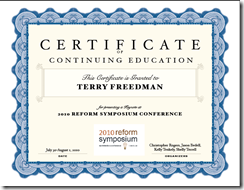
Finally, it was a nice touch to give presenters a certificate. You can see mine here.
Remember: check out the presentations! Whilst looking at them, think about whether they could be useful for you when running a CPD session. Don’t ignore the chat window: as is often the case, what’s going on in the chat is an interesting complement to the presentation proper.

Review of Marxio
Update: Marxio appears to be no longer available, and I am trying TimeLeft instead (see bottom of article for link). You may, of course, wish to read this review anyway for its erudition and general insightfulness :-)
If you're anything like me, time is always at a premium. But relying on the clock in the toolbar isn't always effective as a way of keeping you on track. There’s a pretty good timer from Marxio. I set it to remind me to take a break every 20 minutes. (I often ignore it, but that’s another matter.) Obviously, you could use it to set a time limit for reading, or writing, or anything else.
 Timely reminders
As you can probably tell from the screenshot, there’s a wealth of options. And it’s free! Download it from the Marxio website, where you can see a list of features.
I quite like it, although I haven't used it for a while. I especially like the fact that you can configure your own settings, such as the text of the reminder and when it appears, and save them as a "schema". Why not give it a whirl?
This is a slightly amended version of an article that first appeared in Computers in Classrooms, the free newsletter about educational ICT.
Update on 2010-07-21 11:36 by Terry Freedman, Educational ICT Consultant
Blast! I just tried to re-download Marxio and it seems to have disappeared. I am now trying out TimeLeft instead.
Xobni
I am in love. I wasn’t expecting this to happen, it was just one of those things. I was in my local supermarket, browsing through the latest copy of PC Advisor, just going about my business. Then, one thing led to another and, well, what can I say?
The object of my affections is Outlook. I have used Outlook for my email on and off over the years, but have never really liked it. Over-featured and unwieldy, it’s slow at finding emails and hopeless at finding conversation threads. It has some good features, admittedly, which is why I stick with it, but that slow grinding away of the search function drives me insane.
However, Xobni, which is reviewed in PC Advisor, changes all that, and does so much more. In fact, I don’t think it’s an exaggeration to say that Xobni makes Outlook work as it was meant to; it’s what Microsoft should have done to make Outlook not merely usable, but useful.
What Xobni does is index your emails and analyse them, and places an extra pane in your Outlook view. Searching is incredible, because Xobni works the way people do. Take a typical scenario. I am about to phone you to discuss the ICT Vision document you’ve commissioned me to write. What will I need before I pick up the phone? Your phone number, obviously. The email containing the brief you sent me. The follow-up email you sent clarifying a couple of points. And, for when I send you an email confirming what we end up agreeing in the phone conversation, the name and email address of your colleague to whom you always cc your emails.
To obtain all this information, I simply type your name into the search box, and I see something like this, virtually instantly most of the time.

As you can see, it has collated my contact information so that I have your email address(es), phone number, Skype link, and Twitter, Facebook and Linked-In details (if I’ve added you as a friend in those applications).
A row of icons at the bottom of the panel gives me instant access to our email conversations, attachments sent, and other potentially useful information. As for the name and email address of your colleague, that’s contained further down in the panel shown in the screenshot (which I’ve cropped to avoid giving other people’s details).
 Xobni can also suggest meeting timesThe application is also linked to the Outlook calendar. If I click on “Schedule time with …” an email like the one shown is automatically generated. Xobni has looked at my calendar for the next few days and suggested times when I have no appointments.
Another feature is that it gives you lots of metrics. For example, it will tell you the times of day that people respond to your emails, the purpose being to enable you to call them when they’re most likely to be in the office.
There’s a free version of Xobni that works just fine. The paid-for version costs $29.50 and has an advanced search function and works on more than one .PST file. I tried the free version, and liked it so much I bought the upgrade. I think in terms of time and my blood pressure it paid for itself on the very first use. You can find out more about the program and download it from the Xobni website.
Review of Own-It
Here’s a question for you. If you run a website which involves becoming a member in order to use it, is it OK to ask children to sign up? If you don’t know the answer to this, it may be a good idea to head over to Own-It, and check out the facts for yourself.

Own-It is a website that is dedicated to providing free advice on Intellectual Property (IP) and related issues, for people in the creative industries. If you’re a blogger, that includes you, but even if you’re not, you still need to know about copyright issues in order to guide your students (or at least to not mislead them).
Becoming a member entitles you to obtain free legal advice on IP issues (subject to certain conditions). So if someone tries to rip you off by claiming your property as their own, Own-It could be quite useful. Equally, if you’re employed and also produce resources, your employer may own the copyright rather than you (a fact I mentioned a few months ago in the article 11 Essential Elements of a Digital Financial Literacy Course). Again, guidance available on Own-It will set you on the right track.
Having spent a few minutes completing the free registration form on the site, I discovered to my embarrassment that I had already signed up a few years ago, but had forgotten! Having been reminded, I will certainly be visiting the site on a regular basis, especially as I see that one of the legal advisers is a solicitor called Nicola Solomon, who also provides excellent advice to members of the UK’s Society of Authors. I mention that because there is always a slight anxiety that advice given on the internet may not always be accurate, so seeing a name I recognise gives me even more confidence in the site.
I have a couple of quibbles about the site. I can live with the minute font because you can enlarge it in the web browser. But light green link text? Puhlease!
Also, although being able to download and use the videos provided is great, it’s a shame there aren’t instructions on how to embed them in your own website (as far as I can tell). Actually, it's a pity there aren't some embedded videos right there on the site.
On the whole, though, this is a well-resourced site on which it is pretty easy to find what you’re looking for. If you’re a teacher in the UK, you should add it to your list of bookmarked sites right now.