Tenacity: a good quality or a bad one?

One of the qualities that a subject leader must have, in my opinion, is the ability and willingness to stand one's ground. I think that this applies especially in the case of the ICT (or educational technology) leader, given the sorts of pressure he or she is often under.

For example:

  • It's perceived as expensive....

  • ... Consequently, there is often pressure to demonstrate that the investment has been worth it. Nothing wrong with that, of course, except that I wonder if other subject leaders find themselves under similar scrutiny to prove, say, that the class set of textbooks 'worked'.

  • A good rule of thumb is that around 90% of staff in a school use information technology in a basic but perfectly acceptable way, and most of the other 10% (excluding you) pride themselves on not understanding any of it. Unfortunately, much of the time that small proportion tends to be more influential than their numbers suggest. I have no scientific evidence for that statement, by the way, only my (casual) perception and experience!

The word 'politicians' is not usually found sharing a sentence with the term 'role model'. However, whatever you may think of Michael Howard's 'performance' in this video clip, I think he shows an admirable ability to stick to his guns and to manage to not answer a question which he clearly does not want to answer. (At the time he was bidding for the leadership of the UK's Conservative Party, which gives his stubborness/toughness a context.)The issue here is this: leaving aside the actual issue and politics in general, does Howard demonstrate a trait which ICT leaders should seek to emulate, or not?

This article was first published on 22nd September 2009

The Pros and Cons and Safety Aspects of Social Networking

I'm preparing a talk on the pros and cons of social networking, with some tips on keeping safe. The talk is going to be to a group of 6th formers (ie 17-18 year olds).

I've been doing my own research to see how many social networks these youngsters belong to, and it turns out to be a modest 2 or 3 on average. Then I made a list of the ones I belong to, and had a bit of a shock.

I currently belong to -- wait for it -- 63 social networks. I say "currently" because I am about to join more, and look at another one without joining it, to see what they have to offer. The reason I don't wish to join the second one is that it's for teenage girls. (I'll come on to why I'd want to look into such a network in a second.)

Of course, it all depends on how you define "social networking". The website What is Social Networking says:

"Social networking is the grouping of individuals into specific groups, like small rural communities or a neighborhood subdivision, if you will."

That sounds pretty accurate, although I'm inclined to go further. I come from an Economics background, and I quite like the economist's definition of money:

"Money is as money does."

It takes a bit of getting used to at first, but actually it's a succinct version of the observation by Douglas Adams:

"If it looks like a duck, and quacks like a duck, we have at least to consider the possibility that we have a small aquatic bird of the family anatidae on our hands."

So, applied to social networking: if it looks like a social network and people behave in it as though it were a social network, then it's probably a social network.

On that basis I have lumped together a whole load of applications that enable me to post messages, see other people's messages, comment on those messages, share files and follow or befriend people. In other words, I've included social bookmarking applications, video sharing websites, general social networks like Facebook, specific or focused social networks like Wired Journalists, and what I suppose we might call quasi-social networks like Friends Reunited.

Why is any of this important? Before I go into that, let me just explain why I'd want to look at a teenage girls social network -- and I can assure you that it is not for the sort of reasons you might think! I was reading in an article on social networking in Information Age about the benefits to business of social networking, and it mentioned a site called BeingGirl, maintained by Procter and Gamble. The article states:

"The same technologies can be applied in a marketing capacity. Involving customers and prospects in a community built around products and brands is proving to be a powerful way to maintain loyalty and engagement. 

Procter & Gamble is one notable leader here with its BeingGirl website. The social network provides an environment in which young girls discuss and get answers on many of the awkward topics that arise as they enter their early teenage years, with P&G introducing marketing material for its relevant products at pertinent points."

So I am interested in questions like, does this look like a genuinely useful site for girls? What's the product placement actually like? Is one of the things we should be educating kids about the fact that product placement goes on (including in television programmes)?

I'm coming at this from a number of angles.

Firstly, I see nothing wrong in companies deciding to start a social network in order to engender customer loyalty. Ten years ago I signed up to The Beano website. The Beano is a comic which has been part of the British comic landscape for what seems like forever, and is full of cartoon strips that are so stupid as to be hilarious. Now, the Beano website had all sorts of silly features on it, and it was just a good laugh. And it was an example of product placement.

Another example: I myself started a social networking site called ICT in Education. I stopped promoting it or nurturing it because I felt that it was actually diverting attention from my main website -- although I haven't shut it down because there are nearly 200 members who may be upset if I did so. Given that I often mentioned my articles in discussions where I felt such a reference would be useful to people, that was a vehicle for product placement too.

Secondly, issues like product placement have always been important. Or, to put it more generally, media literacy has always been important to teach. Right from the time I started teaching I made it clear to my students that they should always look not just at what is being said, but who is saying it, and what they're not saying. Nothing new about that.

Thirdly, if people find a social networking site like BeingGirl useful and helpful, and the products are good, that's what's known as "good customer service" isn't it?

So what does this have to do with my talk?

Well, it seems to me that a question like "What are the pros and cons of social networks?", and the supplemental question "And how do you keep safe in them?" raise a number of issues. Taking the first one first:

  • The answer will differ according to whom you ask. The advantage of BeingGirl for P & G is, presumably, marketing opportunities and (hopefully) customer loyalty. The advantage for a young girl is the facility for discussing issues and getting advice.

In addition, the answer will depend on:

  • The exact nature of the social network.
  • How active it is.
  • Who belongs to it.
  • What sort of facilities it offers.
  • The quality of the information posted on it.
  • The quality of the discussions posted on it.
  • The quality of the resources that people share on it.

As for the pros and cons of social networking sites in general, for me it's the same as the pros and cons of social networking, ie interacting with other people, per se.

The answer to the second question, about safety, must partly depend on how one defines "safety". Everyone seems to think in terms of sexual predators, but without wishing to denigrate the importance of that in any way, it does strike me as a somewhat narrow definition. What about identity theft? What about safety from economic predators?

(I was looking at a website this morning on which people can post their stories and articles and earn a share of the advertising revenue. The "small print" says that the site owners reserve the exclusive right to use your work forever, and also to do with it as they like, including chopping it up, featuring it anywhere they like, and so on. Loads of people have posted their stuff on this site, thereby depriving themselves of other sources of income from that work in the future. I hope their earnings from the advertising revenue compensate them for that cost. Shouldn't we be making sure that youngsters are aware of the importance of not selling the family jewellery as it were?)

What about protecting your reputation, or ensuring the "safety" of your future job prospects?

As for why I belong to so many: it's because they mostly do different things. Where I am a member of two or three that do the same thing, it's because I like to try things out. And, to be honest, I'm active in only about three or four of them. Let's face it: if I were active in all of them I'd be spending at least a day a week socially networking online!

I guess that's one of the big disadvantages of social networking: it can be so time-consuming!

This article was first published on 3rd February 2009.

Web 2.0 For Rookies: Proving Professional Development

An interesting issue arising from people's use of Web 2.0 applications like Twitter, Facebook and social networks is that casual or informal learning has now become embedded in people's working lives. In the past, there was a fairly clear division between the kind of learning you experienced by chatting with colleagues in the staffroom or watching a TV programme on the one hand, and going on a course (usually for a day or a series of evenings) on the other. Recording the former never really came into it, and recording the latter is fairly straightforward: you just need to decide how you're going to do so, as discussed in a 5 Minute Tip on the subject.

But the landscape has changed now. Many people, myself included, tend to either have a stream of tweets constantly going on in the background, using 3rd party tools like Tweetdeck, or make a point of checking their Twitter stream, Facebook messages and so on at certain points during the day. Given that on most occasions you are bound to see a message containing information that is likely to prove useful, I think it's legitimate to regard these tools as an integral part of one's professional development. If so, the question is, how can you record that for the purpose of being able to complete the part of an application form which asks what training courses you've been on, or what professional development you've had, over the last X years.

Having given this a lot of thought over the years, I've come to the conclusion that recording professional development in the Web 2.0 sphere is not possible in the same way it is when recording ordinary training courses. If you were to note down every useful tweet or message, or even simply the dates on which you received useful tweets, you would give yourself a nervous breakdown and cause the person reading your application form to die of boredom.

It seems to me that the best way of recording, and proving, professional development in the Web 2.0 world is as follows:

  • If you go to a conference seminar, like the ones at the BETT Show,you can usually pick up a certificate of attendance. Do so.
  • If you 'attend' an online discussion, such as the Classroom 2.0 Live talk I spoke at ask the organisers for proof of your attendance (the Classroom Live folk do this automatically if you indicate that you'd like it).
  • Record your attendance at such events as the ones described so far.
  • Keep a weekly journal listing, in broad terms, the things you've learnt or come across that week. This can be in the form of a blog or eportfolio, as suggested by Andy Hutt and Ray Tolley respectively in response to the 5 Minute Tip already referred to, or as annotated social bookmarks (which may be able to be set up to appear on a blog automatically).
  • Ensure that somewhere in the application form you make it known that you're a member of such networks and therefore have a rich and varied informal learning experience.

Bottom line: I think it's important to bear in mind that what the application reader is looking for is not likely to be a list of every single professional development opportunity you've taken advantage of -- which could mitigate against you if you give the impression that you never have time to do any actual work. They're almost certainly looking for evidence that you're up-to-date with developments in your subject area, and that you know what's going on and what the issues are.

Computers in Classrooms Post-BETT Special

The promised post-BETT special has now been published, here. It contains contributions from a host of educational ICT writers and bloggers.

Here is the table of contents:

  • Safer Internet Day
  • The Next Generation Quiz
  • The Amazing Web 2.0 Projects Book
  • Web 2.0 For Rookies
  • The Learning and Technology World Forum
  • Louise McDonough on Her First BETT
  • The Home Access Programme
  • My BETT
  • Educational Technology Taskforce Launched
  • BETT: A True British Export
  • New Computer Basics Course Launched
  • WOW! Moments from BETT 2010
  • Technology Exemplar Network to be Doubled
  • The Minister's Opening Speech at BETT
  • Dawn Hallybone Talks About Teachers Presenting
  • BETT Stats
  • Doug Woods on What Was NOT There
  • The BETT Awards 2010
  • Too Much Emphasis on Technology?
  • National Education Network Reporting...
  • Seminar: Breaking the Bonds of Learning, featuring Stephen Heppell, Angela McFarlane, Max Wainwright and Tim Rylands
  • Steve Beard Discovers A New Game
  • Seminar: Power Up: How ICT is Transforming BSF Schools, featuring Steve Moss
  • A Projector with no Bulb
  • The Unconference
  • Virtual Learning Environments
  • Mirandamod Discussions
  • ICT CPD
  • Gerald Haigh on the Assistive Technology Party
  • Paul Haigh's Views
  • Merlin John Liked...
  • The Politics Game
  • NComputing: Virtual Desktops

It makes for a good selection of views about the BETT Show and what was hot and what not! Apologies to Paul Haigh and Sean Carragher for inadvertently omitting their Twitter details, and to everyone for addressing them, in the subject line, as FNAME SNAME. Had I remembered to include the brackets, they would have seen their names instead! Thanks to Mark Chambers, Chair of Naace, for pointing out my error!

5 Minute Tip: Keeping a Professional Development Record

5 Minute TipWhat have you learnt today? Most people do not keep good records of their professional development, and many heads of department or curriculum leaders in education keep none for their staff. This makes it difficult, if not impossible, to manage the departmental training needs effectively.

Virtually every application form these days asks for details of courses attended, or of relevant courses, attended within the last x years. Maintaining such a list on a computer is easy-peasy. If you're a team leader, like a head of department, you ought to encourage your staff to maintain their own records, and you should also keep a departmental record, for reasons given below.

First, consider the individual's records.

Individual Records: Table It

The method I'd recommend using is to create a table in a word processor, with the following column headings:

  • Course title

  • Course topic

  • Run by

  • Date(s)

You may prefer to use a spreadsheet rather than a word processor, since a spreadsheet will “see” dates as dates, whereas a word processor will “see” them as text.

By entering the details in a table, you can sort it according to course topic or date (or possibly both at the same time).

When entering the date, do so in this format: yyyy-mm-dd, eg 2007-06-12. There are two advantages of doing it like this:

  • It is easy to sort the data into chronological order.

  • There will be no confusion between UK and USA conventions, eg 12/06/2007 means 12th June to someone in the UK, and 6th December to someone in the USA.

If you use a spreadsheet like Excel, you can use the custom date format feature (Highlight the relevant cells, and then click on Format-Cells-Custom) to create this format. If you do, then if you enter the date as, say, 12 June 2010, it will automatically convert to the correct format. Incidentally, I've looked into the Google Docs spreadsheet, and when you enter a date in the way I've suggested it automatically converts it to the 'normal' format, which is rather frustrating.

Team or Departmental Record

Why is it important to maintain a record of training for your whole team ?

  • Without knowing your staff's skills, you cannot be fully confident in what you, as a team, can offer.

  • By maintaining a group record, you can identify gaps in the training needs of the team as a whole

  • It will enable you to support your individual team members' professional development, be it by recommending courses for them, or writing references for them.

In fact, one criteria of good practice (eg for the ICT Mark) is that there is a professional development 'map' for the whole school.

Write Once, Read Many

It is inefficient and unreasonable to expect people to keep two sets of records. Therefore, you might be tempted to create one central record to which people can contribute. (If you use a spreadsheet, you could have a different worksheet for each person.) However, the problem with this approach is that each person's record can be seen by everyone else, and even if everyone says they don't mind, a new member of staff may do.

The answer, I think, is to ask your colleagues to enter the information in the relevant area of the information management system, and have the data exported to a spreadsheet that can be accessed only by yourself, as long as any legal constraints are abided by (check with your personnel or legal department).

If there are any objections to your having access to individual people's records, then maintain a group record that does not have people's names. This will still help you identify gaps in overall training needs, which is its main purpose. In fact, if you're going to do that, you may as well use something like Google Docs because it just makes access and updating a whole lot easier.

Of course, the obvious disadvantage of that approach is that without knowing who the individual records belong to, it will eventually prove impossible to believe in their accuracy, because you won't know who has updated it and who hasn't. I think this is a clear case of where an overall school policy needs to be decided upon by the senior leadership team, and then adhered to by all staff.

Wait! What IS CPD?

Good question. These days, it's not just formal courses and conferences, but online conferences, blogs, websites, Twitter, Ning communities and all sorts of other informal learning opportunities, especially online. You cannot keep formal records of informal learning without changing the very nature of the professional development involved. What you need to do instead is to encourage members of your team to inform you when they have benefited from some form of informal professional development.

Perhaps even more importantly, they should be encouraged to keep their own records, at least in general terms, so that they do not 'lose' the information. I'll look at this in other 5 Minute Tip.


Efficiency? Don't Make Me Laugh!

One of the reasons always advocated for adopting technology is that it leads to efficiency gains. In other words, it (supposedly) helps you do what you already were doing, but faster, cheaper or easier.

I wonder if this is actually true, as opposed to a convenient white lie with which we console ourselves? Has anybody undertaken a Total Cost of Ownership type of analysis which looks not only at the financial costs of ownership but also the social and economic costs? If anybody were to do so, I imagine we would have to re-evaluate our investment in time, energy and money into technology.

This may sound an odd way to open an article by an educational ICT specialist (and one who loves technology). But I think these issues should be addressed.

Take three examples. Firstly, I've been working on a couple of presentations. Each presentation will last an hour. I have to allow ten minutes for questions, so once I've allowed for five minutes at the start being introduced and saying 'Good Morning', I'm left with 45 minutes to fill. That is, a total of an hour and a half.

So far, preparing for these presentations has taken nearly three days.

Part of the reason is that I like to be well-prepared. As the old saying goes, you don't get a second chance to make a first impression, so I always like to have the problem of trying to pack in as much as I can rather than the opposite one of hoping that nobody will notice if I start talking incredibly slowly in order to drag it out.

A little light reading...But another part of the reason is that it is now so easy to keep finding new sources of information to read and consider. The photograph represents the amount of reading I've done so far. Admittedly, this includes a few books, but the rest of it is, by and large, printed from the internet. In  fact, only this morning I accidently came across yet another article I think I ought to read.

Now, if I'd had to do all this research in my local library, as I used to before the web was invented, I would have stopped long ago. There comes a point where the likely benefit of reading one more article is outweighed by the cost (however measured) of acquiring it. That point is reached much sooner when you have to physically move from your home to a library (and possibly cart a load of stuff home afterwards).

What we have here is a modern manifestation of Say's Law, which states that supply creates its own demand. The reason I'm acquiring all this reading material is that it's so easily available. Perhaps too easily available.

Another example is in the field of writing. It is so easy to rewrite stuff that it's almost impossible to exercise the self-discipline required to say "That is now good enough." When trying a different turn of phrase, or looking up a nice quotation, or finding an appropriate illustration (or, in my case for this article, actually creating one) is so easy, the temptation is to keep on and on tweaking in the vain hope of achieving perfection.

Thirdly, lesson preparation has been made far more time-consuming now than it ever used to be, for all the reasons I've rehearsed so far. Worksheets and other resources tend to be more interactive, colourful, neat and engaging than ever. But I wonder if the gains in terms of students' learning are enough to justify the huge increase in person-hours that computer availability has led to?

(I'm sure I won't be the only person to be able to recount that some of my best lessons were the ones I thought of on the way in to work or even, sometimes, the ones in which I allowed a chance comment or question by a student dictate the content of the entire lesson, because the moment was there and had to be seized.)

Being able to answer such questions does not mean advocating a return to the steam age. But it strikes me that it would represent a much more honest appraisal of the relative costs and benefits of access to computer technology.

This is important, for two sets of people: teachers, because it's a workload issue, and students, who need to learn how to evaluate the effectiveness of technology. They should understand such matters both because it's all part of being digitally literate, and because otherwise it will become a workload issue for them too.

What all this boils down to is an economics argument. We tend to work, especially in education, on the basis of the well-known saying, 'If a job is worth doing, it's worth doing properly.'

This is almost never the case.

Think of it in terms of exam grades. If you advise your students to work as hard as they can to attain a grade A in your subject, the extra hours they spend doing so could mean their obtaining a lower grade in other subjects. Looked at from a higher perspective, what's better: one grade A and four grade Gs, or two grade Bs and three grade Cs?

Think of it in terms of lesson preparation. If you prepare one group's lessons absolutely perfectly, at the cost of being almost completely unprepared for all the others, would that be acceptable?

At the risk of sounding as if I'm advocating low standards (which I most definitely am not), I think we have to try to develop, and inculcate into students, the idea of 'good enough'. It's OK for things to be 'good enough': they don't have to be perfect.

Being a techno-addict (a boy who likes his toys), I imagine a technological solution. Perhaps a macro that will actually prevent you from working on a document any longer once a particular length of time has been spent on it. It would be easy to write.

Indeed, there is a free text editor that does something similar. Write or Die seeks to cure writer's block or slow writing by becoming more and more noisy and unpleasant as time limps on. It's almost impossible to continue in the circumstances it creates.

A technological solution to a problem caused by our inability to exercise self-discipline in our use of technology? I like it!


Mulla Nasrudin's Donkey: A Workload Issue

What can a story about a traditional Persian folk hero teach us about management? In this article, I look at the Mullah's experiment with improving his donkey's running costs, and the lessons we can learn from it.

Mullah Nasrudin decided to reduce his outgoings by reducing the amount of food his donkey ate. Sensibly, he didn't suddenly halve his donkey's food intake, but gave him a little bit less each day. After a few weeks, the donkey dropped dead from starvation.

What a shame", said Mullah Nasrudin. "If only he had lived: I was almost at the point where I'd trained him to live on nothing at all.

So what can we learn from this, from a management perspective?

  • Don't keep incrementally reducing your workers' "food". I have noticed, as have others, that it is becoming more and more difficult in England for teachers to be allowed out of school to attend courses. I'm not sure how you can expect teachers to willingly embrace and experiment with new ideas, and learn from colleagues in other schools, if you constantly reduce the opportunities for them to do so.

And if you tell me that they can do more and more of this stuff online, then I will respond that:

(a) face-to-face is still much better than online for some things;

(b) online interactions should be seen as complimentary to face-to-face, not a substitute; and

(c) when are you expecting teachers to do it anyway? In their own time? Many do, but that's no reason to build it in as an expectation.

  • Don't keep incrementally adding to to people's workload. Asking them to do more and more with the same resources is exactly the same, in effect, as reducing their food intake. It's true that many teachers willing take on more and more anyway, but eventually something will "give", such as their health.

I recall one staff meeting in which the boss said that he was really pleased with the progress being made. He said people were coming in early and staying late, and sometimes even coming in at weekends, and that as a result we were meeting all the targets in our strategic plan.

However, he was very concerned about the increase in the amount of short-term absence, with people taking two or three days off because of a migraine or a cold, and that he was therefore going to be bringing in a new sickness procedure to put a stop to it. Who said that Dilbert was just a comic strip?

  • Part of our "food" is the expression "Thank you". Many people will take on all sorts of things in return for a genuine expression of thanks. I don't think you need to go over the top, like taking all your team to Barcelona for a week. But saying "thanks", supporting them if they are are having problems and, yes, having an end of term/semester meal -- all of those things count.

Staff are not donkeys. Managers should avoid being like Mullah Nasrudin!

Less Waffle, Please

One of the things that educators, especially teachers, are really good at is talking. That's not intended as a criticism, just an observation. Talking is what the job is all about, regardless of what people say about becoming a guide on the side instead of the sage on the stage. Whether it's giving instructions, explaining a point, or teasing out of a student what she or he really understands, talking is what we do best.

But as in every other aspect of life, there are times when you can have too much of a good thing, and here is a case in point. I recently questioned the usefulness of a 'book' called the Field Guide for Change Agents, on the grounds that it's not a guide at all and contains no strategic advice whatsoever. This attracted two comments to the effect that the process by which the 'guide' was produced was really good in itself.

I don't doubt it, although I have to wonder why it took a whole room full of people an hour to produce a 47 page book consisting of quotations and pictures. Be that as it may, what we have here is the following, as far as I can tell:

  • A bunch of people think we need change.
  • It's not that clear what change they'd like to see, or why it's necessary, but still.
  • A book has been produced full of quotations about how wonderful we all are and how marvellous change is.

Nowhere in the book does it give much indication of how to bring that change about, except for a few slides along the lines of 'foster collaboration'. That's in a section called  The Change Agent Toolkit -- another misnomer: imagine if you went to your local DIY store and bought what you thought was a set of screwdrivers, only to discover when you got home that all it contained was vague bits of advice  instead of the tools and instructions on how to use them. The fact that this 'book' is free doesn't really negate that argument in my opinion.

If you're going to have a book of inspirational quotes, why not call it a book of inspirational quotes? But if you're going to produce a guide or a toolkit, then do that.

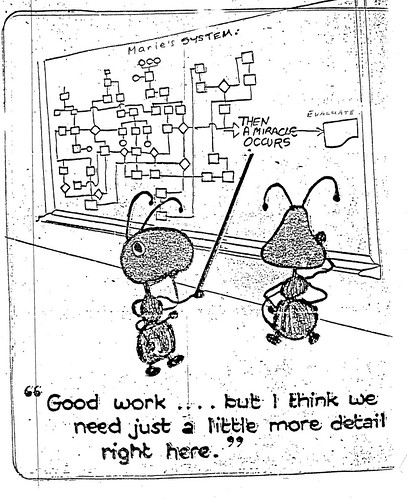
Reading this 'guide' reminds me of this cartoon:

More detail, please

(Sorry, I don't know to whom to attribute it.)

That, in turn, reminds me of all the worst team 'leaders' I have ever worked for. They would say, at the end of a meeting, "OK, so by next month X will have happened." And I would say, "How? By Divine Intervention?"

I have the utmost respect for the people who took part in producing this 'guide', and I'm sure the process was useful in many respects. But as a product, I have to say that, for me at least, the guide has questionable value.

Review of the Field Guide for Change Agents

I've been thinking a lot about change management recently. I think about it a lot anyway, but at the moment I am preparing a presentation I'm giving next month.

And so it was that I eagerly opened the Field Guide for Change Agents, which I heard about through Stephen Downes' OLDaily newsletter.

Now, I don't mean to sound too pedantic or critical, but it's not a field guide at all, at least not in the sense that I understand by the term. It looks pretty, and there are lots of inspirational-sounding quotations, but no real strategic guidance.

So I guess whether it's useful or not will depend on what you need at the time. I've bookmarked it for those times when I need an inspirational quote about change. But if you're in a job where you need to bring about a fundamental change on a whole school level, or even on a smaller scale, I doubt that you'd find this of much use at all.

Cool Tools for Ed Tech Leaders: TaskCoach

In this series I will be looking at tools that leaders of educational technology or ICT may find useful. In fact, anyone who needs to do project management should take the time to explore them.

TaskCoach is a task management application, and has a number of things going for it. But first, what does it actually do?

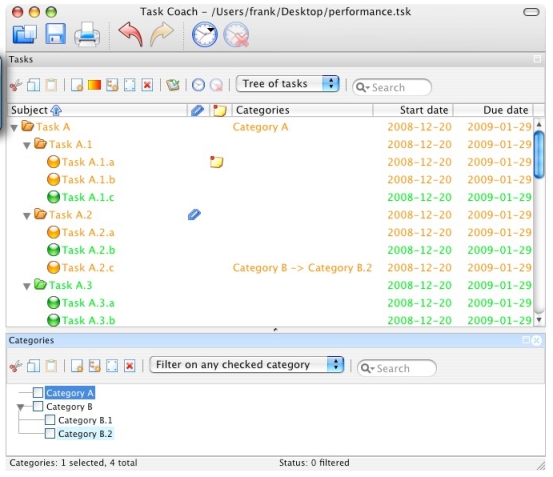
TaskCoachIt helps you organise tasks. You can have categories, which contain tasks, and within tasks you can have 'efforts'. I'm making it sound a lot more complicated than it really is! So let me describe how I use it.

I work for several clients, and so it's important for me to keep track of how much time I spend on various activities.

For example, let's suppose that for Client A I look for resources on the internet, represent them at meetings, and write a blog update once a week.

One of my categories in TaskCoach is therefore 'Client A', and there will be three tasks within that category, corresponding to the activities I've just described. I've configured these tasks with an hourly rate of pay.

Every time I work on one of the tasks I start a new 'effort'. That records how long I spend on the work, and because it knows what the hourly rate is it will calculate how much I've earned from that work. At the end of the month, I can easily see how long I have spent on each activity and therefore how much to invoice the client.

Moreover, should the client want me to, I can itemise the work not only by how much I've done per day, but even by each individual effort. For example, I can show that I worked for three hours from 6 am till 9, and then a further three hours from 2 till 5, or I can just indicate that I worked for 6 hours on that day. I could also view my efforts by weekly or monthly totals.

The only two things that are not that great are the export function, which seems to export the data in a text summary format, whereas the most useful option would be a detailed format that could be imported into a spreadsheet. The other is that I have, somehow, detached a window of the program from the rest of it, and I cannot for the life of me figure out how to stitch it all back together again! But that's a minor inconvenience.

If you don't work for yourself but work for an organisation, the hourly rate feature, or the budget facility (which lets you allocate a budget to the whole task), would still be useful.

Even if you don't charge clients for your time, there is still an imputed cost that is usually worth being aware of.

So what does this program have going for it?

  • It's easy to use.
  • It's accurate.
  • Tasks can be colour-coded.
  • It's free.

 It's been in alpha version forever as far as I can tell, but I haven't had any major disasters with it so far. It's available in versions for Windows, Mac, Linux iPhone and iTouch.

If you know of any tools that do a similar job, please leave a comment telling us about it.

Web 2.0 For Rookies: Commenting

If there is one thing which really characterises Web 2.0, it’s the ability to comment on people’s work. Commenting is what can, or at least should, make a conversation possible. In this article I’d like to look at comments from both an educational and an etiquette point of view.

Educational

I’ve been to several presentations in which the speaker shows a screenshot of someone’s MySpace page indicating that they’ve received 1500 comments about something they’ve posted. My take on this is as follows:

  • How can anyone read, let alone respond to, 1500 comments?
  • If most of the comments are ‘Wow’, or ‘Cool’, how does that benefit the originator of the post, except for giving them an ego boost?

A more important, but more difficult to measure, criterion is how much influence your post has. Shelly Terrell made the following observation in a response to one of my articles:

I have used these posts at various times so just because I'm not commenting on them doesn't necessarily mean they weren't useful.

I’ve sometimes had people say to me, months after I’ve written an article that nobody commented on, that they found it useful.

Also, it’s now possible to read an article in one place and comment about it in another. I typically see comments about my articles on othert blogs, in Twitter and on Facebook. It’s possible, through the magic of RSS feeds, to collate various streams into one place and display it on your website. I find that looks a bit too messy for my liking.

Something I have done in order to keep track of when I or my articles are mentioned anywhere is to set up a Google Alert and a Twitter alert. These let me know, by email, whenever my name is mentioned on the internet.

It seems to me that used wisely, comments on students’ work could form part of your assessment for learning approach. The key to success in this respect is as follows:

  • Be aware of when comments are posted.
  • Discuss the comments, and what might be learnt from them.
  • Work out suitable responses whilst taking into account e-safety and time management issues.

Etiquette

I have set myself the following rules:

  • I always try to respond to comments. If someone has gone to the trouble of making a comment, the least I can do is acknowledge it.
  • I never post anything which is likely to offend people, such as swear words.
  • If someone makes a sensible-sounding comment, but has a website like ‘easyescorts.com’, I won’t publish it.
  • If someone tries to advertise their services in a comment, when the service has nothing to do with the subject in hand, I won’t publish it. Sometimes, I’ll even report it as spam.
  • I never respond to trolls, which is the name given to people who are just plain nasty. They have no interest in furthering the conversation, and usually hide behind a wall of anonymity. If you get targetted by a troll, it’s a compliment in a way because these people only attack those who are patently better than themselves, ie more educated or more informed. The common advice is: don’t feed the trolls. That is, don’t give them any attention. Here is a great post on this subject:

Trolls, meatheads and my mom

I like this video too:

Don’t feed the trolls

That video is a good thing to show to pupils to convey the effects of cyberbullying (because that’s what trollism is) on people.

I also love this feisty response to troll comments. Go to the YouTube site itself for the lyrics.


I found this on the Grammar Girl site about making comments online. It’s a great post and you should definitely read it with your students.

I’d love to know what you think of my comments on comments – but nice ones only please!


The 30 Goals Challenge

#30goals When a long-time subscriber to my newsletter, Computers in Classrooms, emailed me to ask if I could recommend a blogger she should follow, I had no hesitation: Shelly Terrell, without a doubt.

Seemingly indefatigable, Shelly writes an amazing amount of stuff, all of which is high quality. Following her on Twitter is good for one’s professional development in itself, but her blog, Teacher Reboot Camp, is definitely worth a visit.

And worth subscribing to.

At the moment, Shelly is writing a series in which she is setting a new challenge every day for 30 days. Known as the Goals 2010 Challenge Series, this is an excellent set of posts that are:

  • Challenging
  • Replete with resources
  • Well-written

The upbeat tone of the articles, together with their good advice and questioning, serve to remind us of the sheer excitement of working in education.

I have to say I find some of the posts a bit long, so I tend to speed-read them much of the time. That’s not a criticism actually. I prefer long posts sometimes because I like something I can get my teeth into. Besides, Shelly often formats her articles in such a way (ie with bullet points and suchlike) that reading them quickly is not difficult.

I love her challenge about causing a ripple. In fact, I love the idea of this sort of series, and will be starting one myself soon, on a different topic. I’ve been intending to do it for ages, but have been waiting for the right time. Inspired by Shelly, I’ve now decided to start writing it while I’m waiting for the right time!

Another series you might like is Steve Dembo’s 30 Days to be a better blogger.

But check Shelly’s out first ;-)


No Articles For Nearly Two Days? How Come?

Imagine this. You're enjoying a lovely sleep, completely enwrapped in your duvet. Well, you're not enjoying it because you're asleep, but you know what I mean. You start to become aware of something wet and sticky, and a bit rough, in your ear. All of a sudden you know: it's a tongue.

Now, in some circumstances I imagine this might be quite pleasant. But when there's a cat at the other end of the tongue, it is arguably less so. That's how my day started off yesterday morning, and this morning too, at around 3:30 am. Couple that with a horrible chest infection that I managed to pick up at BETT and the usual sorts of deadlines, getting stuff out at my usual rate has been a bit of a challenge.

So, thanks for your patience. Look out for a special post-BETT edition of Computers in Classrooms, another instalment in the Web 2.0 For Rookies series, a post about challenges and the start of a new series (one of two new series) for ICT/ed tech leaders.

In the meantime, I thought you might like to see a picture of the miscreant who disturbed my beauty sleep. Note how overworked he looks. I'd include a picture of myself too, but the bags under my eyes embarrass me.

Cat at work

Web 2.0 For Rookies: Presenting

I can't think of any course in ICT, apart froma  few very specific application-centred ones, that does not require students at some stage to present their findings, views or designs to the rest of the class. The good news is that there are a few applications online which make it very easy to create presentations, share them, and invite comments. Here are four which you might like to explore.

Slideshare

This is like an online version of PowerPoint. Indeed, you can uipload your PowerPoint presentation to form a SlideShare version. Unlike PowerPoint presentations, SlideShare ones can actually be embedded in your blog post or web page.

http://www.slideshare.net

VoiceThread

This enables you to create a presentation from your photos or other pictures, and add a soundtrack (music or commentary) to them. Nothing unusual here, you might say, except that viewers are able to leave their own audio comments on each slide.

The fascinating thing is that once the comments start to build up, unlike the case with some applications, they seem to become an integral part of the presentation. In other words, they enrich the original upload. Great for letting kids collaborate in an easy way!

http://voicethread.com/

Glogster

One does not often associate the word 'fun' with presentations, but it comes naturally when referring to Glogster. Imagine a poster that can contain not only text and graphics, but sound and video too, and that's Glogster.

It's supremely easy to use. The real challenge is ensuring that your 'glog' tells a story: with all those wonderful options available, cacophony is never far away!

http://edu.glogster.com/

Animoto

Last but not least, Animoto, as the name implies, makes it easy to create a video from still pictures. LOad the pics, select some music, add text if you like, and Animoto does the rest, creating an animated display of your 'slides', synchronised with the music. It's a good way of creating a dynamic presentation without needing very much technical know-how. The skill lies in deciding whcih photos to use, and what music to choose to accompany them.

http://animoto.com/

Go on, give these applications a whirl! Get the kids to try them out. Unlike PowerPoint, these don't tend to channel you into creating lots of bullet points -- well, apart from SlideShare I suppose, but then that would have come from the priginal PowerPoint anyway!

If you enjoyed this article, check out the others in this series.

Decision-Making in a Complex Environment

If you manage a large team, including people with more specialised technical expertise than yourself, how do you ensure that your decisions are good ones?

Is decision-making an art or a science?

I think this is an important question. If you think it's an art, then it is only a short step away from saying "some people have 'it', and others don't." And if you think like that, then it is very hard, perhaps even impossible, to improve your decision-making.

So, I come down firmly in the camp that says it's a science. In other words, it can be approached methodically, and the process can be improved.

What do we mean by a "good decision"?

Some decisions are good in the short term, but not necessarily so in the longer term. Every parent understands this: when your two-year old is throwing a tantrum in the supermarket because she wants some sweets, do you give in for the sake of peace and quiet, or ride it out? The first option is undoubtedly better from a peaceful existence point of view, and to avoid embarrassment, but it's very much a short-term solution. In the long run, the child learns that tantrums work, and so your easy way out will cause more of the same in the future.

So, a good decision is one which:

  • Furthers the aims of the team in terms of its strategic plan.
  • Does not sacrifice the long-term for the short-term.
  • Is cost-effective.
  • Included the team, or at least leaves the team feeling that it has been listened to.

Less is more

So, how do you arrive at good decisions? Your decisions can only be as good as the information you have on which to base them. But "good" does not mean "plenty". In fact, the more information you have, the less likely you are to be able to use it effectively. The best thing to do is to ask one of your team to summarise the issues for you.

My preference has always been for what I call the "A4 Briefing". I don't care how complex a problem is, it should be explainable in no more than a side of A4 (or Letter if you're in the USA). In fact, one of my bosses insisted on no more than half a dozen bullet points.

Ask for options

What I also like is for the person who is summarising the information to outline some options. Nothing too complicated -- that would defeat the object -- but just enough to give me some hooks on which to hang my thought processes.

Take time out

Swans at Audley End

Swans on the lake at Audley End. Watching them can help in your decision-making.

I think we have a tendency to hammer away at a problem, but often the best thing to do after some initial thought is to go away from it completely. An afternoon spent by a river, say, can work wonders, because while you're walking, your subconscious is working.

Now that's what I call efficiency!


Why I Love The Internet

I think it's easy to take for granted all the information we have at our fingertips, but every so often I have an experience that reminds me of how wonderful it all is.

Take last Wednesday for example. Elaine and I went shopping in the afternoon to a local supermarket, and all of a sudden a good music track started wafting over the airwaves, one which sounded original rather than the usual ersatz rubbish. Neither of us could place it, but when I arrived home I looked up the only snippet of the lyrics I could remember.

I plugged the following into Google:

lyrics: love is kinda crazy

From that I discovered that the song was called Spooky. I looked that up in Spotify, and very quickly found out that the version being played in the supermarket was the one recorded by Dusty Springfield.

Total length of time spent on research? Three minutes. I can't imagine how long that would have taken me in pre-web days.

So what was all the fuss about? Well, here is the YouTube video of Dusty singing it. To be honest, the video is not exactly the most exciting thing you've ever seen, but the tune is nice!

Games-Based Learning: 3 Things You Need To Know About

If Games-Based Learning is something you’re interested in, or something you don’t know much about but would like to explore, you’ll be interested in these 3 events.

The Games-Based Learning Conference 2010

The first one I’d like to mention is the Games-Based Learning Conference in London. This takes place on the 29th and 30th March, and I would say it’s essential to attend, for the following reasons.

  • I think – and have always thought – that games have tremendous potential for education, as you can see from my case study. It’s great to have a conference dedicated to this subject.
  • I attended the conference last year, and found it extremely stimulating. I met or attended sessions by people who are not on my radar at all.

    For example, I attended a short presentation by someone developing a so-called ‘serious game’ (I thought all games were serious; but what’s wrong with having fun anyway?) for a particular organisation at the time. As I had already arranged a visit by a group of teachers to the company to look at their IT systems, I was able to ask our host for a special detour to find out more about the simulations it had commissioned.

    I also attended one or two talks by academics, some of whom came from abroad. These talks brought an extra dimension to my understanding and knowledge of games-based learning.
  • Like the Handheld Learning Conference, which is also organised by Graham Brown-Martin, the GBL Conference has a very vibrant, upbeat, celebratory atmosphere. At the end of the Handheld Learning Conference in October 2009 I scribbled one word on my notepad: ‘exhilarating’. The GBL Conference is similar.
  • The organisers have been sensible enough to invite Derek Robertson of Scotland to give one of the talks. They’re doing brilliant things in Scotland – so much so that, having attended a Scotland-centred session at the Handheld Learning Conference, half of us were ready to emigrate there and then!

There’s an early bird discount if you book by the 31st January. The cost will be £345 + VAT, a saving of around £250. In addition to a fully inclusive 2 day conference, there is a social networking evening with drinks and the choice of an additional workshop hosted during 2010 in London by Playgen. Also, every ‘early bird’ will receive a FREE digital camcorder so that they can record parts of the conference that interest them. Hopefully this will encourage some video blogging and uploads to YouTube, etc, which should make an interesting addition to the usual Twitter stream and the more official Blip TV videos of the keynotes. There are also two newsletters available at:

General: http://bit.ly/57jJuG

Trade: http://bit.ly/5e4Zr2

To find out more about the conference programme and to register, go to the conference’s home page. And don’t forget: Early Bird registration ends on the 31st January.

Computer games, learning and the curriculum: uneasy bedfellows?

Another, very different, event you might like to attend is the Mirandamod event on the 9th March at the Institute of Education. Run under the auspices of Mirandanet, an academic group founded by Christina Preston, these typically take the form of a seminar at which two or three guest speakers give a presentation and the rest of us chip in, followed by a debate. What makes the experience quite rewarding is the following:

  • Unlike a conference, the atmosphere is a bit more intimate. I’m not talking about candlelit dinners intimate, but with a smallish number (around 20 or so) it’s easy to get to talk to most people there.
  • The event is live-streamed, so we receive comments and questions via Twitter and through the FlashMeeting videoconferencing system.
  • There’s a nice variety of speakers and attendees. This time, for example, Handheld Learning Award winner Dawn Halleybone will speak, as will Colin Harrison, Professor of Literacy Studies at the University of Nottingham, and Dominic Preston (Christina Preston’s son), who will talk about marketing issues.

I will be chairing this event, and look forward to meeting you in person or seeing you online. To find out more about it, read the details, and register, online.

Computers in Classrooms Games in Education Special Edition

The final ‘event’ is the publication of a special Games-Based Learning edition of Computers in Classrooms, my free e-newsletter. I have invited a number of guest writers to give their perspectives on games in education, and there will be reviews as well a prize draw for an award-winning game. Only subscribers will be entered into the draw, and as a subscription doesn’t cost any money, what are you waiting for?

If you have experience of using educational games, or of games in an educational setting, or views, why not share them with your fellow travellers on this road to enlightenment? I can accept articles ranging from ultra short (140 characters), to almost ultra short (50 words) to average (600 words) to rather detailed (1500 words). But get in touch to pitch me your idea first!

If discursive writing isn’t your thing, do have a look at my 50 Ways To Contribute To A Website. There’s sure to be something there to appeal to you!

That edition will be coming out in April, after the Easter break. There are some other great issues planned as well, including a post-BETT special. If you’d like to look at past issues and sign up (did I mention that it’s free?), just go straight here:

http://www.ictineducation.org/newsletter/


The Value Of Games in Education: A Case Study

A short while ago I wrote about my first ‘wow’ moment in educational technology. It concerned using a computer to simulate the workings of a concept in Economics known as ‘the multiplier’. It’s not important what that actually is. More to the point is the fact that it was through using a simple computer program that enabled students to get the concept in an instant, simply because the results of their actions could be seen straight away.

That wasn’t a game as such, but it’s relevant because, just a few years later, I had my students playing a simulation called Running the British Economy. Utilising both the Treasury model and the latest Treasury statistics, the game involved manipulating a number of economic variables in order to keep the economy on an even keel between inflation on the one hand and high unemployment on the other.

Now, the game had value right out of the box. Students were given access to the Chancellor of the Exchequer’s goodie bag, and found out after five game years how successful they’d been, as measured by the simple issue of whether they’d been voted back in after a pretend general election.

OK, Sim City it wasn’t, but it was complex, realistic and, crucially, gave feedback on the effects of changing tax rates, interest rates, government spending and many other things. My students ‘got’ it. I entered them for a national competition, and they came second, beating even a team from a private school. They learnt more in the few weeks of playing the game than I could have taught them using traditional methods in a whole term.

But for me, the real value of the simulation became apparent if you decided to try and break the rules – in order to find out what the rules actually were.

So I instructed the class to go for full employment at all costs. Increase government spending. Reduce taxes. Go for it! They succeeded. Within three game years there was 99% employment. There was a slight problem that inflation was running at around 1,000%, but we’ve got to make sacrifices, right?

However, the prospect of riots in the street and the government being lynched didn’t appeal much, so  we went for the opposite: zero inflation at all costs. We did it too! Within a year of cutting all non-essential services (health care, police, armed forces, education) we had a negative rate of inflation: prices were actually falling! I’m sure the 2% of people who still had jobs were delighted.

What we discovered from all this is that the Treasury model was based on Keynesian economic theory – which is fine if you believe that to be an accurate descriptor of how the economy works. If, like Margaret Thatcher and others, you do not believe that, then the ability of simulations like Running the British Economy to predict outcomes is seriously called into question.

As a result of mis-playing the game in the way we did, my students and I were able to uncover the underlying assumptions of the economic model being used. That led us on to rich discussions, not only about the assumptions in this particular case, but the fact that they were not made explicit anywhere. How far might other economic ‘predictions’ – such as the one which states that if you reduce State benefits you’ll get more people into work – be based on models whose assumptions are questionable? Perhaps even more to the point, the assumptions you start with determine the result. What playing the game in this showed us was that there’s no such thing as an objective economic model, whatever the pundits try and tell you.

This is just one example of how a game or simulation was used as a means of bringing about some very deep learning in quite a complex area. If you’re interested in how games can be valuable in education, you’re in luck because there are three important events coming up. I’ll be writing about those in a separate article.

ICT and Citizenship

Do Citizenship and overlapping subjects like Personal, Social and Health Education (PSHE) have a relationship with ICT? I would suggest they do, in the following ways.

ICT as a facilitator

In a general sense, I believe that ICT can work with any subject in a facilitative way. It’s a discipline, by which I mean a way of looking at things, and a set of skills which together make it possible to do things that would otherwise be very difficult.

For example, at the most fundamental level ICT makes it relatively easy to obtain information. Making sure it’s good information is another matter, of course, but the point is that acquiring the information in the first place is reasonably painless.

It is also easy to collate and present information. For instance, any subject can, and has, benefitted from the existence of a well thought-out website. That’s why I was happy to publish two reviews of a new Citizenship website called Your Justice, Your World. If you read the reviews, one for primary (elementary) school teachers, the other for secondary (high) school teachers, you’ll notice that there is a lot of emphasis on how and whether the website works as a website, regardless of the content. The material is presented on a website, therefore the website has to be effective from an educational point of view: the medium is very much bound up with the message.

Modelling in its broadest sense is easy too. Videos abound of people in situations which youngsters in this country cannot even imagine, such as that experienced by the young lady in this video about human rights.


FIGHTING SUPPRESSION

The effects of technology

One of the things I try to do on this website from time to time is look at issues arising from the deployment of technology, because that is on many ICT syllabuses. For example, I looked at what might happen in the event of a cyber-attack on the country. Topics like this blur the lines between technology and citizenship/social perspectives, providing a reason for the subject specialists in these areas in a school to do a bit of joint project planning.

E-safety issues

Finally, the use of technology, especially where it involves the internet, raises e-safety issues. This was very much in evidence throughout the Web 2.0 Projects book I’m currently putting together. One or two contributors to that have come up with the eminently sensible suggestion that e-safety and netiquette are issues which ought to be addressed within Citizenship and PSHE, and not only in ICT lessons.

Conclusion

ICT and citizenship do not have to be wholly separate topics, as I hope this article has shown. I believe that to be true of other subjects in the curriculum too. If you have ideas on how other subjects, such as History or Geography, relate to ICT, please considered suggesting an article you might write for these pages.


Did You Know We Appear To Have Lost All Critical Faculties?

OK, I admit it: I just don't get it. Did You Know, which is now in its 4th incarnation, has to be one of the worst videos of all time. All it does is present fact after fact (assuming they are facts), as if the facts in themselves are important.

Why, for example, do I need to know that more video has been uploaded in the last two months than if ABC, NBC and some other TV station whose logo I don't recognise had been airing new content continuously since 1948?

What does this fact even mean, except that millions of people now have the ability to upload videos to a website, where millions of people can watch them! I can see the point of saying that, but what's the point of making that comparison?

The facts are presented so rapidly, and some of the numbers are so large, that it's difficult to mentally process them, let alone evaluate them in terms of their potential impact. Imagine if reading was not your forté.

And that's the thing: it takes some doing to take a potentially really exciting medium like video, and reduce it to the equivalent of the worst kind of PowerPoint presentation. The only thing missing are the bullet points. Well, actually, they're not missing: they're just not visible as such.

This latest version has been produced in collaboration with The Economist apparently. When I read that I thought it might have been really beefed up. It turns out that the main change as far as I can tell is that some upbeat music has replaced the awful dirge that accompanied the earlier versions.

And yet this video or its predessors has 'gone viral'. It's shown in schools all over the place, where headteachers and principals, who one would have thought could exercise enough critical judgement to recognise an emperor with no clothes, say how fantastic it is.

Like I said at the start of this article, I just don't get it.

Anyway, here it is. Judge for yourself, and if you think I'm wrong, or you have found it useful in any way, please share your views via the comments section. Thanks.