Is Plagiarism Really a Problem?

I don’t often get annoyed when I read the newspaper these days –- well, not more than once per page anyway – but an article in today’s Guardian entitled “Internet plagiarism rising in schools”, with the subheading “Half of university students also prepared to submit essays bought off internet, according to research”, really wound me up. This for several reasons.

Firstly, the research was carried out by a researcher from the University of Manchester, and the results will be presented at a conference called The Plagiarism Conference sponsored by, amongst others, a company called nLearning, which supplies plagiarism-detecting software. Now come on: how likely is it that they would sponsor a conference in which someone comes along and say “Hey! Our research shows that you really don’t need to be buying plagiarism-busting aplications!”

Don’t get me wrong. I’m not suggesting that the research was fabricated or misreported, or that anyone has said or done anything which is underhand. The fact is that there is a tendency for research results to reflect the views or principles of the researcher or organisation involved.

I first heard about this phenomenon when I was studying Psychology at uni. It was an option I took in my first year, and in one of our experiments we looked at something called the Experimenter Effect. It was fascinating really. Paired off, we students were given the role of either experimenter or subject, and then each experimenter was given an instruction sheet to read to our subject, explaining the nature of the task he or she would be doing. The sheet included the directive to read out the instructions exactly as they were set out, apart from the last paragraph. That final paragraph told me that the task was impossible. What I didn’t know at the time was that other experimenters’ final paragraph said the precise opposite, that the task was as easy as falling off a log.

Despite, as we all thought, carrying out our instructions to the letter, and reading the sheet out exactly as it was written, ie with no diversion from the text or even giving our words a particular nuance, those of us who were told the task was impossible witnessed our subjects flailing and failing abysmally, whilst our more optimistic colleagues saw their subjects succeed with glee.

The same sort of thing was discovered many years ago in the field of Economics, in which it was found that the (to all intents and purposes objective) research of left-wing think tanks tended to reveal things like, for example, the official rate of unemployment was an understatement of the true figure, whilst their right-wing counterparts’ research demonstrated errors in the opposite direction. There was no suggestion that anyone was being economical with the truth.

It seems to me, therefore, that the results of research are coloured by hidden influences such as expectations, underlying methodology, the type of questions asked, and so on. I don’t think truly objective research is possible, and I would even apply that “law” to my own humble efforts. For example, it is hardly surprising that when I set out to find out how teachers were using Web 2.0 applications in their classrooms, and what the outcomes were for students, I discovered that teachers who use blogging and so on in their lessons universally report that it had a profoundly positive effect on their students’ learning. (Read all about in the Amazing Web 2.0 Projects Book, which is not only stupendous, but also free!)

Bottom line: I tend to take all research results, especially the ones I read about in newspapers, with a pinch of salt. And I say "especially" because I find it very depressing that stories like this seem always to be reported without any critical faculty whatsoever being exercised. Like those stories that pop up every so often in which someone starts ranting that kids don't know how to use apostrophes these days, a clear indication if ever there was one of the wholesale failure of teachers, schools and society in general -- and it is mentioned, almost in passing, that the ranter has just published "Apostrophes for Dummies". I know journalists are busy people, with deadlines and stuff, but surely they could at least raise an eyebrow?

Secondly, I refuse to believe that 50% of university students are cheats or potential cheats.

Thirdly, what exactly has changed over the last however many years apart from, perhaps, the ease with which one can buy essays? I recall a “student” I was put in contact with through a private tuition agency offering to pay me three times the hourly rate to write an essay he could copy and pass off as his own. I refused, and he was so upset and angry that he complained to the agency about me, telling them that I had made the offer to him! That was 25 years ago. As far as I can see, the difference is that now he would go to a website and anonymously purchase an essay written anonymously by someone who has basically abandoned all pretence of being professional or ethical.

Fourthly, how come their tutors need software to tell them if their students are cheating? If you read your students’ essays over the year, and listen to them debating in seminars, how could you fail to notice if their writing suddenly used different language, different sentence structures or just seemed different?

Well, maybe university tutors deal with hundreds of (to them) faceless students these days. But schools?  I mean, why should any school need a computer to tell that their kids are “cheating”?

And are they even cheating? There’s an old maxim that if you steal from one writer it’s called plagiarism, but if you steal from lots of writers it’s called research. Do youngsters actually know the difference between plagiarism and research unless they’re taught?

This is nothing new either. In my very first teaching job, when I taught Economics, I set an essay to answer the question, “What are the causes of unemployment?”. When I had marked the essays I gave the class feedback as follows:

That essay you did for me was tackled really well. The only thing I would say, though, to save us all a lot of a bother next time, is that instead of copying several pages straight out of a textbook, just hand me in a sheet of paper with your name on, together with the title of the textbook you’d like to copy from, and the relevant page numbers, and I’ll mark the book instead.

So how did I know thay’d copied large swathes of textbooks? First of all, I possessed all the main textbooks and knew them quite well. I knew the way their authors expressed things. But more importantly, I knew my students, so when the lad who would usually come out with such gems as “My granddad wouldn’t of got any work if he hadn’t gone out looking for it” handed in an essay which was full of sentences like “Indeed, we can surmise from observation of the effects of tax incentives on industry in regional development areas …”, something told me that he may not have written it all by himself.

You don’t need technology to detect plagiarism, cheating, copying or whatever you wish to call it. What you need is teachers who know their students, and common sense – and time by the powers-that-be for teachers to get to know their students, and freedom to trust and rely on their own professional judgement (because that, when it becomes subconscious, is actually “common sense”).

Moreover, if students really are cheating, we need to ask ourselves some questions, such as:

  • Are they really cheating, or have they simply not understood that that isn’t real research, or don’t have the literary skills to summarise or reword passages they read in articles and books?
  • If it turns out that they are cheating, is that because we seem to be living in a society in which it increasingly appears to be the case that the end is regarded as justifying the means?

If there is any truth in that latter suggestion, perhaps we would agree with Cassius in Shakespeare’s Julius Caesar: “The fault, dear Brutus, lies not in our stars, but in ourselves.”

Delete Cyberbullying

If you wouldn't say it in person, why say it online?

The National Crime Prevention Council in the USA has addressed cyberbullying in a number of short videos. They make the point very well: why behave differently online to how you would conduct yourself offline?

There's another, perhaps less obvious, message that comes across when you watch the videos. To quote from Edmund Burke ,

The only thing necessary for the triumph of evil is for good men to do nothing.

Use this as a starting point for discussion with pupils. Perhaps they could make their own cyberbullying video too: that approach has been used to great effect in a number of schools.


31 Days to Become a Better Ed Tech Leader – Day 31: Get a Grip

Keep an overview of your domain!

Image by Terry Freedman via Flickr

Each day, farmers walk or drive around their properties to see what’s going on, and what needs doing. Is there a broken fence that needs mending? Has one of the animals got itself into a ditch? Is everything in order? This practice is known as “farmer’s footing”, and the purpose of it is to nip problems in the bud, to catch them and do something about them before they become insuperable.

I adopt the same practice myself, albeit in a different kind of way, because my circumstances are different. Each morning, no matter how much work I’ve got on, or how urgent it is, I check my email to see if anything has come up which I really ought to attend to, run a quick virus check, and verify that last night’s backup worked. When any of these things do require more attention, it’s infuriating because I’d rather be getting on with the stuff that I’m being paid for. But the truth of the matter is that if I didn’t pay attention to those sorts of things I could end up spending a lot more time on them in the future. It is, you might say, a necessary evil.

If you think about it, what the farmer and I have in common is that we gather information about our situation, and update it on a daily basis. By extension, I think that in order to keep on top of their game, the ICT leader has to know what is going on.

Now, I know that aspects of this have already been covered, in the form of asking the pupils, doing lesson observations, looking at pupils’ work, analysing data, and seeking other people’s opinions. Moreover, one of the first tasks I set was to walk around the school, but that was to get a general picture of what’s happening ICT-wise around the school before actually doing very much. What I’m talking about here is what you might call keeping your finger on the pulse, and it’s an ongoing process which brings together several aspects of what we’ve covered in this series. Not all of it involves actual physically walking about, as we’ll see.

I think the best approach to doing the following is what I do occasionally when I’m in London. I’m very familiar with London, but every so often I’ll try to imagine what it must be like seeing it for the first time, as a tourist. It’s quite astonishing how much more you start to notice: has that statue always been there? When did that building acquire a new lick of paint? Are people considerate?

I wouldn’t suggest doing everything on the list below every day, which I think would be impossible, but to try to make sure you cover everything on the list every week or ten days, say. For today, your task is to look at the list and see if there is anything more you could add, and if there is anything on the list that you haven’t checked for a while.

And so, with no further ado, here is my list of 9 things to do for the ICT leader’s version of “farmer’s footing”.

Look at the wall displays

Are there any posters with the corners missing or curled up? I know it sounds pretty trivial, and I know I was rather taken aback by the way one senior management team prepared for an inspection: by checking that posters were looking OK, but when such things are not  right people pick up on it. There’s a café near me where the all the menus are grubby and have their corners torn off. It really puts me off going there, and I’m sure I can’t be the only one who is affected by it in that way. It gives the impression that the owner just doesn’t care.

Walk into lessons

I always liked to encourage an ethos of staff walking in and out of each other’s lessons. Not to check up on people as such, but in order to get a feel for what’s going on, sit with a group of youngsters discussing things relating to their work, finding out if the teacher is happy with everything.

Look at the usage statistics

I would say that having some kind of statistical package on your system which tells you what software is being used and which computers are being used and so on is an absolute must. Apart from being possibly necessary for licence management, the information is needed in order to allow the resources to be distributed as efficiently and effectively as possible, to help you argue the case for more resources, and to enable you to spend money on things which are in demand rather than things which aren’t (notwithstanding the fact that you will ant to spend some money, if possible, on things just to see if they will be taken up).

Check the equipment

You don’t necessarily have to do this yourself, of course. Asking a technician how many laptops are currently being repaired, or if any projector lamps have needed replacing in the past half-term, and if all the computers in the computer labs are fully up and running are all useful things to know about. Being attentive to such details sends out a signal that you’re on the case and will, hopefully, help to avoid the situation I came across in a primary (elementary) school a few years ago in which one of the classrooms was being used as a repository of broken down computers which nobody was even attempting to repair.

Check the disk usage on the school’s network…

Again, it doesn’t have to be carried out by you personally, but you ought to know. Please don’t get into the situation of the Local Authority whose Corporate IT department sent an urgent message round to everyone saying “We’re running out of server space; please backup all essential files to a CD by 3pm today, because we’re going to erase all the data on the drive.” OK, you say, but in our school we store everything online. The same applies. If, for example, your school uses a learning platform, you will have been allocated a certain amount of storage space; going over that could incur extra cost.

… And check what’s being stored on it

This is another area where a usage statistics program comes into its own. Are people storing lots of videos and pictures, for example? If so, perhaps in the longer term a dedicated video server is required, but in the short term it’s no bad thing to expect everyone to do some “spring cleaning” every so often. By the way, what I’m advocating here is getting information on the types of files stored across the board. I’m not suggesting looking into people’s areas to see what they’ve got there, which I should imagine would break privacy laws.

Ask probing questions

Ask at team meetings: how are students doing? Are any giving cause for concern? Is any of the equipment flakey all of a sudden? Are there any lessons which looked great on paper but which are not really working too well in practice?

Walk around the school

Yes, this is still necessary to do on a regular basis, not just as a one-off activity when you first take up the post of ICT leader. It’s also important to try and walk around at different times of the day and week, to avoid this type of conversation arising:

Head of another subject: Every time I walk past the computer rooms there’s nobody in them. What a waste of money.

Me: Presumably you walk past them only when you’re free?

HOAS: Yes.

Me: Which is at the same time every week.

HOAS: Yes.

Me: Has it occurred to you that the rooms may be fully in use at times when you’re not  free?

The point is, if the only time you walk around is when most people are or are not using ICT (well), you may get a completely false impression.

Listen to people

What are people saying about educational technology? Is there a buzz? Or just a whimper?

Can you think of anything I’ve left out?

Although that brings us to 31 days, I’m not done yet! Look out for a few more articles on the subject of ICT leadership which will supplement what has been published so far. I hope you’ve enjoyed the series and found it useful. Do let me know what you think.

Further reading

I think this forum Q & A is quite interesting, about Freedom of Information. At the very least, it highlights the kind of things an ICT leader ought to know about.

http://www.edugeek.net/forums/physical-security/58092-freedom-information-act-request.html

Who'd Have Thought It?

Interesting video that highlights just how amazing is the mobile technology we probably take for granted. OK, it's an advertisement, but I think it could make a nice starting point for a discussion with pupils.

One of the projects I used to set students when I was teaching was to envisage their library of the future. Some of the outlandish ideas they came up have since come to pass. So I wonder where youngsters think technology is going?

31 Days to Become a Better Ed Tech Leader -- Day 30: 31 indicators of a good ICT leader

Another way of thinking about this is to pose another question: how will you a good ICT leader if you see one? Much of what follows – perhaps all of it – is generic, ie what you’d expect to find in any field of endeavour. The issue is, what does it all look like in the context of educational technology in a school?

A good ICT leader…


Has vision

Say to an ICT leader “what would you like to see in the school in the next five years?” A good leader will have some ideas, and not just come out with some trite comment like “It depends who is in Government” or “Don’t ask me, I don’t dictate policy around here”. Both of those may be true, of course, but a good leader will look and think beyond them. And if you really are in a school where your vision is not shared and your enthusiasm dampened by people who wouldn’t recognise creative thinking if it leapt out and went “Boo!”, then it’s probably time to look around for another job.

Has influence

This is a natural follow-on from the attribute above, with which it overlaps. Influence is where, if the leader says “X ought to happen”, others say “That’s right, X ought to happen. What a great idea!”. So if you have some good ideas, and your colleagues are more conservative, then how will you carry them with you? Assuming they’re not right to be cautious, of course.

Has the ear of the senior leadership/management team

This is similar to the preceding point, but in an upward direction. The ideal Principal, I think, is one who recognises you as the expert, and accordingly takes your advice.

Is able to secure funding

This is a special case of the foregoing point. A good leader is able to convince others of the desirability of funding technology properly, and in a way which enables you to plan a few years ahead.

Is focused on learning and achievement

That’s right: not the technology, but the learning. And not only the learning, but pupils’ achievement over time as well.

Has a grip on the data

A natural extension and corollary of the last point, this recognises that in order to maximise each individual pupil’s achievement, you must know how they’re doing. Same applies to groups of pupils. What you really don’t want to be is the Head of Department in the following conversation I had in a school:

Me: How do you account for the differences in attainment in ICT of boys and girls?

HoD: What difference? I didn’t realise there was one.

Knows what’s going on in their own area

I’m using the word “area” in two ways: metaphorically, to refer to the taught subject of ICT, the ICT teaching team, and the students who are studying ICT; and the physical area where you teach.

Knows what’s going on around the school

I’ve visited only one school in which there was good practice in ICT going on around the school, which the Head of ICT didn’t know about. A rather disconcerting experience it was too! I think generally speaking it’s a good idea to know what’s going on. If nothing else, it may help in planning. It will certainly help when talking to people and showing visitors around.

Knows what’s going on in the local area

Going to ICT meetings called by the Local Authority (increasingly rare these days, as ICT advisors get laid off) is tremendously important. As well as enabling you to pick up useful tips and examples of others’ good practice, attending them can furnish you with knowledge which may prove useful at a later date. Like the time I was castigated because my results were not as good as those of a school down the road. Fortunately, I happened to know, from a meeting a few weeks previously, that the school down the road assigned a mark to the students on the basis of a one hour written test at the end of the three year course of study, whereas I based my grades on a project lasting six weeks. My approach was much more robust and almost certainly more accurate, and I was able to successfully argue my case.

Knows what’s going on in the country

Do not be like the Head of ICT in this conversation I had recently:

HoD: Hey, Terry, wait a minute! Has the ICT Programme of Study changed then?

Me: Yes, five years ago.

Knows what’s going on in the world

Believe it or not, other countries face the same challenges as we do when it comes to issues like what a 21st century education should comprise, online safety and all the rest of it. We can learn from them, and their good practice in various areas like assessment or using Web 2.0 in education. We can share ideas and have discussions with our counterparts in those countries through online communities.

Is innovative…

I’m a great believer in trying things out, whether it’s new software, new hardware or a new teaching approach. If you can, try and get an innovation fund going. When I worked in a Local Authority, I set aside £1,000 each year for buying stuff and trying it out. We bought a visualiser, an electronic voting system and a tablet laptop when these devices were in their infancy. We did so not because it was a case of toys for the boys (half my team were female anyway) but in order to be able to advise schools and other departments in the LA whether they were worth investing in and what they could be used for.

… But not recklessly so

I don’t believe in taking risks with people’s education or the school’s reputation. One way to avoid such pitfalls whilst still being innovative is to set up small-scale and time-limited pilot studies. Sometimes, however, because things are not good as they should be, there is nothing to lose by trying a new, more radical, approach.

Listens to his/her team

If colleagues have concerns, they know they will be listened to and taken seriously. Consequently, they don’t mind coming along with their own ideas (see below).

Enjoys the success of others…

I mean, genuinely enjoys seeing them succeed, and so gives them opportunities to do so (see point about responsibilities, below).

… And so is approached with ideas

I’ve never understood the mentality of those people who take other people’s ideas and pass them off as their own. They can only get away with it once per person, so apart from the sheer immorality of it, it’s a pretty short-term strategy. It’s much better to give people credit for their own ideas, because they’ll be more likely to share them in the future. And besides, if the team is successful, that’s a reflection of the leadership in intself.

Lao Tzu, author of the Tao Te Ching (Way of Life), said this about leadership:

A leader is best when people barely know he exists, not so good when people obey and acclaim him, worse when they despise him....But of a good leader who talks little when his work is done, his aim fulfilled, they will say, "We did it ourselves."  (Taken from http://www.heartquotes.net/Leadership.html)

Gives team members responsibilities

I firmly believe this is necessary in order to help people gain the experience they need for the next phase in their careers. I think they also achieve more for the team and school as a whole if they are allowed to take real decisions and to be creative. One good place to start is by asking them to take the lead with a new idea they presented to you and which, after discussion, is going to be put in place.

Has team members leave (1)

You can always tell when a new leader is being effective: at least one person starts looking for work elsewhere because they don’t like the new challenges or expectations. Note that I’m assuming these are genuine and reasonable, and not merely  a form of bullying or only being promoted because the new team leader wishes to make their mark.

Has team members leave (2)

Much nicer, of course, is where people leave because they have obtained a better job elsewhere – thanks to the opportunities you gave them to gain the right sort of experience.

Enjoys a high level of achievement…

… Amongst ALL pupils

ie no gender or race bias, or at least such issues are being addressed. Another area to look out for is lack of provision for pupils with special educational needs, such as learning difficulties. I’ve always thought that if you start by addressing special educational needs you’re more likely to meet everyone else’s needs too. Another thing to watch is provision for youngsters who need to be stretched (mentally, I mean, not on the rack!)

Enjoys a high take-up of options by students

In secondary (high) schools.

Enjoys a high take-up of lunchtime or after-school clubs

Is approached by outside people who want to get involved

I’m referring to parents, school governors, members of the local community, who may wish to lend their expertise, come to the school to learn about technology, help to raise money, or give talks to the pupils.

Is approached by staff who want to get involved

It’s nice when a teacher from another subject area asks if she can teach one or two lessons of ICT a week, or when a classroom assistant asks if they can be part of the team. The thinking behind this and the previous point is that good leaders attract good people who want to work for and with them.

Sees a high usage of technology by staff

Equipment is always out on loan; the staff-only area is usually packed.

Sees a high usage of technology across the curriculum

Staff have the confidence to use it with their students. Again, equipment is always out on loan; computer labs are fully booked.

Gets good outcomes from external scrutiny

EG from inspections, the ICT Mark assessment, or any other set of criteria.

Sees equipment respected by the students…

… And staff

Is passionate about ICT

Perhaps this is the most important of all in a way. I don’t see leadership in ICT as being a form of painting by numbers. Nor do I think the context is unimportant. In education, I think good leaders are characterised by having a real passion for their chosen area, whatever that happens to be.

Over to you

I regard this list as a starting point. Please feel free to add your own insights and observations in the comments.

Further reading

31 Days to Become a Better Ed Tech Leader -- Day 29: Create a Buzz

Oscar Wilde, the 19th century poet and playwright, was right. He said:

There’s only one thing worse than being talked about, and that’s not being talked about.

But when it comes to using educational technology in a school, I’d say you have go further than getting people to talk about it. You have to go even further than getting people to use it. You have to get people excited about it. That is not necessarily an easy thing to do. You and I may be technophiles, but for many people the prospect of using technology is an unwelcome one, even a terrifying one. Even if you can lure them into your world through having nice facilities just for them, and by having excellent assistance on hand, you may still be in the position, perhaps for historical reasons, of always struggling against a general resistance and reluctance to using technology.

The idea of creating a buzz is to make the idea of using educational technology exciting, perhaps even fun – not a word you tend to see in books and papers about the benefits of using ICT, unfortunately, although Stephen Heppell has tried to change that through his Playful Learning stand at BETT. However, it also has to be perceived as serious too, or students may not choose it in their options, and the Headteacher and others may not be willing to support it very much, financially or otherwise. This shouldn’t be difficult: why should “serious” and “fun” be mutually exclusive?

But the list below may surprise you. For me, creating a buzz is just as much a long-term commitment as a short-term flash: it’s not all about generating a flurry of excitement for a day or two.

And what does creating a buzz have to do with ICT leadership? Everything. I don’t care how great an ICT leader someone thinks they are: if the ed tech facilities are languishing in a state of disuse, and people are studying it or using it under sufferance, they haven’t quite got there yet. I’ll be looking at the indications of a good ICT leader on Day 30 of this series.

Now, with no further ado, here are my top 10 tips for creating a buzz about ICT.

Make it interesting

bore-em If ICT is a taught subject, make sure it’s interesting. A good starting point is the syllabus: the topics covered should be interesting. Where they don’t seem to be intrinsically interesting, you have to make them so. That means using great resources, and teaching it in a non-boring way. A good starting point, if I do say myself, is my seminal work “Go On, Bore 'Em!: How to make ICT lessons excruciatingly dull”. You’ll find the details about this inexpensive but essential volume in the ebooks section of this website.

Make it worthwhile

I have been in a couple of schools in which the powers-that-be have allowed a situation to develop in which ICT is regarded as an easy alternative to “proper” ones like English or Science. Students are entered for purely skills-based courses because they are perceived as easier than the more academic ones. This sort of trend must be resisted. If you’re in a school which prides itself on the fact that by the end of the first year all pupils have gained a portfolio of skills qualifications in ICT, by all means carry on that tradition. But make sure it’s taken seriously as an academic subject as well.

(This, I think, is where the advocates of ICT being taught and used purely across the curriculum, and not in its own right, are wrong. There are concepts to be learnt, and applied more generally. There are ways of thinking about problems, and how to solve them, from an ICT perspective. I’m not sure you get that across very easily where the subject is taught only from an individual curriculum subject’s perspective, and only as a set of skills.)

In one school I worked at, I insisted that every student worked towards a GCSE in ICT, because what had happened was that a vicious circle had materialised. Easy courses were offered in order to attract all kinds of students, including the academically less able. However, that had led to a situation in which the brighter students no longer chose it in their options because they perceived it as being not a worthwhile use of their time: why would they spend the same amount of time going to ICT lessons as going to another subject’s lessons when the end result was a qualification which had little or no currency?

Having every student take a GCSE course didn’t preclude allowing them to take other qualifications along the way, and so didn’t disadvantage the less able. Indeed, many of the so-called less able students themselves gained a GCSE in the subject. It was yet another example of students rising to the level of their teacher’s expectations.

Make it an area of expertise

Many people, myself included, are self-taught when it comes to using technology. So, you and your colleagues may not have letters after your names, but you can still become experts by going on courses and having other professional development experience, and even taking qualifications along with your students. Having a team of experts is important too.

Use positive language

I think it’s tremendously powerful to use the word “when” rather than “if”. I used to say, “When you come to do your GCSE in ICT, you’ll find this concept quite useful.” I felt very gratified once when I heard two girls chatting about what else they were going to take besides ICT in their options – two years hence!

Keep the profile up

Some ways of keeping colleagues and students aware of ICT without being completely in their faces the whole time include:

  • Having a dedicated area of the staffroom noticeboard for announcements, computer room timetables, equipment booking information and so on. Call it something like “ICT Corner” (it’s best to have an actua corner of the noticeboard for this to work!) By all means have all this electronically, but if many or even just some teachers won’t look at the electronic version then you need something else too.
  • Publish  a termly or half-termly newsletter to let people know what new software and equipment is now available, what skills the students should have by now, what’s going to be covered after the break, handy hints, softwre shortcuts – you know the sort of thing. It doesn’t have to be long: a double-sided sheet is plenty. You might even consider getting students to play a large part in its production.
  • As above, but in the form of a weekly blog, podcast or video. These are not mutually exclusive in themselves, but practically speaking it may be hard to find the time to do all of them yourself. If you’re able to get colleagues and pupils involved, not only will that make it all more feasible, but it will in itself help to create a buzz.

Make it lively

An extension of this is displays – not only in the classrooms themselves but outside them. If you have an ICT area, make it an exciting, vibrant place to walk into. Fading, curling posters from British Telecom circa 1980 are unlikely to meet this requirement! Include examples of pupils’ work (copies), copies of interesting newspaper headlines (it’s only a matter of time before someone else leaves a laptop containing everyone’s bank account details on the back seat of a car in full view), careers information (if appropriate in your context), photos (eg of student helpers – see above) and local press cuttings and so on.

Create a geek squad

Having pupil experts – one or two in each class – can not only provide a much-appreciated level of classroom support (eg by putting paper in the printer or going to get a technician), but helps to generate buzz amongst students. See the next point too.

Put on a show

When you have a parents evening or an open day, have something exciting for people to look at, such as a video of ICT in use around the school, or a rolling PowerPoint presentation. Have student helpers on hand to show parents how to use the software. Set up a facility whereby parents can print out a certificate saying they completed a task on the computer. Give your student helpers special badges: it is amazing how proud it makes them feel! You can print off some really nice badges using either printing labels and a wordprocessor or, even better, a badge-maker in conjunction with Flickr.

Invite a special guest

As well as or instead of inviting guest speakers to your team meetings, which may not always be feasible, invite a special guest along to show them what the school is doing with ICT, and to get their feedback. Headteachers tend to love this, and rightly so, because it puts the school in  a really good light. Everyone likes to celebrate success.

Get a story in the local media

This can be useful too, but there are two things to be aware of. Firstly, check your school’s policy on this sort of thing. The last thing anyone wants is for staff to be contacting reporters on an ad hoc basis. There is probably a well-oiled machine in place to achieve local publicity. If there isn’t, discuss the idea with your boss first. Secondly, it’s probably not a sensible idea to advertise the fact that the school has just purchased 2,000 iPads! Stories should focus on pupils or events. For example, I once generated quite a bit of publicity in the local press by informing them that I’d had 15 year-old students taking classes of 11 year-olds to teach them about some aspect of ICT, as part of their work experience (don’t worry: the 11 year-olds’ usual teacher was present the whole time).

Conclusion?

I've included a link to a marketing blog below. It's not a bad example of the standard sort of marketing approach to generating a buzz about something, but I think there's a limit to how far you can, or even ought to, regard an aspect of education as a product to be marketed. Moreover, marketing posts such as this tend to focus on the short term.

However, I've included it because you can learn something from it, not least because it basically says you have to have something worth promoting in the first place. It's an important point: if the ICT provision in your school is not that great, please sort it out before crowing about it: nobody is interested in hype and spin, and they'll probably be put off using ICT in the future if they feel they've been misled now.

Anyway, I'm pretty sure I haven't covered every possible way of generating buzz about ICT. What would you suggest?

Summer Reading

If you're worried about how to keep yourself occupied over the summer break, and are not interested in novels and suchlike, why not curl up with a copy of The Amazing Web 2.0 Projects Book?

With 87 really interesting projects featured, it's a good read. Others think so too: I've received a lot of good feedback, some of which I've included on the Free Stuff page, from where you can download it. As of about 10 minutes ago, this is how the stats are stacking up:

Downloads: 14,347

Views in SlideShare: 509

Views in Myebook: 2,742

Views in Scribd: 399

You'll find all the links to these alternatives here. There is also an HTML version over in the OU Vital community, although you'll need a (free) login to be able to access it.

I'd also highly recommend checking out Shelly Terrell's suggestions. She lists 35 professional development resources which will keep you busy for a while! (I have to declare a slight interest here, because she has included two of my own efforts.)

Whether you prefer learning through books, audio books, blogs or live seminars, you're bound to find something of interest in Shelly's list. For me, I'm hoping to check out the discussion with Howard Rheingold on 16th June 2010.

I'm also working on the next issue of Computers in Classrooms, which was delayed because of computer problems. Long story short: it's all sorted now, but in the meantime lots of stuff has piled up and so I'm in catch-up mode. But that hsould be a good read too, plus if you subscribe yu'll have a chance of winning a computer game and a year's subscription to another game. More information on all that soon.

Youth Safety on a Living Internet

Youth Safety on a Living Internet is the report of the USA’s Online Safety and Technology Working Group. I discovered it when Penny Patterson posted the link to it on Becta’s Safetynet email discussion list.

It's available as a free PDFAt 148 pages it’s quite a read but, astonishingly for an official report, engagingly written. It’s full of the sort of common sense advice that makes you go “Of course"!”, but backed up by research findings.

Although the committee’s remit covered only the USA, it cites studies from other countries, such as the UK’s Byron Review. Moreover, although the evidence base will be different between the USA and the UK, a number of things will be applicable here.

For example, the citing of different kinds of safety, which I have certainly mentioned in these pages – see, for example, The Pros and Cons and Safety Aspects of Social Networking and 11 Essential Elements of a Digital Financial Literacy Course.

Also, stating the (what ought to be) obvious point that youngsters will use the internet regardless of what sort of measures are in place to protect them, so a sensible thing to do would be to help them learn how to use it safely.

All in all, a worthwhile read, which is both well-structured (there are lots of summaries near the beginning) and, as I said, readable.

31 Days to Become a Better Ed Tech Leader: Consolidation Day 4

It strikes me that over the last 25 years or so, industry and commerce have concerned themselves with improving management, whilst education has focused on leadership. Not exclusively so in either case, and I’m not saying this is objectively true, but I do have a strong impression that this is very much the reality by and large.

businesswoman I first became aware of the trend when attending an interview for a Head of ICT post some years ago. One hapless candidate asked whether the successful person would have a place on the senior management team. The response – or perhaps it was the tone of the response -- was reminiscent of the kind of class snobbery which sociologists, from time to time, seek to assure us no longer exists:

We don’t have a senior management team at this school. We have a senior leadership team.

Does it matter? Well, if leadership is all about saying what ought to be done and inspiring people to want to do it, management is surely about how it will be done. Leadership without management is nothing less than institutionalised daydreaming, while management without leadership is nothing more than box-ticking. In other words, for an ICT department to thrive, you need both.

That’s why in this series, and especially on Days 24 to 28, I’ve covered nitty-gritty issues which purists would say are more to do with management than leadership. But in my opinion, a good leader will seek to put into place mechanisms to ensure that practical issues are dealt with.

Take the equipment loans procedure, for instance. What’s the point of having fantastic equipment and loads of ideas on how to use it across the curriculum, when actually getting your hands on the stuff is like one of the labours of Hercules? Similarly, colleagues won’t want to chance using education technology if technical support leaves much to be desired.

I read a comment recently to the effect that leaders shouldn’t have to concern themselves with such matters. Perhaps not in a hands-on kind of way, but it is certainly the job of the leader to make sure that someone is dealing with them.

A lot comes down to filling gaps on the ICT team, assuming you have the luxury of having a team and that you get the opportunity to do some recruiting. If you’re the visionary sort of leader who has little patience with details, then you need someone on the team who is quite pernickety about crossing the Ts and dotting the Is. Conversely, if you fret over the minutiae then you ought to get someone on board who has dreams and visions and is always coming up with new ideas. Ninety percent of them will be unworkable, of course, but it’s the remaining ten percent that’s important.

If you’re on your own, as many ICT co-ordinators are, then joining a community will be of paramount importance. The key thing is not to try and go it alone.

There are also plenty of resources that can help. A quick search in Google resulted in my discovering the BNET UK website, which has a section devoted to management.  It’s about business rather than education, but management is management, and with articles like “My biggest mistake as a rookie manager”, “The quick and dirty guide to getting things done” and “The Rookie manager’s guide to office politics”, the site is worth visiting it on a regular basis.

For a succinct run-down on essential leadership skills, with lots of links to articles on each one, see Chris Winfield’s 90 ways to become a better  leader.

Bottom line: although this series is about how to become a better educational technology leader, you ignore management at your peril.

Cool Tools for Ed Tech Leaders: Stickies

One of the techniques used by organisations and teams when formulating their plans is to gather people’s ideas on sticky notes, post them on a wall, and then look at everyone’s “stickies”. Then they use this process as a basis for further discussion.

There are two clear advantages of this approach.

Firstly, stickies are small, so people can’t write loads on them unbless they cheat by writing microscopically or on several stickies. Secondly, if they are colour-coded, or placed in different areas of the room, according to categories, you can see at a glance where people’s thinking is tending towards.

But there is a huge disadvantage: what happens to the stickies afterwards?

In the best-case scenario, some hapless person has the task of transcribing them. More likely they, and along with them an important element of the history of the organisation, go into the trash can.

There is a better way. In fact, two better ways.

Wallwisher

Wallwisher is an electronic stickies program which emulates the paper version on which it is based. Permitting only 160 characters of text – the same as an SMS message – it doesn’t let yu write reams. What  it does allow you to do is insert pictures and choose the background colour. These are clearly advantages over what its humble paper cousin is able to offer.

 An example of a Wallwisher wall Moreover, being online, it is ideal for enabling team members in different locations to take part in the process at the same time.

Yet another advantage is that, unlike a wall in a training or meeting room, the Wallwisher room need never be closed. That means that people can keep adding ideas to it, and that anyone who was unable to take part in the original activity can still have their say.

Sadly, the transcription disadvantage remains, as you can’t export the wall as text. However, as is often true of techie things, there is a workaround: you can copy/paste each stickie into a Word document. However, to be able to do so if your wall is copiously populated you would need, as Mae West so eloquently put it, nothing to do and plenty of time to do it in.

StickySorter

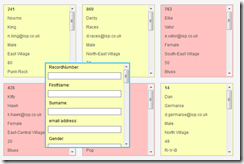
Stickies can be grouped and colour-coded If that sounds like hassle, and you’ve already developed your plan using a spreadsheet, then StickySorter is the tool for you. A free download from Microsoft, this takes each row of your spreadsheet and converts it into a stickie. You can then move the stickies around, group and colour-code them.

“What’s the point?”, you might ask. Well, spreadsheets are not everyone’s cup of tea, and StickySorter provides a very visual way of seeing the overall plan.

Not only that, but each stickie will contain al the information from that particular row in the spreadsheet. In other words, the column headings in the spreadsheet serve as field names in the stickies, just as they would if exported to a database. (In fact, you can use this to illustrate to students – and perhaps even colleagues --  the concept of inputting data once, and then using it over and over in different ways.

Unlike Wallwisher, you can search StickySorter, and obtain basic stats as well as the facility to group results at a simple level.

For example, if I do a search for “Male” I will be told somehting like “There are 200 records, and of these 67 are male”, and will be able to group those stickies together and move them to somewhere else on the screen.

A disadvantage of the program is that it’s not great for capturing ideas in the form of stickies in the first place. You can create new stickies, but that particular functionality works much better when you already have a bunch of stickies that you’ve imported from a spreadsheet, because then each new sticky contains the field names possessed by all the others.

A second drawback of the application is that, unlike Wallwisher, StickySorter must be installed on a computer: it does not reside on a website.

Which one is better?

No doubt you will wsh to decide which of these applications you will use, and how. One option might be to use Wallwisher to help you generate and capture ideas, then transcribe them to a spreadsheet, and then convert them into StcikySorter stickies to show not only what the final plan looks like, but more important tasks (on red, say). Cerainly, it is bound to be easier to discuss possible changes from looking at this than from looking at the spreadsheet version.

Each of these tools can, of course, be used independently of, but also in conjunction with, each other. The main point to bear in mind from this article is that you can now enjoy many of the traditional advantages of paper stickies without having to suffer from their inherent disadvantages.

If you’d like information on how Wallwisher may be used in the curriculum, download your free copy of The Amazing Web 2.0 Projects Book.

A Good Example of Bad Conclusions

Unless The Register has missed something out of its report, or I'm not thinking straight, there is a serious flaw in Hitwise's conclusion that Brits' greater use of social networking sites than search engines prove that they are  "more interested in talking about themselves than they are in learning about their world".

How does one reach that  conclusion? Perhaps there is a legitimate chain of logic, but I can't see it, and it hasn't been explained as far as I can see. It's an excellent example of the need to probe beyond the headlines and soundbites, and to teach our pupils to do the same.

Anyway, any true narcissist wouldn't bother to visit social networks to see what people are saying about them: they'd set up a few Google Alerts.

That's what I've done, anyway.

I'm back!

This is just a very quick update. Having sorted out my computer problems (fingers crossed and touch wood), reinstalled loads of software and (hopefully) not lost any data, I'm now almost ready to start writing again.

After I've done a mega backup, installed Tweetdeck and actually gone out to earn a crust, I will be back with some new articles.

In the meantime, take a look at this report by Patrick Hadfield on the 140 Meetup panel discussion I took part in last week. Some very interesting issues were raised, from a wide variety of people (mostly from outside the education profession).

What's happening here?

This is just a quick post to keep my loyal readers (hi, mum and dad!) informed of what's going on. I don't have time to go into all the gory details right now, but suffice it to say that I am currently working on a borrowed computer having expended loads of time and energy dealing with my own one, have been descended upon by relatives virtually unannounced, and just to bring the number of things up to three (things always happen in threes, so they say), my exhaust dropped off a few days ago. Well, the exhaust from my car if you are going to be pedantic about it.

So the upshot is this:

  1. I have had to focus on my work in the reduced time and energy I've had available. I am sure you understand the need to put bread on the table. Not that we eat bread, but you know what I mean.
  2. I will be writing about a visit to the RM REAL Centre soon, my experiment with setting up a newswire in Publish2, which I have been a member of for a couple of years, and of course continuing with the 31 Days to Become a Better Ed Tech Leader series.

But right now I have to drive my car to the garage to have the exhause fixed. If you live in my neck of the woods and you hear what sounds like a tank going past, it's probably me. Don't forget to wave as I crawl past.

A slight glitch....

Unfortunately, I haven't been able to get the latest '31 Days' article out today. I have been somewhat distracted by the fact that some problems I have been having with my computer have been nailed down to an impending hard drive failure! (Fortunately, the computer came with a pretty good diagnostics program that identified the fault.)

I am extremely assiduous in taking backups of data. However, before the computer goes off to be sorted out (it's still under Warranty) I wish to erase all the data off the drive, and because I know that some vital piece of information will be found to be missing after I've done that, I've been double-checking that software licence numbers have been noted down, vital emails forwarded on to my lady wife (as well as backed up) etc etc. It all takes time, and is rather distracting, as you will know if you have had this happen to you (who hasn't?).

More articles will appear soon, but in the meantime I hope you enjoy reading what's already been published here. Look down the left-hand side of the page for the last 10 articles.

Thank you for your forebearance.

Constructing Education for the Future

I've been invited by Bernie Mitchell to take part in a panel discussion at one of the #140 Conference Meetups. The topic to get us started is:

Constructing Education - Do we have a real time responsibility to future generations - NOW? (And what does that look like?)

Here are my initial thoughts.

There is a temptation to say, like Sir Boyle Roche,

What has posterity ever done for us?

I believe that would be both shortsighted and wrong, for the following reasons:

  • The future is closer than we think. The pace of change, as measured by, say, adoption rates, is so fast these days that anything we do now, or fail to do, is likely to have repercussions in our own lifetime. So from a self-interest point of view if nothing else, we'd be pretty stupid not to exercise responsibility towards future generations.
  • On moral or ethical grounds (I'm never quite sure of the difference), why would anyone go into teaching if they were not committed to the welfare of future generations? I like to think that not everyone goes into teaching as an interim measure between more lucrative forms of employment.
  • The term 'real time' is quite interesting. It suggests the idea of changing education according to needs much more quickly than is usually true. It ties in with an idea I've had for some time, which is that if you want schools to succeed you have to give them more freedom rather than less. Micromanagement stifles creativity in commercial life; surely the same is true in education?
  • That being the case, if I am right then what we need to do is construct an education system which is minimalist, rather than detailed.
  • We also need to somehow remove the risk of failure from the educational process. Many teachers/schools are so concerned about league tables that they dare not risk trying out new approaches, such us using Web 2.0 applications in the classroom. I wonder if there is a way of allowing innovation -- especially using educational technology -- without risking students' life chances or Headteachers' careers? The fact is, not innovating and not using technology are just as risky as taking risks!
  • That's because the world is changing. The world is becoming a Web 2.0 world. I may have a chance to say more about this tomorrow, but basically the point is this, and it has been made many times by many people: there is little point in educating future generations for life and work in a world that is gradually disappearing.

If you can make it to Holborn Piccadilly in London tomorrow evening, I hope you will be able to join me and a brilliant line up of other panelists and a great bunch of participants to discuss such matters. What are your  thoughts?

STOP PRESS! The venue has changed: it is now at the Grace Bar, 42-44 Great Windmill Street, London W1D 7NB.

31 Days to Become a Better Ed Tech Leader -- Day 28: Start a Surgery

Here's a question for you: if you were thinking of doing something different, and you had two choices, which of these would you go with? Option A, where there is little or no support available, or Option B, where there's a lot of support available. I think most people would choose Option B, if all other characteristics of the two options were equal.

A task a day for 31 daysThe same goes for using educational technology. Despite the fact that many people use it in their everyday lives, there is still a reluctance on the part of some people to use it in the classroom. As well as putting on in-service training for people, having user-friendly how-to guides on the wall, and making sure that the technical support is first class, there is another thing you can try: starting a surgery. This is a difficult thing to recommend actually, because it can involve working beyond the school day, and asking others to do the same. (The fact that many teachers do so anyway is neither here nor there.)

So I'll explore some options, once I've described what I mean by a 'surgery'. It works along the same lines as a doctor's surgery: if something is wrong, or you're not sure about how to do something, the idea is that you can pop along to the surgery, where someone will be delighted to help out.

The great thing about setting up a surgery is that it provides yet one more safety net for those colleagues who are less than confident when it comes to use technology in their work.

The traditional model of a surgery, which is still used in many schools, is where the Head of ICT or Educational Technology Co-ordinator makes herself or himself available every Wednesday (say) for an hour after school. Where people are willing to 'muck in' and take turns to do it, so much the better.

A far better option, if you can set it up, is the one I saw in a school I supported when I was an ICT advisor. They had set up a computer area for staff use only, as I recommended here, but they had gone a step further. The staff computer area was also the Head of ICT's office, in effect, and it was shared with his technician. Consequently, there was someone available to give assistance at pretty much any time of day. As if that wasn't enough, there was a kettle and a coffee machine, with a tin of biscuits plus milk and sugar for people to help themselves to. Yes, you're not supposed to eat or drink in a computer area. Yes, it cost them money to provide those refreshments. And yes, the room was in use all the time.

Another model, if you can arrange it, is to arrange for each member of staff in your team to use one of their free periods (assuming you have them) in exchange for not being asked to cover a lesson at that time. The benefit for the teacher is that she knows where she is going to be, and can take some work in to do. If your Principal is very wedded to the idea of staff using the technology, you should be able to make a persuasive argument for this sort of thing.

A variation on that theme is to ask members in the technical support team and/or classroom assistants to do some of their work in the computer room at particular times in the week, so that they can be available to assist teachers if required. There is also nothing to stop you creating a kind of 'virtual surgery', comprising walkthroughs in the form of videos or screen captures. A virtual surgery is obviously not personalised in the same way that  a physical one is. However, by making a set of guides available in this way it is possible that you may alleviate many of the problems which come up in a typical surgery anyway.

Don't believe me? I know of one part-time educational technology co-ordinator in a primary (elementary) school who reduced the number of enquiries made of her from several a day to one or two per week. How? By the simple expedient of placing a ring binder folder in the computer room with some How-to guides for staff -- and lots of blank pages, along with the simple request:

If you have a problem and then discover the solution, please write it all down here so that others can benefit.

It was, in effect, a paper version of a wiki. Why not use a real wiki? Set one up so that staff who feel confident enough can share their expertise and solutions.

Making this facility, and the walkthroughs, available online means that if you don't have a computer room in your school it doesn't matter, because people will be able to use them at home or in their own area in school.This will also be a useful facility if you don't have a computer room.

Another interesting approach is to have a pupil rota, such as at lunchtime. The benefit for them is that they get to use their favourite applications or continue with their work, and helping staff can be a great confidence booster. Unfortunately, having a student roster doesn't usually obviate the need to have a member of staff present as well. From staff's point of view, they are likely to obtain help faster, though; and you benefit by being rushedoff your feet only half as much as you would have been! (At least until word gets round about what a great service is being provided!)

Bottom line: a surgery can be yet another lifeline for reluctant teachers -- the removal of yet another barrier to entry.

31 Days to Become a Better Ed Tech Leader -- Day 27: Review Your Technical Support

A task a day for 31 daysIt stands to reason that people aren't going to use the technology if it's unreliable (or reliable only in the sense that it is certain to go wrong), or that getting a problem sorted out takes ages.

Therefore today, I have just one question for you: what is your technical support like?

It shouldn't come to this...In my opinion, the best technical support is that which is completely invisible. Things tend not to break down because only the best was purchased in the first place, and because the technical support folk are proactively monitoring and maintaining all the systems in use. When, in the unlikely event a piece of equipment does go on strike, it's replaced within hours, or even faster.

Is that a counsel of perfection? Is it pie in the sky? I don't think so; in fact, I know it's not the case because I've seen ordinary, urban, working class area schools achieve exactly that. Yes, even primary schools.

So again, I challenge you: what's your technical support like? What would you like it to be like? What needs to happen in order to bridge that gap?

Check out the References section for other articles which may be useful to you on this topic.

Photo by Linusb4.

How to Write An Online Review: Guiding Your Students

Is writing an online review any different from writing an offline one? Probably the biggest difference is the (usual) restriction on word count. Most good website articles weigh in at around 500 words. Occasionally -- very occasionally -- I expand beyond that, but a good rule of thumb is that anything over 1,000 words or so could probably benefit from being split into two or more posts.

Strange that, when you come to think of it. You'd think that, given what is effectively an infinite amount of space, a website could cope with a few essays now and again.

Of course, the key factor is not the amount of room you have, but the supposed antipathy of readers towards scrolling. "Keep it above the line!", advertisers demand. That is, make sure the viewer doesn't have to scroll down in order to see it. So the same goes, or so the common wisdom has it, for any copy appearing on a computer screen.

In fact, restricting your prose to above the line (or fold, as it's also known) is not only an impossible exercise (how do you know how big your readers' screens will be, or how large they like their text?) but a pointless one. As Jacob Neilsen points out, people are quite happy to scroll down these days, although given people's relatively short attention span when reading text on a screen, it's probably better to err on the short side, given a choice.

Now, the reason that I've gone into some detail on this apparently minor point is that I think it's important to give people reasons for doing something, or not doing it, and this is where I think How to Write an Online Review falls down. It gives short, sharp advice, without really explaining the reasoning behind it, or leaving any room for discussion.

And there is room for discussion. You might want to question not only the scrolling argument, but even the attention span argument. For example, if I invite you to write a review of a software application, which would cost a school several hundred dollars to implement, I'd expect more than a cursory 500 words, unless the product is such a pig that it's not worth wasting any words on it. (I'm reminded of Dorothy Parker's review of a book: "This is not a book to be tossed aside lightly. It should be thrown with great force.") More importantly, my readers would want you to go into some depth. After all, if they think it's too long they'll vote with their mice; but you ought to give them that choice.

So the "rule" about keeping the review to "500 words or less" -- it should actually be "fewer": why does a video about writing contain such an error? -- is not a rule at all. It is a point to be discussed with an editor (which may be yourself, if you're writing for your own website or blog), taking into account the nature of your audience.

If you don't know how your readers feel about long articles, then you need to ask them, or find out in some other way. In other words, you need to do research, and act accordingly. Where will you do your research? Well, apart from reading articles on the subject, you could also analyse your web statistics. How long are people spending on your website? How long are they spending on each page, on average? Which posts are the most popular? How are they different from the rest? (Google Analytics is a great tool for answering the quantitative questions.)

Already, we have taken this apparently simple task of writing a review from a kind of painting-by-numbers approach which, frankly, has no, if any value, as far as the ICT curriculum is concerned, to one that starts to address Levels 4 or 5 (audience), and even nudge up to the higher levels (customer feedback). The temptation to use a video like this straight off the bat without really thinking about it is great indeed. But that's like buying something in a supermarket because it's on special offer, not because you will actually use it.

There's another curious bit of advice in the video: use strong verbs and nouns. What's a strong noun? What's a strong verb, come to that? Surely it would be better to use the most appropriate word? I may be wrong, but without having been given an explanation of the word "strong" in this context, how can I know?

One useful piece of advice is to use the active rather than the passive tense. This is always the right thing to do unless you are writing an academic article or your objective is to bore the reader into a stupor. Saying something like, "I drew the picture and then coloured it in using the Fill tool" is much more dynamic, and therefore engaging, than the passive (almost supine) "The picture was drawn by the reviewer ,etc etc".

What about the advice that was left out? For example:

  • Discussing with the website editor or blog owner exactly what his or her requirements are.
  • Should screenshots be included?
  • What rights are you giving away?
  • Must the review be brand new, or is it OK to recycle one you wrote before?
  • If you live in the UK, such are our libel laws that it's probably a good idea to be on the safe side and make sure you include the magic mantra, "In my opinion" in the review if you've decided to pan it.

Incidentally, everything I've written here is only my opinion, which I formed whilst watching and reflecting on the Howcast video (see below).

So am I saying this video is a waste of time and that you shouldn't show it? Not at all. By all means, use it as a starting point for discussion with your class, and use it (or its best points) as an aide-memoir once you've covered the topic.

In fact, once you've decided to not use it straight out of the box, but to encourage discussion and questioning around it, you'll probably conclude that it's not really a bad piece of video at all.