A Great Reading Video

One of the planned special editions of the Computers in Classrooms newsletter is about books, so I was pleased to come across this video by Science Girl Em. Em is a 2nd grader, which I guess means 7 to 8 years old, and she is taking part in the Student Blogging Challenge, run by Sue Walters.I discovered it through Stephen Downes.

This is a delightful response to another video about reading, which I hadn't come across. If you like it, please leave comments on Em's blog; I'm sure she'd appreciate it.

Also on her blog is a wonderful description of a trip to Kansas University. Em writes:

We saw a big giant classroom. I thought it was a theater.

Here is the video. Enjoy!

Learning Platforms Revisited

In the article Learning Platform or Virtual Learning Environment?  I reported on my visit to Grays Infants School in Newhaven, Sussex, UK. There was a film crew in attendance, and the resulting video along with some commentary has been published on the Next Generation Website: 

Show and tell: Extending learning both within and beyond the classroom

Nina Howse of Shiny Red has kindly given permission for me to include the video here. Do take 10 minutes to look at it, as it is quite interesting to hear what various people have to say about what has made it work so well.

One of the things which this video, and the visit itself, emphasised for me, yet again, is the key importance of having a school leader who is both visionary and practical -- a rare combination!

Here is the video. Enjoy.

If you found this article useful, you may be interested in the extended article in the next edition of Computers in Classrooms. Jeff Smith, London Headteacher and member of Becta's Leading Leaders Network, describes the issues involved in transforming a school, and what he describes as a 'personal journey'. It's a great read, and very insightful.

Also, take a look at the new series on managing change.

This Small World

We take so much for granted, we digital citizens. But every so often I stop to think of the 'amazingness' of it all. Here's an example of what I mean:

It's a small worldI've just come back from the Naace 2010 conference in England where I met up with a Canadian fellow, Michael Furdyk, co-founder of Taking IT Global. I first met Michael at the ICTLT 2010 Conference in Singapore a couple of weeks ago.

He happens to know someone called Derek Wenmoth, from New Zealand, whom Elaine and I had dinner with on Friday night. He was in Singapore too, and I first 'met' him by being introduced to him by Sharon Peters, a Canadian Blogger.

If my memory serves me well, Sharon introduced herself to me after hearing of a book I was on, through Jennifer Wagner, an American educator.

And I think that Jennifer and I got to know each other through the blogosphere after I'd published a free book about Web 2.0, Coming of Age, that feaured, amongst other writers, David Warlick, who also lives in the USA.

Who could have predicted 15 years ago that anything like this would ever happen?

What I Look For in a Conference

There is an updated version. of this article.

I attend a lot of conferences, and over the years I've developed a useful set of criteria by which to evaluate them. Here, then, in no particular order, are my top 14 characteristics of a good conference.

#1 Fresh air and daylight

I shouldn't have to say this, but air and natural lighting are pretty fundamental for our existence. We all know that, so how come half the conference sessions I attend don't make the grade in these respects? Worst of all were the National Strategies' training days. They were pretty dire anyway, for the most part, but what made them even worse was they always seemed to be held in a basement room with no windows and no air. As the day wore on, especially after lunch, half the delegates would be falling asleep. Not good.

#2 Can we move now?

That raises another issue. A lot of conferences involve a lot of sitting around and listening. After a while, you feel like your blood has stopped circulating -- which it probably has. Now, I don't go along with ideas like getting the audience to do some sort of physical workout, which I have seen advocated in self-styled 'cutting edge' texts. But I think a variety of different kinds of session, together with making each one no longer than an hour -- and preferably less -- helps a lot.

#3 Where are the kids?

Seesaw

Like I said in an article called But where are the kids?, you would never know, walking into a lot of educational conferences, that the conference is about education at all. At best, some of them have a few token young people around to remind us all what they look like, but that's about it. I have to say that this is where conferences like ISTE(previously known as NECC) and iCTLTdo well. Kids not only start the conference off, but are seen at the exhibitors' stands, and even speak!

I like the increasing presence of young people as reporters at some conferences. This was the case at the BETT show in January 2010, and a curriculum conference in March 2009 (see the 'kids' link, above). We need more of this sort of thing.

#4 Plenty of 'down' time

Some conference organisers feel that they have to pack every waking moment -- and half our sleeping moments too! -- with activities. This is justified on the grounds that would-be delegates have to have their applications approved by bean counters who equate more stuff with better value. In fact, after a certain point has been reached, the opposite is likely to be the case.

My own view is that the best part of any conference is the conversations you have. I won't even say 'networking', because although you're 'supposed' to go to conferences to network and make connections, I find it really hard to do. The reason is that whenever people unleash their 'elevator speech' on to me, I feel like I am being sold to -- which, of course, I am. Far more interesting is having a normal, honest conversation. And if that leads to some business in the future, that's all wonderful and marvellous. And if it doesn't, well that's fine too because at least you had a good social time.

#5 Good speakers, on good topics

For me, given my views on the importance of #4, if the sessions are good too then that's a bonus. By 'good speakers' I do not mean people who shout, jump up and down, try and gee us up, and regard themselves as primarily entertainers (unless, of course, it's in the context of an after-dinner speech). I mean people who are at the top of their game, who have a deep knowledge of their subject, and who are going to give me some information and insights which I would either not be able to obtain at all otherwise, or which it would take a fair bit of time and effort to get otherwise. And up-to-date insights too, not the ones they came up with five years ago and have been trotting out ever since. Ever heard of blogs and YouTube, guys?

By 'good topics', I do not mean stuff I am interested in, because that's taken as read. I mean stuff that I should  be interested in but which I didn't know I need to know about!

#6 Let the people speak

I think there's a place for 'unconference' elements in the conference programme, like a Teachmeet or opportunities for groups of people to get together to discuss topics of mutual interest. It's not the end of the world if there isn't this option, but I think every effort should be made to provide it where possible.

#7 I wanna be connected

Connected

The best conference will have wi-fi throughout the venue, including the hotel. There must also be a conference Twitter feed, and Flickr and Technorati tags. Some conferences also have a conference blog, Facebook page,  and a social network. I think having all that is more likely to dissipate commentary, or even discourage it altogether, by making the choice too wide. What's the point anyway? Anyone who's going to write about the conference will want to do so on their own blog, wouldn't they?

#8 Who else is here?

I like to see a delegate list. Notwithstanding what I said about networking, if there is someone there whom I'd really like to meet, I'd prefer to know about it so I can look out for them and try to connect with them. Conferences provide great opportunities to meet people you have had dealings with, or need to have dealings with.

For example, at the Naace 2010 conference I was able to meet up with several people I've been having work-related conversations with. As it happens, the conference was small enough for me to see they were there. At larger conferences, you cannot rely on spotting or bumping into people, which is why a delegate list can be so handy.

#9 Decent accommodation

It's a well-known fact that people evaluate training days on the basis of whether the food was any good. The same goes for conferences, and more so if you're staying overnight. Good grub, with a proper choice for vegetarians and other diets, and a clean, well-appointed room, are what we all like.

#10 Lots of choice

It can be very frustrating when sessions you want to go to clash with each other. But I'd rather be spoilt for choice than to feel like I have almost no choice at all.

#11 Post-conference information

Presentations, and podcasts or videos of the presentations, should be available afterwards. So should supplementary material where relevant.

#12 If you're going to advertise, tell us

If you look at the ads in the paper, or this website, you'll see they have the word 'Advertisement' above them. The reason is obvious: to make sure that people don't mistakenly think they're part of the editorial. Well, I believe conference speakers should do the same. I've been to a couple of conference sessions where the presentation was an extended advertisement in all but name. If this is made clear in advance, then people are given a genuine choice. If you find out once you're in the session, not only have you had your time wasted if you didn't want to listen to an ad for 45 minutes, but you've missed the chance to go to a presentation you would have liked to have seen.

#13 No text please

Exhibitors should make their stuff available electronically, such as on a conference CD. I think it's unreasonable to expect delegates to lug tons of printed material home.

#14 Start and end on a high

I want my conference to open with a bang, and make me eager with anticipation. I want to end my conference on a high, full of adrenalin, wanting to rush back home with renewed determination to make a difference.

Over to you

What do you think are the characteristics of a great conference?

The Bug Force

It's quite obvious that there are forces at work which deny rational explanation -- at least in terms of the laws of nature as we commonly perceive them. This can be seen most readily where any kind of proofreading is required. Is there anything we can do about it?

All joking aside, should we always be encouraging students to produce perfect work? And if not, how many errors are acceptable?

P1030955.JPGNow, I don't want to detain you longer than necessary, so I'll come straight to the point: the short answer is "no". True, you can take a proofreading course, seek advice in a forum, have an extra pair of eyes, and seek advice from the experts. Nothing makes any difference, ultimately, because you're dealing with the unknown. The real  issue is this: how many errors are acceptable? I'll come back to this point shortly.

What proof do I have that proofreading is the playground of a malevolent spirit? Simply this: no matter how many times you proofread a document, there will always be one more error. This is even enshrined in a "law" of computing, albeit in a different context:

Lubarsky's Law of Cybernetic Entomology: There's always one more bug.

You, or someone else, will discover the flaw. Eventually. My research into this phenomenon over many years has led me to the inescapable conclusion that you will discover it in one of the following types of circumstance:

  • When you have printed off 400 copies.

  • When you have just mailed it in response to a job advertisement.

  • When you have just emailed the third version of it to an editor you have never worked with before.

Does this mean that you can never create a perfect copy? Not exactly, but even if you manage to thwart the forces of non-good at the proof-reading stage, the gremlins in the software you use will launch a second wave attack. How else would you explain things like:

  • A document that looks perfect on screen does not retain all the contents of the page when you print it out.

  • Page-numbering develops a mind of its own.

  • Sometimes, if you try to place a caption beneath the picture instead of above it, Word goes berserk. For example, once it caused the two paragraphs under the caption to disappear altogether.

  • Once, a colleague said that her document included a copy of a spreadsheet which looked fine on the screen, but kept printing out with most of the left hand column missing.

Is there anything you can do about it, being serious for a moment? After all, one doesn't like to be completely fatalistic. Well I do three things:

  • Run the spell-check.

  • Read through it one word at a time (and boy, is that tedious!).

  • Cajole someone else to read it.

Ultimately, none of this will make much of a difference (see Lubarsky's Rule, above), but at least you will not need to castigate yourself over it.

So, being realistic, what this really boils down to is: how many errors are acceptable? This is a serious question, and one which I don't think tends to be addressed in schools.

Students are encouraged to produce perfect work for their e-portfolios or coursework. But that is unrealistic. What we ought to be doing is encouraging them to make a judgement about the acceptable number and type of errors given the nature of the piece of work in question, the audience for whom it is intended, and the purpose of the exercise.

There are, I believe, viable alternatives to the proverbial view that if a thing is worth doing it is worth doing properly. Consider the following:

  • If you do something perfectly, there may well be an opportunity cost involved, ie the cost expressed in terms of the next best thing foregone. For instance, is it better for me to obtain a grade A in my Art exam and fail everything else, or to obtain a scattering of Bs and Cs across a range of five subjects? The answer will depend on a number of factors, such as whether I want to get into Art college or become a vet.

  • We owe it to our students, in our any time, anywhere  society, to nurture a "good enough" attitude. Don't get me wrong: I am a perfectionist, as no doubt you are too. But there comes a point (three in the morning, perhaps, or the third draft) where we all say:

    "That will have to do, and if they don't like it, they can do it themselves!"

  • In a related way, there is also the Law of Diminishing Returns. After a certain point, the benefits from continuing to work on something are outweighed by the costs in terms of fatigue or opportunity cost (see the first point).

  • Sometimes, imperfection is good. Once, for example, I completely messed up something I was doing whilst demonstrating some software to a class of teachers. They actually found it reassuring, and it gave them confidence. The logic was along the lines of:

    "Well, if an expert like Terry can make a stupid mistake like that, it's ok for me to do so too without beating myself up over it."

I don't know the answer to the question: "How many errors are acceptable?". It's a judgement call. Our job as educators, I suggest, is to help students make that judgement as part and parcel of the skill of writing and presenting for different audiences.

This article was first published on 1st August 2008.

Postscript

I received an email recently from Cate Newton of the SR Education Group. Cate says:

"The Bug Force" is an excellent article for writing, editing, and proofreading.

My interest in proofreading and writing for students sparked an article that was just published on our website, Guide to Online Schools, here: http://www.guidetoonlineschools.com/tips-and-tools/proofreading. We are trying to build up useful resources for students of all ages and this is our most recent. We’ve compiled a list of the most useful grammar, proofreading and writing style guides on the internet into one, easy-to-navigate article.

I've looked at the article and I have to say Cate has probably undersold it. It is full of links to writing and grammar guides, and looks immensely useful. The only caveat I would add is that it is mainly (though not exclusively) for a non-British audience. So whilst the processes and general principles of writing and proof-reading no doubt apply everywhere, you should exercise caution when looking at non-UK grammar texts, as there are significant differences.

In this context I should recommend Grammar Girl. This is an excellent podcast full of useful tips, and advice on common errors. And although the podcaster, Mignon Fogarty, is either American or Canadian, she usually gives the British version of grammar and sentence construction -- which is, of course, the correct one ;-).

Does any of this matter? I think so. Just because writing for the web is, arguably, less formal than other writing, and blogs are fine for publishing off-the-cuff thoughts, writing should still be error-free as far and possible, notwithstanding my comments in the article, and pleasant to read.


The internet – empowering or censoring citizens?

I attended a fascinating talk at the RSA last September. In a lecture entitled “The Internet: Empowering or Censoring Citizens”, Evgeny Morozov questioned whether the internet really is the means to inevitable freedom and democracy it is often portrayed to be.

‘So what?’, you may ask. From an educational point of view I think this is an important topic for discussion for two reasons. The first is that, in general terms, we should take every opportunity to ‘force’ students to think for themselves. When I was a teacher, I usually adopted Oscar Wilde’s stance:

“Don't say you agree with me. When people agree with me. I always feel that I must be wrong.”

Students need to be encouraged to seek questions, even if the answers are not as readily forthcoming.

Matthew Taylor and Evgeny Morozov at the RSA

Secondly, in every ICT course, apart from purely skills ones, there is a section on the effects of technology on society. By examining issues such as whether or not the internet is automatically a means of distributing power more evenly in a society, the teacher would be addressing the spirit (if not always the letter) of that section.

Morozov challenged the view of the people he refers to as ‘cyberutopians’ that connectivity + devices = democracy. Some states, he pointed out, are using the web to crack down on dissidents.

In his talk, the link to which is given below, he described a number of ways in which some countries are using the power of the web to curtail, rather than to extend, democracy and freedom. If you think about it, it is obvious that web 2.0 applications are not inherently good or bad, so why would it be so surprising to discover that countries use them for their own ends?

In this context Morozov spoke of the ‘spinternet’. The idea is that when deletion of content is, in effect, impossible, the next best approach to dealing with what we might call off-message sentiments is to use political spin to defuse the issue.

The general and simplistic view seems to be that once every young person in a country has an ipod, they will miraculously turn into democrats. This ipod liberalism, as Morozov terms it, represents a deterministic view. It seems to me to be pretty insulting too. After all, if someone gave you an ipod, would your principles and beliefs suddenly fly out of the window? I realise that that is a somewhat simplistic counter-argument, but no more so than, it seems to me, the argument itself.

In any case, a more realistic approach would be to recognise the existence of cyberhedonism: most people are not interested in politics, as shown in this illustration:
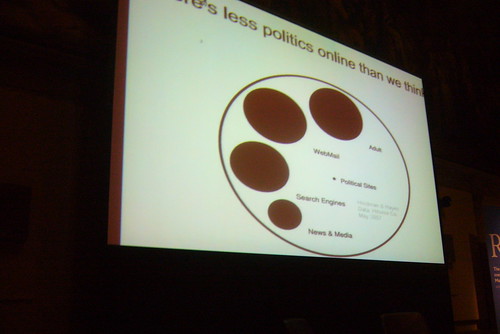
 Online politics

And perhaps we need to borrow from Maslow and draw up a hierarchy of cyberneeds (see illustration below). In this paradigm, internet users start by satisfying their basic ‘needs’ – for pornography, file-sharing and video downloading – before progressing to less self-centred activities.
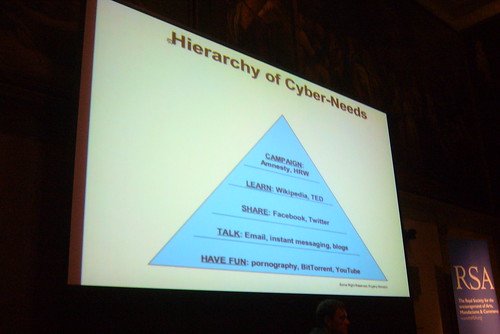
Hierarchy of internet needsTowards the end of his talk, in an almost throwaway comment, Morozov vividly illustrated the power of the web in the ‘wrong’ hands. In the past, he said, a totalitarian regime would have to torture an activist to find out the names of his associates. Now all they have to do is go on Facebook.

Of course, it’s easy to point the finger at totalitarian regimes, but even in countries like the UK and USA, power is not evenly distributed on the web. For example, half of Wikipedia’s articles are accounted for by only 10% of its users (Clay Shirky has drawn attention to this sort of thing as well). There is nothing nefarious in this, of course, but it’s salutary to bear in mind that, according to Morozov, the average person stands only a 2% chance of being mentioned on the front page of Digg. Hardly an even distribution of influence.

It seems to me that a number of questions might fruitfully be discussed with students:

What do you think of Morozov's arguments?

Is the concept of a hierarchy of cyberneeds a useful one?

Does it exist?

Where would your students place themselves in that pyramid?

Where would you and your colleagues place yourselves?

If web 2.0 applications can be manipulated by governments and even individuals, how can one guard against being taken in?

Is being digitally literate enough?

One of the key points to come out of a discussion about these issues would surely be that of identity? Morozov focused mainly on the use of Web 2.0 applications by non-democratic governments, but the truth of the matter is that you actually don’t know who you’re ‘talking’ to in any online space unless you do a bit of research and cross-checking. How do you know that the word-of-mouth recommendation you have just received is genuine?

How do you know whether or not the person ‘bad-mouthing’ a particular product is working for a rival company?

How do you know if an Amazon book review is genuine?

And is it not crucial, therefore, that we take some issues out of the ‘niche’ area of e-safety and bring them into the mainstream, or widen the definition of e-safety to include such issues?

Further reading:

Read Matthew Taylor's blog post about this (which centres on the political rather than educational implications of Morozov's address) and, especially, the comments. I especially like Taylor's conclusion:

The web is changing culture, relationships and organisations. Its effects are real and important. Sometimes they are good and sometimes not. The exaggerated claims of those who say the internet is inherently a destroyer of organisations and hierarchies or that it is bound to lead to greater democracy and collaboration are an unhelpful distraction from the important study of the internet’s real impact on real lives.

The internet society – time to get real

Listen to Morozov's talk

This article was first published on 30th September 2009.

 

Why Schools Cannot Ignore Web 2.0: Technical Factors

#iCTLT2010 Based on my recent talk at the ICTLT2010 Conference, this short series looks at the social, technical, commercial, economic and educational factors that I think together mean that a compelling case can be made for schools to fully embrace Web 2.0 technologies.

Last week I looked at the social factors involved. This time, let’s look at the technical drivers for change. The obvious one here is changes in technology. As well as Wikipedia and social networking, there are other developments too, such as Cloud Computing, which is starting to enter the mainstream as a viable proposition. In fact, 98% of reluctant companies have said that their main concern was security. But technically, it is now completely feasible to use web-based software for most things, and some schools and even whole districts have been using Google Applications for Education, or similar services, with success. In fact,  Singapore's Minsitry of Education has arranged for access to Google Apps right across the country.

There is also now an openness on the part of government as far as data is concerned. For example, the UK Government recently launched a data portal that enables people to work with the data, and create apps, to drill down into the data to find information which might otherwise remain hidden, such as to do with housing and local amenities in an area. In the USA, the Patent Office has built a wiki called Peer to Patent to enable people to peer review patent applications.

The technology of search engines has changed so that search results can include blogs and consumer reviews. There has also been a  growth of open source, consumer-developed apps, such as for the i-Phone. There are now 150,000 apps  in the Apple Store, and by January there had been 3 billion downloads. Other companies are also adopting this model. Facebook Connect, which lets you take your Facebook identity with you to other communities on the internet, is another example of what I called a kind of 'levelling' process.

Changes in technology have enabled the existence of what Chris Anderson has called the long tail, by which is meant the fact that anyone can produce a niche product in an economic way. For example, by using print-on-demand you can produce a book that only you and your students will use, or you can create a television channel just for use in your school.

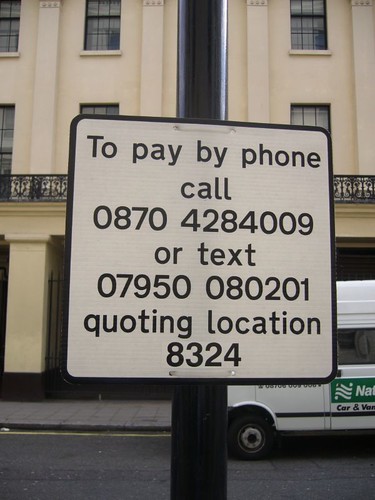
AnywhereIn a recently-published book called ‘Anywhere’, Emily Nagle Green talks about the importance of connectivity, in devices, such as pill boxes that know when they’ve been opened and closed, and can notify the network accordingly; in customer experiences, such as people being able to pay parking meters by text messaging, as shown below; and connectivity in business, such as wireless transmitters on taxis in London to save waiting time at Heathrow Airport.

I discovered that in Singapore when you enter a car park your arrival and departure are noted, and you are sent the bill afterwards. Apparently, in Hong Kong things are even more connected.

Parking by textI think the degree of connectivity in the world was brought home to me recently by something which a manager in IBM said:

“There are more transistors in the world than grains of rice”

Brendan Riley, IBM

I have no idea how many grains of rice there are in the world, but I’m sure it’s a lot!

Next week: The Economic drivers for change.

Email: The Electronic Leash?

I am not sure why it is, but whereas channels such as Twitter and Facebook are pleasant and liberating, email is somehow depressing and restrictive. Perhaps it's because it is associated with work rather than pleasure, or because it is, psychologically, more demanding. Perhaps, in my case, right now, it is because I have just returned from the #Naace2010 conference (which I shall write about in due course) -- and to 3,697 emails.

No, the conference was not 3 months long, it was 3 days in total. And yes, they did have wi-fi, so in theory I could have dealt with some of the deluge whilst at the conference. Here are a few of my thoughts on the matter.My reaction to nearly 4,000 emails waiting for me

The trouble with alerts

Setting up alerts to tell you when something has been downloaded is, usually, good. In my case, I find that seeing a few downloads of something I've published, each time I check my mail, lifts my spirits. Thus it was that when I published the Amazing Web 2.0 Projects Book a few days ago, I set up an alert of this nature. I should have turned off the alert before I left for the conference, but in my naivety I assumed there would be a few hundred downloads at the most.

I could not have been more wrong.

As of a few minutes ago, it has been downloaded 4,758 times, and the majority of the 3000+ emails were the associated alerts.

So my conclusion about this is: disable any automated alerts and things of that nature before leaving home for more than a day or two!

Web mail can be slooooow

Checking my email at the hotel was a nightmare. For some reason, my main provider's web mail service is always really slow. It's cope-able with when there are just a few emails, but not when there are over 90 pages of messages. It got to the stage where each page was taking several minutes to load. I can get email on my phone, but I've learnt from past experience that if the number of messages becomes too large, the phone grinds to a halt. I found that out in Phoenix, Arizona a few years ago, when I spent a merry hour in an organic wholefood café (I don't know why I put that detail in, but I just felt the need to give the complete picture!) furiously deleting stuff and even uninstalling apps I'd never used.

Conferences are for conferencing

The other thing is that, whilst I try and keep on top of what's coming in to my email inbox whilst away, I don't want to miss the opportunities for networking and so on that a good conference provides. So unless the email is from a client, or urgent in some way, then (assuming I'd seen it at all) I would normally wait until I return and deal with it then. I constantly meet colleagues at conferences who miss entire sessions in order to deal with emails, and I can see why they would do that, but I think I am doing my clients, subscribers and readers a better service in the long run by participating in the conference as much as I can.

Sleep is important too

I know from my days of studying and teaching economics that the rarer a commodity is, the greater its value. Well, at conferences sleep tends to be placed in that category, and that has a twofold effect on my dealings with email.

Firstly, on  business grounds, I don't think answering emails late at night when you've been on the go for 19 or 20 hours is especially sensible.

Secondly, faced with the choice of grabbing 4 or 5 hours' sleep, or checking emails, surely the more sensible option is the former?

And now the deluge

And so, today and no doubt part of the weekend will involve my going through the emails, responding and, hopefully, catching up on work too. So, if you happen to be one of the people who have emailed me and have not as yet had a reply, please accept my apologies.

As it may be a bit of a wait, you might like to download that book I mentioned. Its 121 pages of good stuff, from some fantastic practitioners. And no doubt of more practical use than War and Peace, which was going to be my other reading suggestion.

But seriously, you no doubt have better things to do than wait around for responses to emails, but if you have a moment or two I'd be interested in how you deal with the inevitable email mountain we typically find on returning from a conference or vacation.

In Praise of Silliness

I am all in favour of the experiment by an ATM company in London which sees instructions in rhyming slang on some of its cash machines.

People tend to be too serious, and sometimes you can achieve quite a lot in terms of making people think, or even improving learning, through the interjection of a bit of mild humour.

I’m not suggesting that these ATMs will educate people, but that a similar principle might be introduced into the school environment. When I was running an ICT department in a school, I sometimes used to put up silly notices along the lines of:

Is you is or is you ain't printing? If so…

(From the song Is you is or is you ain’t my baby?)

OK, so it didn’t produce guffaws, but then it wasn’t meant to. Just about every ICT suite has notices saying what you can’t do, what is forbidden. The overall effect is to put people on edge, in my opinion. You can grab people’s attention with an unusual and slightly humorous headline, and then state a few rules. I believe that the light-hearted opening puts them in the right, ie receptive, frame of mind.

Humour is fine to use in other places too, especially when the work can get pretty intense. I tweaked a spreadsheet once so that at the top, in the title bar, it read:

Mr Freedman says: Get on with your work!

I also had a button which said

Click here in case of an emergency.

Inevitably, clicking on it caused a message to pop up stating:

This is not an emergency! Stop messing about!

My coup de grace, however, was recording myself saying "Stop that and get back to your work", and assigning the sound file to one of the windows events on a stand-alone computer. It was quite humorous to see the reaction of a pupil experiencing it for the first time!

Of course, it goes without saying that such frivolity will not work if you have not already established classroom discipline and have really interesting work for the students to do. My aim was to try to replicate a workplace environment, in the sense that in a normal, healthy work environment people work, have a bit of a break, exchange some banter, and get on with their work. Why should school be any different?

Related article: Fings ain’t wot they used to be.

This article was first published on 26th August 2009.

Web 2.0 For Rookies: Music While You Work

When I was a teacher I used to play music in the background, whilst the students were working. Not House, or Funk or whatever the current fad happened to be, but baroque music such as, and especially, Vivaldi.

I found that the music calmed the students down if they were a bit 'hyper', and they also worked better, and for longer. I didn't know it at the time, but there is, apparently, some research which shows that this was not a figment of my imagination. Listening to baroque music is not only soothing but it also, or so I've read, makes the brain waves more coherent, ie work together, like meditation.

If you think about it, that is, counter-intuitively perhaps, exactly what one needs when working on a highly logical problem such as the ones encountered in ICT.

Notwithstanding such benefits of this type of music, was I abusing my position of authority by not allowing the students to listen to the music they liked? I don't think so, because the purpose of the exercise was not for me to enjoy 'my' music, but to create a calm, ordered atmosphere in which we all get on with our work. Much as like the deep bass drum, hi-hat and general 'groove' of House music, I have never heard anyone argue the case for its being conducive to quiet, serious work.

If I were teaching now, I would involve the kids more, simply because the technology allows it. For example, I might ask them to compile playlists based on users' preferences. That would entail compiling a questionnaire, collating and analysing the results, coming up with a solution (or set of solutions) and then  seeking client feedback. It would also entail examining copyright issues, an whether it's worthwhile paying for advertisement-free versions of services like Spotify, rather than make do with the no-cost version.

In short, I would be able to integrate the use of background music into the ICT curriculum in a way which would not have worked as well when the selection was confined to my CD selection. How come? Because ultimately, whatever solution my students would have come up with would have been unfeasible unless I happened to have those CDs in my collection, and we had the time to record, mix and compile a physical playlist – illegally. In fact, unless I had the CDs in my possession, or the local library had an extensive selection, even sampling different sorts of music or artist would have been far too cumbersome a process to be viable.

With Spotify or Last.FM or similar services, you can easily find different types of music, find out what others rate as worth listening to, try out different combinations of tracks (another example of modelling) and come up with a draft solution to run by the client.

And at the end of the whole process, the whole class can work with their own playlist going on in the background.

If that isn't an incentive to approach the work seriously, I don't know what is!

Web 2.0 For Rookies: Projects to Try Out

So far in this series we've looked at various types of application that fall under the Web 2.0 umbrella. But what does a Web 2.0 activity actually look like, and how can you go about setting one up?

Those were the kinds of questions I set out to answer when I embarked on the Amazing Web 2.0 Projects Book activity. Previously, I had compiled a list of around 60 projects that teachers had undertaken, using Web 2.0 applications. That proved to be quite popular, and it met my aim of wanting to spread ideas and practice.

A truly amazing collection of project ideasNotice that I didn't say 'spread good practice'. Clearly, it is not my intention to spread bad practice, or even mediocre practice. But it seems to me that the very terms 'good practice' and 'best practice' are value-laden. What I, in my circumstances, may regard as 'good' may, given your students and school set-up, be fairly pedestrian as far as you're concerned.

So, this updated collection of projects are largely self-selected. I invited contributions, and    quite a few came in. I asked would-be contributors for answers to specific questions, such as 'What challenges did you face in introducing this project into your school, and how did you overcome them?'

Where necessary, I emailed people individually to obtain further information. I was very clear in my mind that I wanted the projects to be replicable. So, even if providing a website for people to look was out of the question for safety reasons, I made sure that the description of the project, preferably with accompanying screenshots, made it possible for the reader to get a very good idea of what it was about, and what it looked like.

Although the book is arranged in order of student age, starting with All Ages and then from  Primary to Adult, I believe that any project can be used at any age, with a bit of tweaking obviously.

Certainly, the challenges people faced, the concerns people had, and the contributors' recommendations are not differentiated by age group.

I hope you will find this resource useful. If nothing else, it will give you a good idea of how some of the applications we've looked at in an abstract sort of way have been put to use by real teachers, in real classrooms, with real kids.

Enjoy!

You can find out more about this free resource by going to our Free Stuff page, from where you may download it.

Stop Press! At the time of writing this, the Amazing Web 2.0 Projects Book has been downloaded by 2,142 people.


Web 2.0 For Rookies: Mashups

A mashup is the combining of two or more sources of data to form a new data set. In principle, there is not really any difference between a mashup and the situation in which you trawl a few websites for data, paste the data you find into a spreadsheet, and insert some formulae to work on the data to yield different, and potentially more interesting and revealing, results.

The kind of mashup we're talking about here is (usually) on the web, and is updated automatically in real time.
A kind of low-level mashup is, I would say, inserting an rss feed into your home page so that people can see what you've been saying on Twitter, or the comments people have been making about your articles. If you think about it, that meets the criteria for a mashup which I have just outlined: it's on the web, it combines one set of data (the comments) with another (your blog's front page) to yield information that is updated in real time, ie immediately.

You could argue that this isn't a real mashup in the sense that it doesn't reveal anything new, and certainly doesn't give you anything you could not have found anyway. However, by adding the comments to the front page of your blog, it provides the visitor with a richer experience and, furthermore, saves you and them time: why go looking for the data if if you can have it delivered.

More adventurous mashups combine data from sources you may not know exists, or does so a lot faster than you could without assistance.

Take Trendsmap, for example. This takes Twitter trends and places them on a world map. Want to see what's hot news in British Columbia right now? Look no further. Is this a solution looking for a problem? Not if you're a journalist or a blogger wishing to write about the latest news on everyone's lips.

It should be obvious by now that this sort of application does not merely present you with two or more sets of data. By combining the data sets in new ways, the information you obtain is itself different to what would otherwise have been the case. Anyone who has ever used a pivot table in Excel will know exactly what I'm talking about: by mashing up the data, you start to see patterns that were hitherto hidden.

This has business and social applications too. The UK government has recently made publicly available sets of data in ways that techies can use them to create mashups, as described in Hacking For Good Reasons. Mashups which let you see what jobs are available locally without having to stir from your kitchen table, or which tell you which areas of your town are safest, or what was in the news when your local politicians were waxing lyrical to the press -- all these things matter to real people.

As far as business is concerned, mashups can form an essential component of a company's data-gathering armoury. The real-time characteristic of mashups can even be put to use for defence purposes.
An interesting exercise for students might be to ask them to come up with ideas for mashups. They can explain why they think the mashup would be useful, and who for, and what data sets they would need in order for it to work. They would not necessarily have to create the mashups, although as part of a unit on sequencing (programming), or in an after-school club, such an exercise could be very interesting indeed. The idea would definitely fit in with the section in the National Curriculum (in England and Wales) which looks at the effects of technology in Society and the importance of client feedback. Other curricular include similar demands.

In many respects, mashups are among the most exciting of Web 2.0 applications -- not least because they are all different from each other.

Free Web 2.0 Projects Book Now Available!

At last! The Amazing Web 2.0 Projects Book!

  • 87 projects.
  • 10 further resources.
  • 52 applications.
  • 94 contributors.
  • The benefits of using Web 2.0 applications.
  • The challenges of using Web 2.0 applications.
  • How the folk who ran these projects handled the issues...
  • ... And what they recommend you do if you run them.
  • What were the learning outcomes?
  • And did I mention that this is free?!

To download it now, and to pick up a badge you can use to promote it (if you want to), please go to the Free Stuff page.

Hacking For Good Reasons

We tend to think of hacking as bad, and hackers as evil. But as well as the ones wearing white hats, ie the ones who are on our side and checking out vulnerabilities that others might exploit, there are the techno-geeks who are all dressed up and with nowhere to go.

Until now.

On the 11th March, the UK's Home Office, Cabinet Office and Ministry of Justice opened their doors to 10 technical experts from http://www.rewiredstate.com who used data.gov.uk and the web to develop tools and services that help people.

I've had a look and these are mash-ups -- the combining of two or more services -- with a difference: they are actually useful to people in helping them deal with important life issues.

At the moment, not all of the newly-created projects are working, but we are promised that they will be by the 13th March. Hmm. An IT project delivered on time? Let's see!

Some of them look very useful indeed. For example, One Click Organisations will make it possible for you to generate, at the click of a mouse, the following:

  • A constitution written in plain English
  • An official legal structure so your group can open a bank account
  • A list of group members that’s automatically kept up to date
  • A voting system to help make group decisions
  • A record of every decision that’s been made
  • Easy ways to modify the constitution as your group develops

Just those first two items alone would make it worthwhile using this app, although I think I would still want to have the legal stuff double-checked, just in case.

Moving There and other sites will prove useful to anyone looking to move into an area, in order to check crime and other stats, whilst Job Centre Pro Plus helps you find jobs in your locale. Several apps are concerned with transparency in various contexts. I especially like the sound of Voxpomp, which will collate statements made by MPs during Parliamentary debate and cross-reference them with news stories of the time. The Companies Open House ("Open 24/7, unlike Companies House") works well, allowing you to look up the details of a company unrestricted by the time of day.

There are also fun applications, such as Crime and Punishment 1707 versus 2007, described as "A slight but delightful project mashing up "The Old Bailey online - 1674-1913" and "Ministry of Justice Quarterly sentencing statistics" to compare sentencing for various types of crime." Can't wait for that one, as it will give grumpy old men like me, who think that criminals are given 32 ways of being let off, something else to rant about.

There are more of these 'Hack Days' coming up. In the meantime, to look at the apps I've mentioned in this article, and other examples of what the 'semantic web' might look like, check out the Rewired State website.

Why schools cannot ignore Web 2.0: Social Factors

#iCTLT2010 Based on my recent talk at the ICTLT2010 Conference, this short series looks at the social, technical, commercial, economic and educational factors that I think together mean that a compelling case can be made for schools to fully embrace Web 2.0 technologies.

Starting with social factors, I think we can see a number of trends at the moment.

Social networking statistics

Firstly, more and more people are online, and using Web 2.0 applications , especially social networks like Facebook. For example,

  • 400m people are on Facebook (more since I wrote this!)
  • 74.3% of Singapore’s internet population aged 15+ belong to social networks.
  • 23m Brits in social networks (1 in 3)

Social networks are used badly -- by adults. Take a look at these statistics from an article in the Sunday Times back in 2007:

  • 83% of people give their full name.
  • 38% give their Date Of Birth. Bear in mind that your name and date of birth is pretty much all anyone needs in order to steal your identity.
  • 63% make their email address public.
  • 78% of social network users are adults.

Expectations

I think we also have to consider people’s expectations. Given how widespread wireless access is, together with the trend towards people wanting to be consulted and involved in decisions that affect them, and to doing so many things online or at least in a collaborative way, it seems strange to imagine how schools could not embrace Web 2.0 in the long run.

Internationalisation

Along with this goes internationalisation, by which I mean it’s easy and almost unavoidable to interact with people in other countries when you have free and easy communications applications like Skype available.

In fact, you could argue, as Neil McLean of Becta has, that if a student is learning a foreign language, they should be able to expect to have a conversation with a native speaker of that language at least once a week, and whereas at one time that would have been unthinkable, it is now entirely feasible.

Levelling the playing field

I think there is also a sense in which the playing field has been levelled, so there is less deference to authority in the traditional sense. The obvious example of this is Wikipedia. I’m not saying this is good or bad, just that it is, and I think schools should be helping students to navigate this new world by helping them understand how to recognise authority, and how and when it is appropriate to put forward your own opinions and views, and how to evaluate information you find on the internet.

Companies are using Web 2.0

And more and more, companies are using Web 2.0 ideas to relate to, and engage, their customers. Here are some examples.

The Beano is a children’s comic in the UK, and one of its characters is Denis The Menace, who is always up to mischief and getting into trouble.

What they’ve set up is an area of their website where you can create your own Denis The Menace comic strip and save it to the website, so that other people can comment on your efforts.

Coca Cola has a fan page on Facebook, and Kodak has issued a booklet on how to use social media like Twitter to best effect, because Kodak maintains a presence on Twitter and elsewhere. So does British Telecom, which seems to have a customer services team looking out for comments about its service. A few months ago I heard of a case in which someone who had been trying, without success, for months to speak to a high level manager about a mistake on the bill she was sent, had a response within 15 minutes when she posted a comment about it in Twitter.

I had a very similar experience with another company.

Other companies like Ford, Toyota and Proctor and Gamble have entered the Web 2.0 world. In fact, Proctor and Gamble has an interactive and very engaging site called Being Girl which gives advice to teenage girls on a range of issues, and invites them to contribute, and which also promotes Proctor and Gamble products. There’s nothing wrong with that, of course – after all, I promote my own books on my website! But I think schools can help youngsters develop economic literacy and commercial awareness, as well as meeting expectations, by getting on the Web 2.0 bandwagon themselves.

Last year, Toyota worked with MySpace to launch a competition that attracted 18,000 entries, and which far exceeded the company’s hopes for brand promotion.

It’s not only big companies that are involved. There is a flower shop in London that has a Twitter account so that its followers can easily be alerted to when there are special offers. In fact, a recent survey found that in Britain, 17% of small businesses have a Twitter account.

I find it hard to believe that anyone looking at this collection of information could believe that Web 2.0 is not entirely relevant for schools today.

Since writing this I have come across Why Schools Should Learn To Use Online Services Like Facebook & YouTube Rather Than Banning Them, via Steven W. Anderson's blog.

Cool Tools For Ed Tech Leaders: Spreadsheets

No, wait! Don't stop reading just yet! I know that spreadsheets sound boring, but they really aren't. Used properly, they can be essential tools in your planning toolbox, because they have three brilliant features.

Brilliant feature #1: The sort facility

Using this, you can re-order the spreadsheet by deadline, to see what's coming up, or by  person, to see who is meant to be doing what, or by area of work, to see if everything is being covered. Using the sort feature is easy, as long as you have designed the spreadsheet sensibly. That means, having a separate cell for each attribute of each task, ie date for completion, area, person responsible, and so on.

One tip: format the dates as yyyy-mm-dd (or, in USA, yyyy-dd-mm). Why? Because that's the only way you can make sure everything is listed in chronological order, if that's what you need.

Brilliant feature #2: Sumif

This is a great feature that's available in Excel, Google Spreadsheet and in OpenOffice's Calc. What it lets you do very easily is to perform the following kind of calculation:

If this item comes into category A, add it to the total, otherwise don't.

You can use Sumif to find out what you're spending money on, or where your team's income is coming from. For example, you may have categories like software, hardware, printing, and so on. Using Sumif, I once determined that 60% of my department's spending was going on photocopying worksheets. I asked my team to print off multiple copies instead (if they needed print-outs at all), which resulted in savings of hundreds of pounds over the year.

Brilliant feature #3: Conditional formatting

Use this to create the traffic light system: green for 'yes, done that', amber for 'we're getting there', and red for 'there's been a glitch'. The traffic light system gives you an instant visual summary of how you're doing as far as meeting targets is concerned.

Conditional formatting can work on either numerical values or text, or a formula. For example, you could have a column called Progress, and set up the conditional formatting to turn a cell red if it contains the word 'no', green if it contains the word ';yes' or amber if it contains the word 'partly'. Or you could set it up based on a formula 'today's date minus target date'. If the answer is less than zero, the cell goes red, and so on.

The spreadsheet was one of the first applications developed for the personal computer, and it's more than just a glorified calculator. Pretty it ain't, but boy is it useful!

Web 2.0 For Rookies: Photo-sharing

"Upload your photos and share them with friends and family!" That's how photo-sharing websites such as Flickr are often promoted. But in education, there is a more serious side: photo-sharing sites make available a huge repository of pictures.

Pupils like to illustrate their work, but unfortunately all too frequently neither they nor their teachers seem to fully appreciate the concept of copyright.

Here's the deal: whoever owns a photo owns the copyright in  it. Just because they allow anyone to see it, does not mean they allow anyone to use it. Just because it's available through Google, doesn't mean you're free to use it. Bottom line: if in any doubt whatsoever, assume that you can't use it, and you should be legally safe. Do not be tempted to use something you have no legal right to. Not only might you get caught, it also sets a bad example to your students.

So at the very least you must look at the licence terms next to the photo you want to use. If it says 'All rights reserved', it means you can't use it unless you write the owner a very nice email and they take pity on you. Even better, find a photo that is free to use, usually for non-commercial purposes, and as long as you give credit to the owner.

My tools of choice are Flickr for the pictures, and the Creative Commons search engine for finding pictures with the right licence terms.

When you find a picture you like, if it has the legend "Some rights reserved", click on the text and see what you're allowed -- and not allowed -- to do. You will see something like the Creative Commons licence agreement shown in the illustration.

Find out what you're allowed to doRegardless of whether you make use of other people's pictures, I would always encourage schools to create their own repositories. After all, it's highly unlikely that other people will have taken photos of your street, your school or your neighbourhood. And even if they have, they may not be exactly right for your purposes. Flickr is free, or a modest amount for an unlimited amount of space, or you could use a dedicated hard disk or server in-house. Think about it: if each class spent one lesson a term taking photos for the school repository, by the end of the year you'd have hundreds, possibly thousands, of pictures that anyone in the school could use to illustrate their work.

You can even build in curriculum work. Depending on your subject and students' age group, have a session taking photos on the theme of shapes, or the colour green, or weather, or ... well, you get the picture.

If you do use Flickr, there are 3rd party applications which allow you to do more with your photos than simply share them with others. For example, you can create mosaics, or posters, or magazine covers. One of my favourites is Flickr Toys.

If you like the idea of making more use of photos, you know what to do: start snapping!

My photos on Flickr may be found here.

A Reflection On The ICTLT2010 Conference

#iCTLT2010 It's interesting how people who are at the same event can have such widely differing opinions on the same thing. David Warlick and I were both at the ICTLT2010 Conference, for example, but our experiences of the penultimate keynote were not the same by a long shot.

He writes:

One of the best parts of her [Jenny Lewis'] presentation was her questioning of why we still teach safe themes in our classes, like dinosaurs, Eskimos, etc.  She then suggested that our students, within the context of curriculum, explore more important issues.

The list these 'more important issues', taken from a book called High Noon: 20 Global Problems, 20 Years to Solve Them,  includes the following:

  • Reinventing taxation for the 21st century
  • Biotechnology rules
  • Global financial architecture
  • Illegal Drugs
  • Trade, investment and competition rules
  • Intellectual property rights
  • E-commerce rules
  • International labor & migration rules

Wait a minute! Does Jenny Lewis seriously think we should tell five year olds that instead of looking at dinosaurs this year, they'll be considering global financial architecture? And does the usually sensible David Warlick seriously go along with that?

I have to say that I thought the statement a little silly, and actually detracted from what Jenny Lewis said, which for the most part was pragmatic and encouraging.In fact, until I saw that David had commented on it, I was convinced that I must have misheard it.

Here are four reasons to not jettison dinosaurs and other favourite subjects:

  • These subjects are fun. Isn't learning supposed to be fun? Global financial architecture doesn't sound like a barrel of laughs. What does it even mean?
  • These children are, erm, children. Aren't kids supposed  to be kids?
  • Let me get this straight. Our  generation totally messes up the environment, finance, world peace and 17 other problems, so we decide to steal the next generation's childhood so they can sort it all out for us? Let them grow up first! Then they can sort out our mess and create one all their own!
  • If dinosaurs etc are taught properly, kids will learn to think and ask the right questions for themselves. I'd have thought that that is exactly what we want.

Besides, call me a big kid, but I happen to like dinosaurs.

5 Minute Tip: Having a Backup Plan

Anyone who has been using computers for a while knows that as far as something going wrong is concerned, it's not a matter of if, but when. To acknowledge that is, I think, to be realistic rather than pessimistic (though there is frequently little distinction between the two). And the sooner 'newbies' realise that, the better it will be not only for their students, but for themselves as well.

Why? Because teachers who have just started using computers and related technology almost invariably blame themselves when things go awry. If you do nothing else, tell them that it's par for the course, that all of us experience glitches for no apparent reason, and when least expected.

A different kind of technology: still usefulIt makes sense, therefore, to always have a backup plan. The beauty of having a standby activity is that when your carefully-crafted lesson begins to go pear-shaped, you can put plan B into action before panic sets in. Panic stops you thinking clearly. Having a plan B means you don't really have to.

Types of Plan B

There are several things you can do in the situation, in addition to calling for some technical support, but they all fall into one of the following categories:

  • Category A: Paper-based work related to the work in progress.
  • Category B: Oral work related to the work in progress.
  • Category C: Paper-based work not related to the work in progress.
  • Category D: Oral work not related to the work in progress.
  • Category E: No work at all.

Let's dismiss Category E straight away. I don't see why a technical hold-up should mean that students are effectively given a free lesson. Here are ideas about the sort of thing I have in mind for the the others.

Category A

  • Problem-solving exercises.
  • Tests.
  • Word games based on the relevant terminology.

Category B

  • Class-based Q & A session in which students ask about things they don't understand, and you and the rest of the class attempt to help them out.
  • Discussion about issues related to the topic.
  • Quick-fire Q & A session in which you ask individual students to answer your questions.

Categories C and D are similar, but just not based on the topic in hand.

Generating the contingency work

It's a good idea to plan for the lean times during the times of plenty. In this context, that means preparing one or two extra sets of notes or worksheets when you're planning a topic. If you are part of a team that makes it easy to generate quite a bit of extra stuff very quickly. When I was head of ICT in a school, I asked my team members to produce one contingency lesson plan and resource for every 'real' one. (Each 'one' was actually a unit of work comprising material for six lessons; what I did was ask them to plan for seven lessons instead.) Within a very short period of time we had a drawer-ful of contingency resources, some of which could also be used by cover teachers.

It may be hard to predict when the technology is going to let you down. It should always be predictable that the students will carry on working regardless.

Learning Platform or Virtual Learning Environment?

What's in a name? I mean, does it matter if you call a learning platform a learning platform, or  a VLE? I have to say that until I visited Grays Infants School a few days ago, I tended to use the term 'Virtual Learning Environment' on the purely lazy grounds that (it seems to me) more lay people have heard of that term than the term 'learning platform', meaning that there was less explaining to do.

The Learning Platform is central to the school's activitiesBut Christine Terrey, Headteacher, had the very firm opinion right from the start of the school's virtual journey that the term 'learning platform' had to be used. Why?

"Because we wanted to retain the focus on 'learning'.", she says.

What we saw was a very good implementation of a learning platform. Paradoxically, what made it good was that the emphasis is not on the learning platform itself, but on its role in supporting and adding value to the work the school is doing anyway.

I recently started a series about change management, and three of the essential ingredients, which will each form the basis of an entire article, are putting learning first, collaborating with other staff and putting support in place.

Grays school exemplifies each of these aspects. Firstly, the learning platform hosts activities which the children do in real life, not just on-screen. Secondly, the staff have a monthly meeting in which they work on and share stuff for the VLE. Thirdly, the support staff have time built into their timetable for learning platform-related work.

Grays has even Nursery children, ie 3-4 years old, logging on with their own password, using icons, which affords the opportunity for the adult to discuss shapes. One big problem with schools that prepare their children really well for their digital lives is that all too often the children are let down at the next stage in their schooling. Doug Woods, in a recent comment on this website, vividly drew attention to this, citing the views of children as young as Year 6 (10-11 year olds).

The Headteacher at Grays has sought to avert this situation by working closely with the local Junior school, which uses the same type of Learning Platform.

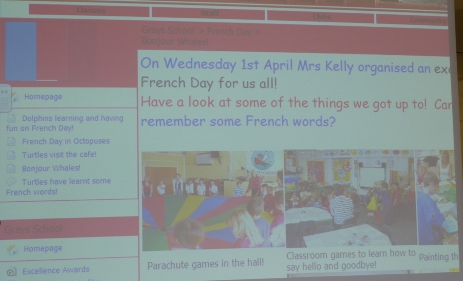
The Learning Platform at Grays is clearly a central component of what the school does. As well as hosting the podcasts which the children make, it serves as a repository for summer holiday activities, and a meeting place, in the forums, for children, staff and parents alike. Parents are not only able to see their children's work, but are encouraged to comment on it through the wiki tool provided.

It was clear from meeting the parents that the learning platform, along with the children being able to take home internet-enabled netbooks, has made a huge difference to everyone. Not least, it has encouraged parents to get involved in their children's education in a way that the dry-as-dust term 'online reporting' could never suggest. Indeed, I suggested to Ray Tolley, who is organising a Think Tank for Naace on the subject of parental engagement, that he invite Mrs Terrey along as a speaker. He told me he already had.

The school is doing some great work, and a video of the visit will form part of Becta's collection of Next Generation Learning vignettes designed to inspire and suggest ideas to others. I will let you know when it's available: you will not want to miss it.