21 rules for computer users


Rosenstock-Huessy's Law of Technology

All technology expands the space, contracts the time, and destroys the working group.

Sattingler's Principle

It works better if you plug it in. If it still doesn't work, switch it on.

Ninety-nine Rule of Project Schedules

The first ninety percent of the task takes ninety percent of the time, the last ten percent takes the other ninety percent.

Grosch's Law

Computing power increases as the square of the cost. If you want to do it twice as cheaply, you have to do it four times as fast.

Computer Rule

To err is human but to really foul things up requires a computer.

Lubarsky's Law of Cybernetic Entomology

There's always one more bug.

Gallois's Revelation

If you put tomfoolery into a computer, nothing comes out but tomfoolery. But this tomfoolery, having passed through a very expensive machine, is somehow ennobled, and no one dares to criticise it.

Westheimer's Rule

To estimate the time it takes to do a task: estimate the time you think it should take, multiply by two, and change the unit of measure to the next highest unit. Thus we allocate two days for a one-hour task.

Peers's Law

The solution to a problem changes the problem.

Gilb's 1st law of unreliability

Computers are unreliable, but humans are even more unreliable.

Gilb's 2nd Law of Unreliability

Any system which depends on human reliability is unreliable.

Gilb's 3rd Law of Unreliability

Undetectable errors are infinite in variety, in contrast to detectable errors, which, by definition, are limited. Investment in reliability will increase until it exceeds the probable cost of errors, or until someone insists on getting some useful work done.

These rules were coined by Thomas Gilb, a systems engineer.

Shipman's First Law

ICT capability is inversely related to seniority within an organisation.

Shipman's Second Law

The length of time required for a task is inversely related to its simplicity.

Freedman's Postulate

The reliability of computer systems is inversely related to the urgency of the task.

Allen's Axiom

When all else fails, read the instructions.

Gall's Second Principle of Systemantics

New systems generate new problems.

Coffee's observation

If you do not have anything to say, a word processor
will not say it ~ Peter Coffee

Peers's Law

The solution to a problem changes the problem.

Richards' First Law of Data Security

Don't buy a computer.

Richards' Second Law of Data Security

If you do buy a computer, don't turn it on.

Thanks to David Harley for providing me with these last two rules.

First published in InTegrate, March 1995.

You may also find 7 rules for ICT teachers, co-ordinators and leaders interesting.


Web 2.0 Project: Damian Maher's Work

Here is a thumbnail sketch of some interesting work that Damian Maher is doing with Web 2.0. It is taken from the forthcoming second edition of the free Web 2.0 projects Book which was published last year -- over 11,000 copies downloaded! The book itself will contain even more information, so look out for that early in 2010!

Name: Damian Maher

Application type: Using Google maps to support an excursion.

Age range: 9-11 years

Description of project

Using Google Maps, students are orientated to a place they are going to for an excursion, for example a river.  Students are able to examine the types of uses for the river by following it along its length. Fits well with direction (mathematics)

Benefits of using Web 2.0

Anywhere

URL: http://maps.google.com/ 

Are you doing interesting work with Web 2.0 applications in your school or college? If so, why not contribute to a new ebook containing ideas that other teachers can pick up and use? Further information is right here:

http://www.ictineducation.org/home-page/2009/10/14/web-20-projects-book-deadline-extended.html


Business thought leaders and their relevance to educational technology leadership: Abraham Maslow

This is article 1 of a series of 3.

A short while ago I posted a message in Twitter to the effect that anyone who quotes a statistic like "The number of geniuses in China outnumbers the total population of our own country" does not understand the nature of genius. I believe that genius has much in common with creativity, about which the psychologist Abraham Maslow had particular views.


He also had views about human needs. In this series I should like to explore what the educational ICT leader can learn from Maslow and others when it comes to performing the educational technology leader's role, especially that of encouraging other teachers to incorporate the use of educational technology into their curricula.

Maslow's views on creativity

What distinguishes you, me, and most of the people we know from someone like Shakespeare? In fact, writing is a good area to look at in this context, because lots of people love the idea of being a best-selling author -- yet the number of best-selling authors can almost be counted on the fingers of one hand. How come?

Maslow drew a distinction between what he called primary creativity and secondary creativity. The former, which most of us enjoy, consists of having great ideas and moments of insight. But most people are lacking in secondary creativity which is the hard slog bit. That's the part where you try to hone the idea, and spend hours drafting a wonderful few pages -- only to discard them when you read them again the following morning.

Oscar Wilde was once asked to define a day's work. He replied:

"I was working on the proof of one of my poems all the morning, and took out a comma. In the afternoon I put it back again."

Like most of Wilde's quotations, that seems like a throwaway comment at first glance, but has a much deeper aspect to it. What Wilde was describing, in effect, was Maslow's notion of secondary creativity as it manifested itself in practice in his own life.

Maslow's hierarchy of needs

Maslow stated that people's primary need was for the need for survival, followed by the need for safety and security. Other needs, in chronological order (ie each one can only be addressed once the preceding one has been met) are social needs, ie the need to be part of a group; ego needs, ie the need to be held in esteem by others and to have self-confidence; and the need for self-actualisation, ie the desire to express oneself fully.

Implications for the educational technology leader

Both of these sets of ideas have implications for the successful embedding of ICT in a school curriculum. For example:

  • Given the reality that most people lack the time, energy or motivation to fully develop their technology skills, part of your role will be to help them achieve their aims without needing to put in the effort.

    For example, it may be that the geography teacher would use a spreadsheet to chart the rainfall in different areas, if only she didn't have to spend time actually creating the graph. She might be more amenable to the idea of using a spreadsheet if all she (and her students) had to do was input the data and then play around with different types of graph -- in other words, if the process of taking rows of numbers and turning them into a chart was not necessary for her to do.

    And if you think about it, why should she have to do it? As far as I know, being able to turn numbers into a chart is not a required geographical skill, whereas being able to interpret charts, and make decisions about the best type of chart to use in a particular situation, are.

    In other words, a geography teacher who does not wish to learn how to create a chart, and does not want to spend time in her lessons doing so, is probably taking a very rational and apposite view of the whole thing.

  • There is no point in expecting anyone to use the educational technology facilities if they are scared of them going wrong. What do you do with a class of kids when the lesson you have spent hours planning has to be abandoned halfway through because something has gone wrong with the technology?You may have an answer, but that won't help a teacher overcome the fear of that sort of scenario.

    Therefore, you need to anticipate the fear and deal with it even if it doesn't explicit reveal itself. We'll discuss how in another article.

  • Dealing with people's social needs does not have to be difficult, and you can kill two birds with one stone by addressing some of their lack of confidence in their own abilities at the same time. I mean, of course, setting up a room, or a surgery, or both, where staff can come along any time they like, away from the laughing eyes of their students, grab a cup of coffee and use the facilities in a warm, friendly, non-judgemental atmosphere.

  • The need for ego-boosting can also be easily dealt with. You give the kids a fillip by putting their best work on the wall. How do you showcase the best work of teachers?

    One way is to ask them to help you deliver some training. For example, in one school I worked in, a science teacher developed expertise in using databases with her students, and taught the rest of her science teacher colleagues how to do so. It did not take a great leap of imagination for me to realise that she would be able to help other teachers too.

    And there is also another psychological benefit of that approach: like it or not, your co-workers see you as some sort of guru, which can be very intimidating for them. As soon as you step aside and let them be taught by someone who, in their eyes, is just like them, part of the psychological defence barrier comes down.

Maslow was primarily concerned with deep issues like the human condition, but it is testimony to the greatness of his insights that his theories can be applied in many contexts, including that of the drive to embed the use of educational technology in schools.

Further information on Maslow may be found here: http://www.answers.com/topic/abraham-maslow.

The next article in this series will be published at the same time tomorrow morning.


7 rules for ICT teachers, co-ordinators and leaders

Here is a set of rules that I hope you will find useful.

Information for tech users should be more useful than this!I think it's important to have rules for oneself, as well as one's classroom. The way I see it, as professionals, our time, and that of our colleagues, is far too precious to waste. We're made to feel guilty, or have somehow been conditioned to feel guilty, if we don't read every possibly useful report. Or every relevant newspaper article. Or if we don't get our lesson plans absolutely perfect -- and then rework them in the light of what happened when we used them.

Feel guilty no more. Here are some rules which I am gradually starting to live by myself.

The heading rule

If you can't tell from the heading what the chapter/article/blog/section is about, at least to start thinking about it, skip it. I was browsing in a bookshop a couple of years ago and was looking at a book about website usability. The author stated that if a heading or link was worded in such a way that the reader had to think about what it might mean, it was no good.

Great stuff. What a pity, then, that he didn't take his own advice. I found it very hard to tell what some of the sections might be about. I didn't buy the book.

The paragraph rule

In a well written piece you will be able to tell from the first paragraph whether you need to read the whole thing. Newspaper articles are a classic example of this technique. No time to read the paper? Then read all the first paragraphs. They contain the gist of the story while the rest of it, usually, is concerned with filling in the details.

Same with press releases. Same with Government reports -- although there the "first paragraph" might be an executive summary of a couple of pages. Same principle though.

The 90 second rule

The trouble with podcasts and video-casts is that it's not easy to skim through to see if it's worth listening to or watching all the way through. Now, iTunes lets you listen or watch for 90 seconds without your having to download it. That should be enough time for anyone to decide if it's worth bothering with the whole thing.

Astonishingly, some podcasters have completely failed to understand this. There was one I was interested in, and I tried previewing 3 different episodes. All of them spent at least the first minute and a half on completely irrelevant stuff. Apart from the intro, which took up at least half the time, there was stuff about his loft, his dog, and some other highly interesting (to him) topic. By the time he said, "OK, today we're going to...", the preview timed out. I'm too busy to have other people waste my time: I can do that myself, but far more productively thank you!

The 1% rule

From what I have seen (and apparently this is a well-observed phenomenon), in any undertaking only about 1% of the people affected are active in any way. What that means is that, on average, if you work in a school which employs 100 teachers, only one of them is going to be moved by your efforts to introduce podcasting, video-blogging or whatever. With that in mind, concentrate your efforts on the people who are going to make a difference, and feel pretty good about yourself if two or three people come on board.

Freedman's 5 minute rule

I invented this rule when I was a head of educational technology and educational technology Co-ordinator in a secondary (high) school. The way I saw it, someone should be able to come into my computer suite, log on, do some work, print it out and save it and log off, all in the space of 5 minutes even if they had never set foot in the school before. I set up systems to enable that to happen, and it was highly successful.

What a contrast to an occasion in my next job. I visited a school where I was, in fact, well known, and asked if I could use a computer for five minutes just to type up some notes. The conversation then went like this:

Ed Tech Co-ordinator: How long will you be here today?

Me: Erm, a couple of hours, probably, why?

ETC: OK, I'll set the password to time out at 2 pm, that should give you an extra 30 minutes or so.

Me: Right. What is it?

ETC: Your username will be mydogisacat, and your password will be t43egi98sp97

Me: I'll just write that down

ETC: No, we don't like people writing it down, it doesn't set a good example to the students.

Needless to say, by the time I got to the computer room, which had to be unlocked, I'd forgotten all this, and by that time the ETC was teaching. I had to find a teaching assistant to help me. All in all, it took me 40 minutes to get on to a computer to do 5 minutes work. Now, I understand about the need for security, but puh-leeeze! This is a school, not the Pentagon! It is perfectly possible to set up guest user accounts which give no access at all to students' areas.

Freedman's 100% Rule

Lesson preparation should never take longer than the lesson, or series of lessons, will be.

Freedman's One More Time Then I Must Get On With My Life Rule

Lesson plans, reports, articles, chapters etc should only be revised once before submitting them. Any more than that and they lose their freshness. Basically, if you can't get it right second time, take the view that this will have to be good enough. Tough one that, if you're a perfectionist like me.

I hope you find these rules useful. If you prefer some more amusing ones, then look here.

A slightly different version of this article appeared on my Technology & Learning blog.


Online predation and cyberbullying

This was originally published as a news item in July 2006, but I think the principles still apply.

Well, the US House of Representatives has ratified the Deleting Online Predators Act (DOPA), which was originally passed in May, and which bans access by minors to any website which involves creating a profile.

In other words, the Act is so broadly crafted as to, in effect, ban almost any useful website, blog, or collaborative  learning and social web spaces from schools. So how's that as a way of dealing with online predator issues?

There's no point in rehearsing all the arguments here, but one thing I would say is that we in the UK need to watch developments closely. It has long been the case that what America does today, the UK does tomorrow. "Tomorrow" used to be around 20 years' time, but these days the time lag is much shorter. Moreover, it used to be the case that this process happened naturally. Unfortunately, the "special relationship" now seems to entail us constantly looking at what the Americans are doing in education in order to see if we could adopt it here.

I don't wish to come across as xenophobic against the USA -- I have friends, family and colleagues there, and I travel there at every available opportunity -- but I do think we need to be somewhat more discriminating than we sometimes are in adopting American ideas. I am concerned that some bright spark in the DfES, fresh out of university (Oxbridge, of course), with no clue as to how the real world works, will decide that banning everything that might attract perverts is a great idea.

In fact, this head-burying approach could, if anything, lead to more and worse cases of online predation, if it leads schools into a false sense of security and makes them pay even less attention to these issues than they do now. Specifically, I am referring to the responsibility of children themselves, and parents. I am constantly amazed that, despite everything you hear, every so often another teenaged girl goes missing after meeting a man 3 times her age whom she met on the internet.

In the long term, the only real defence against online predation in my opinion is to make it compulsory for schools to address online safety issues in the following ways:

  • Teach students how to be safe online, but not as part of technology lessons, but as part of the general citizenship or student welfare curriculum.
  • Appoint child safety officers and make online safety issues their responsibility, rather than the responsibility of the Technology Co-ordinator.
  • Issue guidance to parents: after all, if your child locks himself in their room for 8 hours every day, shouldn't you be wondering what they're doing? And how come the computer is in their room anyway, as opposed to the family lounge?
  • Make classes available to parents on how to deal with these issues, both in terms of what they say and do, and understanding the technology, their ineptitude in which is usually offered by way of an excuse for allowing their kids to completely fool them. I'm sorry, but I don't go for all this digital natives and immigrants stuff when it comes to this: I don't know anything about the internal combustion engine, but I know it's pretty dangerous to wander about on the road, so I've learnt to handle myself safely when I need to get from one side of the road to the other.


Actually, the same goes for teachers: if you're not a technology co-ordinator, that does not mean you are not responsible for observing what the students coin your class are up to.

(You would not believe the number of times I have to say to school administrators, "That is a child protection issue, not an educational technology issue.")

In fact, there is probably a case for arguing that, had the US House of Representatives had more confidence in schools' parents' and students' ability and willingness to address online safety issues in practical ways, perhaps they would not have felt the need to pass this legislation.

Further information.

On this subject, the Department for Education & Skills in England has just issued guidance about cyberbullying. You can find that here:

http://www.dfes.gov.uk/bullying/

It also includes a couple of videos. The "don't suffer in silence" video is quite powerful in its own way, but both it and the other one, which is basically a poem, needs to form part of a controlled discussion activity to be truly effective.

Recent research in the UK suggests that over 20% of children have experienced cyberbullying. Now, this is interesting:

"Phone calls, text messaging and emailing were the most common forms of cyber bullying both inside and outside of school, while chat-room bullying was the least common. The prevalence of cyber bullying was greater outside school than in school."

If that is also true in the USA, then DOPA is doubly dangerous because it will make people think these issues have been dealt with when they have been hardly touched. A bit like arresting the wrong person for a series of murders, leaving everyone in the area with a false sense of security because the actual murderer is still on the loose.

I haven't yet read the report in its entirety, but from what I've seen it is worth looking at and discussing with colleagues.

See here for the full report:

http://www.antibullyingalliance.org/documents/CyberbullyingreportFINAL230106_000.pdf

and here for the summary:

http://www.antibullyingalliance.org/documents/Cyberbriefing.pdf


Oh, Sir, You are too kind

Reading through people's blogs, especially those of educators, one thing that strikes me is what a nice bunch we are. Even David Warlick's rant is, essentially, nice. Jeff Utecht's recent blog about fear is, essentially, kind. Everything they say and everything others say about barriers to implementing the use of educational technology across the school  is correct, but I also believe that part of the problem is our willingness to make allowances.

It is usually at this point that people who know me call me a grumpy old man, but in my mind I am an angry young man! Surely there are some things which we must regard as simply unacceptable? Period?

Here is a personal example of what I find unacceptable. One of my relatives asked me last Sunday if I could create a Word document for her so that she could type a list of dates. She has been teaching, I believe, for over 20 years, and is in a senior position in her school. Why has she been allowed to get away with such a basic lack of knowledge for so long?

In this particular instance it doesn't have any direct effect on the children she teaches, or the staff she manages. Or does it? I am a firm believer in what has been called the "hidden curriculum", in which what you teach and what the kids learn may be rather different. What are her children and staff learning from her behaviour? I would say the following:

1. Technology is relatively unimportant, otherwise she would have learnt how to use it to some extent (I even had to show her how to get from column one in the table to column two, and how to save her work).

2. That it's OK to let people know that your are technologically illiterate.

3. That, from the point of view of one's employer, it is OK to be technologically illiterate.

4. That if you appear helpless enough someone will help you.

I think that although that list is based on just one personal incident, we can extrapolate from it and reasonably conclude that it probably applies more generally. So here is my "wish" list for education, which I think we should adopt as a baseline set of standards.

Before I give my list, I should like to say this. The first step in establishing a standard is to state what that standard is, and/or what it is not. Just because you may not know how to go about achieving it is certainly no reason not to state it. For example, in my classes I always had expectations in terms of acceptable behaviour. It would sometimes take me three months to achieve them, desoite teaching them every single day, but that's besides the point.

Here is my list:

1. All educators must achieve a basic level of technological capability.

2. People who do not meet the criterion of #1 should be embarrassed, not proud, to say so in public.

3. We should finally drop the myth of digital natives and digital immigrants. As I said in my blog, in the context of issuing guidance to parents about e-safety:

"I'm sorry, but I don't go for all this digital natives and immigrants stuff when it comes to this: I don't know anything about the internal combustion engine, but I know it's pretty dangerous to wander about on the road, so I've learnt to handle myself safely when I need to get from one side of the road to the other."

The phrase may have been useful to start with, but it's been over-used for a long time now. In any case, after immigrants have been in a country for a while, they become natives. We've had personal computers for 30 years, and I was using computers in my teaching back in 1975. How long does it take for someone to wake up to the fact that technology is part of life, not an add-on?

4. Headteachers and Principals who have staff who are technologically-illiterate should be held to account.

5. School inspectors who are technologically illiterate should be encouraged to find alternative employment.

6. Schools, Universities and Teacher training courses who turn out students who are technologically illiterate should have their right to a licence and/or funding questioned.

7. We should stop being so nice. After all, we've got our qualifications and jobs, and we don't have the moral right to sit placidly on the sidelines whilst some educators are potentially jeopardising the chances of our youngsters.

What are your kids learning while you're not looking?

This was the title of a seminar which Miles Berry and I presented at the 2009 BETT show. The more I think about it, the more important it seems to me that teachers know about what their students can do.

Soon after the BETT show I had occasion to give a presentation in Rotterdam, on the subject of the potential of ICT in education. Again, I did some research and discovered, perhaps not surprisingly, that what young people do and can do in terms of technology is pretty much the same in The Netherlands as it is in the UK as it is in Europe as a whole as it is in the USA.


What do young people do online at home?

This is very much a broad-brush picture, but from the research and reading we have done, it would be true to say the following.

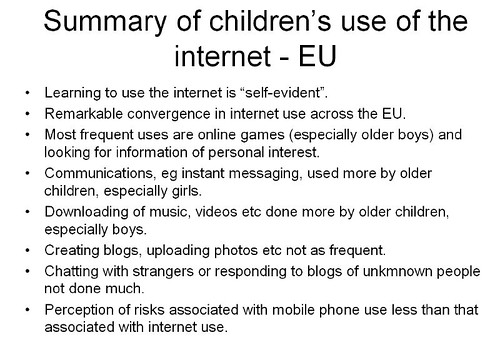
  • It may be politically incorrect to say so, but boys and girls tend to conform to gender stereotypes online as well as offline. For example, boys prefer playing games to writing blogs.

  • Youngsters really do multitask, because the percentage of their time spent on various activities adds up to a lot more than 100%.

  • Despite the emphasis on creativity at the moment, youngsters aren't really all that creative, in the sense of creating stuff, compared to other things they do online.

  • Summary from http://ec.europa.eu/information_society/activities/sip/docs/eurobarometer/qualitative_study_2007/summary_report_en.pdf

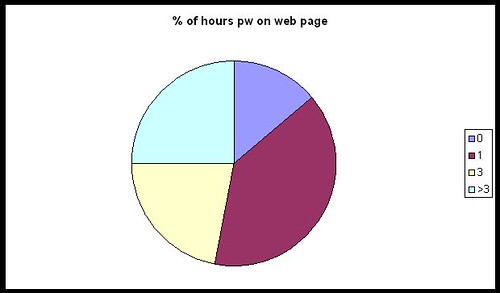
    I find it interesting that youngsters are still mainly consumers of content than creators of content. Mind you, it depends on who you ask, of course. In Larry Rosen's Me, MySpace and I, nearly everyone surveyed spent a lot of time tweaking their web page. How surprising is that?

    myspacepiechart

  • From their responses, it would seem that young people use the web mainly for "sensible" things, like communicating with friends and doing homework.

  • Well the chatting to friends I can believe, but homework? I am not completely convinced by that, and I think what we may have here is evidence of some sort of experimenter effect. I wonder if the results would be different were the same surveys to be conducted by young people?

    If it is  true, I personally think that's something to be concerned about rather than something to celebrate. Kids should be enjoying themselves, not using every spare moment to better their grades.

  • The overall impression one gains from all the research is that technology is indeed very much a part of young people's lives. They spend an inordinate amount of time using it, and have a facility for grasping how to use it, at least in a superficial or immediate sort of way.

    Whether they are able to easily delve deeper into an application or device, or use it in ways for which perhaps it may not have been intended, is an interesting question. 

Like I said, a very broad picture. If you'd like more detail, take a look at the slides from our presentation at Miles' blog. We hope to have the audio accompaniment soon.

Why is this important?

I think we would all agree that it's good practice to base our teaching on what our students already know, understand and can do. If you don't, you run the risk of alienating through boredom and lack of challenge, or through setting work which they find impossible. (These were two of the ten causes of ICT lessons being boring that I identified in my seminal work, Go On, Bore 'Em: How to make ICT lessons excruciatingly dull.)

What this research shows, I think, is that you cannot simply go by what you know they can do from what they have done in school. You also need to find out what they do when they are not in school.


What can you do about it?


The obvious answer is: find out what they can do! You could set up a survey using Google Docs (Go to New-->Form). The results end up in a spreadsheet, making analysis relatively straightforward.

If you include questions like what primary school they went to, if you're in a secondary, that in itself may yield some interesting results. You will need to include age and gender, of course.

If you decide to ask students to give their names, you will need to respect their privacy and not pass that information on. That would be my position, anyway, but you may be in a different situation. In my opinion, it's probably a lot easier to either say that names are optional or simply not to include a field for it. Much more pertinent would be information like the class or registration or option group the students are in.


Feel free to "steal" the questionnaires used by Miles and myself: you'll find the links here.

None of this is intended to be a piece of academic research; rather, it is intended to give you a good basis for deciding on what to teach and where to pitch it.

At least one person left our seminar with the intention of running his own survey within his school, and both Miles and I have said we would be interested in the results of his findings.  We'd be interested in yours too, if you decide to do something like this.

One last word, about presenting the results. Miles used Wordle to generate word clouds from the answers to some of the questions. The results, which are very interesting, are here.


What makes a good teacher as far as technology is concerned?

Path in a forestI'm interested in exploring this question,  which I have phrased very carefully. I think whether you're a teacher of information and communications technology, or someone who teaches with educational technology, there are some common denominators of what makes the teaching good. These are all my ideas and conjectures; I have stated them as though they are facts purely in order to avoid clumsy circumlocutions.

The first requirement is a willingness to experiment and take chances. You never really know whether something is going to work until you try it. A piece of software may be great when used by an individual, but not scale up very well when used with a class.

For example, I came across a program a few years ago which made commenting on a student's work very easy: it was possible to give comprehensive feedback in only 5 minutes by clicking various buttons. But that would mean 150 minutes for a class of 30 students, and a day's work for four or five classes.

Clearly, it was the sort of 'solution' you may wish to use with one or two special case students, but not with whole classes. But you wouldn't know that until you had sat down with the software and spent time using it and thinking about it.

Not everything is within the individual teacher's control. I am thinking in particular of my next requirement: the opportunity to experiment. Too many schools, in England and Wales at any rate, are so frightened of being named and shamed for not having achieved the requisite number of A*-C passes at GCSE that it takes a very brave, stupid or fortunate teacher to feel that they have the time and the support to be able to try things out, especially given the amount of stuff that has to be covered in the curriculum. I admire all those who do, and the colleagues who enable them to do so.

A third requirement is for intellectual honesty. I think one of the most difficult things to do is to admit to oneself, let alone one's colleagues, that as far as achieving X is concerned, the last 3 weeks have been less successful than one would have liked. But there are a few counters to this way of looking at things:

Firstly, adopt the scientific view: an experiment is only a failure if it yields no results at all, ie you find out nothing from it. If you get negative results, you've learnt something which will be useful to both yourself and your colleagues.

Secondly, take a cost-benefit approach. Basically, even if the experiment looks like having been a waste of time, if the benefits outweigh the costs, than it hasn't been. This is all a bit subjective, of course, but let's consider an example. Suppose the use of a website or application has added nothing to the knowledge of 29 of the students in your class, meaning that you wasted a few hours preparing the lessons based on it, and those 29 pupils have wasted the one or two lessons they spent on it. But at the same time, one student, who was thinking of quitting the course, and who has already mentally opted out, is suddenly fired up by the experience and really starts to 'get it'. It's arguable that the net gain has outweighed the net cost.

Thirdly -- and this leads on nicely from the point just made -- it may be that your success criteria need to be changed. In the example of 29 students gaining nothing in terms of learning anything new, if I was the teacher I would ask them to analyse why they gained nothing, and how the resource (or my use and teaching of it) could have been improved.

Also, academic achievement has to be balanced by other kinds of development. If the website or program added nothing to their knowledge or technical skill set, but facilitated critical thinking or collaborative working -- even though they may not have been the intended outcomes -- then I would suggest the whole thing has been very worthwhile.

A fourth requirement for good teaching is a love of the technology. That does not necessarily mean being a geek, but having a love of what the technology can enable you to do. For example, I love my digital camera. It's not good enough for professional photography, but it's good enough for me. I can slip it in my pocket or briefcase, and I use it to take shots which are either interesting in themselves, and which I could therefore use as stimulus material, or to illustrate articles.

Also, call me 'sad' and perhaps needing to get out more, but unlike a lot of people I do not find spreadsheets boring. On the contrary, I think a well-constructed spreadsheet is a thing of beauty, to be marvelled at! (I'm being serious: when I have more time I will explain myself in this regard!)

A fifth requirement is a willingness to not know everything. I think that when it comes to technology, there is every chance that at least one student, and probably all of them, will know more about at least one aspect of it than you do. That's why I have no hesitation in asking teenagers I know how you do certain things in Facebook or Blog TV. They know things I don't. I also know things they don't. What's so threatening about exchanging knowledge and ideas as equals?

Does this mean that I go along with the old chestnut about teachers being a 'guide on the side' rather than a 'sage on the stage'? No, because I think that is a false analogy or an abrogation of responsibility. I see no point in spending an inordinate amount of time encouraging kids to discover something that you could have told them in 5 seconds, so the guide on the side thing is not appropriate in all circumstances anyway.

I don't have a catchy phrase to express this idea, but the way I see it, the class is like a group of walkers going on a guided ramble. You have the leader, who knows the terrain and knows what to look out for and to point out. But at the same time each person on the walk is making sense of it all in their own individual way, and discovering other delights that the leader has not pointed out. That sounds to me more like the guide at the front than the guide on the side. I told you it wasn't very catchy.

There are other factors which make for good teaching. My fifth one is the opportunity to have excellent professional development. Note that I use the word 'development', not training. I am not sure how, in most cases, spending a day being bombarded by bullet points, which they then give you in a pack anyway, can be as useful as having an opportunity to explore and discuss ideas of your own choosing in depth. In fact, as far as feedback is concerned, the most successful training I ever provided consisted of doing absolutely nothing except provide a room, some software, and myself and a technician, to enable a group of teachers to develop their area of the school's website.

My final factor is an amalgam of what good teaching is all about anyway: a love of one's subject, a love of exploring new avenues with other people, a love of being with young people and helping them along the path, a fanatical insistence that each person achieves their own personal best, and a willingness and ability to employ a whole range of techniques, such as questioning, facilitating group work and giving meaningful and useful feedback.

I'd be interested to hear your views about what makes a good technology teacher.

Reblog this post [with Zemanta]

10 things to do when someone follows you in Twitter


If someone follows you in Twitter, the polite thing to do is reciprocate, right? Well, maybe so, but I think it needs a little more thought than that. Here is a list of the steps I take when someone follows me.

Incidentally, the same techniques, with a bit of adjustment, work for any social network situation where people can become your "friend".


#1: What's in it for you?


As a general rule, I think about what I hope to gain from the relationship. Relationship? Yes: as soon as you follow someone, or they follow you, you have a relationship of sorts, whenever you want it or not and regardless of whether you pay it any attention. The only way to avoid it whilst remaining within your Twitter network is by blocking that person.

Now, my primary reason for wanting to link with anyone online is my interest in educational ICT. I have a secondary interest, that of business, because I run my own business. I am also interested in writing and journalism. And that is pretty much it. Unless you have the most amazing powers of persuasion, chances are that I won't be your friend or follower unless you come into one of those categories. Yes, there are the odd exceptions, such as connecting with someone who likes the same sort of music as I do, but even there it is almost certainly the case that I already "know" or know of the person through one of the other spheres I have just mentioned.

This is very much linked to my main website, of course. The focus of that is ICT in education. There may be a great, newsworthy article just begging to be written -- but if it's not to do with ICT in education it probably won't be me writing it, and if I do, it won't be on that website.

What it comes down to is this: I don't want to populate my Twitter network with people who have little or nothing to do with my main interests, because that will only make it more likely that I will miss something important from the people who do. That's why I don't agree with the people who advocate following as many people as possible: I think one needs to be more discriminating than that.

In summary: decide in advance what sort of people you're happy to follow, ie the ones from whom you're likely to benefit from following.

That's the backdrop against which I take all of the steps that follow.


#2: Check the tweets


When I receive an email to say that someone is following me, I click on the link to their Twitter page. I then check look to see what they've been tweeting about. If it's mainly technology or education-related, that's a good start.

If it's about what they had for breakfast over the last week and a half, that's a real turn-off but not a "deal-breaker".

If their tweets are all along the lines of "Great investment opportunity: make $5,000 a week for 5 minutes' work", I will block them straight away.

If they haven't tweeted yet, go straight to #5.


#3: Check the numbers


The next thing I do is check how many people they follow, and who follow them. If they have 3 followers and are following 5,000 people, I probably won't follow them. I would just assume that they're a sort of Twitter groupie and are following everyone in sight. I like to think that they want to follow me because they like what I write about, not to boost their numbers. But I won't dismiss them just yet -- you can't say I'm not fair!

If they have 5,000 followers and follow nobody, that seems on the face of it a bit egotistical and a bit pointless. But I still won't dismiss them just yet!

If they follow 5,000 people and have 5,000 followers, they're probably some sort of spammer. I almost certainly won't follow them. In fact, I may even block them, because this sort of thing usually goes hand-in-hand with the third type of tweet mentioned in #2.


#4: Who's who?


I like to check who the followers are, and who the followees (is there such a word?) are. If I recognise some names I respect, I'm usually happy to set aside my doubts for a while.


#5: Check their profile


If it is blank, or says that they're a professional goof-offer, or that they manage a real estate company and enjoy engineering in their spare time, I won't follow them. I have nothing against real estate workers or engineers, but I don't see what any of that has to do with me. See #1.


#6: Check if they have a website


If they don't, I almost certainly won't follow them unless I'm reasonably satisfied according to points 2, 3, 4 and 5. The existence of a website tells me they're (probably) serious. It also gives me a chance to find out more about them.

#7: Look at their website URL

If they have a website, but it's URL is www.goofingoff.com, I won't follow them. If it's some generic website that I can't check, like www.blogger.com, I won't follow them.

#8: Check their website

If we've made it this far, I'll check their website. In other words, unless I have been totally put off according to some of the earlier criteria, and if they do have a genuine-sounding website, I will look at it. If it's interesting then I will probably bookmark it or subscribe to its RSS feed even if I don't wish to follow them in Twitter (just yet).

#9: Check their profile or About page

If they have a website, I'll try and find out a little more about them there as well. Bottom line: are they who they purport to be, or some sort of scam artist or pornbroker (no, that wasn't a spelling error)?

#10: Home at last!

If all the previous nine hoops have been jumped through satisfactorily, I click on "Follow"!

Conclusion

I suppose all of that makes me sound like some sort of prima donna or intellectual snob, or as if I'm paranoid. I'm not, though I suppose you'll have to take my word for it. But if you think about it, these 10 steps are not a bad blueprint for how students should evaluate requests for online friendship. And although it all seems like a long and drawn out process, the whole thing from start to finish takes me 5 minutes at the outside. The reason I often keep people waiting for a response when they follow me is not that the process takes a long time, but because I usually end up trying to process lots of "follows" in one go, a couple of months after receiving the notification. (But I'm trying to improve in that department!)

I'd be interested to hear what you think of these steps, and how you respond when people follow you in Twitter or other social networks.


 

Web 2.0 Project: Kim Munoz's work

Here’s a thumbnail sketch of some interesting work that Kim Munoz is doing with Web 2.0. It is taken from the forthcoming second edition of the free Web 2.0 projects Book which was published last year -- over 11,000 copies downloaded! The book itself will contain even more information, so look out for that early in 2010!

Name: Kim Munoz

Application type: Live Blogging, Blog,Social networking

Age range: 11-14 years

Description of project

During Pres. Obama's speech to students, I took the opportunity to use Cover It Live. A live blogging app that allows you to embed the shared blogging space into a webpage. This allowed the students to interact during the speech and reflect on the speech

Benefits of using Web 2.0

Motivation,Participation,Variety of means of expression,Anywhere,Multi-tasking

URL: http://techmunoz.edublogs.org/2009/09/07/obamas-speech/ 

Are you doing interesting work with Web 2.0 applications in your school or college? If so, why not contribute to a new ebook containing ideas that other teachers can pick up and use? Further information is right here:

http://www.ictineducation.org/home-page/2009/10/14/web-20-projects-book-deadline-extended.html


Meeting in real life

I love the web and all that, but there's nothing like meeting up in the physical world. Derek Wenmoth and Ali Hughes of Core-Ed are here in the UK, and last night they, Richard Millwood (of Core-Ed UK), Elaine and I went out for a meal.

Good food, fine conversation, plus catching up -- all good stuff. As, indeed, was being able to actually sit down and have a proper conversation -- the last time Richard and I met was back in January when we bumped into each other in Piccaddilly Circus!

It was good to meet Derek and Ali too, and like Derek I'm looking forward to meeting up again.
The picture shows, from left to right, Elaine, Richard, Ali, me and Derek. 

Meeting in Essex, UK

Do-it-yourself technical support

Only last night I was waxing lyrical to Derek Wenmoth about the joys of being self-employed. I forgot to mention one of the downsides, though: having to do your own technical support.

For some reason, a few days ago Outlook started goiung wrong. Actually, it didn't so much start going wrong, as start to not start! And this is a known problem! How do I know it's a known problem? Because there is actually tons of stuff on the internet about it.

Well, I tried everything I came across, except looking to see if there is an upgrade. I managed to gain access for long enough to set it to 'Offline', so that it wouldn't try receiving emails, and to get my email settings. After much fiddling, I am now set up with Windows Mail which also has a bit of flakiness when it comes to creating signatures, but the important thing is that (touch wood), I now have a functioning email program.

Why not use 'the cloud' you say? No thanks. Having heard about thousands of emails being trashed, and not quite trusting free services to always be there, I much prefer having an installed program, with the emails stored locally. Silly, I know, but then losing a ton of emails would be even sillier. I think I'll stick with an old-fashioned solution for now.

But back to the tech support part. I think this week I have wasted around 6 hours or more trying to get this all sorted out.It means that the work I'd planned on doing today will have to be over the weekend. I like time-shifting, but not when it's forced on me in this way: I had other plans for the weekend.
So, much as it's customary to moan about technical support, at least when I was employed I could request that someone fix a problem while I visited a school or something. I can do a lot of this kind of stuff, but it's not a great use of my time when I have other (work) commitments.

Never mind: things could always be much worse. I mean, I could have ended up with no email access at all.

Hmm. Having looked at my burgeoning in-box, I'm not so sure that's an entirely terrible idea….

7 Reasons to have an educational technology library

This article has been replaced by Update of 7 reasons to have an educational technology library.

In my many visits to schools I have rarely seen a book library which has been built up and maintained by the teachers responsible for ICT, or educational technology as it is known in the USA.

Library

There are several compelling reasons for starting such an enterprise. Indeed, not to do so is to implicitly agree with the utilitarian view of ICT being nothing more than a set of skills. Whenever you read an educationalist 's blog or a committee report espousing the view that ICT should be taught across the curriculum and has no place in the school timetable in its own right, you are ingesting the views of people who have little or no concept of the intellectual underpinnings of the subject, or of the importance of theories of learning in relation to it.

Having a library dedicated to ICT, even if only in the corner of a classroom orcomputer room to begin with, is a way of starting to address these and other concerns.

A library is?

But first, what exactly do I mean by 'library' in this context? Perhaps perversely, I do not necessarily advocate maintaining a library comprising multimedia resources -- at least, not to begin with. Whatever we may wish to beieve, books still carry an air of authority often eluded bhy other media. Besides, it's actually much easier to pick up a book and point something out than trying to locate the relevant section in a podcast, say. So, I am firmly in favour of a library comprising mainly, or even solely, printed material.

What should the library contain?

There are several types of printed material, and I would suggest building up a stock of the following:

  • books;
  • magazines;
  • leaflets;
  • advertisements;
  • newspaper clippings;
  • official publications such as curriculum guidance, exam specifications, and government policies;
  • posters.

Reasons to have a library

Here are seven suggestions of how to make your library an integral part of the work you, your colleagues and, of course, your pupils or students do. In other words, these are the reasons to have a library.

  • To inform other teachers. There are lots of books around which detail the educational benefits of using technology, and which delve into what young people do with technology. There are also books which may not be about technology per se, but which discuss the ways in which learning takes place. It's often useful to be able to lend others a book to help them understand the subject, and your approach to teaching it, a little better.
  • To impress others. This may seem rather facile, but I don't think it is. If you want others to understand that ICT has intellectual value, you must have a visible indication of that fact. In short, a library tells or reminds everyone that there is more to ICT than being able to knock up a database or carry out a search on the internet.
  • For reference, for you and your staff. It's almost impossible to keep up with all the policies and other documentation that comes out these days, and even harder to remember what each one stipulates. Although all of it is available electronically, I think it's easier to go straight to the relevant document on a bookshelf and find the bit you need than trying to remember where you stored it or bookmarked it.
  • For reference, for everyone. I doubt that anyone has memorised every Excel formula or OpenOffice shortcut. Having a few books that go into such matters can be a godsend, espeically if they go into more depth than the on-screen or online help.
  • For research. One of our wider goals should be to encourage (traditional) reading, and one way of doing so is to set work that requires book and newspaper research. Having a collection of newspaper clipping smay seem rather quaint, but I often find that unless you bookmark a newspaper story straight away it is virtually impossible to find it later. That is assuming, of course, that it was even published onine on the first place. That is not always the case, especially if the newspaper covers only a relatively small geographical area.
  • For technical research. This is where having one or two computer magazines comes in handy. If you set a piece of work which entails 'speccing out' a computer system for someone, being able to pore over a comparative review article in a magazine can be a great help.
  • Finally, for pleasure. What can be more enjoyable than sitting down for coffee or lunch with an interesting book? Yes, yes, I know you don't have the time. I never had the time either, when I was a teacher or, indeed, in any of my other jobs, including my current one. But it's important to make the time, even if it's only 10 minutes. Time to think, and time to relax, is never wasted.

So, before throwing out that computer magazine when you've read it, bring it into school. Encourage your students and colleagues to do the same. Use some of your allowance to buy a book or two, or recommend that such purchases be made.

It won't take long to build up a small library. Then your main challenge will be getting people to use it.

Web 2.0 Project: Dorothy Burt's Work

Here’s a thumbnail sketch of some interesting work that Dorothy Burt is doing with Web 2.0. It is taken from the forthcoming second edition of the free Web 2.0 projects Book which was published last year -- over 11,000 copies downloaded! The book itself will contain even more information, so look out for that early in 2010!

Name: Dorothy Burt

Application type: Korero Pt England - KPE, Podcast

Age range: 9-11 years

Description of project

Students from Pt England School in Auckland, New Zealand podcast short reviews of New Zealand children's books. They aim to let their global audience know a little about life in NZ. KPE is available on iTunes and on their blog, http://kpetv.blogspot.com

Benefits of using Web 2.0

Motivation,Participation,Variety of means of expression,Any time,Anywhere,Forms of literacy,Creativity

URL: http://www.ptengland.school.nz/index.php?family=1,871,11746 

Are you doing interesting work with Web 2.0 applications in your school or college? If so, why not contribute to a new ebook containing ideas that other teachers can pick up and use? Further information is right here:

http://www.ictineducation.org/home-page/2009/10/14/web-20-projects-book-deadline-extended.html


Take a look: 11/05/2009 (a.m.)

  • A lot of good stuff comes out of Denmark as far as education is concerned, and I think this raises the stakes a bit. In a nutshell, this exam allows students to use the internet to help them answer the questions. The questions are not about finding facts, but validation of search engine results and such like. As Stephen Heppell says, students use computers in their education, and then as soon as they walk through the examination room door they have to leave all that behind and write their answers. I'd go further: research has shown that setting tests which involve a different mode of answering from the mode of learning leads to poorer performance. In other words, if students have covered a course mainly through using technology, they should be required to use the technology for the examination. Similarly with paper-based learning.

    tags: Denmark, web in exams, Danish pupils use web in exams

  • I wonder if (a) this is also true of the UK and (b) if so, what would Baroness Greenfield make of it? The summary suggests that the increase in the use of the internet and mobile phones does NOT lead to social isolation, but instead: "is associated with larger and more diverse discussion networks. And, when we examine people’s full personal network – their strong and weak ties – internet use in general and use of social networking services such as Facebook in particular are associated with more diverse social networks."

    tags: Pew, Social isolation and new technology


Posted from Diigo. The rest of my favorite links are here.

12 ways of Making an event successful

Parents' evenings, ICT open days, local conferences, "away days". As a leader of educational ICT you are bound to have to organise such an event at some stage in your career. What can you do in order to ensure that it is successful? Here are 12 top tips.

1: Know what "successful" means

At the risk of stating the obvious, every event should have at least one objective. Friendly get-togethers that are amiable but also aimless simply waste people's time. But even if they are not a waste of time, they may look as if they will be, and that will deter people from attending.

2. Limit the number of objectives

In my experience the most successful events have a limited number of objectives, no more than four or half-a-dozen. Having a relatively small number of aims means that the event is kept focused.

3. Choose the right time of year

OK, there never is a right time, because there is always something going on. So perhaps this should have been expressed as "choose the least bad time of year"! try to avoid obviously difficult times such as the very beginning of term, or examination time. But equally, the slack times, such as in the last week of term, can also be difficult. Often, teachers are too tired by then to want to attend something where they need to be creative, or they are involved in activities such as museum visits.

4. Have a variety of activities

See 21 Ideas for an ICT or Technology Co-ordinators' Day for some ideas that you can adapt for different types of event.

5. Plan ahead

People tend to be very busy these days, and so their diaries get full. If you are planning to bring in an external speaker, this is especially relevant. So book the event as far ahead as possible.

6. Tell people about the event

I can never understand it when I receive invitations for conferences with a week's notice. Since the event had obviously been planned some time ago, why didn't the organisers tell me about it ages ago? How can you maximise the likelihood of someone attending if you don't tell them about it until the last minute?

7. Keep reminding people about it

I do not mean send them spam. Sending them a reminder a week or two before the conference is fine -- it's when it's the first notification that I think it's unreasonable.

8. Give them reasons to attend

Not your reasons, but theirs: what will they get out of it, and why is that better than what they'd have gained by not attending the event? For example, how will attending help them address the new curriculum, a particular course, Every Child Matters or No Child Left Behind? If it's an event aimed at parents, how will attending benefit them and their child?

9. Bribe them!

If you can get funding, perhaps you could send each attendee away with a freebie of some kind, something useful to them -- such as a CD full of resources.

10. Feed them

People often judge the success of an event by the quality of the food they are given. Pay attention to this.

11. Park them

The other thing that people judge by is how easy it is to get to, and the parking. If possible, it's a good idea to arrange for some parking spaces or parking permits to be available, if this is a relevant consideration.

12. Create a community

This won't be appropriate or easy for all types of event, but sometimes creating a website or blog can generate and maintain interest. Before the event, it can help to generate ideas and anticipation, whilst after the event it can help to keep the discussions going, and keep the event itself alive in people's minds.

Over to you

Can you think of anything else that can help to make an event successful? If so, do tell -- make a comment in the area below.


Web 2.0 Project: Nancy Raff's work

Here’s a thumbnail sketch of some interesting work that Nancy Raff is doing with Web 2.0. It is taken from the forthcoming second edition of the free Web 2.0 projects Book which was published last year -- over 11,000 copies downloaded! The book itself will contain even more information, so look out for that early in 2010!

Name: Nancy Raff

Application type: Planetfesto, Photography,Social bookmarking,Social networking,writing

Age range: 7-18+

Description of project

We're creating a virtual ribbon of 6 pieces with a photo showing why a student loves the earth and a statement of why they love it and what they will do to protect it. Many schools have joined this project and people from 59 countries. Spans all grades.

Benefits of using Web 2.0

Motivation,Participation,Variety of means of expression,Any time,Anywhere,Ownership,Forms of literacy,Collaboration,Creativity

URL: http://www.planetfesto.org 

Are you doing interesting work with Web 2.0 applications in your school or college? If so, why not contribute to a new ebook containing ideas that other teachers can pick up and use? Further information is right here:

http://www.ictineducation.org/home-page/2009/10/14/web-20-projects-book-deadline-extended.html