Review of The Edge of Madness

In What would happen in a national cyber attack? 23 suggestions for tackling this issue in the classroom I looked at ways in which teachers wishing to explore the idea of cyber-warfare, ie the possibility of one country waging war on another by attacking its computer infrastructure, might go about doing so. A terrifying thought, if you think about it, and possibly something that has already happened to Estonia.

Interestingly enough, The Economist ran a story about this subject, and the outlook is not good. The biggest threat comes from small groups or individuals, much like the terrorists threat with which we're already familiar. In such a scenario, there would be no clear target to attack, even if one could, so the best option is to beef up the defence against such an occurrence.

Frankly, the UK's record of even such a simple thing as looking after people's data when it's in a digital form (see Dealing With Data Loss: A Look at the Problem and a Possible Solution for a summary of the problem) is so appalling that I can't imagine there are enough people in the corridors of power who would even to begin to have a sufficient grasp of the issues. The problem isn't necessarily with the people at the top, but the administrators. As I said in a talk I gave at the Westminster Forum:

[There needs to be] ... An insistence that all teachers become computer literate to some extent. Why is it acceptable for people to remain ignorant about technology basics in this day and age?

This is getting to be a hot topic. Information Age ran an article on Gary McKinnon, a hacker fighting extradition to the USA because of his activities. In it he said:

We do need to be prepared for cyber-economic warfare: I know that sounds futuristic and alarmist, but it is coming. There will be attacks on financial centres.

The Edge of Madness is author Michael Dobbs' attempt to explore the cyber-warfare scenario through fiction. Now, I'm not a techie when it comes to what's possible or not in this area, so whilst reading the book I was constantly wondering about that. My worst fears were not much alleviated by the author informing us, after the end of the book, that the stuff in the book was only slightly exaggerated. He states that:

I have taken dramatic licence with much of what they [two experts] have told me, although in truth it seems difficult to exaggerate the potential for cyber skulduggery.

Dobbs has a facility for touching a nerve. Everyone in Britain remembers his House of Cards even if they don't even realise it. The expression "You may say so, but I couldn't possibly comment" has entered the language as the verbal equivalent of the nudge and wink in the world of realpolitik.

This his latest book is no disappointment in that regard. The title might just as well have been "Edge of your seat", because there are two terrifying scenarios unfolding at once. On the one hand, China is in the process of wreaking havoc without sending a single soldier or missile anywhere. On the other hand, the leaders of Russia, the USA and the UK are attempting to devise a solution to the problem when they can't even be in each other's company for five minutes without trying to score points off each other.

In a sense, that's the real worry. When you watch films like Independence Day, you're invited to believe that in the face of a terrible external threat erstwhile mortal enemies would put their differences aside and fight the common foe. Hmm, well, we can but hope.

I think a particularly skilful characteristic of the book is the way Dobbs weaves in real life events, like Chernobyl. So all the time you can't help wondering: does the author know something I don't?

I would definitely recommend this book. Buy it for yourself, and order it for your school library (if there still is one!). If you do decide to explore the possibility of cyber warfare as part of your approach to considering the effects of technology on society, it will be good to make this one of the reference sources. You can order it via this website.

And if the film of the book ever appears, order your students to go see it!



Dealing With Data Loss: A Look at the Problem and a Possible Solution

I once wrote, somewhat flippantly but not entirely jokingly, that if you live in the UK and pick up a newspaper on any particular day there is almost certain to be yet another news report about a government laptop going missing. The very next day another of those articles appeared. My perception is that things have improved since then, but that could be because little has occured for a while on a large enough scale, or frequently enough, to warrant the attention of the mass media.

The sorts of disaster I'm talking about include the occasion when it was reported that the UK's tax website had to be closed temporarily because:

"a memory stick containing confidential pass codes to the system was found in a pub car park."

That was repeated again a few months later, along with another article stating that according to official figures, one official is disciplined over data loss every day. And if that's the "official" figure, there is no doubt in my mind that the actual figure is higher. I wonder what it is when you take into account private companies "losing" data, or Local Authorities "losing" data?

I've even attended a seminar on the subject of missing data and laptops, where a number of experts gave talks on the problem. But it seems to me that the problem could actually be solved very quickly by changing the way we think about data.

One of the aspects of many ICT courses is the effects of IT on society. Perhaps this opinion piece (which, as you will see, is backed up by facts and figures) might be used as the starting point for a debate and other work on the subject.

The phenomenon

For those outside the UK who may not have heard about this phenomenon, these are basically what seem to be the common features of these cases.

1. Someone, for reasons best known to themselves, leaves their place of work with a laptop or memory stick containing personal data details of thousands -- or in one case, 25 million -- people.

2. They leave the laptop or usb stick on a train, back seat of a car or other equally safe places.

3. Someone discovers it and reports it to the authorities or the press.

4. There's a press release assuring us that the data was encrypted, but they've changed everything anyway, so there is no need for anyone to worry.

5. The person who lost the item is reprimanded or fired.

6. There's a lot of wringing of hands, promises of internal inquiries and so on.

7. It all goes quiet as the media focus on the next organisation to lose a load of data.

Terminology

To my mind, there is something wrong with the word "loss" in this context. I'm not sure exactly what the right word would be, but I think of it in much the same way as road accidents. Traffic "accidents" tend not to be called "accidents" these days, because most of them are caused by human error. The word "accident" conveys a sense of "not my fault", when actually most road crashes are someone's fault, as opposed to, say, mechanical failures or acts of God.

In the same way, losing thousands of people's details is not simply accidental, as the term "loss" implies. To leave a laptop lying around or to lose a memory stick in the street surely suggests a lack of attention. We all lose stuff -- I'm always putting things down and then retracing my steps mentally to work out what I did with them -- but I can assure you that when I leave the house with something really valuable, like my passport, I go to absurd lengths to prevent losing it, such as using a bulldog clip to attach it to the inside of my pocket. Or, despite wearing a jacket with zipped pockets, I check that it's still there every 5 minutes.

But wait...

Why do people feel the need to take such huge amounts of data away from the office in the first place? I've been working now for nearly 35 years, and in all that time I have never taken home the kind of data that seems to go missing virtually all the time now in the UK. If I did take data home, it consisted of pupils' names and their exam grades. School registers, which contained pupils' names and addresses and phone numbers, were never allowed off the premises.

These days, if people have to work from home, they should be able to access the data they need over a secure internet or extranet arrangement. I just don't see why there should ever be a need to physically remove the data from the place of work.

What to do about it?

Health and safety

As long as people continue to think of data loss as losing "data", there is never going to be a real appreciation of the possible consequences of the data loss in human terms. There have been cases of armed forces personnel details going AWOL, fugitive criminals' details, financial records going missing . See this article for a summary of this pretty bleak picture as it stood in August 2008, and then this article for more examples from the first few months of 2009. Just last month someone walked into a council office and walked out again carrying a laptop containing over 14,000 people's names and other details.

So surely the first thing we should do is redefine data loss as a health and safety hazard? According to a report last year into identity theft:

"More than 49% of the respondents reported stressed family life, 22% felt betrayed by unsupportive family members and friends, and 23% said their family didn't understand.

The strongest feelings expressed were: rage or anger, betrayal, unprotected by police, personal financial fears, sense of powerlessness, sense they were grieving, annoyed, frustrated, exhausted, sleep disturbances, an inability to trust people, and the desire to give up and stop fighting the system. ITRC long term emotional responses included: 8% felt suicidal (my emphasis), 19% feeling captive, 29% ready to give up and 10% felt that they have lost everything."

When we discuss e-safety with kids we talk about the need to keep their identity secret from strangers. There's an inconsistency if we fail to regard the losing of data, which could clearly lead to identity theft on a massive scale, as a health and safety issue too.

Now, if a company was poisoning its employees or the local populace with toxic waste or a contaminated water supply, they would risk being fined. The directors could even find themselves arrested on a charge of corporate manslaughter. I wonder what effect it would have on data loss if employees and their managers knew that if a memory stick ended up in a rubbish tip or whatever they could end up facing years in prison?

Learning from schools

Schools in the UK are subject to inspection every so often, and are also obliged to undertake self-evaluation. Why shouldn't companies have to do the same, and be expected to show high standards, and improvement over time, on a range of criteria, including data security?

Learning from photo libraries

If you're in the media business in the UK, and you need to hire photographic transparencies from a photo library, don't lose or damage them. Why not? Because you're likely to be fined between 400 GBP (630 USD) and 600 GBP (945 USD) for each one.

What if, applying this principle, companies or government departments were fined for each unit of data they lost? Even if only £1 per item was levied, losing 25 million names would be a costly business. Or do we as a nation think that in principle photos have more value than people?

Over to you

What do you (or your students) think of my suggestions?

This is an updated version of an article which appeared in 2008.

What would happen in a national cyber attack? 23 suggestions for tackling this issue in the classroom

We often hear of companies’ websites becoming inaccessible because of denial of service (DoS) attacks.

What would happen if an entire country were to be subjected to a distributed denial of service (DDoS) attack?

This article looks at ways of approaching this subject in an ICT course.

1 Start with what you know

If a whole country DDoS is too difficult a concept to start with, try asking what might happen in the event of a power cut.

2 Consider actual incidences

We do have some evidence to go by, notably the attacks on Estonia back in April 2007, as recorded here.

3 Explore in your classroom

However, rather than only do research of 3rd party documents and websites, why not explore this issue in your classroom?

In many, if not all, sets of standards of educational ICT, there is a section which states that students should understand the effects of information technology on society.

4 The economist's approach

One way of approaching the topic is to ask: what would be the effects of not having information technology all of a sudden? This is the economist’s approach to things. If it’s difficult to work out the cost of something, you could try working out the cost of not having it.

There’s a good example of this concept in the area of road pricing. Suppose you wanted to calculate the cost of maintaining roads that is attributable to heavy goods vehicles. In Britain, lorries (trucks) are not permitted in the outside lane of a motorway. Therefore it is theoretically possible to see if there is a difference between the wear and tear of that lane compared to the others. If there is, the difference is more or less due to the fact that heavy goods vehicles don’t use it.

So how could you start to get your students to think about what a DDoS would mean in terms of what might happen, and what the consequences would be?

5 Make it personal

One approach would be to get them to consider how a personal lack of internet access would affect them. This would make an interesting topic for a class discussion.

6 Set up a survey

You could set up a survey, for example, using the survey function in Google docs. To get to it, register for Google Docs, and select New->Form.

7 Set up a poll

Polls are usually quicker and easier to set up than surveys. An alternative is Zoho’s Poll feature. Again, it’s free but you have to register. If you don’t want to have to register, you could try Pollcode. That lets you post the poll onto a website of your choice, or to use Pollcode’s, as I have done here. If your school allows students to use Twitter, try this poll instead.

Questions you can ask might include how many hours they spend online in a week, and about what they do online. The results may surprise and even shock you (or perhaps they won’t). In a survey I carried out, teenagers said they spent an average of 9 hours a week online (another survey said 12). That’s over one working day if you think about it.

8 What about the school?

Schools are increasingly being encouraged to operate in a way that they would find it extremely hard to function effectively if their network went down. You could ask the students to brainstorm what systems the school uses computers for. Suggestions are likely to include registration, lesson planning and lesson delivery, contact with parents, and finances.

9 Effects on parents?

Students’ parents would also be affected if the school computer systems were inaccessible. For example, how would they be able to access their child’s details, such as their grades and attendance, which is another objective to be met in England.

10 Discuss the effects on  the local community

Perhaps a local business could send someone along to talk about the likely effects on business, or...

11 Go on a visit

Arrange a visit to a local supermarket: they are utterly dependent on their computer systems and their data collection and storage.

12 Carry out a survey in the town centre

An interesting exercise might be to carry out a survey in the town centre:

  • How do local businesses use information technology? How do local residents make use of it?
  • How are they affected by it? They may not think they are, but how does the local council use technology? For example, it may be possible to obtain information, and pay parking fines, online.
  • How about recording people’s views with a video camera or voice recorder? (Make sure you obtain permission to publish on the the school’s website, of course.)

See below also.

Out and about

As well as surveys, polls and podcasts, don’t forget that a picture tells a story.

13 Use a photo as a starting point for discussion

Get the students to look at the photo below, and try and identify how many things in it rely heavily on the use of computers and related technology.

Street scene

With a bit of imagination and common sense, they should be able to come up with quite a few ideas.

14 Use a photo as a starting point for story-telling

The photo below was taken outside the Barbican, in London. It struck me as a good metaphor for all systems being stopped. (For more photos, please look here.)


All systems stop

Use the photo above (or one that the students or you have taken) and weave a story around it.

15 Find a suitable photo...

Alternatively, arm the students with a digital camera each (or let them use their phones) and tell them to spend a lesson looking for and taking a photo which they think conveys what would happen in the event of a cyber attack, or set this for homework.

16 ... And do a presentation to the rest of the class

17 ... Or make a podcast on the subject

How about creating a 'live' news bulletin about it?

18 ... Or shoot a video on the subject

19 ... Or create a Glogster poster on the subject

This is and the photo, video and podcasting suggestions are certainly not mutually exclusive. Indeed, it would make sense to create the Glogster after doing them.

20 Discussion

It would be good to discuss these issues with your students offline as well as online, but there are some great online opportunities.

21 Start a wiki

Wikis are a great way of encouraging discussion and collaboration, and at the time of writing Wikispaces were giving away 250,000 premium ad-free accounts free of charge. See here for details.

22 Start a social networking community

If your school permits social networking, why not set up a free Ning site? You will be able to share photos and videos, and write about issues through the blog feature, and discuss issues through the forum feature.

23 Start a Twitter conversation

Create a Twitter identity for the project, or use your own if you have one, and start a discussion on this subject. Use the hashtag system for keeping track of it. eg end each tweet with #cyberattack.

Conclusion

The key message here is that a topic like “How does technology affect society?” can be treated in an interesting way that engages the students.

An earlier version of this article appeared in the November 2008 issue of the Computers in Classrooms newsletter.

The Well-Fed Writer, by Peter Bowerman

Reviewed by Terry Freedman

The Well-Fed WriterWhat's a book on writing doing in a publication about educational ICT? Looked at from one point of view it's completely out of place. However, that is not the only perspective available. Much of the ICT curriculum centres on the concept of audience. Whether it's preparing a presentation for a particular audience, or responding to user feedback, the work requires an attention to someone other than oneself, and something other than the technology. Peter Bowerman, the author of TWFW, has managed to forge a living out of writing. It follows, therefore, that he may be able to teach us something about audience, and have some useful web resources up his sleeve into the bargain.

The book is, in effect, a marketing manual for the would-be serious freelance writer. Thus there is much about how to choose products and services (free is not always second-rate compared to exorbitant, it turns out), and how to approach potential clients. There is good advice about website design and what you should provide on the site, a wealth of websites to explore, and guest sections by other writers (including a few I've come across in the blogosphere, and whom I respect as writers).

There are a couple of niggling things. One is that although Bowerman makes it clear that social networking is very important in today's economy (schools that ban them, please take note), he admits that he himself isn't a member of any of them. That is disappointing because he may have been able to distil into a few bullet points the best way of making contacts in such spaces from his own first-hand experience.

As far as I can tell, there is no information about print-on-demand. Given that writers can be their own publishers these days, a section on that would not, I think, have gone amiss. There was a section about it in his companion book, The Well-Fed Publisher, in which he disparages the use of PoD (although at that time Lulu had only just appeared on the scene, and Bowerman himself had not used it yet).

However, given the readability of the book, such annoyances can be overlooked. Although the jocular (in parts) tone can start to sound a bit forced occasionally, it more often has the effect of making you want to look up that website or read such and such a blog.

Bottom line:

Perhaps not the most obvious choice for an ICT department in a school, but full of hidden gems and a cornucopia of resources. Buy it.

Related article: The case for print-on-demand.

A Teenager's View of Social Networking and Digital Citizenship

MillerElaine and I had the pleasure of chatting to Miller, a 15 year-old girl living in the USA. It is so refreshing to listen to someone who is so level-headed when it comes to issues such as cyber-bullying. It is also interesting to hear how blogging and other web 2.0 applications helped Miller to find her writer's voice within, and to deal with some difficult situations.

There is a lot in this: how her class handled a setback created inadvertently by Google, how their teacher laid down the rules and gave tuition on internet safety right up front, how their other teachers are learning from Miller and her classmates, and a lot more.

The stories I mentioned in which Facebook was involved are here:

Facebook and suicide prevention

Facebook and bankruptcy prevention

Her teacher, Vicki Davis, made the following comments on the recording:

Actually, the middle schoolers aren't using Jott; they are using cell phones in English. They are using Jott to proofread papers. We just use it for 9th grade (Year 9) but they just started charging so we had to discontinue it. That was pretty recent so Miller may not know it. I actually just canceled my Jott account but they were using it like crazy in the fall. Miller doesn't use the features requiring premium Jott.

I actually do not like Jonas brothers chat rooms, etc. That is a place for a lot of predators -- Woogi world is better than Club Penguin. But Miller and I differ on our opinion on that one.

On the issue of over-familiarity between students and their teachers, Vicki said it wasn't an issue in her school because it's a small community in which many people know each other anyway.

Miller mentioned PowerSchool. Their website is here.

The recording lasts just over 25 minutes.


Miller has also written a fantastic article for the Computers in Classrooms newsletter.

Acknowledgements

Thanks to Vicki Davis for her help and support in setting up this interview, and to Miller for her time.

The music after the introduction and at the end is Simple Soulman by The Groovebusters. The music is under a Creative Commons licence. Hear the band at:
http://www.garageband.com/song?|pe1|S8LTM0LdsaSkYFexYGE

Disclaimer

Miller's views do not represent the views of her school, her teacher, nor any other organization which she belongs to, but are solely her own views and opinions.

If you enjoyed listening to this, you may also enjoy hearing our interview with Edith, and English teenager.

Computing at School

Last night I attended the Owers Lecture on the subject of "Can we reverse the decline in schools' computing, especially with girls?" (I'll report on this in due course.) As the group called Computing at School was mentioned a lot, I thought I'd reproduce the following article from the April 2009 issue of Computers in Classrooms. The conference mentioned has, obviously, been and gone, but I think it's worth retaining that information for the links and because the agenda is interesting in itself.

The group has recently produced a glossy magazine (insofar as a pdf can be described as 'glossy'!) and some teaching materials, which I intend to review.

My own interest in this (as it's now de rigeur to declare one's interest, however slight) is that I love messing about with programming, having dabbled in Visual Basic and Visual Basic for Applications. Indeed, my chapter in the Year 8 book in the ICT 4 Life series is all about addressing the sequencing aspects of the National Curriculum through the use of VBA in a  spreadsheet.

There is a looming crisis in the world of computing, says Roger Davies.

As the speed of technological developments increases and with it the need for ever greater rdaviesthumbnail1numbers of computer scientists, researchers and technologists the numbers opting to study computing in higher education have halved in the last ten years. There are many reasons; the image of the discipline, the lack of a coherent study pathway in secondary education, limited exposure to any computing before 16 to name just a few. Post 16 the numbers studying Computing are small. As a result, Computing teachers often feel isolated and face difficulties keeping up-to-date.

It is ironic that as ICT becomes increasingly ubiquitous, fewer children are being taught the fundamentals of computing, in particular programming. Bright students, of the kind who might make a career in computing, often progress in spite of, not because of, their school education.

Yet many children are curious about the technology we take for granted. They want to know how Google finds so many hits so quickly, and how it ranks them. How does an email get to its correct destination? How does file compression work? It is computing that gets i-tunes onto their mobiles, allows them to stream videos from across the world and buy things safely online.

In recent years, diverse groups of enthusiasts have sought to bring these concepts to life in a way that is understandable for children. For example Queen Mary College produce CS4Fn – a magazine aimed at secondary age pupils with a wonderful supporting website. Based at Glasgow University, Computer Science Inside have worked with teachers to develop a growing number of resources and in New Zealand the Computer Science Unplugged team have produced a marvellous collection of classroom activities to demonstrate computing concepts without the need for a computer.

If the thought of programming conjures up visions of blank faces staring at incomprehensible lines code it is time to rethink. There are many exciting resources that aim to introduce children to programming in enjoyable and engaging ways. GameMaker (developed at Utrecht University), Greenfoot, (Kent University), Scratch (MIT) and Alice from Carnegie Mellon are just some of the excellent free tools finding their way into schools.

The recent revision of the National Curriculum, with a new, welcome focus on sequencing provides an opportunity to replant the computing flag within our Key Stage 3 (11-14 years old) ICT provision. Computing has a rich and deep tradition and it is time for teachers to rediscover it. Programming teaches children the skills to dissect problems, understand the logic and sequences that lie behind solutions and be able to construct those solutions so a computer can execute them. These foundations provide generic and extendable skills that have value in many spheres beyond IT. As Nicolas Negroponte (architect of the OLC project) commented:

"Computer programming is a powerful tool for children to 'learn learning,' that is, to learn the skills of thinking and problem-solving... Children who engage in programming transfer that kind of learning to other things."

There is something special in pupils being able to get a computer to dance to their own tune. In my experience computing projects are highly motivational because of their capacity to make pupils think and stretch them. But above all else, they can be fun. One of my Year 9 (14-15 year old) pupils observed, on completing a unit using GameMaker:

“That was great. You normally teach the boring bits of my Mum’s job”.

‘Computing At School’ is an open, informal working group of enthusiasts that aims to promote Computing at school. Its membership is broad including teachers, examiners, parents, LEA advisors, university faculty, and employers. CAS was born out of our excitement with the discipline; a key goal being to put the fun back into teaching computing.

We would like to invite fellow teachers to an inaugural conference at Birmingham University on June 19th. Speakers will include Tim Bell (http://csunplugged.org/), Paul Curzon (http://www.cs4fn.org/), Michael Kölling (http://www.greenfoot.org) and Quintin Cutts (http://csi.dcs.gla.ac.uk/) amongst others. We hope this free event will provide an excellent opportunity to explore new ways to bring computing into our classrooms.

We hope the conference will provide a basis for creating an organization similar to the American Computer Science Teachers Association which has done much work to support teachers and promote a passion for computing. Please come and join us.

Further details about the conference and booking details can be found at http://computingatschool.org.uk/files/CAS_Conference_2009.pdf or by mailing conf2009@computingatschool.org.uk

Roger is Director of ICT, Queen Elizabeth School, Kirkby Lonsdale, Cumbria. He started the social network http://aqacomputing.ning.com/ which aims to provide a self help group for teachers involved in A Level Computing. He is a member of the CAS Working Group.

How good is the teaching of ICT? An interview with Edith, an English teenager

EdithWe're always interested in hearing the views of young people, so it was with great pleasure that Elaine and I interviewed Edith. Edith is a teenager living in England, and has some definite views about the teaching of information and communications studies (ICT).

I saw her, not for the first time, at a recent Teachmeet and was struck by her statement that she, and her peers, were being 'under-taught'. This ties in with what I reported in a recent newsletter:

"It's been found recently , by Ofsted, that teachers tend to teach ICT up to the limit of their own knowledge, and that this effectively holds children back."


In this interview we explore this and other issues. The podcast lasts just over 19 minutes.


The music after the introduction and at the end is Simple Soulman by The Groovebusters, and is under a Creative Commons licence. Hear the band at:  

http://www.garageband.com/song?|pe1|S8LTM0LdsaSkYFexYGE

Edith is 14 and attends school in England. She has spoken at Teachmeet events, such as the North London Teachmeet in 2009.

To respond to Edith, please submit a comment in the comments area below, or send me an email.

If you enjoyed listening to Edith's views you may also like our interview with Miller, an American teenager. That will be posted here on the 11th December 2009.

And you will probably enjoy the following: What are your kids learning while you're not looking?

That was the title of a presentation that Miles Berry and I did at the BETT Show 2009. Based on original research, it made it very clear that teachers make life more difficult for themselves, and less than interesting for their students, by ignoring what their students can already do.

For more information, including a link to Miles' blog on the subject and a slide show, see my article on What are your kids learning while you're not looking?  There is also a more up-to-date article I wrote for the IFIP newsletter, which is based in India.


21st century skills do not exist; here are 9 skills that do

Guest blogger Derek Blunt suggests what the real 21st century skills are.

Has there ever been such a frenzy of thinking and activity over a concept which does not even exist? I am referring, of course, to the ridiculous notion of so-called '21st century skills'.

Bloggers, teachers, employer organisations and even governments have fallen over themselves to produce documents 'proving' that 21st century skills are essential in the 21st century. Papers have been written. Rubrics have been created. In England the National Curriculum itself has been perverted from its course to include 'Personal Learning and Training Skills' (aptly pronounced, generally, as 'pelts').

I am surprised that I've yet to see jobs advertised: "Wanted: Dynamic Director of 21st Century Skills"; "Needed as soon as possible: 21st century skills co-ordinator."

The truth of the matter is that there are no such things as 21st century skills, only the skills that have always enabled people to get on in their lives since time immemorial.

Think about it for a second: 21st century skills can't include technical ability, because technology is changing so rapidly that what is far more useful is an ability to learn, and an ability to be flexible. Since when was that not the case?

Before the Industrial Revolution, people had to learn to be flexible when the harvest failed, or when the local squire decided to hog all the produce for himself.

During the Industrial Revolution, people had to learn new skills, and almost certainly didn't finish their working lives using the same skills as they started with.

Perhaps the pace of change was slower, in which case perhaps a candidate for the title '21st century skill' might be the ability to cope with change taking place at a breakneck speed. I haven't seen that on any syllabus or rubric.

So what are the skills which are essential to every young person? They're certainly not the wishy-washy 'soft skills' like 'being a good team member', which is not even something you can measure. No. Any decent educational system will make sure that young people leave school being proficient in the following:

  1. Ability to size people up instantly. We don't have time to mess around with people who are going to mess us about or, worse, rip us off. An ability to spot charlatans and other ne'er-do-wells instantly and to act accordingly is essential.
  2. Aye, and there's the rub: to act accordingly. Too often we don't, choosing instead to ignore first impressions and intuition and to give the miscreant the benefit of the doubt. Malcolm Gladwell, in Blink, has convincingly shown us that making near-instant judgements is natural and normal. A good education system will teach youngsters to listen to that inner voice, regardless of what their reason is telling them.
  3. Next, an ability to network is crucial. What matters in the 21st century is being connected, both offline and online. All young people should have to take some form of Enterprise education in order to develop their networking abilities.
  4. A corollary of this is that a good school will ensure that every member of staff and every pupil belongs to a social network. It can be a closed (Ning) network if Facebook is felt to be too risky. People have to learn how to behave in such environments, which are becoming part of the normal work and leisure landscape in modern societies.
  5. Manners. We seem to have reared a generation of young people who feel that the world owes them a living and that grunting and snarling are appropriate forms of behaviour. You only have to look at the behaviour of the people who are rejected early on in shows like the X Factor or American Pop Idol. How many of them say, "Thank you, panel. That is a really useful piece of free advice given by three experts at the top of their game."
    Not a bit of it. What you see instead is the all-too-familiar curl of the lip and the barely decipherable mumble along the lines of "You'll be sorry you missed this opportunity when I'm famous!"
  6. An ability to write. I have no issue with text-speak. Used in the proper context it's fine. But I expect to see apostrophes used correctly, and not see a comma when a semi-colon should have been used.
  7. Skill in making small talk. Schools should run simulated parties in which pupils learn key skills like how to hold a glass of wine, how to make light conversation, and to how to talk without spraying their audience with the mushroom vol-au-vent they've just put into their mouth.
  8. An ability to change course almost at the drop of a hat.
  9. Finally, how to think, and how to put a logical and coherent argument together are absolutely critical. To this end I would make Computer Programming compulsory from the first grade of primary school to the final grade.

Twenty-first skills? On the contrary: what we need is a return to the basics which have served people well for as long as anyone can recall.


Derek Blunt: Blunt by name, blunt by nature.

The Case for Print-On-Demand

Terry Freedman's PoD books

The article below was first published on 20 December 2006. It still stacks up now, but I have one or two additional comments to make at the end.

What could be better than receiving a box of books? Receiving a box of books that you wrote, of course! Is there a place for self-publishing in schools?

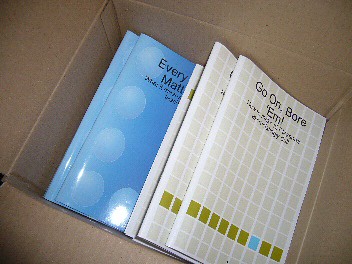
The books I refer to are the two booklets I wrote, on Every Child Matters and Boring ICT lessons. These were produced by print-on-demand, through Lulu, but published by, an therefore assigned an ISBN number by, Terry Freedman Ltd.

I ordered 10 copies of each in order to be able to comply with the UK requirement to send 6 copies of a newly-published books to various libraries and agencies. And that, of course, leaves 4 copies of each for me to send to reviewers and casually leave lying about when guests come to the house....

But isn't this just a case of vanity publishing? Well, yes and no. "Yes", in the sense that you pay the costs of having it printed and bound, whereas in mainstream publishing those costs are borne by the publisher. And "Yes" in the sense that if it's a niche product it would be hard to find a mainstream publisher that will take it on, which leaves doing it yourself as the only option. But "No" in the sense that if, as in my case, you have been approached by mainstream publishers and declined their advances and therefore made a free choice about whom you want to publish your book. And also "No" if the book has virtually no market at all (cf The Long Tail), which is what I should like to consider now.

Print on demand is a very good option when you need  very few, perhaps even just one, copy of a book. The origination costs, ie the fixed costs of setting up the book, are not spread over a large number, and so the fixed cost per book is relatively high. On the other hand, you don't have the twin problems of trying to find (a) start-up capital and (b) room to store hundreds of copies. In the case of Lulu, it's easy to amend the text of your book very quickly too, which in education, and especially the educational technology field, is a must these days.

So, what does all this mean for the ICT (Educational Technology) leader in a school?

I have long believed that if you want people to take something seriously and treat it with respect, it has to look good. What can look better than a publication which looks like it just came from a bookstore? Most schools do not have the facilities to be able to even begin to compete.

So, if I were a Head of Department or subject leader in a school now, I would use Lulu for a number of purposes:

  • The staff handbook
  • The 3 year strategic plan
  • Information about assessment
  • A year planner or calendar with important internal events (like report deadlines, term dates) and external events (like conferences) pre-filled in.
  • Students' completed projects (added Dec 09)
  • Students' leaving portfolios (added Dec 09)


If you wanted to produce your own textbook to distribute to all your students, it may be better, because cheaper, to go down a more traditional self-publishing route. That means, finding a printer who does short print runs, ie 500 or 1000. The biggest barrier to this avenue is the advance cost.

I'm not convinced that such a strategy would be cost-effective: On the one hand traditionally-published books are much cheaper as a rule. On the other hand, it's hard to beat the cost of a ring-binder and handouts or, of course, an online collection of resources.

But for the purposes of boosting your team's morale and creating a great impression with inspectors, having a dozen each of a few publications printed is hard to beat.

Reflections, two years on

Having read this article again, two years after I wrote it, the question arises: do I still agree with it? Broadly speaking, the answer is 'yes', but it's not quite as simple as that.

It is definitely the case that print-on-demand works out more expensive per copy than going to a short-run publisher. However, the issue for me would be: how many copies are required, or are you likely to sell? In other words, the more narrow the niche, the more attractive becomes print-on-demand. So if, say, you want enough copies for your ICT team and perhaps a few more to hand around, I would think that print-on-demand is the way to go.

However, I would not recommend print-on-demand for fiction writing if you can possibly avoid it. Self-published fiction is still associated with rubbish that is not good enough for mainstream publishers to bother with. I think that perception is slowly changing, because most new writers simply do not get a look in these days, and there have been some notable self-published successes. (Update: I accidentally referred to 'non-fiction' in this paragraph in the original version; I have corrected this, although hopefully the context, and the following paragraphs, will have indicated that I'd made the error, which was a slip of the pen as it were.)

In fact, if you have the stamina and the time, there is probably a case for saying that the best thing you can do is self-publish your novel (say) and market it incessantly in the hope that it will come to the attention of a mainstream publisher. But don't count on that happening, not least because you will be hard-pressed to even get it reviewed.

There's another caveat here. The CEO of Lulu didn't do anyone any favours when he said earlier this year that Lulu publishes the worst collection of poetry in the history of mankind. (See this article for a report on that by Angela Hoy, and this article for a follow-up.) I should not go so far as to say that he did a Ratner, because everyone knows that Lulu does not edit manuscripts (you'd have to purchase that service as an extra), and that many, probably most, self-publishers have received 'critical' acclaim from nobody other than themselves and their families and friends, who for the most part are too caring and too polite to say, "Sorry, but you just can't write. Take up painting instead."

Even so, I don't think comments like that help the general perception, based on a bygone era which possibly never existed, in which manuscripts were either eagerly snapped up by publishers willing to invest money and time into them, or were taken to a vanity press.

People's perception of self-publishing is better in non-fiction, certainly in the UK, possibly because people recognise that a lot of non-fiction would not be commercially viable for a mainstream publisher. Also, if you are recognised as an expert within your field, people in the same field are almost certainly not going to be deterred by your book's self-published status.

Of course, these days you can easily avoid physical books altogether and go down the ebook route. But why not do both?

I'd be interested in hearing about your views and experiences in these areas.


My BETT 2010 Seminars

I have been invited to give some talks. Two of them will be at the BETT Show in January 2010. Here are the details of the presentations I will be giving, in case you would like to book for them online at the BETT Show:

Amazing Web 2.0 Projects

What are ordinary teachers doing in ordinary classrooms with ordinary kids to raise their achievement in and with ICT? This presentation will give an overview of projects which have used Web 2.0 tools to bring excitement back into the classroom!

Date: Saturday 16 January 2009

Time: 12:30

Duration (mins): 45

Room: Club

Venue: London Olympia

Session Code: CL43

Click here for details of how to book this seminar.

Driving Your ICT Vision: what can advanced motoring techniques teach us about achieving our goals?

People talk about vision and strategy in relation to ICT, but how do you go about achieving what you want to? Ideas developed in the field of advanced motoring can provide a practical way to lead ICT in today’s schools.

Date: Friday 15 January 2009

Time: 13:15

Duration (mins): 45

Room: Club

Venue: London Olympia

Session Code: CL33


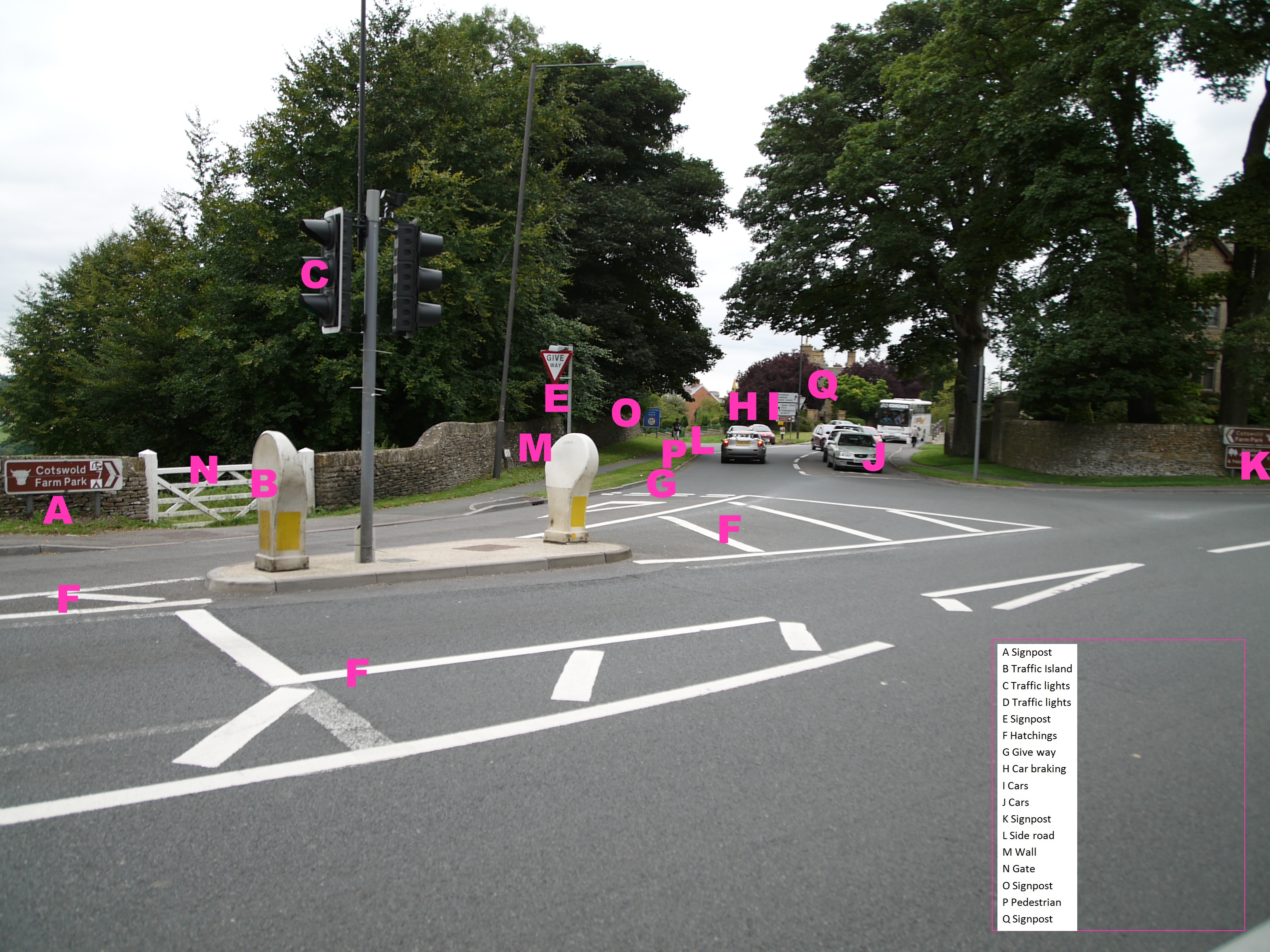
Click here to see how to book this one, and here’s a challenge. A large part of advanced motoring is being able to spot and anticipate hazards. A hazard is defined as anything that is actually or potentially dangerous. Have a look at this photo, and see how many hazards you can spot.


Now check your answers against the annotated version of this photo.


The European Pedagogical ICT Licence (EPICT) Course

Neil Howie describes this course and how it differs from the one it is often confused with, the European Computer Driving Licence, and discusses its potential usefulness for the ICT teacher.
I have started to undertake the European Pedagogical ICT licence (EPICT) course, and am finding it very useful in bringing back to the fore things that I should be using in my teaching yet, for one reason or another, don’t always.

There is a series of modules that are aimed at assisting teachers to develop their pedagogical approach to using ICT within the classroom. It is not about developing one’s skills with software or keeping up to date with the latest happenings in the hardware or software market. Too often, once we’re in the job we focus on what’s the newest piece of kit and how to stay abreast of what’s going on in the real world and bring this to the classroom. Whilst this is important, (for example, my article in this issue of Computers in Classrooms, ‘Learning new software – Adobe CS4’ demonstrates some of the techniques that I use for this), it’s the pedagogical use of these new innovations that we often don’t take time to consider.

This is why this course is both excellent and different. I’ve been told that it can be confused with the European Computer Driving Licence (ECDL), presumably because two words are the same and they both relate to ICT. They are however completely different. Having passed all the ECDL a few years ago in one day, it is a skills based course in the likes of word processing, spreadsheets and databases that I would see as now aimed at good KS3 students, weak KS4 students, or those adults who are just starting out with computers. The EPICT is aimed at educational professionals who wish to further develop (or if you are an ICT teacher, re-visit) their approach to using ICT in a classroom setting.


For those in the UK they can register through a provider with a list at the EPICT UK website . Being in international education I am using a newly formed organisation ‘your WITS’, run by an experienced and very qualified ICT teacher, Peter Napthine from his base in Brazil. YourWITS has set up fifteen EPICT modules using a moodle based system, from which registered users can access all the materials needed for the course, as well as forums for each module (and general forums).

What I think is great, and often is forgotten when using any online course, is the response time, and appropriateness of the response. Whilst it is great to be able to access materials over the internet whenever one wishes, the real value of such a course is when the tutor/facilitator (and other course members if appropriate) gives prompt and useful advice and/or positive criticism. This is certainly the case with yourWITS, and makes taking the courses feel that one is both learning/re-learning, as well enjoying the experience of it.

To highlight what is on offer here is a list of the modules available through yourWITS:

  • Locating and Incorporating On-line Resources
  • Electronic Communication & Collaboration
  • Creating and Using Interactive Resources
  • ICT and Special Needs; Effective Use of VLEs
  • E-Assessment; Presentation Technology, IWBs and Interactivity
  • Literacy and ICT; Numeracy and ICT; ICT and Creativity
  • Publishing on the Web; Digital Images
  • Spreadsheet Models
  • E-Safety
  • Games and Edutainment; and ICT and Strategic Innovation.

The first three, and last are compulsory for the Gold Award, with the remaining optional. In order to attain the Bronze award one has to complete 3 modules (including at least one compulsory module), the Silver award if after completing 6 modules (with at least 2 compulsory) and the full EPICT licence (Gold Award) is achieved after successfully completing 8 modules (4 compulsory and 4 optional).

As an ICT teacher I have started this course in order to both directly facilitate non-ICT teachers with their use of ICT, and act as support for them should they wish to further develop their ICT skills.. Whilst this is still the overall aim, I have been pleasantly surprised at how it has made me think about the pedagogical aspects of my lessons, which I may have taken my knowledge for granted for too long. If you have the opportunity then studying for the EPICT is I feel a worthwhile investment of one’s time and money.

Websites:

http://www.epict.co.uk – EPICT in the UK

http://www.yourwits.com – EPICT for the British International Schools market

Neil Howie is Deputy Principal at the British International School, Belgrade, Serbia. He has been teaching ICT for over ten years in the UK, Nigeria, Serbia and Austria. He is an Adobe Education Leader, Microsoft Master Instructor, and Member of the Institute of IT Training. His latest blog is at http://nhowie.co.uk; he can be contacted via greenmars (at) g (dot) ho (dot) st.

This article originally appeared in Computers in Classrooms, the free ezine.

A Visit to Oakington Manor Primary School

I was recently invited by Becta to a round table discussion about the use of technology. (Becta is the agency that is responsible for implementing the educational ICT strategy in England and Wales.)

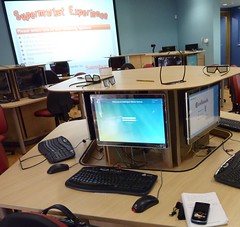
Note the 3D glasses!Shopping was never like this!It was nice to be invited to that, but what especially caught my attention was the information that the primary (elementary) school in which the meeting was due to take place is using 3D technology in its ICT suite. That sounded fascinating, so I asked if I'd be able to interview some of the children and their teacher afterwards. Nina House of Shiny Red, Becta's PR company, asked on my behalf, and Ophelia Vanderpuye, the school's ICT Co-ordinator and Advanced Skills Teacher for ICT agreed.

In terms of technology, there is much to talk about: the computers that rise out of the desks at the touch of a button, the enormous interactive whiteboard which doubles as a movie screen, the natural air conditioning, the low-heat computers. And, of course, the 3D films for which you need special glasses -- unless you watch them on the smaller interactive whiteboard at the back of the room, in which case you don't.

But I think what is even more interesting as you listen to Ophelia and the children talking are the vision and planning that lies behind all of these developments.

Ophelia Vanderpuye

The event was filmed, and the result should be appearing on the Becta website in due course.Lights, camera, action!

Oakington Manor welcomes visits from educators. I said in a recent article that to be an innovative teacher you need to see what other schools are doing. If at all possible, I should add Oakington to your 'must visit' list. To arrange a visit, phone the school on +44 (0) 208 902 2871.

The discussion with Ophelia lasts around 15 minutes, and that's followed by a chat with the children of around the same length of time.

Acknowledgements

Thanks to Ophelia, the children and the school, Becta for inviting me, and Nina Howse for expediting my interview request and for chatting to the children with me.

The jingle on the podcast was produced by Hanson Radio. Read about my visit to John Hanson School for the full story behind it.

The music is Simple Soulman by the Groovechasers, and is podsafe music. Listen to the full version on the GarageBand website.

The photos were taken by myself and may be viewed on Flickr.


Using New Technologies To Enhance Learning Experiences

Kevin Mc Laughlin discusses his reasons for using four (free!) applications – Audacity, Edmodo, Animoto and Voicethread. In this article, he assesses their usefulness from an educational standpoint.

 

I have always used technological tools to enhance my teaching, create enthusiasm and raise standards in my classroom and I am constantly reviewing the effectiveness of the tools I find, or am pointed to by followers on Twitter. However I need to ask myself a very important question before using them.

Why would I want to use this tool for teaching?

I will focus my answer on my use of Audacity (open source sound editor) and three online tools - Edmodo, Animoto and Voicethread.

Using Edmodo

Edmodo is described as ‘a private communication platform built for students and teachers’. With it you can set up a secure, private class account and share files, links and notes, post assignments and send alerts, and grade students’ work. It took me no longer than a few minutes to set up my class and then demonstrate to them how to use it and what we were going to use it for. I use it for posting homework, spellings and details of upcoming school events and my class use it for collaborative project work and sharing ideas and links to resources. I can also respond to their questions and guide them in their learning through the site’s Twitter-like message service.

Using Edmodo has helped raise standards in ICT in my class as I post mainly technology-related assignments such as Science PowerPoint presentations and video animation projects for Literacy. It has also helped my class to practice their English skills as my students will not use their first language (Spanish) to message me or each other.

Edmodo is incredibly useful and another teacher in my school has recently started using it effectively with her class. I have also received a lot of positive feedback from parents who find it helpful as they can see what homework their child has and when it has to be handed in.

Using Animoto with Audacity and Movie editing software

Animoto is a fantastic slideshow presentation tool that I have used with my class during a recent Literacy topic. I wanted to use this for the specific purpose of enhancing creative writing skills through a spoken presentation, the tool itself would provide part of the platform for the children to present their work.

Animoto is quick to set up and within minutes your class can be uploading their images and watching their results. It allows you to use provided background music or if you wish your own music or sounds.

Another tool I use regularly with my class is Audacity, a free sound file editor, and we have used this to create podcasts, and sound effects for school assemblies. It is incredibly useful and no school should be without it. The children in my class are quite adept at using it and after writing and editing their presentations they recorded their ‘voice-overs’ using audacity.

After they had done so and their work was saved I transferred it to a movie editing tool (such as Windows Movie Maker or iMovie if you have a Mac) to create their final video presentations.


Voicethread

Voicethread is another tool that I have only recently started using but wished I had discovered earlier in the year. I would describe it as a collaborative documentation tool that has many uses in the classroom. We used it to document a school excursion and I asked my class to create the documented story in Spanish so that the Spanish tutors in school could use it. Again it is easy to set up and takes no time to learn how to use it. There is a growing list for its use in the classroom on this site. 

I have mentioned only four tools I use with my class although I use many more. Each tool has a place in my classroom and each achieves a purpose I have thought carefully about. I want my class to learn how to use these tools because I understand the effectiveness each can bring to their learning and creative thinking.

After using them in class I am convinced of their validity in the classroom to enhance learning and teaching.

Kevin has started work in his new school as a Primary Teacher this month. He has a great interest in using technology (tools) to enhance his teaching and the learning of his students. He can be contacted through


http://twitter.com/kvnmcl 

http://www.kevinmclaughlin.wordpress.com 

kevindmclaughlin@gmail.com

This article was originally published in Computers in Classrooms.


My Nominations for the 2009 Edublog Awards

Here are my nominations for the 2009 Edublog Awards.

Best individual blog

This is an easy choice; Shelly Terrell’s Teacher Reboot Camp. With interesting articles, the ‘month in review’ series, challenges and guest bloggers, the site is always interesting and thought-provoking.

Best individual tweeter

Well, I’d like to nominate Shelly for this as well, on the grounds that she retweets incessantly. This sharing is what the Web is all about these days, and Shelly exemplifies the principle brilliantly.

I’d also like to nominate Neil Adam. Neil is absolutely brilliant to have at a conference, because he live blogs keynote talks in the form of tweets. I often use his twitter stream to double-check my own notes!

Best educational use of video

My nomination in this category is for Leon Cych, who publishes the Learn for Life blog. Whenever there is a conference going on in Britain, there’s a fair chance that Leon will be there live streaming or recording it. The results are of a very high, professional standard, and his recordings of events such as Mirandamod discussions are forming an important archive that will be useful for years to come.

Best group blog

I quite like the Technology and Learning Blog. I suppose I have to declare an interest, which is that I write for it every other Tuesday, but in fact I’d nominate it even if I didn’t. There’s a good bunch of writers there, and the result is quite a rich reading experience.

Best educational use of a social networking service

My nomination here is for the Digiteen Ning, set up by Julie Lindsay and Vicki Davis. The posts, mostly by teenagers, are usually incredibly thoughtful. Anyone who bemoans ‘the youth of today’ needs to visit this site.


Why Subscribe to Blogs? 8 Things to Consider

So many blogs, so little time. What with all the 101 other things you have to do in your life, you can't afford to waste time on blogs that won't benefit you in any way. Or, to be more accurate, in which the benefits are exceeded by the cost, ie the time spent.

So what kind of things might you take into account when deciding whether or not to subscribe to a blog's RSS feed? Here is what I look for.

  1. I will usually have discovered a blog through a reference to one particular article. The obvious thing to check out, then, is whether all or most of the articles on the blog look interesting, or whether the one I came across was the exception to the rule.
  2. Are the articles engaging? Ideally, I prefer to read stuff that is well-written. Not just well-written from a technical point of view, but in a way that's engaging, that reels me in. I want to have to drag myself away because I have other things to do, not force myself to read it because I think it might be good for me.
  3. OK, not everyone can be a great writer, so is it informative at least? Am I going to learn stuff that I may not otherwise come across, or not packaged in as succinct a manner?
  4. Is it newsworthy? I find it hard to keep up with news, despite, or possibly because of, the dozens of sources I rely on. If there's a blog that consistently mentions the latest news, be it technical or educational or otherwise, I'm interested.
  5. Is it humorous? Even if it's none of the things mentioned so far, if it makes me smile or laugh that is a big plus.
  6. Is it provocative? A blog should make you think, or react.
  7. Once it's made it through the hurdles presented so far, a blog has to show that its owner is serious about it. The issue here is: has it been updated regularly? If it's been more than a month since the last post, that is a real turn-off for me.
    Yes, I know that people are busy, but I think it's a matter of priorities. I have blogs that I haven't updated in months. But this one, ICT in Education, gets updated on average at least once a day during the week, and sometimes more, and sometimes at the weekends and on holidays too. And let me tell you: I am busy!
    That does raise another issue, of course: is a blog updated too frequently? That doesn't bother me in the slightest. I figure that someone can update their blog every 15 minutes if they want to, but I don't have to read it all. But I mention it here because I have recently had one person unsubscribe from my RSS feed because he thought that I update my blog too often.
  8. Finally, is it easy to subscribe? I have a Google toolbar which enables me to subscribe to a blog by clicking on a button labelled 'Subscribe'. If I get a message saying 'Feed not found', I become slightly miffed, because it is pretty easy to avoid that,m and people with slick-looking websites ought to know that. All you have to do is insert the following code within the HEAD part of your Index page:

    "<link rel="alternate" type="application/rss+xml"
    title="RSS Feed for ictineducation.org"
    href="http://www.ictineducation.org/home-page/rss.xml" »",

    substituting your RSS feed and title for mine, or course.

If clicking on Subscribe doesn't work, I'll click on an RSS feed icon or similar. If have to hunt around for that, I'll probably give up, especially if the decision to subscribe was touch and go anyway.

Total time for this whole process? I would say no more than 5 minutes, and most of that will be taken up with #1.

I'd be interested in hearing about what makes you decide to subscribe to an RSS feed or not, so please either comment below or complete the survey on the subject; it will take you just two or three minutes, and I'll publish the results soon.

A Visit to John Hanson Community School

"We come up here in break times or in lesson times"
"Here being where?"
"Here."
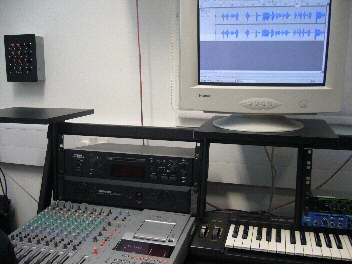
The radio studio at John HansonSuch is the impeccable logic of 14 year olds! As it happens, the "here" in question was the music room, and the recording studio, of John Hanson Community School in Andover, Hampshire, in the south-eastern part of England. I spent a most pleasant morning there a while ago, meeting staff and students, especially those who were working on a podcast for me.

A couple of years ago I wrote in my newsletter, Computers in Classrooms, that while I enjoyed making podcasts, I didn't really have the time or the inclination to devote the time required to make them as polished as I should like. I wondered aloud whether there was a school that would be willing to work with me. The benefits for me would be obvious, and hopefully the students would benefit from having an opportunity to work with a real client, and, if required, a reference or testimonial from me to go into their eportfolio. And, for the school, some extra publicity.

This item was picked up by Hampshire Consultant and newsletter subscriber Colin McQueen, who works for the Hampshire Inspection & Advisory Service. He passed it on to Mike Adams, Assistant Headteacher at the school and, as it turns out, one of the driving forces behind Hanson Radio. As soon as I heard one of their podcasts, I was entranced by the quality and the professionalism (as you will be: give it a whirl).

Up till the visit, communication had been via email, my website, and the school's VLE. I'd been sending recordings, and Mike sent me some original music, which I commented on. Then I visited the school and met Mike and Colin for the first time, some of Mike's colleagues -- including Alastair Johnston, Head of Performing Arts, who was also heavily involved with this project -- and some of his students.

I was impressed with what I saw and heard:

The pupils were not only confident users of some music-creating software (eJay DJ Mix Station 2.0, which appears to have been discontinued), but were confident in playing for me and the class the results of their efforts. They had every reason to be confident, because their compositions sounded great. (And just for the record, I'm not easily satisfied.) In fact, not only did it sound nice, it also satisfied the brief, which was to produce some upbeat music with a jazz funk feel. They had also responded well to the feedback I gave on the first one they produced.

In English National Curriculum terms, taking into account user feedback is Level 7, and taking users' needs into account is Level 8. Don't get me wrong: I'm not suggesting for a moment that taking part in this activity has propelled the students to the dizzy heights of Level 8, but it does serve to illustrate the fact that if you want your students to be able to work at those levels, you have to provide opportunities for them to do so.

Two pupils who have been working on one of the sections played me what they'd done and showed me how they'd achieved the miracle of making me sound fluid and coherent! They seemed very comfortable working with Audacity in the music studio.

Terry on airI was then interviewed by four students, Sophie, Ruby, Alan and Steven, who had prepared some thoughtful questions and who agreed to be interviewed by me in turn. It was in that context that we had the discussion about where "here" was. Their interview of me was featured in a Hanson Radio podcast (which appears to be part of an archive now), and in the one they did for me, as was my interview of them. You can listen to these interviews and the whole Hanson Radio treatment in this podcast.

(In looking up the URL for this episode, I realised with horror that Paul Harrington had left a comment about it, which I hadn't realised! Paul said:


Terry, I have just spent a very entertaining 45 minutes listening to the podcast, excellent work - could you pass on my congratulations for their professional job ( you weren't bad either -lol). The tips on BETT made me instantly rush off and print some business cards in order to save me writing - so thank you very much for that. Regards Paul

So I hope this is a case of better late than never!)

Mike has also had a couple of great jingles made for me, and sought and obtained permission to use the original works of a living composer, Kevin MacLeod.

As it turned out, we didn't get to make another podcast together. I suppose we're all busy people, and doing something like this is a pretty big time commitment. But it was a great experience, and I still use the jingle they created for me!

I was delighted that  a year later the school was awarded the ICT Mark. From what I saw, it was very richly deserved.

You Need To Set a Good Example

If you want students to be good learners and users of technology, you have to set a good example. That is basically the message of Shelly Terrell's latest post, Most Teachers Don't Live There. Shelly asks:

Shelly Terrell

If we are knowledge sharers, shouldn’t we continue to fill ourselves with knowledge?

If we want to inspire students to continue learning throughout their lives, then shouldn’t we continue to learn throughout our lives?

If we want motivated students who see learning as a journey, then shouldn’t we continue our journey?

If we want to motivate students to be the best in their fields, then shouldn’t we be the best in our fields?

If we want other educators to listen to our ideas, then shouldn’t we read about their ideas?

If we want support from our colleges, then shouldn’t we support their workshops and projects?

If we want students to use digital media responsibly, then shouldn’t we give them access and show them how?

If we want student to not let technology overtake their lives, then shouldn’t we teach them how to balance themselves?

How can we teach balance, if we don’t have any social media in our diet?

These are great questions, and they are spot on. Whether you work in a school, a Local Authority or for a company or for yourself, if you do nothing else you must at least be an excellent role model in your appraoch to education in general and to educational technology in particular.

In fact, I would go further than Shelly has, and say it's not only about setting a good example to our students, but to our colleagues as well.

Of course, some of Shelly's challenges are hard to meet, like the ones about balance. Recently we watched a programme called "Email is ruining my life", which looked at someone who sleeps with her Blackberry next her in case an email comes through in the middle of the night, checks emails in the bathroom, checks them whilst having dinner.... I am not that bad, but I must be heading in that direction because at the end of the programme Elaine said to me:

"Recognise anyone you know?"

I tried to plead the 5th, but that doesn't cut much ice in England.

It reminds me of this story:

A woman takes her little boy to see a Holy Man. She says, "Please tell my son to stop eating sugar."

He replies: "Certainly. Bring your son to me in three days' time."

Three days later, she returns with her son, and the Holy Man says to him, "Stop eating sugar."

The woman says, "Why couldn't you have told him that three days ago?"

"Because", he says, "Three days ago I had not stopped eating sugar."

Shelly's post is very challenging, I think, and she finishes it with a great challenge to the reader. Do head on over there to read her post in full.

ICT in the Rose Review of the National Curriculum

I wrote this document in May 2009. Since then, the proposed Level Descriptions have been changed. Here is a summary of the differences between this document and the revised changes, not in terms of the descriptors themselves, but my comments on them. Basically I have taken the view that a difference is only a difference if it makes a difference, so if the proposed level descriptor has changed, but its import hasn't, I haven't commented on it. In fact, as far as I can tell only two of the level descriptors have changed, and then only slightly.

Although this post is clearly aimed primarily at colleagues in England and Wales, it may be of interest to teachers from other countries too, as it shows what we're expecting young people to be able to do at different ages.

Also, it covers the whole of the programme of study for ICT, not just primary.

Anyway, here is a summary of the changes:

Level Changes in New Descriptor? Comments on Changes
1 Yes - shorter None
2 Yes - shorter None
3 Yes - the reference to editing and formatting has been removed It's now quicker to read, but I think it has lost some of its clarity
4 No Not applicable
5 No Not applicable
6 No Not applicable
7 No Not applicable
8 No Not applicable
Exceptional Performance No Not applicable

The level descriptors are © 2009 QCDA Copyright. I have reproduced them here in accordance with the QCDA's terms.


Teaching Yourself Chinese Through the Internet: Honourable Mentions

In this series, taken from the Computers in Classrooms newsletter, Adrienne Blaser has been evaluating websites designed to help people learn Mandarin. In this final article she lists other sites which are worth exploring.

http://mandarintube.com

http://www.choosechinese.com/

http://www.mangolanguages.com/ -- check your local library to see if they are registered

http://www.guavatalk.com

http://www.chinese-tools.com/learn/chinese

http://www.bpchinese.com/

http://www.nciku.com/ --- this site is a great dictionary Chinese to English and English to Chinese -- helpful for extra studying

Adrienne Blaser is 14 years old. She plays tennis, the violin and loves to read. She one day hopes to learn many languages, hopefully one being Chinese, which she is currently teaching herself.

If you have enjoyed reading this series, please leave a note for Adrienne to that effect. Thanks!

The other articles in the series 

Teaching Yourself Chinese Through the Internet - LiveMocha

Teaching Yourself Chinese Through the Internet: ChinesePod

Teaching Yourself Chinese Through the Internet: Zon


Who Ya Gonna Call? Results of My 'Experts' Poll

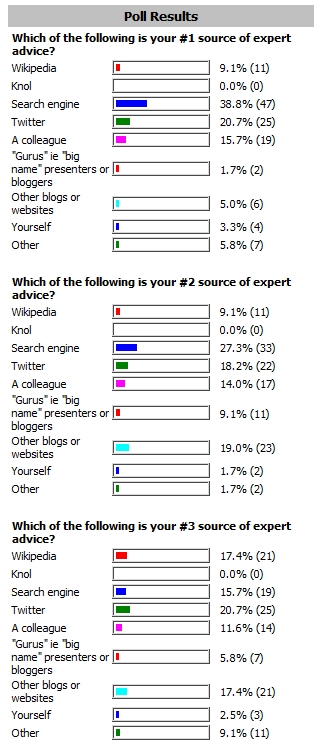
A while ago I conducted a survey to find out who or where people turn to for expert help. Here is a quick snapshot of the results:

Who you turn to for answersIn a forthcoming issue of Computers in Classrooms I'll be adding more detail, such as what people suggested in the 'Other' category. Thanks to everyone who took part in the survey.