Many people need to find ways of shaving time off of tasks, and getting more done in a day. This book covers both.
Read MoreClick the pic to see the book on Amazon (affiliate link)

Click the pic to see the book on Amazon (affiliate link)
Many people need to find ways of shaving time off of tasks, and getting more done in a day. This book covers both.
Read MoreAlthough the book has not been written with teachers in mind, it contains information that many teachers would find useful.
Read More
Conference, by Terry Freedman
* UPDATED * The folks at Westminster Forum are running a very timely conference on 11 March 2020, about the future of edtech.
Read MoreThis is a fairly comprehensive account of the steps I went through to convert a course from one I taught in a physical classroom to one I could teach online.
Read More
This is the sort of feedback you want.
I’ll never forget once at a conference where the organisers, rather unfairly I thought, put on a talk by an unknown teacher at the same time as a keynote speech by a big name speaker. The latter’s talk was on the challenges faced in running a school, and what to do about them – even though he had never run a school.
Read More
Aching feet, by Terry Freedman
One positive outcome of coronavirus and lockdown is that we can attend Bett, or part of it, this year without moving from the comfort of our own homes. No more being crammed on the Dockland Light Rail along with hundreds of others, no more spending the day breathing lots of stale air, and no more aching feet!
Read MoreA few weeks ago I put together a collection of articles on using Zoom, good practice, etc etc, and bundled them into a PDF. You can get this for free just by signing up to my newsletter, Digital Education, but time is running out! The offer ends at 11:59pm on 20th December 2020.
Read More
The “two minutes” referred to is not entirely accurate. Graphic by Terry Freedman
What are the elements of a typical blog post, and why are they useful?
Read More
Terry Two Minute Tips, by Terry Freedman. Not all of these tips are two minutes long, but numeracy was never my strong point.
What does a typical blog consist of?
Read MoreThis online conference looks quite interesting. Not all of it seems to concern ed tech, but it might be useful to attend anyway because of the different perspectives of international speakers.
Read MoreWhat is MVT, and why have I adopted the MVT approach?
Read More
Zoom Meeting, by Terry Freedman
Now that most events, including conferences, have transitioned to being online only, are they still worth attending?
Read More
Webinar, by Terry Freedman
The Department for Education is running a series of webinars about returning to school.
Read MoreFor more than 30 years, London has hosted the Bett show, a mega education technology exhibition/conference. Will it go ahead in 2012?
Read MoreWhat does dealing with mistakes “properly” mean in practice?
Read MoreLearning is necessary, useful and pleasurable! Here are 15 suggestions for continuing to learn, ranging from some pretty easy almost costless ways to a major commitment. Hopefully there’s something for everyone in this article.
Read MoreTechnology goes wrong from time to time, but isn’t it wonderful when the technology and the training go well?
Read More
The scream by Terry Freedman
We all have the occasional awful experience when giving training. Here are mine!
Read More
Idea!, by Terry Freedman
If your role in school is to encourage your colleagues to use technology, you might be wondering if you’re needed any more. After all, circumstances have forced schools to adopt some form of online learning to some extent. Even with pupils returning, it’s looking doubtful (in the UK at least) that all pupils will go back all day every day, some degree of online learning will probably be needed for the days pupils are not in school. Therefore hasn’t Covid-19 effectively done your job for you?
I think the answer is that this pandemic has forced the issue, but that for e-learning co-ordinators there are still reasons to be cheerful. You may not have to cajole your colleagues into using the technology, but face it: some will have been dragged kicking and screaming into this new reality! Perhaps the focus of your role could now shift to making it easier and more attractive for them, or at least less daunting. Here are a few suggestions about how you might do that:
Produce some simple how-to guides (“Quick Start” guides) on how to use Zoom, Google Classroom or whatever platform your school uses. At the most basic level, I would say you need only a few simple instructions on how to set up a meeting, possibly a recurring meeting too, and how to invite people to join.
Produce a handy hints and tips sheet. For example, have a look at Mute that mic!, Teach yourself the technology, and Chatting and Messaging.
Run some (online) training sessions. Think about beginning, intermediate and advanced classes.
Set up a Google Classroom sandpit that colleagues can try things out in. (This will involve just setting up a new class called Test or Sandpit, and possibly making your colleagues co-teachers.)
Run a Zoom session in which different colleagues take it in turn to be given the host rights to try out various features such as muting everyone’s mic and putting people in break-out rooms.
Set up a Google Doc on which colleagues can share useful hints and tips.
On the same Google Doc, create a section where colleagues can ask questions, which either you or other colleagues can answer. Use heading styles (Heading 1 etc) for the headings (ie not just bold or bigger text) and the document outline feature. Go to View—>View Document Outline. This is what the document will look like:
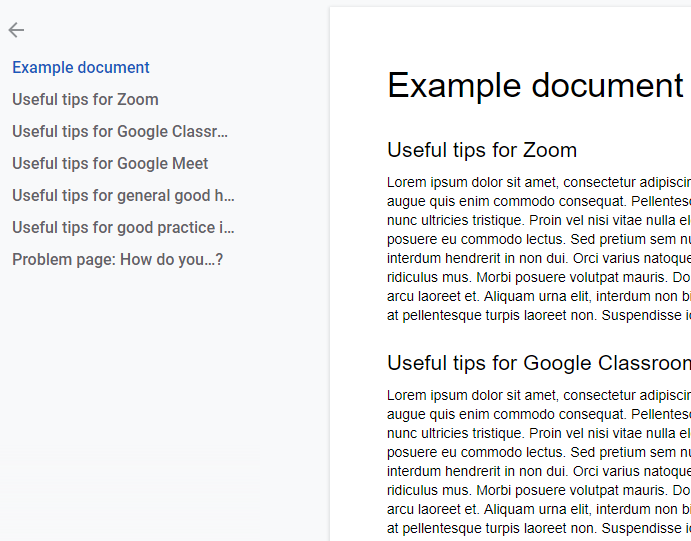
Google Docs Outline, by Terry Freedman
People can click on a heading in the Outline on the left, and they will be taken directly to that section in the document.
Set a time when you can run an online surgery. That will be for colleagues who wish to drop in to ask a quick question. For example, tell staff that you will be online in the “Virtual Surgery” at 4 pm every Tuesday afternoon, and make the link available everywhere. The “hidden” purpose of this suggestion and the preceding one is to save you from being bombarded in an ad hoc manner at all times of the day (and possibly at night as well). If you’ve provided some “Quick Start” guides, an editable Google Doc where colleagues can ask and answer questions and a set time for a drop-in surgery, you’re much more likely to protect your time and blood pressure!
Here’s a list of the articles I’ve written so far relating to Covid-19 and ed tech.
In my past roles as ICT Co-ordinator or e-learning co-ordinator, I have formed and chaired an ICT or e-learning committee. What are the benefits of having such a body, and does Covid-19 change anything?
How sensible — or effective — is it to have kids sitting at a computer all day long?
Google Meet has nowhere near the range and sophistication of the features of other online learning applications, such as Zoom. So why would anyone want to use it?
Some handy hints about Google Classroom.
Here are 9.5 useful features of Zoom. Why such an odd number? Read on and find out.
Although visiting schools is unlikely to be possible in the foreseeable future (even if schools were to reopen completely), you can still help them out. Here are 7 ways you might do so.
If you enjoyed this article, why not sign up to my free newsletter, Digital Education?
Some handy hints about Google Classroom.
Read More(c) Terry Freedman All Rights Reserved






In my past roles as ICT Co-ordinator or e-learning co-ordinator, I have formed and chaired an ICT or e-learning committee. What are the advantages and disadvantages of having such a body?