Guidance for the BETT Show (and other conferences)

Last year I published a guide to BETT (and other conferences) for subscribers to the free newsletter, Computers in Classrooms. I think the advice is still relevant. I looked at the following:

  • 9 reasons to attend.
  • 4 arguments to put to your boss as to why you should be allowed to attend.
  • 3 other kinds of colleagues who should attend.
  • 13 things to do in advance.
  • 16 ways to get the most out of the show.
  •  7 ways to follow up afterwards (once you’ve recovered!).

You can read that online here.

The Myth of Leadership

Leaders and managers don't change people: people change themselves. All that an effective leader or manager can do is get the right conditions in place for effective change (for the better) to happen. In political terms, it's the difference between power and authority. Power is where, when someone says "X will happen", people say "We must do X"; authority is where, when someone says "X will happen", people say "X ought to happen". Having authority is better than having power in the long run.

Read More

Making It To Christmas: Starting Well

Well, the new term -- indeed, school year -- has started or is about to start, so you may think it is somewhat premature to be thinking about Christmas already!

However, in my experience the autumn (Fall) term is the toughest of the lot, and the final few weeks can be purgatory.

Read More

21 Ideas for Getting Off to a Good Start

So, you're about to start a new job as leader or manager of educational ICT. It can be scary as well as being fun. And you know what they say: you don't get a second chance to make a first impression. It's good to have a "shopping list" of things to do, or at least get started on, as soon as you walk through the main entrance. Here are 21 suggestions you might like to consider.
Read More

Life Without A Spellchecker

It is almost a truism that we have become too reliant on technology. You only have to step into a place where the computer system has 'gone down' to see that. Like the restaurant I wandered into a few days ago in which there was, to quote one of the staff, 'anarchy' because the computerised booking set-up had, as it were, downed tools.

But in a funny kind of way that sort of situation is copable with if you're reasonably intelligent, have a contingency plan and possess a spark of creativity. The thing is, a system which is off is, by definition, not on. Like the binary system on which it's based, the computer system's state leaves no room for doubt, no room for ambiguity. at the risk of sounding a little Monty Pythonish, it's off, not working, finished, kaput – at least for the time being.

What is far worse, in my opinion, is when something goes wrong but in such a quiet sort of way that you don't even notice at first. Thus it was that when my spell-checker stopped checking my spelling, it did so without warning, without fanfare and, crucially, without any wavy red lines. Unfortunately, the first glimmer I had of something being amiss was when I read an article I'd just posted that mentioned my being resposible.

Now there are a couple of things that come to mind about this. Firstly, it's very apparent what a shoddy job of proofreading I did. That was partly because I had implicitly assumed that the spell checker would pick up any neologism I'd 'penned'. But it was also partly because, like most people, I subconsciously substituted the correct word for the incorrect one when I was reading through my article.

That is why anyone writing for an audience on a professional basis has their work proofread by someone else. Is that done as a matter of course in schools? We harp on about writing or presenting for different audiences (in England and Wales it is stipulated in the National Curriculum). But the logical corollary of that position is having students proofread each other's work and, in special projects, splitting the task between writers and editors and proofreaders.

The second thing that strikes me, somewhat more whimsically, is that not having a spell checker is a good way of coining new words. For example, as far as I am aware the word 'resposible' does not exist (I've even looked it up in the Oxford English Dictionary), yet it sounds like it ought to. Could it be, perhaps, the property of being eligible to be taken back having been disposed of?

Inventing words accidentally, and then creating meanings for them, is quite entertaining. It goes to show that life without a spell checker, whilst not ideal, is not an entirely desperate state of affairs.

This is a slightly modified version of an article first published on 20th May 2009.

Why Teach Spreadsheets?

I often read blogs or articles which allude to the exciting nature of the possibilities of using video and podcasting in the curriculum, as opposed to spreadsheets. I think this raises a number of issues:

Firstly, why even bother to teach spreadsheets given the apparently more exciting possibilities offered by video and so on?

Secondly, is it true to say that spreadsheets are, in their very nature, boring?

Thirdly, even if they are, does it matter?

Why teach spreadsheets?

The short answer is that you don't have to. According to England and Wales' National Curriculum Programme of Study for ICT, you have to teach modelling and sequencing. You could certainly teach the latter through a curriculum centred on podcasting and other media. You could probably teach modelling too, but it would need to be thought through very carefully in order to avoid the danger of it's becoming too superficial.

Spreadsheets, however, are ideally suited to the teaching of modelling because that's exactly what they're designed to do. If you take the basic modelling question as being "What if?", using spreadsheets is, to coin an expression, a no-brainer.

But is it not the case that for spreadsheets to be useful, lots of numbers have to be involved? Well, not necessarily. I read some years ago an article by a teacher who was using spreadsheets in English to demonstrate the progression of a work of literature over time.

If, for example, you take a novel such as The Picture of Dorian Gray, you could plot the number of witticisms per chapter in a spreadsheet and then generate a graph showing how they decline as the book progresses.

Or you could take a work by Shakespeare and plot the number of jokes per scene alongside the number of killings per scene, the instances of dramatic irony per scene and anything else of interest, and then look at the resulting graph.

What that sort of thing will do is illustrate very effectively how the nature of the play or novel changes from start to finish, but it's not the only possibility. At the Online Information conference I attended in 2008 someone showed a screenshot from someone's MA thesis in which the student had used Excel to showcase the different kinds of rhyme in English poetry.

These are good examples of modelling, but you don't have to be quite so avant guard. There are lots of opportunities for modelling of the number-crunching kind, but I'll come on to those in a moment.

Let's not forget sequencing. Contrary to what some people have said, control hasn't so much disappeared from the curriculum as morphed into "sequencing", a much better term because it's more accurately descriptive and also wider in scope:

[Pupils should be able to ... ]use ICT to make things happen by planning, testing and modifying a sequence of instructions, recognising where a group of instructions needs repeating, and automating frequently used processes by constructing efficient procedures that are fit for purpose

That's exactly the kind of thing that spreadsheets are good for, which is why I decided to approach my chapter on sequencing in the latest ICT for Life (for Year 8, ie 13 year olds) through the use of a spreadsheet. It makes use of the IF function, which can be seen as a rudimentary example of sequencing, and macros, which encapsulate both sequencing and automation.

It seems to me that if you're going to decide to teach these skills through, say, video podcasting, you will have a tough time ensuring that the work is demanding enough to meet the criteria of the National Curriculum in a real, as opposed to superficial, sense.

For example, I think that it involves more than deciding on who in the class is doing what, and in what order, and then going out with a pocket camcorder and hoping for the best. You'd need to think of things like editing, which could address both sequencing and modelling, and even issues like background music (which can affect audience reactions and assumptions) as part of the attention to modelling. But, not being an expert in such matters, I think all that sounds more challenging than coming up with a good idea centred on the use of spreadsheet.

Are spreadsheets intrinsically boring?

I think if you regard a spreadsheet as little more than a glorified calculator then you would be hard put to find much of interest there. But there are two sides to the question of whether spreadsheets are boring.

Firstly, it's a matter of functionality. In a fully-featured spreadsheet like Excel, there are all sorts of ways in which you can approach "what if?" questions, from the relatively simple IF function, through conditional formatting and scenarios, to goal-seeking and pivot tables.

Secondly, and more importantly I think, is what you do with them. Over a decade ago I devised a spreadsheet which was quite complex behind the scenes, but easy to use. It was a party planner, and what you had to do was decide how many bottles of fizzy drink and so on you should buy. The rules were that you were not allowed to overspend or underspend (the spreadsheet would alert you if you did), and you had to buy everything on the list.
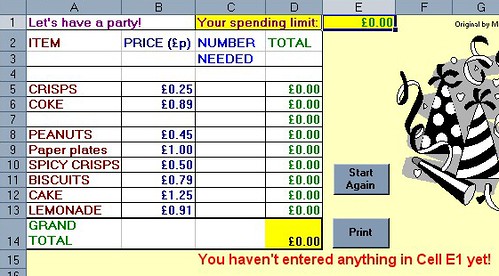
The starting point

Information is provided in real-time...
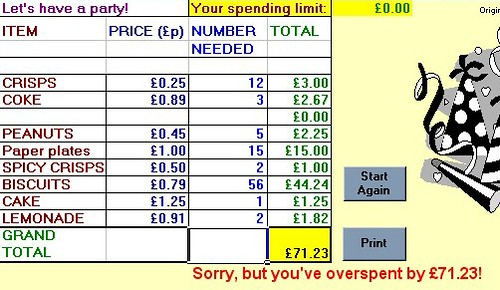
... which is just as well!

Obviously very simple, but put the students to work in pairs and discuss their purchases and it starts to take on a life of its own. It is actually quite hard to spend exactly a given amount of money without resorting to desperate measures like buying 200 bags of peanuts and nothing else!

Then you can start to throw in "curved balls", such as:

"Sorry, class, but I've just found out that your dad couldn't work overtime this week, so you can only spend £25 instead of £40." Or:

"Hey, I just found out that some of the people coming along are vegetarian, so make sure you buy something they can eat and drink too."

As a homework exercise beforehand you can ask them to do some research into what sorts of tings people buy for parties, and part of the lesson can involve getting onto the internet to try and find the lowest prices.

So, in a sense, the spreadsheet itself is boring: after all, all the pupils are doing is entering numbers because everything has been set up for them. But they're starting to learn what modelling is, in a way that is interesting to them.

But where this sort of approach really starts to take off is afterwards, when you say, in effect, OK, let's take the lid off and see how this thing works. You can ask the pupils, what do you think is actually happening behind the scenes to give you a message like "Sorry, but you have overspent by £14.16."?

The idea is to get them to understand the logic of what is happening, expressed in ordinary language. Once that's been achieved, you can start to construct a spreadsheet model using syntax that the spreadsheet program will understand.

If your spreadsheet work consists of (and I've seen this) getting the pupils to type in rows and rows of football scores and then find the average score and the highest score, then I agree with you: that is mind-numblingly boring. It's tedious, pointless (why not give them an already-populated spreadsheet?) and mundane.

With older students you can push the boat out a bit further. We're accustomed to spreadsheet models being concerned with business or sports, but how about science fiction for a change?

In The Cold Equations, Tom Godwin posits the idea of a supply spaceship that has almost precisely the right amount of fuel for its return journey, taking into account weight and distance. What happens when the pilot discovers a stowaway on board? I won't spoil the story for you by telling you (read it, especially if part of your job is to discuss moral issues with your students), but what a great starting point for a spreadsheet exercise! Can you construct a simple model showing what happens to fuel consumption when one of the critical factors (weight or distance) goes over a certain limit?

Again, this activity can be enriched by asking the pupils to do research into this area -- not necessarily in the area of space flight, but in the more accessible realm of fuel consumption by cars.

Even if spreadsheet are boring, does it matter?

I thought I'd throw this one in. I do think it matters, up to a point, which is why I wrote the book "Go on: bore 'em: how to make ICT lessons excruciatingly dull". However, I do think there is a danger of falling into the trap of thinking that school has to be entertaining all the time. It's a fact of life that some activities are boring, but possibly necessary.

What springs immediately to my mind is preparing my invoices. I love the work I do, and when I finish one assignment I like to move on to the next. Instead, I have to find time to sort out the paperwork and get an invoice sent off to the client. That's just plain boring as far as I'm concerned. But if I didn't do it, we wouldn't eat!

I'm not suggesting that we try and bore kids as part of their preparation for adult life! But neither do I think we should tear our hair out and rent our clothes if school activities are not always as action-packed and fun-filled as kids would often have us believe they want them to be.

In fact, it's a con on their part, perhaps an inadvertent one. What kids want at school is not necessarily to be entertained, but to be kept interested, and to feel that they're learning something useful. Spreadsheets have the potential to form the basis of activities that help to achieve exactly those goals.

This is an updated version of an article that was first published on 24th December 2008.

Risk Assessment

You cannot avoid risk, so you have to manage it. Whether you’re considering installing a new computer system, or trying out a new teaching approach, how can you manage the risk sensibly and effectively?

You have to manage riskThe way to do so is to carry out a risk assessment. That sounds like it could be a lot of work, but it need not be. Or at least, it can be turned into an enjoyable professional development exercise. That way, not only do you assess the risk, you also (hopefully) bring your colleagues along with you and, into the bargain, have some mind-stretching discussions as part of the process.

The reason for that is simple: risk assessment tends to be fairly subjective. You can make it less so by doing some research and obtaining a range of facts and figures, but ultimately you have to take a decision, and that will involve a degree of conjecture.

Risk assessment involves considering, and assigning values to, three criteria:

     
  • What can happen as a result of this course of action?
  •  
  • What is the likelihood of each outcome happening?
  •  
  • How bad will be the consequences of each thing happening?

Now, in some scenarios the value assigned to the last one is so great that it crowds out any other consideration. For example, what is the likelihood of your child being abducted if you allow her to go out on her own? The answer, despite what you may think from keeping up with the daily news, is quite low in the UK. However, the consequences of that happening would be so awful as to render the low likelihood irrelevant.

Thankfully, when it comes to trying out innovative teaching methods we tend not to have to countenance such extreme situations. So, let’s work through an example:

Question: What might happen if I introduce the use of social networking into my lessons?

You might set out a grid like this:


Outcome


Likelihood of occurring


Severity of consequences

     
Students will fail course Low High
Parents will complain Medium Medium
Students will come across unsavoury people High High


Now, you can start to manage all this. For example, taking the last one, you can prepare the students by teaching them about keeping safe online, and you can further protect them by having an invitation-only social network. That won’t completely protect them (if only because some of the students may themselves be unsavoury characters), but it will certainly go a long way towards reducing the risks.

But the important thing to bear in mind about risk is that once you have identified an activity as potentially ‘risky’, the solution is not necessarily to simply abandon the idea. After all, keeping to ‘tried and true’ teaching methods also carries a risk.

An earlier version of this article was published on 11th June 2009.

5 Tips For Assessing What Students Know

It is not enough to teach students how to understand information and communications technology. At some point you are going to have to assess their knowledge and understanding.

Girl studying. (c) hvaldez1 (http://www.sxc.hu/profile/hvaldez1)Here are 5 broad suggestions of how to do so effectively.

1. Set open-ended tasks rather than closed tasks

For example, say: “Produce a poster” rather than “Produce a poster using Microsoft Publisher”. By the same token, don't be too prescriptive in what needs to be included. Instructions like "include 2 pieces of clip-art" do not easily lend themselves to assessment of much more than the student's ability to select appropriate illustrations. In fact, such a painting-by-numbers approach may be useful as a training exercise, but ultimately all you can really assess is how good the students are at following instructions.

The open-ended approach can be adapted for use with all age groups, in my experience. 

2. Use a problem-solving approach rather than a skills-based approach

This suggestion assumes that the course is a problem-solving one rather than once concerned purely with skills. In some circumstances it will be quite appropriate to ask students, say, to create a spreadsheet consisting of 5 worksheets and involving the use of the IF function. However, for the sorts of courses I'm thinking about, a question that requires problem-solving is much better, for these reasons:

  • It does not require there to be one right answer.

  • It provides an opportunity to discuss with the student why they opted for a particular solution -- and why they did not choose an obvious alternative.

  • It provides scope for out-of-the-box thinking. The trouble with telling students they must (to continue with the example) use an IF function precludes them from coming up with a more creative, and potentially better, solution of their own.

3. Watch what students do in the lesson

The finished product indicates very little about ICT capability. In the absence of other information, it’s the process that counts. The biggest problem with making a statement like this is that teachers and others can sometimes extrapolate from it to suggest that the process is all that matters. This is patently not the case, as a simple example will illustrate:

Your boss asks you to prepare a presentation on the subject of what the school offers by way of ed tech facilities, to be shown to prospective parents at a forthcoming Open Day. You prepare a fantastic presentation, using all the bells and whistles (appropriately, of course), on the topic of what ed tech facilities the school will offer in 5 years' time once an impending refurbishment programme has been completed.

The way you prepared it is sheer brilliance: you create an outline in a word processor, import it into a presentation program in a way that automatically creates slides and bullet points, and all your illustrations are original, created by you and your students.

Given the fact that your presentation is actually irrelevant, or at least not what the boss asked for, how likely is it that your boss will congratulate you on your presentation on the grounds that the way you went about preparing it was exemplary?

4. Avoid the temptation to atomise

Do not disassemble the Level Descriptors in the National Curriculum Programme of Study (in England and Wales), or, indeed, any set of national standards. The English and Welsh ones are intended as holistic descriptions rather than atomistic ones, and it is likely that the same is true of other countries' standards (but you will need to verify that, of course).

5. Assess what students say about the work they have done

You may find it useful to use a standardised approach, but I have always found that you can pick up a lot from a fairly open-ended discussion. It's interesting to explore, for example, if they understand why they have done something. (An answer along the lines of "Because the teacher told me to" is not good enough.)

This article was first published on 2nd January 2008.

7 Tips for Planning an ICT Lesson with One or Two Computers


What if you can only have access to one or two computers for the whole class for much of the time. Does that mean you cannot do anything of any value? Not at all. Here are seven suggestions for how to make the best of the situation.

Draw up a class rota of who will be using the computer(s), and in which lesson. Your planning may not entirely work out in practice, because of factors like absences and power cuts and so on. However, it is easier to ensure that all pupils have been given the same opportunities to use the computers if you have a rota than if you don’t.

With the ICT co-ordinator or other teachers, identify the areas of the ICT Programme of Study (PoS) -- or your own scheme of work -- that you will be able to cover. This is not to say that the ICT PoS is a sort of pick-’n’-mix, but that it may be possible for different teachers to cover different aspects of the PoS in order to ensure that it is completely covered.

Devise generic activities that can be applied to a variety of situations, such as internet research skills and copy/paste.

Devise activities that require pupils to share a computer. Computers are excellent for encouraging collaborative learning and higher-order skills such as modelling.

Adopt the approach of showing the pupils as a class how to do something on the computer, and then practising it in that lesson and subsequent lessons.

Plan your lessons in a way that computer-based work and non-computer-based work are similar in terms of intended learning outcomes. For example, to take the copying and pasting idea again, all pupils could be engaged in finding suitable pictures and pasting them into their written work, whether they are working at a computer or not.

If you are in the fortunate position of having a computer suite and computers in classrooms, it may be possible to teach the whole class a computer skill all at once, which they can subsequently practice in the context of other subjects and/or lessons.

Did you find this article helpful or useful? It was first published on 15th February 2008.


E Is For Everything -- But Why?

Is the 'E' necessary?There is an unfortunate tendency for e-learning evangelists to try and come up with as many e-words as possible when promoting the benefits of e-learning. Why?

I suppose the idea is to generate excitement, and to energise one’s colleagues. But to my mind, this is mere gimmickry.

I’ve seen it done with the 'C' in ICT as well. That stands for 'communication' or 'communications', but I’ve known people to embellish and complement it with 'collaborate', 'co-operation' and the like.

(Curiously, I have never seen it done with 'd', as in 'digital', or any other letter.)

If that is all there was to it, this tendency would be merely annoying. However, I believe it has a subtle -- but real – derogatory effect, in two ways.

Firstly, just as it is often the case that a piece of writing is diminished in direct proportion to the number of adjectives used, so is the authority of a discipline lessened as more and more attributes are generated for it. It seems to denote a certain lack of confidence: you don't see geography teachers babbling on about how good, great or gritty their subject is; you don't hear historians trying to convince people that their area of study brings happiness, or that it reduces harm or hubris.

To quote from Hamlet, "The lady doth protest too much, methinks".

Secondly, and worse, it can actually do some positive harm. As long as the myth is propagated that e-learning is different to learning, or that an e-portfolio is fundamentally different to a portfolio, some teachers and their principals will quite happily continue as if the e-revolution has nothing to do with them. Worse, concerns over e-safety could easily mask the fact that all teachers should feel responsible for children’s safety, and that there is not a subset of safety that can be delegated to the ICT staff.

As far as I am concerned, the sooner we drop the 'e' from everything, the better.

Reblog this post [with Zemanta]

An earlier version of this article first appeared on 29 July 2009.

If Your ICT Provision Were a Restaurant...


Presentation is important tooA lot of restaurants provide free 'extras' that help to make the experience enjoyable. So, as an interesting little exercise, if you're an ICT co-ordinator or ICT subject leader, what do you do to make people's experience of ICT more pleasant?

The kind of things restaurants do, depending on the type of cuisine, and the individuality of the owner, include:

  • Placing fresh iced water on the table without your having to ask for it.
  • Placing bread on the table.
  • Placing bread sticks on the table.
  • Putting a plate of olives on the table.
  • Supplying you with 'bottomless' coffee.
  • Supplying you with 'bottomless' fresh orange juice.
  • Giving you a square of chocolate when the bill is presented (as a sweetener?).
  • Giving you a complementary drink along with your bill.
  • Opening the door for you as you leave.
  • Shaking hands with you as you leave.
  • Presenting ladies with a rose.

What do all of these have in common?

  • They are 'extras'. One could argue that good food and service are to be expected and therefore, in a sense, need not be commented upon. However, extras are, by definition, things you were not expecting, and therefore nice to receive.
  • They do not involve huge effort or cost on the part of staff.
  • They are the kinds of thing that are most likely to generate word-of-mouth recommendations.

So, if you were to adopt this philosophy, what kind of 'extras' might you provide to other teachers wanting to make use of the educational technology facilities? Remember, this could be quite important in encouraging reluctant teachers to use the technology in the future. Here are a few of my suggestions.My philosophy is that someone ought to be able to use the facilities from scratch, and walk out with a print-out of their work five minutes later. Therefore, these first suggestions are all geared towards that (although that is not the only consideration).

  • There should be guest log-ins available, with the details on a card that is attached to the computer or laptop.
  • Printing should be easy: no need to have to think about which printer to use, for instance, unless the choice is blindingly simple, eg between monochrome and colour.
  • Instructions should be available -- on the walls, on the desks, perhaps even on the computer itself.
  • Assistance should be available if needed, perhaps from a classroom assistant or a technician.

I also believe that your working environment should be pleasant and welcoming, so I should recommend one or more of the following:

  • Get rid of all those notices telling people what they can't do. It just creates a depressing, negative atmosphere.
  • Make sure the keyboards are clean. When I use the tech facilities in a school, I don't expect to have to use an alcohol-based hand wash afterwards.
  • Make sure the monitors are dust-free, as far as they can be. Why should people have to risk eye or skin irritation?
  • Make sure the environment is clean and pleasant. When I work at home I am not surrounded by screwed up print-outs on my desk and floor, so why should I have to be in that environment in a school?

You might say that these things aren't your job, and I'd agree. But I'd argue that it is your job to make sure they get done. Your role may be that of a 'technology evangelist', working alongside teachers and encouraging them to use the technology rather than having a direct part to play in the provision of such facilities. Even so, your job is going to be that much harder to do if the physical environment is deeply unpleasant.Incidentally, in case this post seems predicated on the existence of a computer lab, pretty much the same arguments apply in other circumstances. If, for example, you have banks of laptops and no computer room at all, you would still want to make sure that, for example:

  • The laptops are clean.
  • They are fully charged.
  • They come with instructions for using the laptop itself, including log-in details...
  • ... and instructions for using common programs like the word processor on your system.
  • A number to call if assistance is needed.

Of course, none of these are 'extras' as such. So extras might include, say:

  • A private area where staff can work at computers without having to worry about students looking over their shoulder.
  • Providing staff with the most up-to-date and/or advanced facilities.
  • Making tea, coffee and biscuits available.
  • Having USB sticks to give to staff on which to save their work, security considerations permitting.

If none of these appeal, perhaps the 'extra' is simply a pleasant and friendly attitude. If staff feel that they are in a sharing, collegiate environment, rather than invading someone's private domain, they are much more likely to return.

For more ideas, read the series called 31 Days to Become a Better Ed Tech Leader.

An earlier version of this article was originally published on 15 September 2009.

Benchmarking and Customer Satisfaction

If part of the purpose of your job is to spread the use of information and communications technology, it's a good idea to start collecting statistics in order to benchmark your performance.

This article looks at a fairly simple approach to benchmarking which does not take long to implement, but which can be extremely useful.

It is true that you could content yourself with collecting statistics on how many people are using the educational technology facilities, but I regard that as necessary but not sufficient. For a start, it tells you nothing about the quality of what people are doing, and it is more than likely that if you start to insist on high standards of work, or even merely that colleagues do not use the computer facilities as a fall-back when they don't have a lesson planned, you will start to see a fall in the amount of usage -- at least in the short term.

Furthermore, there is little you can do about increasing the usage until you know why people use or don't use the facilities. Hence, some deeper probing is required.

A very good "way in" is the customer satisfaction survey. If your school or organisation has a history of poor performance and bad experiences in this area, you may feel that to carry out customer surveys would lay yourself wide open to criticism, and therefore be the last thing you'd want to do. In fact, in those circumstances finding out what people like and dislike  about the service on offer is even more essential.

There is another dimension to this as well. In general, although people are often happy to criticise someone or something when in a crowd, and anonymous, they are usually much more considered when asked to do so in writing, and with their name attached to it. In one of my jobs, the IT service was constantly being criticised by Headteachers: not directly to me, but to my boss. As well as being upsetting for me, it was also upsetting for my team, who tried to do a good job and, from feedback they received whilst in school, thought that they were. Once I'd implemented the customer survey regime, my boss and I had a couple of the following sorts of conversation before the unwarranted criticisms stopped altogether:

Boss: At the meeting today, the Headteachers were complaining that your team take ages to respond to a call for assistance, and never complete the work properly.

Me: That's strange, because according to the customer satisfaction records we've been keeping, 95% of the schools rated our service as excellent, and the rest rated it as very good. Was there anyone in particular who was leading the complaints?

Boss: Yes, Fred Bloggs.

Me: Hmm, that's a bit odd. Looking at his last completed customer survey sheet, he said "An excellent service. The technician was really helpful and fixed the problem with no interruption to the school's computer network at all." Would you like a copy?

Now, there was no intention on my part to stifle criticism. However, I think that if you are going to criticise someone, especially when potentially people's jobs are at stake, you need to be very specific about what was wrong. The trouble with educational technology is that people have come to expect the same level of service as they enjoy from the electricity board. And so they should, but they do not always understand the wider forces at work. Thus it was that when an internet worm knocked out computer systems all over the world, my team got the blame! When things like that happened, the Headteachers would complain in their meetings with the boss that the IT service is useless, not realising what the real causes were. Given that on no occasion, as far as I know, did any of them contact him out of the blue to say "The IT service is fantastic today!", the impression the boss had was that we were not doing our jobs properly. The implementation of the customer survey approach counteracted that by being very specific, and by providing hard evidence of how Headteachers found the service in general over the long term, as opposed to how they felt immediately after the most recent virus alert.

OK, so how do you conduct a customer survey? I would suggest that you ask people to complete a very simple form, and sign and date it. Then transfer the details to a spreadsheet, which won't take long once you have created the spreadsheet in the first place. You will then be able to generate useful statistics.

The questions themselves will differ according to the nature of the service you are running, of course, but if you are an ICT Co-ordinator (Technology Co-ordinator) I would suggest the following items be put on the form:

  1. Name of teacher

  2. Class

  3. Date

  4. Subject

  5. Was the room tidy when you entered it?

  6. Was the system too slow/fine?

  7. How easy was it to achieve what you set out to achieve? Very easy/very hard

  8. Please add a brief explanatory note, especially if it was very hard.

  9. Any suggestions as to how the facilities or service could be improved?

As you can see, a very simple form, which not only helps you to obtain some information in a consistent manner, but also indicates pretty clearly what your own concerns are --  the room being left tidy, for example.

I’d strongly suggest you assign numerical values to the responses (EG 1 = Very Good) and use a spreadsheet to collate and analyse the responses, because it is easier to calculate averages where necessary.

Run this for half a term, and see if you can spot a pattern emerging. If so, it will help you to prioritise future developments.

How helpful did you find this article? Please leave a comment. If you like the customer focus approach, you will probably find this article interesting too, and this one on the Framework for ICT Support.

An earlier version of this article was published on 16th September 2008.

A Commercial Approach to Promoting Educational Technology

I do believe there is a lot we can learn from the commercial world when it comes to promoting the use of educational technology in schools. In this article I draw on the example of how one company's approach to getting repeat business may hold lessons for the ICT leader.

The company in question is one called Viking Direct, a huge office supplies company in the UK. We tend to buy quite a bit of our stationery from there because (a) it's usually cheaper than other places and (b) you can often get same day or next day delivery.

We recently received a catalogue from them which had this printed -- not merely stuck on -- the front cover:

"Mr T Freedman

On 3 February 2008 you ordered a pack of folders at £7.49 per pack. We have a special private sale price for you! Just £6.29 per pack. Just quote reference number ..."

Now think about that for a moment. What has Viking actually done?

  • They have kept a record of what I bought and when, and at what price.
  • They have printed an individual catalogue for me, obviously through the magic of mail-merge.
  • They have used their knowledge of me to try and tempt me back.

So imagine a message like this in a colleague's inbox:

"Dear Joanne

On 3 February 2008 you took a group of Y9 pupils into the computer room, where they used KoolFX to help design posters. We've now upgraded to KoolFX 2.0, which has 30 more wizards and is even easier to use. If you'd like to bring your class in again, just click here to go straight to the online room-booking system."

If you think such a thing might work, the mail-merge bit is pretty easy. The hard part would be collecting the information in the first place, because if you ask some people to give you too much detail when they want to book the use of a computer room, you may just put them off bothering. I would suggest doing one of the following:

  • Have a very simple electronic booking system, where very few questions are asked, and most of the answers or even all of them can be answered with drop-down menus. The information you need is teacher's name, age or year of group, the software to be used, the purpose of the session, and the date.
  • Install network monitoring software that will capture much of the information required automatically.
  • At a pinch, ask for the information and enter it into a spreadsheet, say, yourself.

You may also need to "sell" the idea, otherwise it can seem very Big Brother-ish. There are two good reasons to monitor how the system is being used:

  • To ensure that the software you purchase is actually the software that teachers want to use.
  • To ensure that the system is being used cost-effectively, ie that you haven't wasted lots of money on resources that people don't use.

I know both of those reasons sound the same, and in fact they are alternate sides of the same coin. But there is a subtle change of emphasis. In the first case, the issue is, to get commercial again, customer satisfaction. In the second, it is about best value.

The example given here is quite simple: you are asking for what is known in the business world as a "repeat order". Repeat business is a very good thing to have, as any business person will tell you. A key thing to bear in mind is that if you set your sights on repeat business, you have to invest time and effort into the customer's very first experience of using your services.

Otherwise it could well be their last.

This is a slightly amended version of an article first published on 14 May 2008.