General Impressions of ICT in Singapore

#iCTLT2010 If I were asked to give a one-phrase description of education in Singapore, I should have to say that the overriding impression is one of faith and trust. Faith in the ability of the child to rise to challenges that we might consider beyond their years. Trust in the ability of the teacher to guide the youngsters and nurture their talents and abilities.

Faith and trust also in their ability to look at what other countries have done and experiment and come up with solutions all their own.

I am not naive. I understand that when one visits a foreign country, one will be shown the best, not the worst or even the mediocre. But seeing the best is actually what should happen: we need to see what our own students might aspire to given the right circumstances and ingredients.

Two mottos struck me as especially noteworthy. One is the Ministry of Education's ideal that teachers should teach less in order that students may learn more. Teach Less, Learn More, or TLLM, appears to be another way of stating the 'guide on the side' idea, but it seems to me to run deeper. The TLLM philosophy is not simply to leave the students to it, but to encourage and guide them in asking important questions, and then seeking the answers.

A great sentimentThe other motto is 'Every Child Ready for the World'. This strikes me as so much more positive than our own, unfortunately necessary, Every Child Matters. One of the strengths of our education system is that it considers the whole child; school is not only an educational (in the narrow sense) establishment, but the hub of the community and the locus for all sorts of services – police, social, medical – that may impinge on the individual child.

But that is also its weakness. As Michael Gove has pointed out, there is no official body in England that is solely concerned with excellence in school. We do not have a ministry of education, we have a department for children, schools and families. Even Ofsted, the inspection body, is not exclusively focused on schools, but in everything ranging from childcare provision to old age homes.

I'm not familiar enough with the Singaporean education system to be able to say whether they have cracked this dilemma, of striking the right balance between the academic and the social and emotional aspects of the child's experience. But certainly what we saw was impressive: students, even as young as 8, who were articulate about what they have done, and why; students who have worked with mentors in further education in extended projects; students who are able to work well with each other.

I don't think they have completely got it right. A teacher who has been doing very innovative work in science gives her class a pencil and paper test every six weeks. There is no slot on the curriculum for ICT, which is embedded in other subjects across the curriculum. Many will agree with this philosophically, but in my experience it's quite difficult to make it work.

Despite such doubts, for me the real issue is not whether Singaporean children are ready for the world, but whether the world is ready for them. 

The Tyranny Of Relevance

IMG_0836

#BloggersCircle In a recent address called 'What is education for?' to the Royal Society of Arts, Michael Gove bemoaned the fact that there is no government department in the UK whose sole remit is the pursuit of educational standards.

According to Gove, education is not regarded as a good enough end in itself, but as something which can help to achieve some other goal.

In his exposition of his views in favour of liberal education, he used the term 'the tyranny of relevance'. Although he wasn’t talking about Information and Communications Technology (ICT), this phrase did strike a chord with me. In the continuing debate over whether ICT should be taught as a subject in its own right, is there perhaps too much store set by 'relevance'?

I’ve noticed (although, curiously, I’d never consciously noticed it before) that whenever people tell me that they think ICT should be taught through the context of other subjects, they always cite 'relevance' as a factor. They almost always throw in a reference to kids having to suffer boring lessons on spreadsheets and databases. They seem to think that having lots of lessons on e-safety and plenty of opportunities to use blogs, Google and Wikipedia will somehow turn out youngsters who can use their knowledge of technology and ability to transfer their skills to excel in subjects right across the board.

Perhaps I have overstated my case slightly – but only slightly. Like Gove, I happen to think that the best kind of education is one in which students develop a deep knowledge of subjects. I like the idea of cross-curricular themes, and of making subjects 'relevant' both to each other and a wide range of issues and circumstances. However, I do not think you can achieve that without mastering individual subjects. To summarise, I regard the following statements (which are mine, not Gove’s) as axiomatic:

     
  1. It is important for students to gain a deep knowledge of ICT, because only by understanding key issues (such as the difference between data and information) can they protect themselves against some forms of hype.    
       
    More positively, an understanding of how ICT can be used for 'provisional' activities, such as drafting and modelling, and an ability to appreciate the importance of precision in language (as required, for example, in 'sequencing' or programming, is essential for being able to avoid being subservient to a computer system’s apparent will.    
       
    However, even this is falling into the trap of looking for 'relevance'. Why can't ICT be studied and enjoyed for its own sake?
  2.  
  3. Far from being boring, spreadsheets and databases can be extremely interesting, even beautiful. I don’t mean just to look at, but in their design and construction.
  4.  
  5. Any teacher who makes spreadsheet or database lessons boring either has not had the time to develop interesting lessons, or does not really have a deep grasp of, and appreciation for, these areas themselves.
  6.  
  7. What we need are teachers who have a deep love of ICT. I think to achieve that we have to encourage teachers to join communities in which important subject-related (not necessarily education-related) issues are debated (such as the RSA or British Computer Society).
  8.  
  9. To help promote #4 we need to ensure that teachers have the time, and the authority, to develop teaching resources of their own.
  10.  
  11. As part of that, teachers should have the flexibility to be able to teach topics they have a deep interest in.When I started teaching economics, something I was especially interested in was road pricing. I usually spent around 2 weeks on that topic alone, but in doing so I was able to touch on a whole plethora of concepts that I knew would prove relevant throughout the rest of the course.
  12.  
  13. Finally, there needs to be an entitlement for top quality professional development, and the funds to back it up. For example, why shouldn’t teachers be able to apply for a ‘scholarship’ to attend national or even international conferences about educational technology?

I strongly believe that if we are to tackle the oft-cited lack of computer programming courses, say, or the sometimes perceived 'dumbing down' of ICT as a subject in its own right, we have to address the 'tyranny of relevance'.

The video of Michael Gove’s talk may be viewed on the RSA website.

This article was first published on 2nd July 2009.

Web 2.0 For Rookies: Instant Messaging

Instant messaging, or IM, is the name given to communicating with someone else, via a keyboard, when that other person is online at the same time, as you can see in the screenshot below. In this respect it differs from emailing, tweeting or texting, where the other person may pick up your message later -- when perhaps you are offline.

IM is great for sharing informationWhen IM first appeared on the scene it achieved notoriety because of the way some people conducted themselves in chat rooms in Yahoo!, MSN and other providers. In fact, in the teen rooms especially, but also in 'adult' rooms, some people would use IM for writing sexually explicit content. I found that the sensible rooms were sometimes quite useful, as there were rooms for all different interests, but because it was always a bit hit and miss as to who was going to be online at the same time, these were never as good as today's communities and the ability to 'friend' or 'follow' someone.

There was also the ever-present danger that, because IM is text-based, you could never be certain that the person you were speaking to really was who they purported to be. Not that that particular danger has gone away, as the recent Facebook murder story sadly illustrates. However, there are ways of teaching youngsters about this sort of thing, as Dughall McCormick illustrated in Computers in Classrooms last April.

Today, many of the original chat rooms have disappeared, and those that remain seem to be overrun by spam. However, IM has entered the mainstream, insofar as anything Web 2.0 may be termed 'mainstream'. You will find it in applications such as Skype, streaming video, Facebook, Google Wave.

The reason is that IM is a brilliant way of communicating with someone else instantly. You can quickly share an opinion, ask for a file, give them a useful URL. Used sensibly, IM can provide a rich extra dimension of communication whilst engaged in another activity such as taking part in a discussion or watching a video.

Like anything else, such as text messaging, just because IM has been abused, does not mean it should be abandoned all together.


Conversation is sometimes better than reading

At six am on the morning of my second Spotlight presentation in Singapore, I opened my hotel door slowly and gingerly put my head out. The corridor was empty. Excellent. Creeping to the lift, and walking in the shadows, I was able to get right into the dining area, have a bowl of cereal and a glass of orange juice, unseen and unspoken to. Wonderful! I took out my presentation notes and started to read.

It was then that I made the mistake (or so I thought at the time) of glancing up, because I spotted Junko Yamamoto, whom I had been talking to with David Warlick the previous evening, at a networking reception. I am nothing if not a gentleman, and I offered to join her. She accepted.

In a very short time, I was as delighted as I had previously been disappointed to find myself in company rather than alone. Although I had not been able to read over my notes one last  time, the conversation, on the relevant topic of '21st century skills’ was so stimulating as to make such last-minute revision unnecessary. There is no doubt that the talk I gave was enriched by this unplanned exchange.

I was not alone in being thus affected. Junko, who arrived 15 minutes late for the morning’s keynote address, explained to me afterwards that she had been so stimulated by our conversation that she had to rush back to her room and start writing a paper.

You sometimes hear of all sorts of goings-on at conferences. I think that if the effect I have on women is to make them want to race off and write an academic treatise, my wife has nothing to worry about!


5 Minute Tip: Using Your Phone As An E-Reader

How can you read stuff digitally on the move if you don't have an e-reader and don't want to use a laptop?

I have just returned from Singapore, where I was invited by the Ministry of Education to give two Spotlight presentations at the ICTLT2010 Conference, on the subjects of introducing Web 2.0 into your classroom, and into your school. Because of weight restrictions and for the sake of convenience, I didn't want to take reams of paper with me, and I didn't want to have to read everything on a laptop either, as the one I took with was a fairly large one.

The solution? I used my phone instead.

Who needs an e-reader?

I have a smartphone, meaning that I can synchronise appointments and contact details with my computer. It also comes with a suite of applications like Word, and Acrobat Reader. I found that trying to read documents on the small screen is a challenge: you either need microsopic vision, or not mind scrolling furiously every few words.

However, I found that reading my presentation slides in pdf format worked very well indeed. The file was much smaller than the original PowerPoint version, and was perfectly clear, as you can see in the illustration. It meant that I was able to look at my slides very easily and without any fuss, whilst in situations like drinking a coffee in the airport lounge. I would highly recommend this.

Here's what I did (I'm using Office 2007).

  1. In PowerPoint, go to Save As -> PDF or XPS.
  2. Select the Minimal Size (Publish online) option.
  3. Connect the phone to the computer, via a USB cable.
  4. When asked what sort of connection, select ActivSynch.
  5. Create a suitably-named folder in My Documents on the phone.
  6. Copy the file across from the computer to the phone in the usual fashion.
  7. View the file on the phone by going to Program -> File Explorer and then navigating your way to the file.

I shall be doing a lot more of this from now on!

Ebooks: No Need For Publishers To Worry?

Still safe?Are ebooks merely a footnote to publishing? I attended a Society of Authors' conference yesterday afternoon, and the panelists seemed to take that view. Apparently, according to the latest stats, ebooks in the UK account for only about 2% of the published output, and next year it's not predicted to rise to much above 3%. From this, the panelists concluded that the book industry was unlikely to go the way of the music industry.

Far be it from me to question the experts, but it seems to me that a few things are not being considered here.

Firstly, it's generally the case that when there is a sudden transformation, it's almost impossible to predict that it's going to happen. There's even a theory to help explain such changes: catastrophe theory. A good example is boiling water: until the last second, there is almost no indication that anything dramatic is about to happen to the state of the water.

So, just because only two or three percent of published books are in the form of ebooks should not, in itself, give any comfort to publishers at all.

Secondly, it is now technically feasible to sell books in single chapters. It used to be the case that you had to buy an album, and hope that most of the tracks were OK. Now you can buy only the tracks you want. By the same token, why should I have to buy a whole book, when there may only be one or two chapters that are relevant to my needs? One of the things preventing this may be that there are not good enough micropayment systems around (I say 'may' because there wasn't the last time I looked; there may be now).

Thirdly, when it comes to niche publishing, the situation may be different. I wonder, for example, what the proportion is in educational publishing or, even more specialised, ICT in education?

Fourthly, and this was actually stated by the panellists present, it is essential these days that if you're going to publish a book, you have to make sure there is an e version. This advice probably comes naturally to those of us have been experimenting with print-on-demand.

Like a lot of people, I like the feel of a 'real' book, and I like being able to put physical bookmarks and post-it notes in it, and to annotate it (in pencil, of course). But given ebooks' convenience and lack of weight, and the growing ubiquity of devices on which to read them, I think the panellists were perhaps being more optimistic than may have been justified.

Are You Only Teaching Kids To Drill Holes?

Drilling holes? What’s that got to do with ICT? Possibly quite a bit….

A perfect hole. But what's it for?You can always rely on Niel McLean of Becta to come up with a fresh insight, and his talk at the Naace 2009 Conference proved to be no exception. I can’t recall the exact details of the story, but Niel related a conversation which took place at a parents’ open day:

Parent: What’s this machine for?

Design & Technology Teacher: It’s for drilling holes.

Parent: So why would you want to use it?

Teacher: To drill holes.

Parent: Yes, but why teach the kids how to use it?

Teacher: So they can drill holes.

People don’t always express themselves very well, and this is a case in point. What the parent was really asking was: Why would anyone want to drill holes?

The issue is, how far do we fall into the same trap?

Q: Why use SlideShare?

A: To create slides.

Q: Why use Audacity?

A: So we can edit a podcast.

Q: Why use a spreadsheet?

A: So we can do calculations.

We need to make sure that we have a rather better set of answers!

This is #16 in a series of 25 reflections on the Naace 2009 Conference. It was first published on 28th May 2009.


Efficiency? Don't Make Me Laugh!

One of the reasons always advocated for adopting technology is that it leads to efficiency gains. In other words, it (supposedly) helps you do what you already were doing, but faster, cheaper or easier.

I wonder if this is actually true, as opposed to a convenient white lie with which we console ourselves? Has anybody undertaken a Total Cost of Ownership type of analysis which looks not only at the financial costs of ownership but also the social and economic costs? If anybody were to do so, I imagine we would have to re-evaluate our investment in time, energy and money into technology.

This may sound an odd way to open an article by an educational ICT specialist (and one who loves technology). But I think these issues should be addressed.

Take three examples. Firstly, I've been working on a couple of presentations. Each presentation will last an hour. I have to allow ten minutes for questions, so once I've allowed for five minutes at the start being introduced and saying 'Good Morning', I'm left with 45 minutes to fill. That is, a total of an hour and a half.

So far, preparing for these presentations has taken nearly three days.

Part of the reason is that I like to be well-prepared. As the old saying goes, you don't get a second chance to make a first impression, so I always like to have the problem of trying to pack in as much as I can rather than the opposite one of hoping that nobody will notice if I start talking incredibly slowly in order to drag it out.

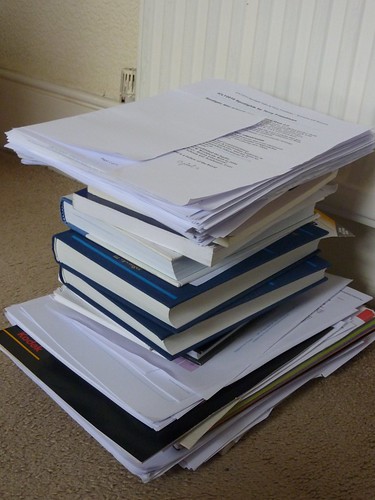
A little light reading...But another part of the reason is that it is now so easy to keep finding new sources of information to read and consider. The photograph represents the amount of reading I've done so far. Admittedly, this includes a few books, but the rest of it is, by and large, printed from the internet. In  fact, only this morning I accidently came across yet another article I think I ought to read.

Now, if I'd had to do all this research in my local library, as I used to before the web was invented, I would have stopped long ago. There comes a point where the likely benefit of reading one more article is outweighed by the cost (however measured) of acquiring it. That point is reached much sooner when you have to physically move from your home to a library (and possibly cart a load of stuff home afterwards).

What we have here is a modern manifestation of Say's Law, which states that supply creates its own demand. The reason I'm acquiring all this reading material is that it's so easily available. Perhaps too easily available.

Another example is in the field of writing. It is so easy to rewrite stuff that it's almost impossible to exercise the self-discipline required to say "That is now good enough." When trying a different turn of phrase, or looking up a nice quotation, or finding an appropriate illustration (or, in my case for this article, actually creating one) is so easy, the temptation is to keep on and on tweaking in the vain hope of achieving perfection.

Thirdly, lesson preparation has been made far more time-consuming now than it ever used to be, for all the reasons I've rehearsed so far. Worksheets and other resources tend to be more interactive, colourful, neat and engaging than ever. But I wonder if the gains in terms of students' learning are enough to justify the huge increase in person-hours that computer availability has led to?

(I'm sure I won't be the only person to be able to recount that some of my best lessons were the ones I thought of on the way in to work or even, sometimes, the ones in which I allowed a chance comment or question by a student dictate the content of the entire lesson, because the moment was there and had to be seized.)

Being able to answer such questions does not mean advocating a return to the steam age. But it strikes me that it would represent a much more honest appraisal of the relative costs and benefits of access to computer technology.

This is important, for two sets of people: teachers, because it's a workload issue, and students, who need to learn how to evaluate the effectiveness of technology. They should understand such matters both because it's all part of being digitally literate, and because otherwise it will become a workload issue for them too.

What all this boils down to is an economics argument. We tend to work, especially in education, on the basis of the well-known saying, 'If a job is worth doing, it's worth doing properly.'

This is almost never the case.

Think of it in terms of exam grades. If you advise your students to work as hard as they can to attain a grade A in your subject, the extra hours they spend doing so could mean their obtaining a lower grade in other subjects. Looked at from a higher perspective, what's better: one grade A and four grade Gs, or two grade Bs and three grade Cs?

Think of it in terms of lesson preparation. If you prepare one group's lessons absolutely perfectly, at the cost of being almost completely unprepared for all the others, would that be acceptable?

At the risk of sounding as if I'm advocating low standards (which I most definitely am not), I think we have to try to develop, and inculcate into students, the idea of 'good enough'. It's OK for things to be 'good enough': they don't have to be perfect.

Being a techno-addict (a boy who likes his toys), I imagine a technological solution. Perhaps a macro that will actually prevent you from working on a document any longer once a particular length of time has been spent on it. It would be easy to write.

Indeed, there is a free text editor that does something similar. Write or Die seeks to cure writer's block or slow writing by becoming more and more noisy and unpleasant as time limps on. It's almost impossible to continue in the circumstances it creates.

A technological solution to a problem caused by our inability to exercise self-discipline in our use of technology? I like it!


Web 2.0 For Rookies: Commenting

If there is one thing which really characterises Web 2.0, it’s the ability to comment on people’s work. Commenting is what can, or at least should, make a conversation possible. In this article I’d like to look at comments from both an educational and an etiquette point of view.

Educational

I’ve been to several presentations in which the speaker shows a screenshot of someone’s MySpace page indicating that they’ve received 1500 comments about something they’ve posted. My take on this is as follows:

  • How can anyone read, let alone respond to, 1500 comments?
  • If most of the comments are ‘Wow’, or ‘Cool’, how does that benefit the originator of the post, except for giving them an ego boost?

A more important, but more difficult to measure, criterion is how much influence your post has. Shelly Terrell made the following observation in a response to one of my articles:

I have used these posts at various times so just because I'm not commenting on them doesn't necessarily mean they weren't useful.

I’ve sometimes had people say to me, months after I’ve written an article that nobody commented on, that they found it useful.

Also, it’s now possible to read an article in one place and comment about it in another. I typically see comments about my articles on othert blogs, in Twitter and on Facebook. It’s possible, through the magic of RSS feeds, to collate various streams into one place and display it on your website. I find that looks a bit too messy for my liking.

Something I have done in order to keep track of when I or my articles are mentioned anywhere is to set up a Google Alert and a Twitter alert. These let me know, by email, whenever my name is mentioned on the internet.

It seems to me that used wisely, comments on students’ work could form part of your assessment for learning approach. The key to success in this respect is as follows:

  • Be aware of when comments are posted.
  • Discuss the comments, and what might be learnt from them.
  • Work out suitable responses whilst taking into account e-safety and time management issues.

Etiquette

I have set myself the following rules:

  • I always try to respond to comments. If someone has gone to the trouble of making a comment, the least I can do is acknowledge it.
  • I never post anything which is likely to offend people, such as swear words.
  • If someone makes a sensible-sounding comment, but has a website like ‘easyescorts.com’, I won’t publish it.
  • If someone tries to advertise their services in a comment, when the service has nothing to do with the subject in hand, I won’t publish it. Sometimes, I’ll even report it as spam.
  • I never respond to trolls, which is the name given to people who are just plain nasty. They have no interest in furthering the conversation, and usually hide behind a wall of anonymity. If you get targetted by a troll, it’s a compliment in a way because these people only attack those who are patently better than themselves, ie more educated or more informed. The common advice is: don’t feed the trolls. That is, don’t give them any attention. Here is a great post on this subject:

Trolls, meatheads and my mom

I like this video too:

Don’t feed the trolls

That video is a good thing to show to pupils to convey the effects of cyberbullying (because that’s what trollism is) on people.

I also love this feisty response to troll comments. Go to the YouTube site itself for the lyrics.


I found this on the Grammar Girl site about making comments online. It’s a great post and you should definitely read it with your students.

I’d love to know what you think of my comments on comments – but nice ones only please!


The 30 Goals Challenge

#30goals When a long-time subscriber to my newsletter, Computers in Classrooms, emailed me to ask if I could recommend a blogger she should follow, I had no hesitation: Shelly Terrell, without a doubt.

Seemingly indefatigable, Shelly writes an amazing amount of stuff, all of which is high quality. Following her on Twitter is good for one’s professional development in itself, but her blog, Teacher Reboot Camp, is definitely worth a visit.

And worth subscribing to.

At the moment, Shelly is writing a series in which she is setting a new challenge every day for 30 days. Known as the Goals 2010 Challenge Series, this is an excellent set of posts that are:

  • Challenging
  • Replete with resources
  • Well-written

The upbeat tone of the articles, together with their good advice and questioning, serve to remind us of the sheer excitement of working in education.

I have to say I find some of the posts a bit long, so I tend to speed-read them much of the time. That’s not a criticism actually. I prefer long posts sometimes because I like something I can get my teeth into. Besides, Shelly often formats her articles in such a way (ie with bullet points and suchlike) that reading them quickly is not difficult.

I love her challenge about causing a ripple. In fact, I love the idea of this sort of series, and will be starting one myself soon, on a different topic. I’ve been intending to do it for ages, but have been waiting for the right time. Inspired by Shelly, I’ve now decided to start writing it while I’m waiting for the right time!

Another series you might like is Steve Dembo’s 30 Days to be a better blogger.

But check Shelly’s out first ;-)


Web 2.0 For Rookies: Presenting

I can't think of any course in ICT, apart froma  few very specific application-centred ones, that does not require students at some stage to present their findings, views or designs to the rest of the class. The good news is that there are a few applications online which make it very easy to create presentations, share them, and invite comments. Here are four which you might like to explore.

Slideshare

This is like an online version of PowerPoint. Indeed, you can uipload your PowerPoint presentation to form a SlideShare version. Unlike PowerPoint presentations, SlideShare ones can actually be embedded in your blog post or web page.

http://www.slideshare.net

VoiceThread

This enables you to create a presentation from your photos or other pictures, and add a soundtrack (music or commentary) to them. Nothing unusual here, you might say, except that viewers are able to leave their own audio comments on each slide.

The fascinating thing is that once the comments start to build up, unlike the case with some applications, they seem to become an integral part of the presentation. In other words, they enrich the original upload. Great for letting kids collaborate in an easy way!

http://voicethread.com/

Glogster

One does not often associate the word 'fun' with presentations, but it comes naturally when referring to Glogster. Imagine a poster that can contain not only text and graphics, but sound and video too, and that's Glogster.

It's supremely easy to use. The real challenge is ensuring that your 'glog' tells a story: with all those wonderful options available, cacophony is never far away!

http://edu.glogster.com/

Animoto

Last but not least, Animoto, as the name implies, makes it easy to create a video from still pictures. LOad the pics, select some music, add text if you like, and Animoto does the rest, creating an animated display of your 'slides', synchronised with the music. It's a good way of creating a dynamic presentation without needing very much technical know-how. The skill lies in deciding whcih photos to use, and what music to choose to accompany them.

http://animoto.com/

Go on, give these applications a whirl! Get the kids to try them out. Unlike PowerPoint, these don't tend to channel you into creating lots of bullet points -- well, apart from SlideShare I suppose, but then that would have come from the priginal PowerPoint anyway!

If you enjoyed this article, check out the others in this series.

Games-Based Learning: 3 Things You Need To Know About

If Games-Based Learning is something you’re interested in, or something you don’t know much about but would like to explore, you’ll be interested in these 3 events.

The Games-Based Learning Conference 2010

The first one I’d like to mention is the Games-Based Learning Conference in London. This takes place on the 29th and 30th March, and I would say it’s essential to attend, for the following reasons.

  • I think – and have always thought – that games have tremendous potential for education, as you can see from my case study. It’s great to have a conference dedicated to this subject.
  • I attended the conference last year, and found it extremely stimulating. I met or attended sessions by people who are not on my radar at all.

    For example, I attended a short presentation by someone developing a so-called ‘serious game’ (I thought all games were serious; but what’s wrong with having fun anyway?) for a particular organisation at the time. As I had already arranged a visit by a group of teachers to the company to look at their IT systems, I was able to ask our host for a special detour to find out more about the simulations it had commissioned.

    I also attended one or two talks by academics, some of whom came from abroad. These talks brought an extra dimension to my understanding and knowledge of games-based learning.
  • Like the Handheld Learning Conference, which is also organised by Graham Brown-Martin, the GBL Conference has a very vibrant, upbeat, celebratory atmosphere. At the end of the Handheld Learning Conference in October 2009 I scribbled one word on my notepad: ‘exhilarating’. The GBL Conference is similar.
  • The organisers have been sensible enough to invite Derek Robertson of Scotland to give one of the talks. They’re doing brilliant things in Scotland – so much so that, having attended a Scotland-centred session at the Handheld Learning Conference, half of us were ready to emigrate there and then!

There’s an early bird discount if you book by the 31st January. The cost will be £345 + VAT, a saving of around £250. In addition to a fully inclusive 2 day conference, there is a social networking evening with drinks and the choice of an additional workshop hosted during 2010 in London by Playgen. Also, every ‘early bird’ will receive a FREE digital camcorder so that they can record parts of the conference that interest them. Hopefully this will encourage some video blogging and uploads to YouTube, etc, which should make an interesting addition to the usual Twitter stream and the more official Blip TV videos of the keynotes. There are also two newsletters available at:

General: http://bit.ly/57jJuG

Trade: http://bit.ly/5e4Zr2

To find out more about the conference programme and to register, go to the conference’s home page. And don’t forget: Early Bird registration ends on the 31st January.

Computer games, learning and the curriculum: uneasy bedfellows?

Another, very different, event you might like to attend is the Mirandamod event on the 9th March at the Institute of Education. Run under the auspices of Mirandanet, an academic group founded by Christina Preston, these typically take the form of a seminar at which two or three guest speakers give a presentation and the rest of us chip in, followed by a debate. What makes the experience quite rewarding is the following:

  • Unlike a conference, the atmosphere is a bit more intimate. I’m not talking about candlelit dinners intimate, but with a smallish number (around 20 or so) it’s easy to get to talk to most people there.
  • The event is live-streamed, so we receive comments and questions via Twitter and through the FlashMeeting videoconferencing system.
  • There’s a nice variety of speakers and attendees. This time, for example, Handheld Learning Award winner Dawn Halleybone will speak, as will Colin Harrison, Professor of Literacy Studies at the University of Nottingham, and Dominic Preston (Christina Preston’s son), who will talk about marketing issues.

I will be chairing this event, and look forward to meeting you in person or seeing you online. To find out more about it, read the details, and register, online.

Computers in Classrooms Games in Education Special Edition

The final ‘event’ is the publication of a special Games-Based Learning edition of Computers in Classrooms, my free e-newsletter. I have invited a number of guest writers to give their perspectives on games in education, and there will be reviews as well a prize draw for an award-winning game. Only subscribers will be entered into the draw, and as a subscription doesn’t cost any money, what are you waiting for?

If you have experience of using educational games, or of games in an educational setting, or views, why not share them with your fellow travellers on this road to enlightenment? I can accept articles ranging from ultra short (140 characters), to almost ultra short (50 words) to average (600 words) to rather detailed (1500 words). But get in touch to pitch me your idea first!

If discursive writing isn’t your thing, do have a look at my 50 Ways To Contribute To A Website. There’s sure to be something there to appeal to you!

That edition will be coming out in April, after the Easter break. There are some other great issues planned as well, including a post-BETT special. If you’d like to look at past issues and sign up (did I mention that it’s free?), just go straight here:

http://www.ictineducation.org/newsletter/


The Value Of Games in Education: A Case Study

A short while ago I wrote about my first ‘wow’ moment in educational technology. It concerned using a computer to simulate the workings of a concept in Economics known as ‘the multiplier’. It’s not important what that actually is. More to the point is the fact that it was through using a simple computer program that enabled students to get the concept in an instant, simply because the results of their actions could be seen straight away.

That wasn’t a game as such, but it’s relevant because, just a few years later, I had my students playing a simulation called Running the British Economy. Utilising both the Treasury model and the latest Treasury statistics, the game involved manipulating a number of economic variables in order to keep the economy on an even keel between inflation on the one hand and high unemployment on the other.

Now, the game had value right out of the box. Students were given access to the Chancellor of the Exchequer’s goodie bag, and found out after five game years how successful they’d been, as measured by the simple issue of whether they’d been voted back in after a pretend general election.

OK, Sim City it wasn’t, but it was complex, realistic and, crucially, gave feedback on the effects of changing tax rates, interest rates, government spending and many other things. My students ‘got’ it. I entered them for a national competition, and they came second, beating even a team from a private school. They learnt more in the few weeks of playing the game than I could have taught them using traditional methods in a whole term.

But for me, the real value of the simulation became apparent if you decided to try and break the rules – in order to find out what the rules actually were.

So I instructed the class to go for full employment at all costs. Increase government spending. Reduce taxes. Go for it! They succeeded. Within three game years there was 99% employment. There was a slight problem that inflation was running at around 1,000%, but we’ve got to make sacrifices, right?

However, the prospect of riots in the street and the government being lynched didn’t appeal much, so  we went for the opposite: zero inflation at all costs. We did it too! Within a year of cutting all non-essential services (health care, police, armed forces, education) we had a negative rate of inflation: prices were actually falling! I’m sure the 2% of people who still had jobs were delighted.

What we discovered from all this is that the Treasury model was based on Keynesian economic theory – which is fine if you believe that to be an accurate descriptor of how the economy works. If, like Margaret Thatcher and others, you do not believe that, then the ability of simulations like Running the British Economy to predict outcomes is seriously called into question.

As a result of mis-playing the game in the way we did, my students and I were able to uncover the underlying assumptions of the economic model being used. That led us on to rich discussions, not only about the assumptions in this particular case, but the fact that they were not made explicit anywhere. How far might other economic ‘predictions’ – such as the one which states that if you reduce State benefits you’ll get more people into work – be based on models whose assumptions are questionable? Perhaps even more to the point, the assumptions you start with determine the result. What playing the game in this showed us was that there’s no such thing as an objective economic model, whatever the pundits try and tell you.

This is just one example of how a game or simulation was used as a means of bringing about some very deep learning in quite a complex area. If you’re interested in how games can be valuable in education, you’re in luck because there are three important events coming up. I’ll be writing about those in a separate article.

ICT and Citizenship

Do Citizenship and overlapping subjects like Personal, Social and Health Education (PSHE) have a relationship with ICT? I would suggest they do, in the following ways.

ICT as a facilitator

In a general sense, I believe that ICT can work with any subject in a facilitative way. It’s a discipline, by which I mean a way of looking at things, and a set of skills which together make it possible to do things that would otherwise be very difficult.

For example, at the most fundamental level ICT makes it relatively easy to obtain information. Making sure it’s good information is another matter, of course, but the point is that acquiring the information in the first place is reasonably painless.

It is also easy to collate and present information. For instance, any subject can, and has, benefitted from the existence of a well thought-out website. That’s why I was happy to publish two reviews of a new Citizenship website called Your Justice, Your World. If you read the reviews, one for primary (elementary) school teachers, the other for secondary (high) school teachers, you’ll notice that there is a lot of emphasis on how and whether the website works as a website, regardless of the content. The material is presented on a website, therefore the website has to be effective from an educational point of view: the medium is very much bound up with the message.

Modelling in its broadest sense is easy too. Videos abound of people in situations which youngsters in this country cannot even imagine, such as that experienced by the young lady in this video about human rights.


FIGHTING SUPPRESSION

The effects of technology

One of the things I try to do on this website from time to time is look at issues arising from the deployment of technology, because that is on many ICT syllabuses. For example, I looked at what might happen in the event of a cyber-attack on the country. Topics like this blur the lines between technology and citizenship/social perspectives, providing a reason for the subject specialists in these areas in a school to do a bit of joint project planning.

E-safety issues

Finally, the use of technology, especially where it involves the internet, raises e-safety issues. This was very much in evidence throughout the Web 2.0 Projects book I’m currently putting together. One or two contributors to that have come up with the eminently sensible suggestion that e-safety and netiquette are issues which ought to be addressed within Citizenship and PSHE, and not only in ICT lessons.

Conclusion

ICT and citizenship do not have to be wholly separate topics, as I hope this article has shown. I believe that to be true of other subjects in the curriculum too. If you have ideas on how other subjects, such as History or Geography, relate to ICT, please considered suggesting an article you might write for these pages.


Review of Your Justice, Your World From a Primary/Elementary Perspective

Beatriz Lopez Tienza looks at this new website from a primary school’s perspective.

For the last couples of weeks I have had the chance to try this new website with my students. The website provides a number of lessons with matching activities. The lessons are based on an imaginary town and the issues surrounding this neighbourhood. The website´s layout is very clear and engaging, however for younger children brighter colours would make it more attractive. The first and second units, which are based in the new school, Crownford Rise, were the most suitable for the age group I teach (Year 2). The characters are primary school children who have the same problems as the children I teach. The third and fourth units were more complex, dealing with issues that at the moment do not affect the children in my class, which makes it difficult to role play the scenarios.

The website offers a good range of activities catering for all kinds of students, discussions, role play, worksheets and online activities which can be printed once they have been completed. It also offers extension activities for more able students. Students with special educational needs should be able to access these activities, although depending on their needs they may need adult support.

The content of the website is in line with the current National Curriculum requirements for PSHE and Citizenship as stated in each lesson plan. It will also be suitable when the new primary curriculum is in place, as it will address the main requirement, educate responsible citizens who would make a positive contribution to society. I have concentrated on the 7-11 activities, although some of my children are still only 6 years old.

Role-playing and reporting

When I first explained that we were going to do citizenship on the computer and that they were going to be able to play some interactive games, they felt very excited. Previously we had been able to use the computers to do some work related to citizenship, but they had never been able to play citizenship games on it. This has brought a new dimension to the subject and although they have always enjoyed it, throughout the week they kept asking me when they were going to do citizenship again.

We started with the first unit: WHAT ARE LAWS FOR? In this unit, children carried out the suggested role play activity. We set up a mock council meeting, which proved to be very successful. Most children are not part of the school council and at this age and they sometimes find it difficult to envisage how the school council works. I decided not to have children playing the part of the school governors, as this role is not clear to them, but we had pretend parents, teachers, children and neighbours (in case they wanted to say something about noise levels during playtime). They then became reporters.

I slightly changed this activity and instead of writing for a newspaper, they reported in the news, as I didn’t want the children to worry about the writing and miss the essential points of the lesson.

We answered the questions together and then, in groups they chose a sentence to report on. I found that the use of a pretend microphone helped! They also designed a leaflet for Martians. The stimulus for the activity was very successful, especially for boys, whose engagement at times can be a challenge. They love Martians and they enjoyed explaining the school rules in the leaflet.

Overall the unit was a success. Children felt engaged at all times and produced some great pieces of work. The only aspect that proved difficult with some children was the amount of reading that it was required to complete the online activities, for example, when playing the dominoes game, they needed to be able to read all five pieces of writing before matching them to the image. Also for the quiz, we had the same problem, we needed to solve the quiz as a group. However, we found a way around this difficulty by pairing more able and less able children, which is what I intend to do from now on.

Lesson structure

The lessons within the unit are structured in three main parts:

Discussion: I allowed about 10 minutes for this part of the lesson, as when children came to a decision on the issue proposed, they found it difficult to then consider other points of view.

Role Play: this was probably the most successful part of the lessons. Children understood the purpose of the activity and found no difficulty in becoming someone else, although as specified before, some roles were removed as they were not relevant to children of this young age.

Extension activities: These activities were also of their interest. In here they had the opportunity to record, in writing, orally or in pictures, their thinking and conclusions.

Finally I would like to add that the opportunity to print their own work when completing online activities was very well welcomed by the children, the print outs were clear and attractive. Overall I have found this website very useful. The opportunity to do citizenship online, children to play interactive games, following a story of “real” children and having a structured lesson plan to follow has been really successful, and therefore I plan to continue making use of it in the future.

Beatriz Lopez Tienza teaches Y2 and leads PSHE and Citizenship in Whitchurch CE Primary School, Hampshire. The school is set in the small town of Whitchurch, Hampshire. It has 287 number of children who come from the surrounding area.

See also our review of the YJYW website from a secondary perspective.

Technology and Writing: Dealing With Ideas

The great thing about technology as far as writing is concerned is that we need never forget a brilliant idea. I sometimes think to myself how much I admire writers (or, indeed, anyone) in centuries past for writing anything at all. I mean, if you're travelling on foot or by horse and carriage in the 18th century and you have a great idea for a story, how do you jot it down? Did Samuel Pepys, for example, carry a quill and an inkwell around with him?

I suppose that most of the time such issues never affected most people. Only a small elite was able to read, and en even smaller elite able to get their work published. But what of the present?

One of the words people use to describe me is 'prolific'. If that's the case, how do I manage to write so much? I think there are three factors.

Firstly, I have lots of ideas for articles. In this respect I don't think I am any different to anyone else.

Secondly, I act on those ideas. I think that probably in this respect I am different from a lot a people. I've met plenty of wannabe writers who bemoan the fact that they have never had anything published, forgetting the inconvenient fact that in order to do so you actually have to write something. Maslow distinguished between primary and secondary creativity. The former is having the ideas and creativity in the first place. The latter is being prepared to go through the agonising process of writing something, tearing it up, and starting again. This, for example, is my second attempt to write an article connecting writing with technology. I spent nearly an hour on the first one before deciding it was a lost cause.

Perhaps this is what Oscar Wilde meant when he said:

This morning I took out a comma and this afternoon I put it back in again.

And read Gerald Haigh's comment on my post entitled The Right Writing Style. He says:

Time and again, when I write an article, I go back and cut the whole of the first para. That's because I've sort of used it to get up speed, and it ends up being quite redundant. The general point is that ruthlessness with the virtual scissors is essential for all writers. "Kill your babies" is oft-used saying -- i.e. don't be afraid to cut favourite lines. You may be the only one who thinks they're any good.

Thirdly, how do I ensure that I remember the ideas I have? In my time I have used several kinds of technology to help me:


·    A notebook and pen. You can't beat it for speed, reliability and robustness.
·    A cell phone. I use the notes feature to jot down some points.
·    Alternatively, sometimes I will leave a message for myself on voicemail, so it will remind me when I arrive home.
·    I've sometimes used digital recorders to record my thoughts whilst driving.
·    I'm pretty good at creating visual prompts for myself. I always carry a camera around with me, or there is always my cell phone. A well-chosen photo is often all I need to remind me of what my earth-shattering idea was.
·    I used to have a pocket computer called a Psion Organiser which I always carried around with me. It had a qwerty keyboard and I managed to get quite fast on it. I once even composed an entire issue of my newsletter, Computers in Classrooms, on it. Sadly, the ravages of time have rendered the screen virtually unreadable to me now, but I cannot bring myself to get rid of this wonderful little device.
·    If I am out and about with my netbook and have discovered a nice cafe with a free wi-fi connection, I jot my ideas down in Google Docs, from where I can retrieve them once I get back home.
·    If the nice café does not have wi-fi access, undaunted I will use OpenOffice for my scribblings.
·    Finally, however I have recorded my ideas, I enter them into a Word document I have created called, erm, 'Article Ideas'. That keeps them fairly secure, in case I lose a notebook or my phone or another device gets trashed. I've tried those things which create a wordprocessed document from your handwriting, but my handwriting has become so illegible over the years that I spend more time correcting and spell-checking than I would spend typing it up from scratch!

Unlike Samuel Pepys, we don't have any excuse for forgetting ideas for articles if you're not within reach of a quill: think tech, and you can't go wrong!

Review of Your Justice, Your World From a Secondary/High Perspective

Will Ross looks at this new website from a secondary school’s perspective.

This is a thorough resource on the justice system with a wide range of web-based activities and useful lesson ideas. It is not a one-stop-shop in terms of just leaving students to work through the units. However it is not designed to be used like this and If a teacher is willing to put in the time to work out what they want their students to learn and go through the teachers’ notes to support the web-based activities using this resource will be rewarding in terms learning and engagement of students.

Graphics and layout

The graphics on the whole are good. The cartoons are not too immature for older students but would still appeal to younger students. The use of the map seems a bit of a needless distraction as it adds little to the navigation and the moveable map in the circle at the bottom right corner of each activity seems to serve no purpose at all.

The layout is “busy” but clear. Occasionally during the activities it is difficult to locate what to do next in terms where the appropriate button is.

I think sight-impaired students would struggle with the size of the text and the intricacy of some of the drawings. However by providing the audio of the written elements it goes someway to combat this.

Age suitability

In terms of suitability for different age groups, I think this depends on how you choose to use it. Some Key Stage 3 students would struggle with the amount of text and written sections required with some activities. However if a teacher were to use this as a stimulus using the IWB it would be manageable.

Key Stage 4 students could to some degree be left to work independently with the activities. The print option also provides an opportunity to produce evidence of their learning. This is more valuable than the multiple choice assessments at the end of each section. These may be enjoyable for students but simply test on facts rather than learning across the unit.

Differentiation is mentioned in the “How to use this resource” section but this is a bullet pointed list of strategies that most teachers are well aware of.

The resources

The resources for 7 to 11 year olds could be used for more independent work with KS3 students and with those with special education needs in a more directed manner. This is due to less text and simpler interactive activities. However the topics are sometimes clearly for younger students making this troublesome, such as coming up with rules for your primary school.

In terms of meeting National Curriculum requirements for Citizenship, the web-based activities clearly meet some range and content in terms of legal rights and the justice system. It still requires the skill of the teacher to make sure they deal with the concepts and processes. The discussion, role plays and extension activities in the teacher notes give a useful steer for this. In terms of the National Curriculum links given within the teachers’ notes sections, I find some of these are not entirely accurate missing off some of the processes being used for activities.

The teachers’ notes contain a useful background information section with key terms and some links. The glossary pages are inexplicably numbered rather than alphabetised making navigation needlessly tricky. However within the text in the students’ activities any key words are underlined and when clicked give a succinct definition.

The useful links and resources section is fantastic covering a range of topics and containing some very good resources. Quite often links pages on education websites simply have every link and resource available with no quality assurance whereas there seems to have been a lot of care taken here.

The “How to use this resource” section is 6 web-pages and would be more palatable as a 1 or 2 page download. I initially did not realise there were 5 further pages resulting in me blindly struggling with the notes on the activities at first. My main concern with the resource as a whole in that it is just so big, though the designers have done their best to help with this by providing clear objectives for each section and easily navigable activities.

If teachers take the time to decide which sections are appropriate for their students, breaking up the web-based activities with the discussions and role plays, they will find this a fine and useful resource.

Will Ross is the Association of Citizenship Teachers’ Citizenship CPD Project Manager and Consultant.

See also Beatriz Lopez Tienza' review of the YJYW website from a primary/elementary perspective.

These articles first appeared in the newsletter, Computers in Classrooms.

Web 2.0 For Rookies: Creative Writing

One of the big issues of our time seems to concern writing. Or, to be more specific, NOT writing. And to whittle it away even further, boys' writing. Apparently, boys don't like writing. If that's the case, perhaps Web 2.0 can help?

I think the first thing I'd like to say is that if it happens to be true that boys don't like writing, perhaps that's because they're not being asked to write about anything they're interested in. I know that's either a really facile statement or a no-brainer, depending on where you stand on the issue, but it strikes me as pretty obvious that if you ask someone to write about something they have no interest in whatsoever, why would they?

You might say that the same argument applies to girls, and you'd be right. Except that in my experience girls tend to (a) be more compliant than boys and (b) like writing for its own sake anyway.

I recall that in one class I had I could not get one of the boys to settle down for more than ten minutes at a time. Then one day, he was really quiet and engaged for about 25 minutes before I could risk breaking the spell by talking to him.

"I don't understand this.", I said. "Normally you're a complete head-banger, and all of a sudden you're a model pupil. How come?"

He laughed and then gave the brutally honest response, "'Cos usually I don't find it interesting enough to bother."

So what was so interesting that captured his attention for the entire lesson? He was compiling a list of all the games his team had won in the last ten years, from a whole load of football programmes he'd brought in. For me, that would be the most boring thing on earth. For him it was captivating. As my American friends might say: "Who knew?"

But even if you regard this example as an aberration, is even the broad statement about boys and writing true?

I think not, because boys write all the time. Perhaps what is meant is discursive writing, but boys text each other, and send each other games cheats by instant messenger or Facebook, to take a couple of examples.

Well, that's a start for an article like this, because there are several ways in which teachers can take the enthusiasm of boys for writing, which I believe does exist, and the variety of Web 2.0 applications, and harness them together. Here are some suggestions.

  • Get the pupils to take it in turns to act as the class scribe. The scribe writes down the main points covered in the lesson, and writes it up in the class blog. Check out Sue Waters' Using Scribe Posts on Class Blogs for some tips and references about this.
  • Get the youngsters to write film and book reviews, either using a blog, or using something like Blippr. Blippr is a social network which specialises in reviews. It gives you 160 characters -- the same as you get for a text message - in which to have your say. It's possible, and it's fun -- but it's challenging (which is, more than likely, WHY it's fun). Have a look at mine for some examples.
  • If 160 characters strikes you as far too easy, how about 140? You can use Twitter for the same sort of thing, or for writing short (very short!) stories. See, for example, Twitterfiction.
  • If you like the idea of a book review in 160 characters, but not the idea of a social network, try Wallwisher. It's like having post-it notes, and you can type up to 160 characters on each one. You can also include pictures and, a big bonus, everyone can see each others' efforts. Maybe you could even get boys to work together on some writing.
  • Blogs are useful for writing book and film reviews too. There are one or two great examples of this in the forthcoming 'Amazing Web 2.0 Projects' book.
  • Also in the book are some creative uses of Twitter, including its use in getting a class of primary school children to understand what life on the run must have been like from the standpoint of one of the Gunpowder Plotters.

I could go on giving example after example, and don't forget there is also the writing involved in podcast and video scripting - not just the dialogue but 'stage directions' too.

I think that by using a variety of Web 2.0 applications it can't be that hard to get kids -- including boys -- writing.

Of course, finding a topic they're actually interested in -- or making a topic interesting to them -- no doubt helps!


Educational Uses for Microsoft's Deep Zoom

I was impressed by Microsoft's Deep Zoom Composer tool, which I saw demonstrated at the Naace conference 2009. Deep Zoom Composer lets you explore hi-res photos in a very innovative way, letting you get in closer and closer, or back away further and further.

You can see what I mean by looking at the demonstration shown on a video created by Ollie Bray.

The question remains: is this a solution looking for a problem? Probably. But I can see how this might be used in an interesting, and perhaps unintended, way.

First, though, watch the video:

Pretty cool, right? Now, it seems to me that where the thrill factor comes in as that at each stage of the process you think you have the full picture, and then discover that you were only seeing a small part of a much bigger picture. In a sense, this is an alternative way of depicting what the TV advertisements for the Guardian newspaper in Britain showed a couple of years ago:


Getting back to Deep Zoom, you could use it as a metaphor in citizenship, media or politics courses. You could also use it in science, geography or history. Basically, you could use it in any situation where you wanted the students to understand that everything that happens, happens in a particular context, and that sometimes you have to go quite a distance away, or quite a few years back in time, to really get an idea of just what that context might be.

Wordle Summary:

Wordle: Deep Zoom Composer Article

What Was Your 'WOW' Moment

Dr John Cuthell of MIrandanet likes to ask people what was their 'wow' moment, that nanosecond in which they realised that technology had something truly transformative to offer.

That 'wow' moment!For me, that moment came in 1976. Interestingly, I had already been using technology, but at one remove. I was teaching Economics at the time, and in order to familiarise my students with the vagaries of the stock market, I enrolled them in a game called Stockpiler. The idea was that you were 'given' a certain amount of money, and the students' job was to use that to maximise their profit through the buying and selling of shares.

Each week they would pore over the share prices and, having spent their 'spare' time (I didn't believe in such concepts) in the previous week reading periodicals like The Economist and the newspapers (I'd made sure these were amply available) and then make their decisions.

I would then collect in the forms on which they'd detailed their instructions, and send it off to some central processing place. Around a week later we'd find out how we did.

That was interesting, but it's hard to become excited by the technology when the time between input and output is so high.

About a year after I'd joined the school, a student brought in his computer. He had taught himself to program it, so I asked him to knock up a quick program to emulate a concept called 'the multiplier'. He did so, and the rest of us crowded around the screen. When we saw the numbers responding instantly to the suggestions we threw at him ('Make the interest rate 12%'; 'Lower income tax to zero'), I knew things could never be the same. With this technology it would be possible to model the behaviour of systems and show instantly the effect of changes in inputs on the outcomes.

That was my 'wow' moment. What was yours?