Awards for the best use of technology in schools

Becta has announced Inner-city comprehensive Broadgreen International School in Liverpool and independent Prospect House School in Putney, London as the top two schools in the UK when it comes to the best use of technology.

I think it's worth reading the article below, and going to the Awards website (see below), in order to pick up some more ideas about what constitutes great use of ICT in schools.

The prestigious accolade of ‘Best Whole School’ is given to only one secondary (high) and one primary (elementary)school each year. The two schools beat more than 100 other schools across the country to collect their awards at Bristol’s newest science venue, At-Bristol, last night.

Both schools have demonstrated that they have successfully placed technology at the heart of learning as well as wider school management.  This has helped to enhance teaching and bring lessons to life. It has shown how technology makes a difference, not only in the classroom, but at home within the family and across other school activities. As I will say in my talk at Classroom 2.0 Live tomorrow,

"People ask: how can I use this application in my teaching? That’s starting with the technology and hoping it will lead to the education bit. A better question is: what applications can I use to help my students achieve X? That starts with the education and leads on to the technology. I think there’s a reason our area of expertise is sometimes called ‘educational technology’ as opposed to ‘technological education’!"

Broadgreen International School impressed the judges with its futuristic technology centre and use of ICT to involve the wider community in every aspect of the school’s life including its deaf resource base and a lively ‘silver surfers’ group.

The school’s Deaf Resource Base was able to create an online British sign language version of ‘Living in the Blitz’ for history lessons. It is fully accessible by deaf pupils, allowing them to work alongside and complete the same work as hearing pupils.
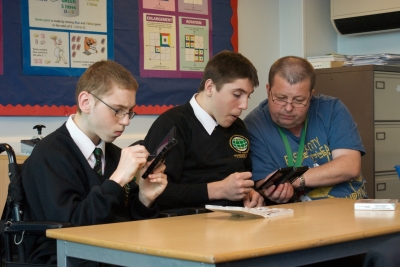
Students and teacher at Broadgreen School

The school also has ‘Silver Surfers’ groups for older members of the community learning to use technology. Age is no barrier and Les, an original member of the group who is ninety next birthday, regularly communicates via webcam and has his own blog about his war time experiences.

When giving advice to other schools looking to boost ICT, Peter Banks, Assistant Headteacher, says: “Use the Becta self review framework to see where you are and how you can improve. Ensure your ICT equipment is up to date and sustainable in terms of financing. Visit schools that are using ICT well so you can learn from them.”

I would certainly agree with all this, and made that last point myself in the article 10 Ways to Become an Inspirational Teacher.

The SRF is something I very much go along with too. It's comprehensive, and at the same time generic enough to incorporate as-yet-uninvented technology.

Prospect House has students who are confident, enthusiastic and independent in their use of computers, mobile devices, digital cameras and virtual learning platforms across the entire curriculum. From reviewing their sporting performances on screen to creating animations in art lessons, technology is used in every lesson to help students achieve more. It sounds like the school has successfully embedded the use ICT right across the curriculum.

The school also posts podcasts of lessons on its Virtual Learning Environment, so that parents can see how, say, long division is taught. This has helped to raise parental involvement in their children's work.
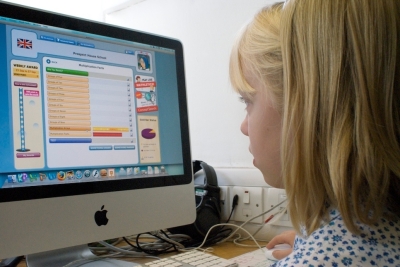
Pupil at Prospect House

When reflecting on why the school won the award, Dianne Barratt, the Headmistress, says it is a combination of a shared vision by the Senior Leadership Team, including the school governors combined with an enthusiastic staff, all of whom are committed to developing their practice with the aid of technology. 

For more information on the Awards, please visit the Winners 2009 website, where you will find details of other winners, as well as further information about each one along with short videos. On a personal level, I was delighted to learn that The Havering ICT support service was a joint winner in the Support for Schools section.

Acknowledgements

Thanks to Kate Brennan of Shiny Red for information, case studies and photos. I’ve amended the written stuff (not the photos!) with permission. Thanks also to Dave Smith of Havering for additional information. Read Dave’s Havering blog for more ICT-related news.

Further information

The ICT Excellence Awards is an awards scheme open to all schools which aims to identify and reward excellence in Information & Communications Technology (ICT). The awards acknowledge UK schools approaching technology in outstanding or innovative ways.

See also the Next Generation Learning website.


Robot rights

"I will NOT have any daughter of mine bringing a robot into this house!"

You can just imagine the family rows of the future, should technology ever reach the point where it isn't possible to distinguish between humans and non-humans merely by looking at them.

And what of the ethnic monitoring forms of the future? Will employers have to ensure that a certain percentage of its workforce is non-human? An ethnic monitoring form of the future?

An article in the Daily Telegraph reports that people have already started to think about such matters:

"Society must decide if it is willing to accept relationships between humans and robots before the machines become so sophisticated they start demanding rights, a legal expert has warned."

I recall reading a short story some years ago in which a person discovers that they're not human, but a robot, and has to leave his job because of antagonism which I suppose would be classified as 'robotism'. It gives grist to my mill that, as I argued recently, science fiction can be a great starting point for discussion in a whole range of areas.

Furthermore, as this story in the Telegraph shows, the pace of technological change is such that we cannot assume that just because something is still confined to the fiction area of the bookshop it is not worth thinking about for its implications in actuality.

What Anna Russel, the legal expert referred to, has done is to extrapolate from current technological developments to potential problems for the future. This kind of exercise can be quite useful in getting students to think about the (possible) effects of technology on society, which is part of the National Curriculum in England and Wales and the curriculum of other countries.

What's RSS and why is it useful?

Here's a quick guide to RSS, which you may have seen mentioned on websites and blogs. (Note: I've written this guide with the complete novice in mind. If you already know what an RSS feed is, think about bookmarking this article in order to refer to it colleagues who are less knowledgeable than you. Thanks!)

What does RSS stand for?

The most commonly accepted answer is 'Really Simple Syndication'.

What does RSS let me do?

It makes it easy to do two things really easily. Firstly, it lets you read the articles on your favourite websites all in one place, using an application called a 'feed reader'. Secondly, as an extension of that, it lets you collate the latest posts from several blogs all in one place. It doesn't have to be only blog posts. It could be latest comments on someone's blog, or their most recent tweets in Twitter, or anything else that has an RSS feed.

Taking the first point, it means that you don't have to traipse from one website to another to check if there is anything new: new stuff will show up in your feed reader automatically.

How do I obtain a feed reader?

Just search for the term 'feed reader' and then find one that suits you. You can have one which is installed on your computer, or one that resides on the web. I prefer the latter, because it means it doesn't matter whether you're sitting at your own computer or not when you feel like checking for new content. Some installed feed readers let you synchronise with a web-based one, meaning that you potentially get the best of both worlds.

Popular feed readers include Bloglines and Google Reader, which are web-based. For other readers, look at this article about feed readers.

Update: since this article was written, Google has decided to discontinue its RSS Reader service. There are plenty of alternatives, however. Check out RSS isn't dead: the best Google Reader alternatives. Read the comments too, as there are suggestions in there as well. Feedly has been cited lots of times in articles. I myself have started to try one called The Old Reader, which seems quite nice.

How do I subscribe to an RSS feed?

If you've installed your feed reader's browser toolbar, you should be able to do so by clicking on 'Subscribe', if the blog or website has been set up to allow this. Otherwise, look for an icon like this: and click on it; your feed reader should do the rest. If it doesn't, right-click on the icon and select the menu item which reads 'Copy link location' (or similar), open your feed reader, and then paste the link into the New Subscription box. Don't worry: it's all a lot simpler and quicker than it sounds.

How do I read new articles?

Just open your feed reader and see what, if anything, has been added to the various websites since you last looked.

Conclusion

RSS makes it easy for you to keep up with lots of reading in a shorter period of time than would probably otherwise be the case, because you're not racing all over the internet from site to site.

If you're a teacher, it can also benefit your students. For example, if your school uses a virtual learning environment (VLE) you could set up areas for students to visit where the latest headlines from a range of websites are displayed. That could be used purely for reference, or you could incorporate it into lessons. For example, the first five or ten minutes of each lesson could be spent discussing what's new in the world of hospitality and catering, or in business and finance. At the risk of sounding clichéd, the uses for RSS are limited only by your imagination.

I hope you have found this useful. Feel free to comment on the article.

18 highlights from the 140 Conference

Yesterday I attended the 140 Character Conference in London, where I met up with Bill Gibbon, Neil Adam and Bill Lord.

From left to right: Neil Adam, Bill Lord, Bill Gibbon, Terry Freedman

Here are 18 highlights, any one of which could be the start of a rich conversation. I think if you take the volume and variety of the presentations overall, you would have to conclude that any schooling which does not address matters such as etiquette in, and use of, Twitter and other social media is not really a fully rounded education at all. Anyway, here are my ‘takeaways’.

I love the idea of Buy A Credit. Donate £1 and you get to have your name listed on the credits of a film. The money goes towards financing said film. What an ingenious idea. @buyacredit.

In the eracism slot, Kyra Gaunt told us that racism gives us the opportunity to be courageous.

Apparently, one fifth of businesses in the UK are on Twitter.

Several people, such as Stephen Fry and the lady from SB Buzz reminded us that Twitter is a relationship channel, not a sales channel.

Alex Bellinger told the story of a high street florist which engages its customers with Twitter. The plasma screen in its shop, displaying Twitter conversations, attracts curiosity, and then converts. This would probably be a good tactic to adopt in a school setting, both as a way of engaging other teachers and, on open days, parents.

I liked hearing from Dean Landsman and Dean Meyers that an augmented reality system tried out in New York provided the information that, in a particular direction, the nearest tube was 3,000 miles away. This is almost science fiction: think of the great creative writing you would see if you used this anecdote as a starting point.

In the musicians’ slot, Manny Norte started a sentence with the words, “M and M comes from an age…”  That was only 5 years ago! He went on to say that if M and M were starting out now, he would almost certainly use Twitter to engage with fans, as part of the marketing strategy.

I have to say that, in the ‘brands’ session, talk of ‘humanising the brand’ all sounded very cynical to me. Why not just be upfront and admit that Twitter is part of the marketing mix and be done with it?

JP Rangaswami, chief scientist at BT, asked why we couldn’t subscribe to a car park’s Twitter feed. Brilliant idea: you’d know which car parks are full in advance. After all, Tower Bridge has a Twitter feed and sends out alerts when the bridge is about to go up.

Josie Fraser gave an excellent talk about retweets, followed by some fake stats. I didn’t realise: RTs are a rarity apparently.

If you’re a consultant, maybe you miss the buzz and gossip of the office? Federico Grosso suggested that Twitter is actually a gigantic water cooler. Nice idea! Does that mean, then, that home-working is now not only technically possible, but feasible from a ‘human’ point of view too? A question for business studies students perhaps?

Some of the more ‘switched-on’ police forces, both here and abroad, have used Twitter to find missing persons and murder witnesses. Chief Inspector Mark Payne explained how using Twitter as a two-way information stream allowed the police to be deployed in the most efficient way during demonstrations, and to keep the public informed of what they were doing, and why. Question for citizenship students: is this a step towards policing with people rather than the policing of people?

The education session was interesting. James Clay stated the obvious (which is often necessary) when he said that “We need to get educational leaders to understand the value of social media.”

I was impressed by Ruth Barnett, of Sky, who emphasised the need for integrity when quoting from sources like the ‘Twitterverse’. For example, when covering the recent troubles in Iran, Sky apparently did its best to ensure that the tweeters it obtained information from were people who had already been reporting on it before it became the hot topic.

I also thought what she said about the challenges of networking with China was very interesting: they use a different character set and different networks. I’d also add that they probably have a profoundly different world view. All cultures differ, of course, which is what makes all this so interesting and, ultimately, rewarding.

Vikki Chowney made the point that, at the G20 conference, live blogging was difficult because of the volume of data being thrown at the audience. Twitter became, in effect, a tool for live blogging. That’s exactly what goes on at many conferences these days, of course.

She said that Twitter closed the gap between politics and people.

Finally, the author Thembisa Mshaka listed the differences between celebrity and stardom; for instance, a star has a tireless work ethic. She said, in a way reminiscent of Malcolm McLaren’s talk at the Handheld Learning Conference, that mediocrity becomes the order of the day because it is so easy to get away with.


Web 2.0 Project: Bill Lord's work

Name: Bill  Lord

Project title: Virtual Balloon Race

Application type: Twitter

Age range: 5-7 years

Description of project

Three KS1 classes (aged 5-7 years) will be using Twitter to microblog daily as one of a range of strategies to develop writing.

They will also seek to use Twitter to make contact with schools across the world.

They will also use Skype later in the year.

I met Bill today at the 140 Characters Conference, and his excitement about this project was palpable! Follow Bill on Twitter, where is username is @joga5.

Benefits of using Web 2.0

Motivation,Participation,Collaboration,International links

URL: Follow the project on Twitter: @giraffeclass

Are you doing interesting work with Web 2.0 applications in your school or college? If so, why not contribute to a new ebook containing ideas that other teachers can pick up and use? Further information is right here:

http://www.ictineducation.org/home-page/2009/10/14/web-20-projects-book-deadline-extended.html


Is the teaching and assessment of text messaging an example of falling standards in education?

The Daily Telegraph today reports on the fact that a forthcoming GCSE examination (for the benefit of non-Brits, the GCSE, or General Certificate of Secondary Education, is taken at 16) includes questions on text messaging. The paper writes:

"In a move described by education campaigners as the "ultimate in dumbing down", pupils will be asked to write an essay on the etiquette and grammar of texting."

I've learnt that you can never take anything the media says about education at face value, so I decided to look up the new qualification for myself. I have to say that, before I did so, my reaction to the news was, well, reactionary. It seemed pretty pointless, at the very least.

Having thought it about it some more, and looked at the new qualification, I have come to the conclusion that the AQA GCSE English Language GCSE (Spoken Language) looks like a fairly interesting qualification.

The section on text messaging is brief, and is under the heading 'multi-modal talk'. The 'blurb' reads:

"This topic deals with new technologies that alter the demarcation between traditional areas of spoken and written language – MSN, text speak, etc. It opens up the ambiguity of imprecise language and, what seems like limited subject material, can actually prove a fertile ground for further analysis."

I think that sounds like a fine set of aims. We live in a modern world; who writes letters any more? Actually probably everyone at some point, especially when applying for jobs. Do young people know that text-talk is not always appropriate? Anything that can help them understand such niceties is to be welcomed.

Shifting gears slightly, there are also positive things to be said for being able to communicate an idea in 140 characters or fewer. Being able to do so is quite an art. In fact, I would suggest that one really good form of assessment (in any subject) would be to ask students to summarise the main points of the lesson in the equivalent of a single tweet.

Brevity often leads to creativity. See, for example, these examples of award-winning fiction in 140 characters. Have a look, too, at this competition for start-up stories in 140 characters. True, it's sponsored by the National Venture Capital Association, so it's not altogether a disinterested party, but it's an interesting idea. If I were an employer, I would specify that job applicants send me their CV (resumé) accompanied by a letter of application comprising no more than 140 characters; it would certainly cut down on the reading, if nothing else.

Going back to the qualification, there is always a danger of taking something out of context. I had a look at the draft assessment paper they've knocked up, and it's not bad. For example, one of the things which caught my eye was this exercise:

"The web host of a creative writing web site approaches you to submit some writing for it. This month’s theme is “Work”. You have complete freedom in your choice of form, but are asked not to make what you submit longer than 1000 words. In this case, ‘work’ could refer to paid employment, work experience, training for work or voluntary work. Write your piece for the web site."

Writing for the web is, in many respects, different from writing for print, especially as far as story titles are concerned. Given that many job entrants will need to write for online consumption, it would be a good idea to address it in an English qualification.

I'm not an English specialist, and I'm not a marketer for the AQA, but this qualification seems to me to be definitely worth further investigation.

I may have more to say on such matters after I've attended the 140 Characters Conference in London tomorrow (17 November 2009).

Reduce, re-use, recycle: 3 steps towards the paperless office

I wonder what 'visionary' came up with the concept of the paperless office? This is an idea that could have been born only in the days before personal computer technology was ubiquitous, at a time when it was peripheral to our everyday lives.

Paperless office?Quite apart from our natural tendency to prefer something tangible to something which, in a physical sense, seems not to exist at all, we are just not designed to do lots of reading on a screen. Eye strain and other computer-related ailments are all too easily acquired when people try to achieve what is, when all said and done, impossible.

Reading on a screen is a different experience to reading on  paper. That's why several studies have shown that people skim text on screens more than they do text in print,and why a whole industry has grown up advising people how to write specifically for the web. (A good summary may be found here: http://www.paperhat.net/articles/how_do_people_read_on_screen/.) It will be interesting to see whether the same reading limitations will hold true, in the long run, for ebook readers, even the ones whose screens purport to emulate paper.

Yet every so often I visit a school which prides itself on having a virtually paperless environment. I find that hard to believe, but more importantly, as it's such a difficult goal to attain, why not be pragmatic and adopt the green lobby's mantra of 'reduce, re-use, recycle' as their motto?

Here in the Freedman household we strive to abide by these principles. We reduce our use of paper by only printing out stuff when it's absolutely necessary, and then using both sides of the paper when we do.

We re-use the paper by using the blank side, when there is one, for things like shopping lists and telephone messages. We have attempted to re-use paper by putting it back in the printer's paper tray.
The trouble with this though is that at least fifty percent of the time it screws the paper up, which results not only in wasted time but in even more paper being used. But worse still is the embarrassment of turning up at a meeting with a sensible breakdown of costs on one side of a sheet of paper, and some political blogger's rant on the other. It hasn't actually happened to me yet, but give it time.

More often than not, I forget or don't realise that there is used paper in the printer. I set it to print a 30 page report while I go off and pummell a cat (everybody needs a hobby), only to return to a completely useless stack of paper, and the need to use even more.

We're especially good at the recycling bit. We shred a lot of our paper in order to safeguard ourselves against identity theft. The shreddings find their way either into the cats' litter tray, or to our compost heap. The rest goes into a recycling box which is collected once a week.

Of course, the road to hell is paved with good intentions, and one must always be alert to the possibility of unintended consequences. Like the time I set out recycling sacks in the computer suites in order to encourage the pupils to put discarded print-outs in them rather than the waste paper baskets. The volume of printing increased dramatically overnight, which I could only summise was due to the fact that the pupils thought it no longer mattered since they would recycle unwanted results. I was right: as soon as I removed the bags, from the pupils' sight at least, printing returned to its normal level.

I'd be interested in hearing your views on all this. Do you strive towards being completely paperless, for instance? What do you do?

Web 2.0 Project: Chris Leach's work

Here is a thumbnail sketch of some interesting work that Chris Leach is doing with Web 2.0. It is taken from the forthcoming second edition of the free Web 2.0 projects Book which was published last year -- over 11,000 copies downloaded! The book itself will contain even more information, so look out for that early in 2010! 

First name: Chris

Surname: Leach

Title of Project: Gunpowder Plot

Application Type: Social networking

Age range: 9-11 years

Brief description of Project

 Creating a twitter account for Robert catesby, leader of the Gunpowder Plot. Children researched the events after Fawkes's capture and then scheduled tweets using Hootsuite. He gained over 60 followers.

URL of project: http://www.twitter.com/LCS_RCatesby

Are you doing interesting work with Web 2.0 applications in your school or college? If so, why not contribute to a new ebook containing ideas that other teachers can pick up and use? Further information is right here:

http://www.ictineducation.org/home-page/2009/10/14/web-20-projects-book-deadline-extended.html

Shock tactics: 7 ideas for teaching with technology

Shock tactics

One of the hazards of teaching youngsters about educational technology -- well, any subject I suppose -- is that it's all too easy to become predictable.

What's a database for? Storing data. Yawn. What's a spreadsheet for? Modelling. Snooze. Yes, I know that we have to address such things -- indeed, would be failing in our obligations if we didn't -- but sometimes it does a lot of good to be a little 'left field' about it all, where possible.

Here are some ideas.

1. Look out for modern dress productions of Shakespeare

One of the best I've ever seen was a production of Julius Caesar. There were many fine moments in it, but the two which really stood out for me were the following:

In Act 1 Scene 2, Cassius says to Casca,

"Will you sup with me tonight, Casca?",

to which Casca replies,

"No, I am promised forth."

I the production I referred to, Casca didn't answer straight away. Instead, he reached into his pocket and pulled out a PDA, flipped it open, checked it for a few seconds, closed it, and put it away, and then said,

"No."

"I am promised forth."

Marvellous! Needless to say, the audience laughed its collective head off.

Later in the play, the action takes place in Mark Antony's camp. In this production, as the curtains draw apart we saw someone putting sheets of paper through a shredding machine. From an Eng Lit point of view this is wonderful, because it sows a few seeds of doubt in the audience's mind: what's being shredded, and why? Is Mark Anthony as squeaky clean as we were perhaps led to believe?

A very good film is Ian McKellan's Richard The Third, in which the first scene opens with a tickertape being transmitted. There's a discussion about technology in itself. If you teach modern history and you want to convey what Hitler's Germany was like, or a Citizenship teacher wanting to discuss ethics and loyalty, you could do a lot worse than show this film.

2. Bring old stories up to date

Similar to the first idea, this is all about getting the class to think about how modern technology would have been used by historical figures.

A good one I tried once was about Jesus. Instead of preaching the Sermon on the Mount, perhaps he'd have used YouTube. What difficulties might he have faced (a) getting his message across to as many people as possible, and (b) being believed?

Once you start to look at these things in a modern setting, the ideas, and even the language, seem less remote. In this way, focusing on modern technology can help to make subjects like history and Religious Education more comprehendible.

3. Look for alternative ways of presenting concepts

For example, I love this spreadsheet poem.

It's another way of getting the pupils to think about mathematical relationships. You could ask them to work out the relationships for themselves, before showing them the poem. You could devise a much simpler one, and then ask them to do the same.

4. Use technology to help you see things in different ways

I witnessed a very effective art lesson (for teachers) once, in which the tutor gave out digital cameras and instructed the teachers to go out and take pictures of textures. "Get right up close and personal", he told them. And they did: close-ups of brickwork and carpet tiles, to mention just two, were enough to stimulate discussion about texture, pattern, colours and shadows.

5. Use your imagination

Or rather, get the students to use theirs. How could a writer make use of a handheld camcorder, for example? Or, turning this idea on its head, what yet-to-be-invented gadget would be a real boon to an author?

You don't have to know the answers to such questions, because the important thing is the discussion and presentation which ensue.

6. Get reading

rocket

In the current issue of The Author, the Society of Author's magazine, there is an article about the use of historical fiction in the teaching of history:

"Rebecca Sullivan, CEO of the Historical Association, a charity that exists to promote and support the study and teaching of history at all levels, [said] 'Fiction can engage pupils and open them to more thought and study. Teachers use historical fiction because it improves historical understanding in pupils.'"

How much use of fiction do teachers of ICT use? There are some rich pickings, such as:

Asimov's Laws of Robotics

The dialogue between the astronaut and Hal, the all-powerful computer, in 2001: A Space Odyssey

The marvellous piece from Asimov, The Machine That Won the War

The Cold Equations by Tom Godwin

Flowers For Algernon, by Daniel Keys,

And last but not least, the brilliant news flash, 'Time travel is possible'

These stories can be great starting points for discussion, not only in the educational technology classroom, but for other subjects too.

7. Designing the classroom

Finally, a nice activity is a project in which pupils, working in groups, have to analyse the classroom and come up with ways in which it could be enhanced with technology. Part of that will have to include any refurbishments which may be necessary to accommodate the changes (such as a storage facility for a class set of mp3 recorders).

Needless to say, groups should present their findings and ideas to the rest of the class and even, if there's a particularly mouth-watering idea, to the Principal.

The thing that all of these ideas have in common is that they stray from the 'norm', and that gives them a bit of a punch.

What 'outside the box' ideas have you used to teach technology, or with technology?

If you enjoyed reading this article, you will probably find this one useful too:

More Shock Tactics: Making ICT More Exciting

10 ways to become an inspirational teacher

Yesterday I attended a Westminster Forum event on testing and assessment. It was an excellent event, not least because something I have been saying for years was validated.

It has always been my contention that if you love your subject and teach it well, your students should do well in the final exam. Yesterday, a member of the audience (whose name I unfortunately failed to catch) stated that it has been found that the students of teachers who teach in an inspirational way achieve better results than students of those who teach to the test. This chimed with Bruce Dickson's observation, based on 50 years in education, that inspirational teaching turns pupils on.

I agree. So what can we do about it? It's generally held to be true that inspirational teachers are born, not made. I am not altogether convinced by that: I think it's possible for most teachers to be inspirational. Here are some reflections on these matters.

1 Throw out the syllabus, at least one lesson a week

Some of my best lessons were the ones I 'planned' driving into work or on my way to a lesson. A few days ago, for example, there was an article in the news about the English government deciding to pass a law making it compulsory for the police to retain the DNA samples of innocent people for six years. That's too rich a story to be shelved until I'm covering databases, in six weeks' time or whenever.

2 If throwing out the syllabus for a day is too risky, then throw it out for 10 minutes

That's right. Why not start each lesson going through the news, or picking up on one or two stories that have an educational technology aspect to them?

3 Use the pupils

If all that sounds like too much extra work, allocate the work to pupils, age permitting. Assign the task of gathering news items to three pupils per lesson. Their homework will be to spend a bit of time together deciding on the best two or three items. Assuming you have a class of 30, by the end of term all of them would have done this.

Think of the skills they will be learning and honing in the process: news spotting, collaboration with each other, discussion with each other as they each argue the case for ‘their’ item to be included, and presentation skills.

They will also, of course, be demonstrating their understanding of ICT itself. Otherwise, how could they select an item for discussion at all?

4 Use a photo

Try taking a photograph (or finding one on Flickr), and then asking your pupils to identify what educational technology they can see, or which is implied.

Where's the ICT?

Image by Terry Freedman via Flickr


5 Turn the tables

Ask your pupils to take photos and then explain where the educational technology is, or why they think the photo is relevant to the subject.

You could do this every couple of weeks. Alternatively, ask each student to take and print off a photo, and put them all on the noticeboard. Where there is a spare five minutes at the end of a lesson, select a pupil at random and ask them to explain their photo. Or somebody else's.

6 Work with other teachers

One of the things which I took away from yesterday's conference was the following, from Professor Mary James, of the University of Cambridge:

"Teachers who 'get' Assessment for Learning,

are themselves reflective learners;

collaborate with colleagues;

go to see good practice in other schools."

So how about getting together with your English colleagues and set up an extended writing exercise involving educational technology - as the subject matter, not just the means of producing it? For instance, how about a short story or a haiku on the theme of identity theft, virtual friendship or technology going wrong?

7 Invest time in reading

There are lots of interesting blogs to read. Just set up a Google alert for 'ICT in Education' or 'educational technology' and you'll find them. A few I really enjoy reading are Paul Blogush's blog, Shelly Terrell's blog and Di Brooks' blog. I like them for different reasons. Try them out for yourself.

I have already made the case for maintaining a (small) educational technology library at school. There are some really interesting books around, not all of which are to do with educational technology as such. For example, I am currently enjoying Howard Gardner's Five Minds For The Future (listed on http://www.ictineducation.org/books-from-amazon/).

8 Definitely visit other schools to see what they're up to

When I was inspecting schools' ICT provision I had to say to the ICT leader, on more than one occasion, "You need to get out more." Even the best provision can often benefit from the injection of fresh ideas and perspectives.

9 Go to conferences

You may pick up new ideas, and get to make new connections with like-minded others. There are at least three interesting conferences coming up in the near future:

Transforming Learning Through Creativity and ICT, Liverpool 27 November 2009. Features Keynotes by Sir Ken Robinson, Tanya Byron, John Davitt and Ben Johnson. Phone (+44)151 233 3901 to book a place.)

Or there's the 140 Character Conference in London on November 14th: check http://london.140conf.com/for details.

School won't let you out? Then how about the K12 Online Conference, which starts on November 30th. See http://k12onlineconference.org/ for details.

And don't forget Mirandamod for some serious seminar-style discussions via FlashMeeting (and in person, if you can get there). See http://www.mirandanet.ac.uk/mirandamods/for topics and dates.

Also, Classroom 2.0 takes place on the internet every Saturday at http://live.classroom20.com/(I shall be talking myself -- hopefully not to myself! -- on November 21st.

Finally, you ought to try to get to a Westminster Forum conference now and then. As well as featuring speakers who are experts in their field, they last only for a morning or an afternoon.

10 Join a club

I think it's important to get involved, or at least belong to, offline communities too. That's why I'm a member of Naace, the British Computer Society and the Royal Society of Arts. Attending events is another way of meeting new people and being exposed to fresh ideas.

Once someone starts to feel inspired, they're more likely to inspire others. By adopting these sorts of strategies, and encouraging (and allowing) your colleagues to do the same, you're helping to create the conditions in which inspirational teaching can flourish.

I doubt that I have covered the whole range of ideas here! I'd be interested to hear your ideas for encouraging inspirational teaching.

Web 2.0 Project: Silvia Tolisano's work

Here is a thumbnail sketch of some interesting work that Silvia Tolisano is doing with Web 2.0. It is taken from the forthcoming second edition of the free Web 2.0 projects Book which was published last year -- over 11,000 copies downloaded! The book itself will contain even more information, so look out for that early in 2010!

Name: Silvia Tolisano

Application type: Around The World with 80 Schools, Video Conferencing

Age range: All age groups

Description of project

Schools connect with other schools around the world through a short 5 minute video conference call.Students introduce themselves, share something special about their location or culture and ask a data collecting question.Over 200 schools are participating

Benefits of using Web 2.0

Motivation,Participation,Collaboration,Global Connections & Collaboration

URL: http://aroundtheworldwith80schools.wikispaces.com/ 

Are you doing interesting work with Web 2.0 applications in your school or college? If so, why not contribute to a new ebook containing ideas that other teachers can pick up and use? Further information is right here:

http://www.ictineducation.org/home-page/2009/10/14/web-20-projects-book-deadline-extended.html


Web 2.0 Project: Paula Naugle's work

Here is a thumbnail sketch of some interesting work that Paula Naugle is doing with Web 2.0. It is taken from the forthcoming second edition of the free Web 2.0 projects Book which was published last year -- over 11,000 copies downloaded! The book itself will contain even more information, so look out for that early in 2010!

Name: Paula Naugle

Application type: Cloudy with a Chance of Meatballs Skype Call, Skype call

Age range: 9-11 years

Description of project

My 4th graders in Louisiana and Jan Wells' 4th graders in Kansas read the book Cloudy with a Chance of Meatballs together via a Skype video call. Both classes practiced their reading fluency and voice before performing for each others' class.

Benefits of using Web 2.0

Motivation,Participation,Variety of means of expression,Ownership,Attention to detail,Peer assessment,Forms of literacy,Collaboration

URL: http://pnaugle.blogspot.com/2009/09/cloudy-with.html 

Are you doing interesting work with Web 2.0 applications in your school or college? If so, why not contribute to a new ebook containing ideas that other teachers can pick up and use? Further information is right here:

http://www.ictineducation.org/home-page/2009/10/14/web-20-projects-book-deadline-extended.html


21 rules for computer users


Rosenstock-Huessy's Law of Technology

All technology expands the space, contracts the time, and destroys the working group.

Sattingler's Principle

It works better if you plug it in. If it still doesn't work, switch it on.

Ninety-nine Rule of Project Schedules

The first ninety percent of the task takes ninety percent of the time, the last ten percent takes the other ninety percent.

Grosch's Law

Computing power increases as the square of the cost. If you want to do it twice as cheaply, you have to do it four times as fast.

Computer Rule

To err is human but to really foul things up requires a computer.

Lubarsky's Law of Cybernetic Entomology

There's always one more bug.

Gallois's Revelation

If you put tomfoolery into a computer, nothing comes out but tomfoolery. But this tomfoolery, having passed through a very expensive machine, is somehow ennobled, and no one dares to criticise it.

Westheimer's Rule

To estimate the time it takes to do a task: estimate the time you think it should take, multiply by two, and change the unit of measure to the next highest unit. Thus we allocate two days for a one-hour task.

Peers's Law

The solution to a problem changes the problem.

Gilb's 1st law of unreliability

Computers are unreliable, but humans are even more unreliable.

Gilb's 2nd Law of Unreliability

Any system which depends on human reliability is unreliable.

Gilb's 3rd Law of Unreliability

Undetectable errors are infinite in variety, in contrast to detectable errors, which, by definition, are limited. Investment in reliability will increase until it exceeds the probable cost of errors, or until someone insists on getting some useful work done.

These rules were coined by Thomas Gilb, a systems engineer.

Shipman's First Law

ICT capability is inversely related to seniority within an organisation.

Shipman's Second Law

The length of time required for a task is inversely related to its simplicity.

Freedman's Postulate

The reliability of computer systems is inversely related to the urgency of the task.

Allen's Axiom

When all else fails, read the instructions.

Gall's Second Principle of Systemantics

New systems generate new problems.

Coffee's observation

If you do not have anything to say, a word processor
will not say it ~ Peter Coffee

Peers's Law

The solution to a problem changes the problem.

Richards' First Law of Data Security

Don't buy a computer.

Richards' Second Law of Data Security

If you do buy a computer, don't turn it on.

Thanks to David Harley for providing me with these last two rules.

First published in InTegrate, March 1995.

You may also find 7 rules for ICT teachers, co-ordinators and leaders interesting.


Web 2.0 Project: Damian Maher's Work

Here is a thumbnail sketch of some interesting work that Damian Maher is doing with Web 2.0. It is taken from the forthcoming second edition of the free Web 2.0 projects Book which was published last year -- over 11,000 copies downloaded! The book itself will contain even more information, so look out for that early in 2010!

Name: Damian Maher

Application type: Using Google maps to support an excursion.

Age range: 9-11 years

Description of project

Using Google Maps, students are orientated to a place they are going to for an excursion, for example a river.  Students are able to examine the types of uses for the river by following it along its length. Fits well with direction (mathematics)

Benefits of using Web 2.0

Anywhere

URL: http://maps.google.com/ 

Are you doing interesting work with Web 2.0 applications in your school or college? If so, why not contribute to a new ebook containing ideas that other teachers can pick up and use? Further information is right here:

http://www.ictineducation.org/home-page/2009/10/14/web-20-projects-book-deadline-extended.html


7 rules for ICT teachers, co-ordinators and leaders

Here is a set of rules that I hope you will find useful.

Information for tech users should be more useful than this!I think it's important to have rules for oneself, as well as one's classroom. The way I see it, as professionals, our time, and that of our colleagues, is far too precious to waste. We're made to feel guilty, or have somehow been conditioned to feel guilty, if we don't read every possibly useful report. Or every relevant newspaper article. Or if we don't get our lesson plans absolutely perfect -- and then rework them in the light of what happened when we used them.

Feel guilty no more. Here are some rules which I am gradually starting to live by myself.

The heading rule

If you can't tell from the heading what the chapter/article/blog/section is about, at least to start thinking about it, skip it. I was browsing in a bookshop a couple of years ago and was looking at a book about website usability. The author stated that if a heading or link was worded in such a way that the reader had to think about what it might mean, it was no good.

Great stuff. What a pity, then, that he didn't take his own advice. I found it very hard to tell what some of the sections might be about. I didn't buy the book.

The paragraph rule

In a well written piece you will be able to tell from the first paragraph whether you need to read the whole thing. Newspaper articles are a classic example of this technique. No time to read the paper? Then read all the first paragraphs. They contain the gist of the story while the rest of it, usually, is concerned with filling in the details.

Same with press releases. Same with Government reports -- although there the "first paragraph" might be an executive summary of a couple of pages. Same principle though.

The 90 second rule

The trouble with podcasts and video-casts is that it's not easy to skim through to see if it's worth listening to or watching all the way through. Now, iTunes lets you listen or watch for 90 seconds without your having to download it. That should be enough time for anyone to decide if it's worth bothering with the whole thing.

Astonishingly, some podcasters have completely failed to understand this. There was one I was interested in, and I tried previewing 3 different episodes. All of them spent at least the first minute and a half on completely irrelevant stuff. Apart from the intro, which took up at least half the time, there was stuff about his loft, his dog, and some other highly interesting (to him) topic. By the time he said, "OK, today we're going to...", the preview timed out. I'm too busy to have other people waste my time: I can do that myself, but far more productively thank you!

The 1% rule

From what I have seen (and apparently this is a well-observed phenomenon), in any undertaking only about 1% of the people affected are active in any way. What that means is that, on average, if you work in a school which employs 100 teachers, only one of them is going to be moved by your efforts to introduce podcasting, video-blogging or whatever. With that in mind, concentrate your efforts on the people who are going to make a difference, and feel pretty good about yourself if two or three people come on board.

Freedman's 5 minute rule

I invented this rule when I was a head of educational technology and educational technology Co-ordinator in a secondary (high) school. The way I saw it, someone should be able to come into my computer suite, log on, do some work, print it out and save it and log off, all in the space of 5 minutes even if they had never set foot in the school before. I set up systems to enable that to happen, and it was highly successful.

What a contrast to an occasion in my next job. I visited a school where I was, in fact, well known, and asked if I could use a computer for five minutes just to type up some notes. The conversation then went like this:

Ed Tech Co-ordinator: How long will you be here today?

Me: Erm, a couple of hours, probably, why?

ETC: OK, I'll set the password to time out at 2 pm, that should give you an extra 30 minutes or so.

Me: Right. What is it?

ETC: Your username will be mydogisacat, and your password will be t43egi98sp97

Me: I'll just write that down

ETC: No, we don't like people writing it down, it doesn't set a good example to the students.

Needless to say, by the time I got to the computer room, which had to be unlocked, I'd forgotten all this, and by that time the ETC was teaching. I had to find a teaching assistant to help me. All in all, it took me 40 minutes to get on to a computer to do 5 minutes work. Now, I understand about the need for security, but puh-leeeze! This is a school, not the Pentagon! It is perfectly possible to set up guest user accounts which give no access at all to students' areas.

Freedman's 100% Rule

Lesson preparation should never take longer than the lesson, or series of lessons, will be.

Freedman's One More Time Then I Must Get On With My Life Rule

Lesson plans, reports, articles, chapters etc should only be revised once before submitting them. Any more than that and they lose their freshness. Basically, if you can't get it right second time, take the view that this will have to be good enough. Tough one that, if you're a perfectionist like me.

I hope you find these rules useful. If you prefer some more amusing ones, then look here.

A slightly different version of this article appeared on my Technology & Learning blog.


Online predation and cyberbullying

This was originally published as a news item in July 2006, but I think the principles still apply.

Well, the US House of Representatives has ratified the Deleting Online Predators Act (DOPA), which was originally passed in May, and which bans access by minors to any website which involves creating a profile.

In other words, the Act is so broadly crafted as to, in effect, ban almost any useful website, blog, or collaborative  learning and social web spaces from schools. So how's that as a way of dealing with online predator issues?

There's no point in rehearsing all the arguments here, but one thing I would say is that we in the UK need to watch developments closely. It has long been the case that what America does today, the UK does tomorrow. "Tomorrow" used to be around 20 years' time, but these days the time lag is much shorter. Moreover, it used to be the case that this process happened naturally. Unfortunately, the "special relationship" now seems to entail us constantly looking at what the Americans are doing in education in order to see if we could adopt it here.

I don't wish to come across as xenophobic against the USA -- I have friends, family and colleagues there, and I travel there at every available opportunity -- but I do think we need to be somewhat more discriminating than we sometimes are in adopting American ideas. I am concerned that some bright spark in the DfES, fresh out of university (Oxbridge, of course), with no clue as to how the real world works, will decide that banning everything that might attract perverts is a great idea.

In fact, this head-burying approach could, if anything, lead to more and worse cases of online predation, if it leads schools into a false sense of security and makes them pay even less attention to these issues than they do now. Specifically, I am referring to the responsibility of children themselves, and parents. I am constantly amazed that, despite everything you hear, every so often another teenaged girl goes missing after meeting a man 3 times her age whom she met on the internet.

In the long term, the only real defence against online predation in my opinion is to make it compulsory for schools to address online safety issues in the following ways:

  • Teach students how to be safe online, but not as part of technology lessons, but as part of the general citizenship or student welfare curriculum.
  • Appoint child safety officers and make online safety issues their responsibility, rather than the responsibility of the Technology Co-ordinator.
  • Issue guidance to parents: after all, if your child locks himself in their room for 8 hours every day, shouldn't you be wondering what they're doing? And how come the computer is in their room anyway, as opposed to the family lounge?
  • Make classes available to parents on how to deal with these issues, both in terms of what they say and do, and understanding the technology, their ineptitude in which is usually offered by way of an excuse for allowing their kids to completely fool them. I'm sorry, but I don't go for all this digital natives and immigrants stuff when it comes to this: I don't know anything about the internal combustion engine, but I know it's pretty dangerous to wander about on the road, so I've learnt to handle myself safely when I need to get from one side of the road to the other.


Actually, the same goes for teachers: if you're not a technology co-ordinator, that does not mean you are not responsible for observing what the students coin your class are up to.

(You would not believe the number of times I have to say to school administrators, "That is a child protection issue, not an educational technology issue.")

In fact, there is probably a case for arguing that, had the US House of Representatives had more confidence in schools' parents' and students' ability and willingness to address online safety issues in practical ways, perhaps they would not have felt the need to pass this legislation.

Further information.

On this subject, the Department for Education & Skills in England has just issued guidance about cyberbullying. You can find that here:

http://www.dfes.gov.uk/bullying/

It also includes a couple of videos. The "don't suffer in silence" video is quite powerful in its own way, but both it and the other one, which is basically a poem, needs to form part of a controlled discussion activity to be truly effective.

Recent research in the UK suggests that over 20% of children have experienced cyberbullying. Now, this is interesting:

"Phone calls, text messaging and emailing were the most common forms of cyber bullying both inside and outside of school, while chat-room bullying was the least common. The prevalence of cyber bullying was greater outside school than in school."

If that is also true in the USA, then DOPA is doubly dangerous because it will make people think these issues have been dealt with when they have been hardly touched. A bit like arresting the wrong person for a series of murders, leaving everyone in the area with a false sense of security because the actual murderer is still on the loose.

I haven't yet read the report in its entirety, but from what I've seen it is worth looking at and discussing with colleagues.

See here for the full report:

http://www.antibullyingalliance.org/documents/CyberbullyingreportFINAL230106_000.pdf

and here for the summary:

http://www.antibullyingalliance.org/documents/Cyberbriefing.pdf


Oh, Sir, You are too kind

Reading through people's blogs, especially those of educators, one thing that strikes me is what a nice bunch we are. Even David Warlick's rant is, essentially, nice. Jeff Utecht's recent blog about fear is, essentially, kind. Everything they say and everything others say about barriers to implementing the use of educational technology across the school  is correct, but I also believe that part of the problem is our willingness to make allowances.

It is usually at this point that people who know me call me a grumpy old man, but in my mind I am an angry young man! Surely there are some things which we must regard as simply unacceptable? Period?

Here is a personal example of what I find unacceptable. One of my relatives asked me last Sunday if I could create a Word document for her so that she could type a list of dates. She has been teaching, I believe, for over 20 years, and is in a senior position in her school. Why has she been allowed to get away with such a basic lack of knowledge for so long?

In this particular instance it doesn't have any direct effect on the children she teaches, or the staff she manages. Or does it? I am a firm believer in what has been called the "hidden curriculum", in which what you teach and what the kids learn may be rather different. What are her children and staff learning from her behaviour? I would say the following:

1. Technology is relatively unimportant, otherwise she would have learnt how to use it to some extent (I even had to show her how to get from column one in the table to column two, and how to save her work).

2. That it's OK to let people know that your are technologically illiterate.

3. That, from the point of view of one's employer, it is OK to be technologically illiterate.

4. That if you appear helpless enough someone will help you.

I think that although that list is based on just one personal incident, we can extrapolate from it and reasonably conclude that it probably applies more generally. So here is my "wish" list for education, which I think we should adopt as a baseline set of standards.

Before I give my list, I should like to say this. The first step in establishing a standard is to state what that standard is, and/or what it is not. Just because you may not know how to go about achieving it is certainly no reason not to state it. For example, in my classes I always had expectations in terms of acceptable behaviour. It would sometimes take me three months to achieve them, desoite teaching them every single day, but that's besides the point.

Here is my list:

1. All educators must achieve a basic level of technological capability.

2. People who do not meet the criterion of #1 should be embarrassed, not proud, to say so in public.

3. We should finally drop the myth of digital natives and digital immigrants. As I said in my blog, in the context of issuing guidance to parents about e-safety:

"I'm sorry, but I don't go for all this digital natives and immigrants stuff when it comes to this: I don't know anything about the internal combustion engine, but I know it's pretty dangerous to wander about on the road, so I've learnt to handle myself safely when I need to get from one side of the road to the other."

The phrase may have been useful to start with, but it's been over-used for a long time now. In any case, after immigrants have been in a country for a while, they become natives. We've had personal computers for 30 years, and I was using computers in my teaching back in 1975. How long does it take for someone to wake up to the fact that technology is part of life, not an add-on?

4. Headteachers and Principals who have staff who are technologically-illiterate should be held to account.

5. School inspectors who are technologically illiterate should be encouraged to find alternative employment.

6. Schools, Universities and Teacher training courses who turn out students who are technologically illiterate should have their right to a licence and/or funding questioned.

7. We should stop being so nice. After all, we've got our qualifications and jobs, and we don't have the moral right to sit placidly on the sidelines whilst some educators are potentially jeopardising the chances of our youngsters.

What are your kids learning while you're not looking?

This was the title of a seminar which Miles Berry and I presented at the 2009 BETT show. The more I think about it, the more important it seems to me that teachers know about what their students can do.

Soon after the BETT show I had occasion to give a presentation in Rotterdam, on the subject of the potential of ICT in education. Again, I did some research and discovered, perhaps not surprisingly, that what young people do and can do in terms of technology is pretty much the same in The Netherlands as it is in the UK as it is in Europe as a whole as it is in the USA.


What do young people do online at home?

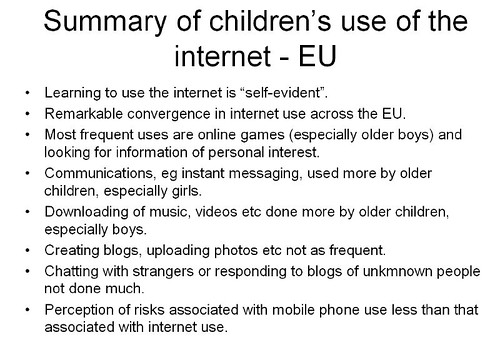
This is very much a broad-brush picture, but from the research and reading we have done, it would be true to say the following.

  • It may be politically incorrect to say so, but boys and girls tend to conform to gender stereotypes online as well as offline. For example, boys prefer playing games to writing blogs.

  • Youngsters really do multitask, because the percentage of their time spent on various activities adds up to a lot more than 100%.

  • Despite the emphasis on creativity at the moment, youngsters aren't really all that creative, in the sense of creating stuff, compared to other things they do online.

  • Summary from http://ec.europa.eu/information_society/activities/sip/docs/eurobarometer/qualitative_study_2007/summary_report_en.pdf

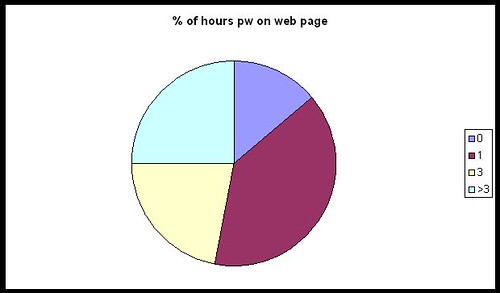
    I find it interesting that youngsters are still mainly consumers of content than creators of content. Mind you, it depends on who you ask, of course. In Larry Rosen's Me, MySpace and I, nearly everyone surveyed spent a lot of time tweaking their web page. How surprising is that?

    myspacepiechart

  • From their responses, it would seem that young people use the web mainly for "sensible" things, like communicating with friends and doing homework.

  • Well the chatting to friends I can believe, but homework? I am not completely convinced by that, and I think what we may have here is evidence of some sort of experimenter effect. I wonder if the results would be different were the same surveys to be conducted by young people?

    If it is  true, I personally think that's something to be concerned about rather than something to celebrate. Kids should be enjoying themselves, not using every spare moment to better their grades.

  • The overall impression one gains from all the research is that technology is indeed very much a part of young people's lives. They spend an inordinate amount of time using it, and have a facility for grasping how to use it, at least in a superficial or immediate sort of way.

    Whether they are able to easily delve deeper into an application or device, or use it in ways for which perhaps it may not have been intended, is an interesting question. 

Like I said, a very broad picture. If you'd like more detail, take a look at the slides from our presentation at Miles' blog. We hope to have the audio accompaniment soon.

Why is this important?

I think we would all agree that it's good practice to base our teaching on what our students already know, understand and can do. If you don't, you run the risk of alienating through boredom and lack of challenge, or through setting work which they find impossible. (These were two of the ten causes of ICT lessons being boring that I identified in my seminal work, Go On, Bore 'Em: How to make ICT lessons excruciatingly dull.)

What this research shows, I think, is that you cannot simply go by what you know they can do from what they have done in school. You also need to find out what they do when they are not in school.


What can you do about it?


The obvious answer is: find out what they can do! You could set up a survey using Google Docs (Go to New-->Form). The results end up in a spreadsheet, making analysis relatively straightforward.

If you include questions like what primary school they went to, if you're in a secondary, that in itself may yield some interesting results. You will need to include age and gender, of course.

If you decide to ask students to give their names, you will need to respect their privacy and not pass that information on. That would be my position, anyway, but you may be in a different situation. In my opinion, it's probably a lot easier to either say that names are optional or simply not to include a field for it. Much more pertinent would be information like the class or registration or option group the students are in.


Feel free to "steal" the questionnaires used by Miles and myself: you'll find the links here.

None of this is intended to be a piece of academic research; rather, it is intended to give you a good basis for deciding on what to teach and where to pitch it.

At least one person left our seminar with the intention of running his own survey within his school, and both Miles and I have said we would be interested in the results of his findings.  We'd be interested in yours too, if you decide to do something like this.

One last word, about presenting the results. Miles used Wordle to generate word clouds from the answers to some of the questions. The results, which are very interesting, are here.


What makes a good teacher as far as technology is concerned?

Path in a forestI'm interested in exploring this question,  which I have phrased very carefully. I think whether you're a teacher of information and communications technology, or someone who teaches with educational technology, there are some common denominators of what makes the teaching good. These are all my ideas and conjectures; I have stated them as though they are facts purely in order to avoid clumsy circumlocutions.

The first requirement is a willingness to experiment and take chances. You never really know whether something is going to work until you try it. A piece of software may be great when used by an individual, but not scale up very well when used with a class.

For example, I came across a program a few years ago which made commenting on a student's work very easy: it was possible to give comprehensive feedback in only 5 minutes by clicking various buttons. But that would mean 150 minutes for a class of 30 students, and a day's work for four or five classes.

Clearly, it was the sort of 'solution' you may wish to use with one or two special case students, but not with whole classes. But you wouldn't know that until you had sat down with the software and spent time using it and thinking about it.

Not everything is within the individual teacher's control. I am thinking in particular of my next requirement: the opportunity to experiment. Too many schools, in England and Wales at any rate, are so frightened of being named and shamed for not having achieved the requisite number of A*-C passes at GCSE that it takes a very brave, stupid or fortunate teacher to feel that they have the time and the support to be able to try things out, especially given the amount of stuff that has to be covered in the curriculum. I admire all those who do, and the colleagues who enable them to do so.

A third requirement is for intellectual honesty. I think one of the most difficult things to do is to admit to oneself, let alone one's colleagues, that as far as achieving X is concerned, the last 3 weeks have been less successful than one would have liked. But there are a few counters to this way of looking at things:

Firstly, adopt the scientific view: an experiment is only a failure if it yields no results at all, ie you find out nothing from it. If you get negative results, you've learnt something which will be useful to both yourself and your colleagues.

Secondly, take a cost-benefit approach. Basically, even if the experiment looks like having been a waste of time, if the benefits outweigh the costs, than it hasn't been. This is all a bit subjective, of course, but let's consider an example. Suppose the use of a website or application has added nothing to the knowledge of 29 of the students in your class, meaning that you wasted a few hours preparing the lessons based on it, and those 29 pupils have wasted the one or two lessons they spent on it. But at the same time, one student, who was thinking of quitting the course, and who has already mentally opted out, is suddenly fired up by the experience and really starts to 'get it'. It's arguable that the net gain has outweighed the net cost.

Thirdly -- and this leads on nicely from the point just made -- it may be that your success criteria need to be changed. In the example of 29 students gaining nothing in terms of learning anything new, if I was the teacher I would ask them to analyse why they gained nothing, and how the resource (or my use and teaching of it) could have been improved.

Also, academic achievement has to be balanced by other kinds of development. If the website or program added nothing to their knowledge or technical skill set, but facilitated critical thinking or collaborative working -- even though they may not have been the intended outcomes -- then I would suggest the whole thing has been very worthwhile.

A fourth requirement for good teaching is a love of the technology. That does not necessarily mean being a geek, but having a love of what the technology can enable you to do. For example, I love my digital camera. It's not good enough for professional photography, but it's good enough for me. I can slip it in my pocket or briefcase, and I use it to take shots which are either interesting in themselves, and which I could therefore use as stimulus material, or to illustrate articles.

Also, call me 'sad' and perhaps needing to get out more, but unlike a lot of people I do not find spreadsheets boring. On the contrary, I think a well-constructed spreadsheet is a thing of beauty, to be marvelled at! (I'm being serious: when I have more time I will explain myself in this regard!)

A fifth requirement is a willingness to not know everything. I think that when it comes to technology, there is every chance that at least one student, and probably all of them, will know more about at least one aspect of it than you do. That's why I have no hesitation in asking teenagers I know how you do certain things in Facebook or Blog TV. They know things I don't. I also know things they don't. What's so threatening about exchanging knowledge and ideas as equals?

Does this mean that I go along with the old chestnut about teachers being a 'guide on the side' rather than a 'sage on the stage'? No, because I think that is a false analogy or an abrogation of responsibility. I see no point in spending an inordinate amount of time encouraging kids to discover something that you could have told them in 5 seconds, so the guide on the side thing is not appropriate in all circumstances anyway.

I don't have a catchy phrase to express this idea, but the way I see it, the class is like a group of walkers going on a guided ramble. You have the leader, who knows the terrain and knows what to look out for and to point out. But at the same time each person on the walk is making sense of it all in their own individual way, and discovering other delights that the leader has not pointed out. That sounds to me more like the guide at the front than the guide on the side. I told you it wasn't very catchy.

There are other factors which make for good teaching. My fifth one is the opportunity to have excellent professional development. Note that I use the word 'development', not training. I am not sure how, in most cases, spending a day being bombarded by bullet points, which they then give you in a pack anyway, can be as useful as having an opportunity to explore and discuss ideas of your own choosing in depth. In fact, as far as feedback is concerned, the most successful training I ever provided consisted of doing absolutely nothing except provide a room, some software, and myself and a technician, to enable a group of teachers to develop their area of the school's website.

My final factor is an amalgam of what good teaching is all about anyway: a love of one's subject, a love of exploring new avenues with other people, a love of being with young people and helping them along the path, a fanatical insistence that each person achieves their own personal best, and a willingness and ability to employ a whole range of techniques, such as questioning, facilitating group work and giving meaningful and useful feedback.

I'd be interested to hear your views about what makes a good technology teacher.

Reblog this post [with Zemanta]

10 things to do when someone follows you in Twitter


If someone follows you in Twitter, the polite thing to do is reciprocate, right? Well, maybe so, but I think it needs a little more thought than that. Here is a list of the steps I take when someone follows me.

Incidentally, the same techniques, with a bit of adjustment, work for any social network situation where people can become your "friend".


#1: What's in it for you?


As a general rule, I think about what I hope to gain from the relationship. Relationship? Yes: as soon as you follow someone, or they follow you, you have a relationship of sorts, whenever you want it or not and regardless of whether you pay it any attention. The only way to avoid it whilst remaining within your Twitter network is by blocking that person.

Now, my primary reason for wanting to link with anyone online is my interest in educational ICT. I have a secondary interest, that of business, because I run my own business. I am also interested in writing and journalism. And that is pretty much it. Unless you have the most amazing powers of persuasion, chances are that I won't be your friend or follower unless you come into one of those categories. Yes, there are the odd exceptions, such as connecting with someone who likes the same sort of music as I do, but even there it is almost certainly the case that I already "know" or know of the person through one of the other spheres I have just mentioned.

This is very much linked to my main website, of course. The focus of that is ICT in education. There may be a great, newsworthy article just begging to be written -- but if it's not to do with ICT in education it probably won't be me writing it, and if I do, it won't be on that website.

What it comes down to is this: I don't want to populate my Twitter network with people who have little or nothing to do with my main interests, because that will only make it more likely that I will miss something important from the people who do. That's why I don't agree with the people who advocate following as many people as possible: I think one needs to be more discriminating than that.

In summary: decide in advance what sort of people you're happy to follow, ie the ones from whom you're likely to benefit from following.

That's the backdrop against which I take all of the steps that follow.


#2: Check the tweets


When I receive an email to say that someone is following me, I click on the link to their Twitter page. I then check look to see what they've been tweeting about. If it's mainly technology or education-related, that's a good start.

If it's about what they had for breakfast over the last week and a half, that's a real turn-off but not a "deal-breaker".

If their tweets are all along the lines of "Great investment opportunity: make $5,000 a week for 5 minutes' work", I will block them straight away.

If they haven't tweeted yet, go straight to #5.


#3: Check the numbers


The next thing I do is check how many people they follow, and who follow them. If they have 3 followers and are following 5,000 people, I probably won't follow them. I would just assume that they're a sort of Twitter groupie and are following everyone in sight. I like to think that they want to follow me because they like what I write about, not to boost their numbers. But I won't dismiss them just yet -- you can't say I'm not fair!

If they have 5,000 followers and follow nobody, that seems on the face of it a bit egotistical and a bit pointless. But I still won't dismiss them just yet!

If they follow 5,000 people and have 5,000 followers, they're probably some sort of spammer. I almost certainly won't follow them. In fact, I may even block them, because this sort of thing usually goes hand-in-hand with the third type of tweet mentioned in #2.


#4: Who's who?


I like to check who the followers are, and who the followees (is there such a word?) are. If I recognise some names I respect, I'm usually happy to set aside my doubts for a while.


#5: Check their profile


If it is blank, or says that they're a professional goof-offer, or that they manage a real estate company and enjoy engineering in their spare time, I won't follow them. I have nothing against real estate workers or engineers, but I don't see what any of that has to do with me. See #1.


#6: Check if they have a website


If they don't, I almost certainly won't follow them unless I'm reasonably satisfied according to points 2, 3, 4 and 5. The existence of a website tells me they're (probably) serious. It also gives me a chance to find out more about them.

#7: Look at their website URL

If they have a website, but it's URL is www.goofingoff.com, I won't follow them. If it's some generic website that I can't check, like www.blogger.com, I won't follow them.

#8: Check their website

If we've made it this far, I'll check their website. In other words, unless I have been totally put off according to some of the earlier criteria, and if they do have a genuine-sounding website, I will look at it. If it's interesting then I will probably bookmark it or subscribe to its RSS feed even if I don't wish to follow them in Twitter (just yet).

#9: Check their profile or About page

If they have a website, I'll try and find out a little more about them there as well. Bottom line: are they who they purport to be, or some sort of scam artist or pornbroker (no, that wasn't a spelling error)?

#10: Home at last!

If all the previous nine hoops have been jumped through satisfactorily, I click on "Follow"!

Conclusion

I suppose all of that makes me sound like some sort of prima donna or intellectual snob, or as if I'm paranoid. I'm not, though I suppose you'll have to take my word for it. But if you think about it, these 10 steps are not a bad blueprint for how students should evaluate requests for online friendship. And although it all seems like a long and drawn out process, the whole thing from start to finish takes me 5 minutes at the outside. The reason I often keep people waiting for a response when they follow me is not that the process takes a long time, but because I usually end up trying to process lots of "follows" in one go, a couple of months after receiving the notification. (But I'm trying to improve in that department!)

I'd be interested to hear what you think of these steps, and how you respond when people follow you in Twitter or other social networks.