

“Oooh!” “Ah!” “Oh my!”. Such were the collective gasps emanating from the Freedman household when I unpacked the Dell Latitude 2110 Netbook I’d been sent to review. Slim, striking and silent (but enough about me), the Latitude certainly makes the grade as far as aesthetics are concerned. But how does it actually perform?

The Dell Latitude 2110According to the display on the bottom of the screen, the battery lasts for around 9 hours. I find that unbelievable – in the sense that I don’t believe it. At least, I think it may well last for 9 hours if you simply leave it on, but the more intensively it’s used, presumably the less time the battery will last. Nevertheless, I have to say that it did seem to last a very long time, which is just what you need in a school situation. As Angela McFarlane said in a talk entitled “The Myth of the Digital Native”:
Devices need to have a battery that would remain charged up for the length of a school day.
I have little doubt that this would fit the bill. Recharging the battery was remarkably quick: it couldn’t have taken more than two hours, and could well have taken less.
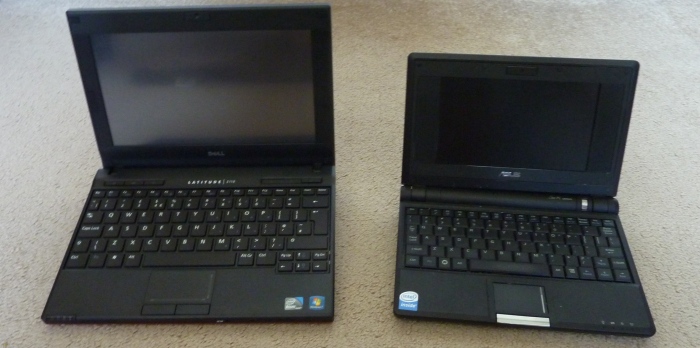
The Latitude (left) and the AsusI found it to be very light. It’s a little heavier than the Asus I have, but given the extra size, both of the keyboard and the screen, as shown here, for me it would be a price worth paying. But not everyone would agree. An elderly relative paid us a visit. “Here”, I said. “What do you think of this?”
“Too heavy for me”, she scowled. “And I can’t read the screen, it’s too small. And where’s the pointy thing?”, she demanded, jabbing her finger in the general direction of the netbook.
I pointed out to her that the pointy thing was unnecessary, given that it had a trackpad and in any case was a touch-screen device.
“That’s no good: it’ll get filthy in no time.” she harrumphed. Soon afterwards she got on her broomstick and left, but she had made some valid points. Perhaps children at the younger end of primary schools will find it too heavy, and there’s little doubt that the screens will get pretty dirty very quickly, so there’s a management issue there, concerning cleaning the screens, that would-be school purchasers will need to work out. But I think she was wrong about the screen. You can, after all, increase the size of the text in many if not all applications. Also, I looked at the screen from the side, and it’s perfectly readable, meaning that it should be easy for youngsters to collaborate using it.
Returning to the touch-screen for a moment, I had my doubts at first, but was quickly converted. I usually find trackpads quite difficult to use when it comes to moving and copying files around. I often end up deleting File X when what I wanted to do was copy File Y. Being able to drag it with my finger was simply wonderful.
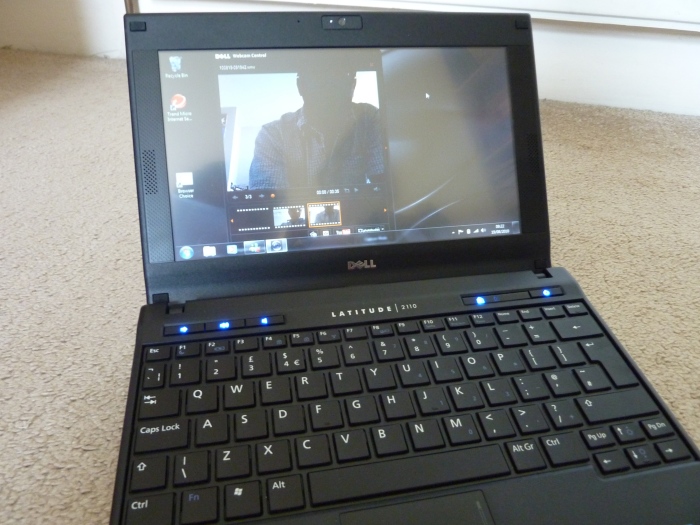
The built-in webcam in actionIt has a built-in webcam, as do most new computers, which was easy to use, and with a very acceptable quality. It’s a pity that the video I recorded to test this facility, what with its unflattering angle, my five-o-clock shadow and my speaking incredibly softly so as not to wake anyone up, makes me appear as if I’m on the run from the police. However, if you ignore all that and just focus on the quality of the sound and vision, I think you’ll agree that they’re not bad at all.
The video software also has a time-lapse feature which you can set up for seconds, minutes or hours. In theory this could be quite useful, although I’m not sure how sensible it would be to leave a laptop on unattended for hours on end while it took snapshots.
In terms of price, this device is very attractive: just £279 + VAT, which State schools don’t pay anyway (except for Academies). Also, it feels quite sturdy, which is a big plus point when it comes to using it in school.
Would I buy it myself? That’s a tricky one. This website is hosted by Squarespace, and blog posts can either be sent by email or (my preferred method), entered into a template on the Squarespace site. Unfortunately, that template is impossible to use properly on small-screen devices except, I discovered recently, the iPad. Squarespace has developed an app which makes the template usable on an iPhone, iTouch and, as I say, iPad. I haven’t used an iPad yet, so until I do I will have to decline to say which of the two devices, the Latitude or iPad, I’d prefer, since being able to blog easily from wherever I happen to be is quite important to me. However, if that is not a consideration for you, or you don’t have the template with small-screen problem I’ve described, the Dell Latitude 2110 is most certainly worth looking at.