Also on the web: 12/08/2009 (a.m.)


Posted from Diigo. The rest of my favorite links are here.

My Nominations for the 2009 Edublog Awards

Here are my nominations for the 2009 Edublog Awards.

Best individual blog

This is an easy choice; Shelly Terrell’s Teacher Reboot Camp. With interesting articles, the ‘month in review’ series, challenges and guest bloggers, the site is always interesting and thought-provoking.

Best individual tweeter

Well, I’d like to nominate Shelly for this as well, on the grounds that she retweets incessantly. This sharing is what the Web is all about these days, and Shelly exemplifies the principle brilliantly.

I’d also like to nominate Neil Adam. Neil is absolutely brilliant to have at a conference, because he live blogs keynote talks in the form of tweets. I often use his twitter stream to double-check my own notes!

Best educational use of video

My nomination in this category is for Leon Cych, who publishes the Learn for Life blog. Whenever there is a conference going on in Britain, there’s a fair chance that Leon will be there live streaming or recording it. The results are of a very high, professional standard, and his recordings of events such as Mirandamod discussions are forming an important archive that will be useful for years to come.

Best group blog

I quite like the Technology and Learning Blog. I suppose I have to declare an interest, which is that I write for it every other Tuesday, but in fact I’d nominate it even if I didn’t. There’s a good bunch of writers there, and the result is quite a rich reading experience.

Best educational use of a social networking service

My nomination here is for the Digiteen Ning, set up by Julie Lindsay and Vicki Davis. The posts, mostly by teenagers, are usually incredibly thoughtful. Anyone who bemoans ‘the youth of today’ needs to visit this site.


Why Subscribe to Blogs? 8 Things to Consider

So many blogs, so little time. What with all the 101 other things you have to do in your life, you can't afford to waste time on blogs that won't benefit you in any way. Or, to be more accurate, in which the benefits are exceeded by the cost, ie the time spent.

So what kind of things might you take into account when deciding whether or not to subscribe to a blog's RSS feed? Here is what I look for.

  1. I will usually have discovered a blog through a reference to one particular article. The obvious thing to check out, then, is whether all or most of the articles on the blog look interesting, or whether the one I came across was the exception to the rule.
  2. Are the articles engaging? Ideally, I prefer to read stuff that is well-written. Not just well-written from a technical point of view, but in a way that's engaging, that reels me in. I want to have to drag myself away because I have other things to do, not force myself to read it because I think it might be good for me.
  3. OK, not everyone can be a great writer, so is it informative at least? Am I going to learn stuff that I may not otherwise come across, or not packaged in as succinct a manner?
  4. Is it newsworthy? I find it hard to keep up with news, despite, or possibly because of, the dozens of sources I rely on. If there's a blog that consistently mentions the latest news, be it technical or educational or otherwise, I'm interested.
  5. Is it humorous? Even if it's none of the things mentioned so far, if it makes me smile or laugh that is a big plus.
  6. Is it provocative? A blog should make you think, or react.
  7. Once it's made it through the hurdles presented so far, a blog has to show that its owner is serious about it. The issue here is: has it been updated regularly? If it's been more than a month since the last post, that is a real turn-off for me.
    Yes, I know that people are busy, but I think it's a matter of priorities. I have blogs that I haven't updated in months. But this one, ICT in Education, gets updated on average at least once a day during the week, and sometimes more, and sometimes at the weekends and on holidays too. And let me tell you: I am busy!
    That does raise another issue, of course: is a blog updated too frequently? That doesn't bother me in the slightest. I figure that someone can update their blog every 15 minutes if they want to, but I don't have to read it all. But I mention it here because I have recently had one person unsubscribe from my RSS feed because he thought that I update my blog too often.
  8. Finally, is it easy to subscribe? I have a Google toolbar which enables me to subscribe to a blog by clicking on a button labelled 'Subscribe'. If I get a message saying 'Feed not found', I become slightly miffed, because it is pretty easy to avoid that,m and people with slick-looking websites ought to know that. All you have to do is insert the following code within the HEAD part of your Index page:

    "<link rel="alternate" type="application/rss+xml"
    title="RSS Feed for ictineducation.org"
    href="http://www.ictineducation.org/home-page/rss.xml" »",

    substituting your RSS feed and title for mine, or course.

If clicking on Subscribe doesn't work, I'll click on an RSS feed icon or similar. If have to hunt around for that, I'll probably give up, especially if the decision to subscribe was touch and go anyway.

Total time for this whole process? I would say no more than 5 minutes, and most of that will be taken up with #1.

I'd be interested in hearing about what makes you decide to subscribe to an RSS feed or not, so please either comment below or complete the survey on the subject; it will take you just two or three minutes, and I'll publish the results soon.

A Visit to John Hanson Community School

"We come up here in break times or in lesson times"
"Here being where?"
"Here."
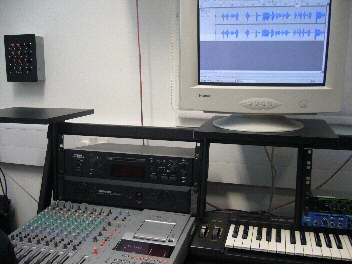
The radio studio at John HansonSuch is the impeccable logic of 14 year olds! As it happens, the "here" in question was the music room, and the recording studio, of John Hanson Community School in Andover, Hampshire, in the south-eastern part of England. I spent a most pleasant morning there a while ago, meeting staff and students, especially those who were working on a podcast for me.

A couple of years ago I wrote in my newsletter, Computers in Classrooms, that while I enjoyed making podcasts, I didn't really have the time or the inclination to devote the time required to make them as polished as I should like. I wondered aloud whether there was a school that would be willing to work with me. The benefits for me would be obvious, and hopefully the students would benefit from having an opportunity to work with a real client, and, if required, a reference or testimonial from me to go into their eportfolio. And, for the school, some extra publicity.

This item was picked up by Hampshire Consultant and newsletter subscriber Colin McQueen, who works for the Hampshire Inspection & Advisory Service. He passed it on to Mike Adams, Assistant Headteacher at the school and, as it turns out, one of the driving forces behind Hanson Radio. As soon as I heard one of their podcasts, I was entranced by the quality and the professionalism (as you will be: give it a whirl).

Up till the visit, communication had been via email, my website, and the school's VLE. I'd been sending recordings, and Mike sent me some original music, which I commented on. Then I visited the school and met Mike and Colin for the first time, some of Mike's colleagues -- including Alastair Johnston, Head of Performing Arts, who was also heavily involved with this project -- and some of his students.

I was impressed with what I saw and heard:

The pupils were not only confident users of some music-creating software (eJay DJ Mix Station 2.0, which appears to have been discontinued), but were confident in playing for me and the class the results of their efforts. They had every reason to be confident, because their compositions sounded great. (And just for the record, I'm not easily satisfied.) In fact, not only did it sound nice, it also satisfied the brief, which was to produce some upbeat music with a jazz funk feel. They had also responded well to the feedback I gave on the first one they produced.

In English National Curriculum terms, taking into account user feedback is Level 7, and taking users' needs into account is Level 8. Don't get me wrong: I'm not suggesting for a moment that taking part in this activity has propelled the students to the dizzy heights of Level 8, but it does serve to illustrate the fact that if you want your students to be able to work at those levels, you have to provide opportunities for them to do so.

Two pupils who have been working on one of the sections played me what they'd done and showed me how they'd achieved the miracle of making me sound fluid and coherent! They seemed very comfortable working with Audacity in the music studio.

Terry on airI was then interviewed by four students, Sophie, Ruby, Alan and Steven, who had prepared some thoughtful questions and who agreed to be interviewed by me in turn. It was in that context that we had the discussion about where "here" was. Their interview of me was featured in a Hanson Radio podcast (which appears to be part of an archive now), and in the one they did for me, as was my interview of them. You can listen to these interviews and the whole Hanson Radio treatment in this podcast.

(In looking up the URL for this episode, I realised with horror that Paul Harrington had left a comment about it, which I hadn't realised! Paul said:


Terry, I have just spent a very entertaining 45 minutes listening to the podcast, excellent work - could you pass on my congratulations for their professional job ( you weren't bad either -lol). The tips on BETT made me instantly rush off and print some business cards in order to save me writing - so thank you very much for that. Regards Paul

So I hope this is a case of better late than never!)

Mike has also had a couple of great jingles made for me, and sought and obtained permission to use the original works of a living composer, Kevin MacLeod.

As it turned out, we didn't get to make another podcast together. I suppose we're all busy people, and doing something like this is a pretty big time commitment. But it was a great experience, and I still use the jingle they created for me!

I was delighted that  a year later the school was awarded the ICT Mark. From what I saw, it was very richly deserved.

Web 2.0 is not a thing...

Great image from Daniel F. Pigatto via Flickr. Funnily enough, I said in my recent Classroom 2.0 Live talk that, as far as I'm concerned, if it looks like Web 2.0 and behaves like Web 2.0 - ie facilitates collaboration and interaction, then it is  Web 2.0. This image encapsulates my thinking exactly.

Web 2.0 is not a thing...

You mean, there wasn't ALWAYS IM?

This cartoon made me smile because it reminded me of a 13 year old in one of my classes who looked utterly incredulous when I mentioned how nice it was to be able to record TV programmes while you were out and watch them when you came home, or at the weekend.

"Wait!", she said. "Wasn't there always video recorders?"

And she was serious!


Computers in Classrooms December Edition Just Published

Here's what it contains:

  • Editorial
  • Website news
  • Web 2.0 Projects Book
  • The K12 Online Conference
  • Mobile Learning Mirandamod
  • Are you taking Twitter too seriously?
  • How useful are elevator speeches?
  • What To Do When An Inspector Calls: 9 Suggestions
  • The Children, Schools and Families Bill
  • What the recent Ofsted report says about ICT
  • The New Ofsted Framework and ICT: 7 Key Points
  • Learning new software: Adobe CS4

Reviews section:

  • Your Justice, Your World - A Primary Teacher's Perspective
  • Your Justice, Your World - A Secondary Teacher's Perspective
  • WriteMonkey
  • Marxio Timer
  • The Making of a Digital World
  • The Well-Fed Writer
  • Totally Wired
  • Wikified Schools
  • Twitter Means Business
  • Grown Up Digital

Look here for details of how to subscribe (it's free).

You Need To Set a Good Example

If you want students to be good learners and users of technology, you have to set a good example. That is basically the message of Shelly Terrell's latest post, Most Teachers Don't Live There. Shelly asks:

Shelly Terrell

If we are knowledge sharers, shouldn’t we continue to fill ourselves with knowledge?

If we want to inspire students to continue learning throughout their lives, then shouldn’t we continue to learn throughout our lives?

If we want motivated students who see learning as a journey, then shouldn’t we continue our journey?

If we want to motivate students to be the best in their fields, then shouldn’t we be the best in our fields?

If we want other educators to listen to our ideas, then shouldn’t we read about their ideas?

If we want support from our colleges, then shouldn’t we support their workshops and projects?

If we want students to use digital media responsibly, then shouldn’t we give them access and show them how?

If we want student to not let technology overtake their lives, then shouldn’t we teach them how to balance themselves?

How can we teach balance, if we don’t have any social media in our diet?

These are great questions, and they are spot on. Whether you work in a school, a Local Authority or for a company or for yourself, if you do nothing else you must at least be an excellent role model in your appraoch to education in general and to educational technology in particular.

In fact, I would go further than Shelly has, and say it's not only about setting a good example to our students, but to our colleagues as well.

Of course, some of Shelly's challenges are hard to meet, like the ones about balance. Recently we watched a programme called "Email is ruining my life", which looked at someone who sleeps with her Blackberry next her in case an email comes through in the middle of the night, checks emails in the bathroom, checks them whilst having dinner.... I am not that bad, but I must be heading in that direction because at the end of the programme Elaine said to me:

"Recognise anyone you know?"

I tried to plead the 5th, but that doesn't cut much ice in England.

It reminds me of this story:

A woman takes her little boy to see a Holy Man. She says, "Please tell my son to stop eating sugar."

He replies: "Certainly. Bring your son to me in three days' time."

Three days later, she returns with her son, and the Holy Man says to him, "Stop eating sugar."

The woman says, "Why couldn't you have told him that three days ago?"

"Because", he says, "Three days ago I had not stopped eating sugar."

Shelly's post is very challenging, I think, and she finishes it with a great challenge to the reader. Do head on over there to read her post in full.

ICT in the Rose Review of the National Curriculum

I wrote this document in May 2009. Since then, the proposed Level Descriptions have been changed. Here is a summary of the differences between this document and the revised changes, not in terms of the descriptors themselves, but my comments on them. Basically I have taken the view that a difference is only a difference if it makes a difference, so if the proposed level descriptor has changed, but its import hasn't, I haven't commented on it. In fact, as far as I can tell only two of the level descriptors have changed, and then only slightly.

Although this post is clearly aimed primarily at colleagues in England and Wales, it may be of interest to teachers from other countries too, as it shows what we're expecting young people to be able to do at different ages.

Also, it covers the whole of the programme of study for ICT, not just primary.

Anyway, here is a summary of the changes:

Level Changes in New Descriptor? Comments on Changes
1 Yes - shorter None
2 Yes - shorter None
3 Yes - the reference to editing and formatting has been removed It's now quicker to read, but I think it has lost some of its clarity
4 No Not applicable
5 No Not applicable
6 No Not applicable
7 No Not applicable
8 No Not applicable
Exceptional Performance No Not applicable

The level descriptors are © 2009 QCDA Copyright. I have reproduced them here in accordance with the QCDA's terms.


Teaching Yourself Chinese Through the Internet: Honourable Mentions

In this series, taken from the Computers in Classrooms newsletter, Adrienne Blaser has been evaluating websites designed to help people learn Mandarin. In this final article she lists other sites which are worth exploring.

http://mandarintube.com

http://www.choosechinese.com/

http://www.mangolanguages.com/ -- check your local library to see if they are registered

http://www.guavatalk.com

http://www.chinese-tools.com/learn/chinese

http://www.bpchinese.com/

http://www.nciku.com/ --- this site is a great dictionary Chinese to English and English to Chinese -- helpful for extra studying

Adrienne Blaser is 14 years old. She plays tennis, the violin and loves to read. She one day hopes to learn many languages, hopefully one being Chinese, which she is currently teaching herself.

If you have enjoyed reading this series, please leave a note for Adrienne to that effect. Thanks!

The other articles in the series 

Teaching Yourself Chinese Through the Internet - LiveMocha

Teaching Yourself Chinese Through the Internet: ChinesePod

Teaching Yourself Chinese Through the Internet: Zon


Who Ya Gonna Call? Results of My 'Experts' Poll

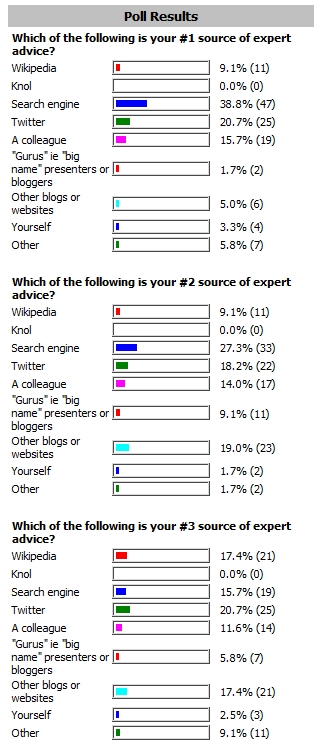
A while ago I conducted a survey to find out who or where people turn to for expert help. Here is a quick snapshot of the results:

Who you turn to for answersIn a forthcoming issue of Computers in Classrooms I'll be adding more detail, such as what people suggested in the 'Other' category. Thanks to everyone who took part in the survey.


The Online Information Conference and other news

In this video I talk about the Online Information Conference. If you're in London and you see this in time (it finishes on 4th December 2009) you might like to get along, for reasons I describe.

If you can't get there, it's worth checking out the website for information and podcasts.

I've also included a short video I shot with a pocket video recorder called the Kodak Zi8, which I'm quite impressed with.

Other items mentioned include the next issue of Computers in Classrooms, which includes several book reviews, two reviews of the same website, current legislation in the works, elevator speeches and coping with inspection. That will be out very soon.

Plus information about the Web 2.0 Projects Book I'm working on, and my two presentations at BETT, which are:

Driving Your ICT Vision: how might advanced motoring techniques help us achieve our ICT goals?

Amazing Web 2.0 Projects: Real projects in real classrooms with real kids!

Teaching Yourself Chinese Through the Internet: Zon

In this series, Adrienne Blaser has been evaluating some websites for teaching yourself the language.


My final choice for one of my favourite Mandarin Chinese learning sites is extremely different from those previously looked at. Zon, is an educational learning site made for kids in school. As in a virtual community, you make your own avatar arriving as a tourist in “China”, with only the bare essentials.

When you are still a tourist you learn about Chinese myths and legends. From there you must navigate your way through the airport (that is just as painful as the one in reality) and to a hotel. Along the way you meet other people who may be just like you, having a hard time understanding how to get out, to experts working at their job. As you progress through the site you learn about Chinese language, customs, and even how to separate currency. Although it may take you days, eventually your avatar will be promoted to Resident or even Citizen where you can buy a car, rent an apartment, or own a business.

Basically, it’s like you are living on the other side of the world without your parents, while sitting in front of your computer at home. Zon isn’t only used at home, many schools use Zon for students to learn about Chinese language and culture in a fun and educational way. This site explains how to navigate through the game, and once you read how, the way is clear. There is a news blog that keeps you updated on changes and problems going on, and the community forum helps build friendships and answer questions. The animation showed real architecture from China and it truly felt like you were there.

I think that this site is really important for younger kids learning Chinese because when you’re young, sitting down and listening or having to concentrate really hard isn’t exciting or motivating. But working towards a goal like buying your first car is. Some improvement could be that the how-to is explained as you go along in case getting lost becomes a reality.

Web address: http://enterzon.com/

Rating: 4

Adrienne Blaser is 14 years old. She plays tennis, the violin and loves to read. She one day hopes to learn many languages, hopefully one being Chinese, which she is currently teaching herself.

This article first appeared in Computers in Classrooms.

Teaching Yourself Chinese Through the Internet: ChinesePod

Schoolgirl Adrienne Blaser continues her series on teaching yourself Chinese, in which she reviews relevant websites. Yesterday she reviewed LiveMocha.

Another distinct site for learning Mandarin Chinese is ChinesePod. This site is more based on individual study because of its many podcasts. Personally, I find podcasts to be an extreme help in learning. The great thing about podcasts is that they go where you want to go and you don’t need internet access to do it.

ChinesePod has a variety of levels, ranging from Newbie, to Advanced. You can sign up for the level you think suitable and download the lessons of your choice. Most of these podcasts include conversations, in which helpful teachers like Jenny and John explain what individual words mean and how they are put together. Since most people can’t just learn by ear, each podcast comes with the dialogue from the lesson and notes, which includes pinyin, character, English meaning, and extra vocabulary.

Back on the website ChinesePoders can join a study group, like Chinese short texts, or watch a video channel like Pinyin Program for more practice.

Even though I love the thought of podcasts I wish that Chinese pod had a little more on their website, like follow up lessons or more grammar. They do have a glossary section and grammar guide with a pinyin chart, to help with pronunciation. On ChinesePod there is a conversation help thread where you can talk to your fellow learners and ask questions. Overall on this site there is minimal advertising and everything is basically clear and uncluttered. ChinesePod does cost money after your first seven day trial. The Basic plan with free podcasts costs $9 a month, but I remember when everything was free on ChinesePod. The highest plan, which includes ten minutes daily phone conversation with a teacher, customized study plan, and a personal needs analysis, cost a whopping $199. ChinesePod still has a way to go until I pay nine dollars a month, but I am still loving the podcasts from my seven day trial, which are very helpful. For the beginner, ChinesePod is more a site for picking up phrases in a conversation being able to understand it and respond correctly than starting from scratch and learning proper writing grammar.

Web address: http://chinesepod.com

Rating: 4

Adrienne Blaser is 14 years old. She plays tennis, the violin and loves to read. She one day hopes to learn many languages, hopefully one being Chinese, which she is currently teaching herself.

15 Ways To Make an Educational Technology Project Successful

How can you make an educational technology project successful? In a sense, the fact that it's to do with ICT in education is irrelevant. There are some generic 'rules' which ought to be abided by.

By ‘project’ I do not mean work given to students, but the kind of research or experimentation that all good institutions should encourage.

It's always good to have an end date in mindFor example, you may want to see how using a ‘voting system’ might help to increase children’s capability in mental arithmetic.

In my opinion, your project must:

Address at least one aspect of your school development plan

There are two main reasons for this. Firstly, as a matter of principle, if the school has a development plan then all school activities should be related to it in some way. If the school development plan doesn’t address things which some people think it should, the ideal situation would be to change the plan over time rather than just ignore it.

However, there shouldn’t be too much trouble linking any ICT-related project to the plan, because ICT can help to achieve almost any educational goals!

Secondly, anything that is perceived to be irrelevant to the school development plan risks losing support, be that financially or otherwise.

Be cost-effective in both financial and economic terms

One of the big problems with technology in education, as I see it, is that it’s very easy to get carried away with the technology. Here’s a case in point. There’s no doubt that a video conferencing system costing many thousands of pounds or dollars will yield much better results, and be able to do far more, than a webcam that comes built in to a laptop. But are the benefits good enough to justify the additional financial outlay? That’s the key issue: not whether the system itself is good, or even whether it represents good value for money (which is mainly a financial matter), but whether the additional benefits of the superior system justify the additional costs.

Be cost-limited

What I mean by this is that it’s very easy for educational technology to suck up more and more resources. Suddenly, the amount of paper being printed out has doubled, because everyone ‘must’ have a manual. Or there’s an optional extra that would make the project so much easier to carry out. Or that free software bundled with the equipment is OK, but the premium upgrade does so much more.

Because of all these – very good – arguments, I would strongly advocate setting a ceiling on the amount of money that will be spent on the project, and stick to it, unless a compelling case can be made to exceed the allocated budget. Because it’s hard to make a compelling case to yourself and then reject it if necessary, you need to have a group of people overseeing the project rather than just yourself. This is covered next.

Have more than one teacher involved

I think all of us have a tendency to get carried away on a pet project, sometimes to the extent that you can start to lose sight of what you’re actually trying to achieve. That’s why it’s good to have two or three people involved, and preferably not all teachers of ICT.

Have a named leader

Even if you don’t like the term ‘leader’, someone has to be named as the person who can account for the money spent, report on the outcomes, and recommend where to go next with the project.

Be consultative, ie not doing to, but doing with

It’s important that the group of people concerned with the project have a collaborative approach. In my experience, that’s by far the most likely way to generate good ideas and, at the risk of sounding clichéd, help everyone concerned to feel a sense of ownership.

Be time-limited

Projects can sometimes have a tendency to go on and on to no discernible purpose. I think there has to be a cut-off date by which a final report will be made. At that point, the question of whether the project should continue can be addressed.

Have targets and milestones, one of which address dissemination

Personally, I think the language of ‘targets’ and ‘milestones’ is ugly – which is why one of my presentations at BETT – Driving Your ICT Vision: how might advanced motoring techniques help us achieve our ICT goals? – will be about a different sort of approach to planning; look out for an article about that soon. Nevertheless, you must be able to say things like “X will happen by such and such a date, Mrs Jones will be doing it, and therefore Y has to have been completed by the week before”.

Be properly documented

This may include reporting on a regular basis, say half-termly, and at the end of the project's life. There may also be short briefings to the senior leadership team and others, and even a supporting website.

Be reproducible

For me, one of the key characteristics of a successful project is that other people can do the same or similar thing with their own class. That’s why the projects in the forthcoming free Web 2.0 Projects ebook are so great: ideas that were used with 5 year olds can easily be adapted to work with HE students and, to an extent, vice versa. I’ll be talking about that at BETT too, in a seminar entitled Amazing Web 2.0 Projects: Real projects in real classrooms with real kids!.

Be scalable

I think the hallmark of a good project is that it can be scaled up, or scaled down. In my anatomy of a successful project which I discussed as part of my talk for Classroom 2.0 Live (and which will be appearing here as a series very soon), I made the point that all the underpinning principles applied just as much to a small single classroom project as the kind of large, multi-school project that was the focus of my case study.

And if you think about it, the same is true of the principles itemised in this article.

Have wider benefits

That is, it should benefit a wider group than only the direct participants. I’m thinking here of groups like parents and the wider community, or perhaps other teachers. Clearly, the project could be successful without addressing a wider audience, but there are usually opportunities to ensure that the outcomes will be enriched by the addressing of wider goals.

That is also likely to be remembered when you look for support for your next project….

Be manageable

It’s very easy to underestimate the amount of time a project can take up. It’s also easy to make the administration of the project, such as the reporting procedures, too onerous. I think it would be better to limit the scope of the project, or even defer it altogether, than risk having the whole thing collapse under its own weight.

Be SMART

That is, the objectives of the project should be Specific, Measurable, Attainable, Realistic, Time-Related. Well, that’s the theory, anyway. I think there is a danger that the ‘measurable’ criterion can lead people to adopting a tick box approach in which targets are being met, but the actual overarching aims of the project aren’t. You can easily end up with something analogous to Oscar Wilde’s cynic: someone who knows the price of everything and the value of nothing.

Be reported

At the risk of stating the obvious, if a project isn’t ‘written up’ in some way then it might as well have not taken place for all the good it will do in the longer term. If the memory of the school resides only in its teachers and pupils, then the long term prognosis is amnesia.

The report could take the form of a video, a case study, a more formal evaluation, a dedicated blog – or all of those and more. The key issue is that it’s preserved in some way so that others may learn and benefit from it.

Teaching Yourself Chinese Through the Internet

We are all aware that the “sleeping dragon” has awoken, and that in the foreseeable future people and businesses will have much more interaction with their Chinese counterparts. It will then be sensible – perhaps even necessary – for Mandarin to be one of the Modern Languages studied in school. In the meantime, over the next few days Adrienne Blaser evaluates some websites for teaching yourself the language. These reviews were originally published in Computers in Classrooms.

With various parts of the world changing, language has become a vital exchange between cultures. Bilingualism, the ability to speak two languages, is becoming a common trend. Although many say that Mandarin Chinese is a difficult language, truly the biggest challenge is finding the right place to learn. Since there are so many great sites out there to learn Mandarin, picking the select few was definitely a challenge.

Livemocha

Livemocha has become one of my quick favourites as a free site unless you decide to buy one of their Travel Crash Courses.

When you first come onto the site, its warm coffee colours greet you. Livemocha is simple, clear, and without advertisement for other sites or products. What makes this site special is that it doesn’t just teach you one language; it’s a site for multiples such as Japanese, Korean, English, Spanish, and Portuguese and each having at least a 101 (beginner) and 102 (intermediate) program. Not only are they brain testers, but each course consists of 3 units with 5 or 6 lesson in each unit. That might sound easy, but in a single lesson you must learn phrases, including the pinyin (pinyin is the name for the system that makes it possible to read and write Mandarin Chinese without characters, by using the Roman alphabet), characters, proper pronunciation, and the English meanings, review them, write them, and then speak them.

Speak you say? Yes, this site expects you to practice speaking, by recording it on your computer microphone, then putting it out to the Livemocha public for reviewing. Sure, it might seem like no big deal but once you get a bad review about your tones, you go right back to the lesson to review each sentence, and then do it again.

What truly helps besides seeing the language in its different forms is the pictures. Each phrase has a picture, or in some cases pictures with bubbles to show who is speaking. I find that overall this site is for those starting from scratch who don’t want to be babied and plan to work diligently to learn their selected language. It takes lots of time and hard work because really this is like a college course, you don’t start out from numbers and colours, instead you start from nouns and go to negatives.  

Adrienne explained what this meant, in an email to me. Unfortunately I was unable to reproduce the Chinese characters in HTML, so I have taken a screenshot of her explanation instead:


For each lesson besides the required exercises, there are optional exercises for even more practice. In case you’re still looking for options to study, you can make your own flashcards or use ones made by others. Livemocha also offers chatting between language learners, with a handy dandy translator conveniently located on the side. Making friends comes with learning a new language, cultures are blended and bonds are made. I don’t know if I’ll ever meet any of my friends face to face but I can still say that I have friends that live across the world.

This site takes all the methods of learning and puts them together in a manageable way, and I know they are still expanding their site. The opportunity to teach is planned to be going to be available soon. Not only will future teachers be able to practice but they could earn credits or money. Although you must be invited to become a Livemocha teacher, consistently leaving instructive reviews or making helpful flashcard sets boost your teaching score and increase your chances.

Web address: http://www.livemocha.com/

Rating: 5

Adrienne Blaser is 14 years old. She plays tennis, the violin and loves to read. She one day hopes to learn many languages, hopefully one being Chinese, which she is currently teaching herself.

How I started teaching ICT

Full Circle: How I started teaching ICT

Image by Terry Freedman via Flickr

Sometimes people ask me how I made the transition from teaching Economics to teaching ICT. In case you're interested, here's (part of) the story.

In 1986 I was working as what was called a Permanent Unattached teacher in London. Basically, it was supply teaching with a difference. In fact, with two differences. Firstly, it was for at least one term at a time in a particular school, to cover long-term absence. Secondly, it was (in theory, at least), subject-specific. In other words, I was covering lessons in my own subject specialisms.

Although I loved teaching Economics, I was starting to have doubts as to future job prospects in that field. It seemed to me that fewer and fewer schools were offering it as an option, and more and more schools were looking at vocational and business studies courses. I'm not sure if the then government's half-baked notion of teaching economic literacy across the curriculum was a help or a hindrance in the prognosis for Economics. (It's interesting to me, as an aside, how Economics has suddenly become very popular in the mainstream.)

The school I was in at the time was quite forward thinking. It had a suite of computers in the business studies department, which taught word processing. A senior teacher used a computer spreadsheet for helping him work out the timetable.

Now, I had used computers in one form or another since starting my teaching career, but I had used them as a means of enhancing my lessons in Economics (a topic for another article), not as a tool in their own right. Thus I didn't know how to use a word processor or a spreadsheet.

(The school also had a computer club for female staff to learn how to do computer programming. In an appalling act of sexism I was not allowed to join that group. That, too, is a subject for another article.)

You have to bear in mind that in those days the computer programs were not WYSIWYG (What You See Is What You Get). To make a word bold you had to put a control code before and after it. To centre a paragraph or a heading you had to put a code in the margin. It wasn't exactly intuitive, and you could never be completely sure you'd got it right until you'd printed it off.

The Head of Business Studies, Jane, taught me how to word process. Tony, the Senior Teacher, taught me how to use the spreadsheet. Thanks to them, I learnt enough about using the software to talk my way into my next job, Head of Business Studies and Information Technology.

Eleven years later I was working as an ICT advisor in the same borough. One day, my boss asked me to go down to the school where I'd cut my teeth on word processing and spreadsheets. Apparently, the Deputy Headteacher was trying to devise a spreadsheet that would enable him to analyse and correlate examination results with attendance records and that sort of thing.

I made an appointment through the school secretary, and turned up the next morning. I was shown into the Deputy Head's office. He had his back to me while he desperately tried to clear some papers so I could sit down.

"It's very good of you to come at such short notice, Terry", he said. "Can I get you a cup of tea?"

He turned round to face me and we shook hands.

"Good morning, Tony", I said.

The Big Sweep

Jack Alibi knew how to work. He also knew how to work a scam. Sure, going legit was good, but it took time. Lack of time was something Alibi had plenty of.

The Big SweepHe knew from the wire that the local school was being rebuilt, and that they were looking to put in a heap of technology. As far as Alibi was concerned, selling computers was like a licence to print money.

He staked out the school and got to know the movements of the big cheese, a classy dish who barely looked old enough to have left school, let alone run one. One night he waited in a doorway for her to pass.

As she did he started walking and brought himself up alongside her.

"Hey, honey", he grinned. "How about a little coffee?"

She didn't respond, except maybe her pace stepped up a notch.

Alibi went into phase two of his plan.

"I hear you're looking for high tech stuff. Maybe I can cut you a sweet deal."

She ignored him, but he continued.

"That stuff costs a lot of lettuce. That means less to spend on a fancy office and all the trimmings. Maybe I can help out."

She stopped and glared at him.

"Oh yeah?", she said. "And why would you wanna be helping someone you don't even know?"

"On account that I'm community-minded. Besides, I'd hate to see a classy dame like you being taken for a ride. I can get what you need at a whole lot less."

She remained motionless, but a quick glint in her eye let Alibi know she was interested.

"OK", she said. "Let's suppose I'm interested, which I ain't. But let's be hypothetical. What are you offering, and what's your rake-off?"

Alibi was ready for that: he'd done his homework.

"I get all the tech you need, on a no questions asked basis. Hypothetically. As for me, I work on commission, 5% of the value of the merchandise. That hardly pays my rent. But Like I said, I'm community-minded."

She looked at him like he was something that was tossed out in the garbage the night before.

"Yeah, I can see you're all heart. OK, muscle head, you talk big, but maybe that's all you do? Talk, I mean. My guess is that this ‘merchandise' is old cast-off junk, right? That ain't no use to me. I just took over running this joint, see? I'm the new broom around here, and there's gonna be one hell of a big sweep. No jackass like you is gonna louse things up for me."

"OK, sister, I get the picture, but you got me all wrong. I tell ya, lady, this stuff is so new it uses technology that ain't even been invented yet."

She reached inside her bag. Alibi's hand went instinctively to inside his coat. She pulled out a packet of gaspers, put one to her lips. He lit it for her.

"I tell you what I'm gonna do", she purred. "I'm gonna think about it."

She drew on the butt and let out a plume of smoke.

"Well, I thought about it. No."

"No? How come?"

"Well, Buster, I just remembered the advice my daddy gave me when I was knee-high to a cricket."

"Oh yeah? And what might that be?"

"Never accept suites from strangers."

Thanks to William Denton for his Dictionary of Hardboiled Slang.

This story originally appeared in the September 2009 edition of Computers in Classrooms.

Wasteful Widgets #4: Maps

Like many bloggers, I have a map on site showing where visitors are coming from. Why?

World viewI think there are two aspects to this question: why have a map, and why show it to the world?

On the first issue, it is quite nice to look at one's reach. I have to admit to a little thrill when I see that someone in Borneo, say, has been checking out my blog. And I find it fascinating that I can write something now, sitting here in my home near London, England, and seconds later someone on the other side of the world, in Australia or New Zealand, can be reading it. I am still intrigued despite having done this kind of stuff for nearly 15 years.

But the other question, about why show it, is more problematic. At first, I did so because I wanted people to see that I am being read internationally. I now feel that one should be able to take it as read that that's the case, and not make a big deal out of it.

I also think, like recent comments, it's a matter of context. When I took part in the Classroom 2.0 Live discussion, people were asked right at the start to click on a map to show where they were listening from. Seeing the whole world 'light up' as members of the audience did so was an incredible experience. And for me, as the guest speaker, it really did bring it home to me that, although I was loafing around in casual clothes and unshaven, I was addressing a global audience in just as real a way as if I had been speaking at a physical event.

So, given that there's not much point in displaying a map on my site, because it lacks context and smacks ever-so-slightly of egotism, why do I continue to do so?

The answer, I'm afraid, will be familiar to married men everywhere. My wife likes to look at it, and doesn't want to have to bother logging in in order to do so.

International ICT in education superstar I may be, but at home I know my place!

Other articles in the Wasteful Widgets mini-series

Wasteful Widgets #1: Most popular articles

Wasteful Widgets #2: Twitter Feeds, and 7 Reasons to Eschew Them

Wasteful Widgets #3: Recent Comments