Wasteful Widgets #4: Maps

Like many bloggers, I have a map on site showing where visitors are coming from. Why?

World viewI think there are two aspects to this question: why have a map, and why show it to the world?

On the first issue, it is quite nice to look at one's reach. I have to admit to a little thrill when I see that someone in Borneo, say, has been checking out my blog. And I find it fascinating that I can write something now, sitting here in my home near London, England, and seconds later someone on the other side of the world, in Australia or New Zealand, can be reading it. I am still intrigued despite having done this kind of stuff for nearly 15 years.

But the other question, about why show it, is more problematic. At first, I did so because I wanted people to see that I am being read internationally. I now feel that one should be able to take it as read that that's the case, and not make a big deal out of it.

I also think, like recent comments, it's a matter of context. When I took part in the Classroom 2.0 Live discussion, people were asked right at the start to click on a map to show where they were listening from. Seeing the whole world 'light up' as members of the audience did so was an incredible experience. And for me, as the guest speaker, it really did bring it home to me that, although I was loafing around in casual clothes and unshaven, I was addressing a global audience in just as real a way as if I had been speaking at a physical event.

So, given that there's not much point in displaying a map on my site, because it lacks context and smacks ever-so-slightly of egotism, why do I continue to do so?

The answer, I'm afraid, will be familiar to married men everywhere. My wife likes to look at it, and doesn't want to have to bother logging in in order to do so.

International ICT in education superstar I may be, but at home I know my place!

Other articles in the Wasteful Widgets mini-series

Wasteful Widgets #1: Most popular articles

Wasteful Widgets #2: Twitter Feeds, and 7 Reasons to Eschew Them

Wasteful Widgets #3: Recent Comments

Delete: The Virtue of Forgetting in the Digital Age

In "Sketches Among The Ruins of My Mind", Philip José Farmer depicts a nightmare scenario in which an object suddenly appears in our skies, and proceeds to remove everyone's memories, four days at a time. Gradually, people regress through their chronological age, ending up drooling like babies, and forgetting all their relationships and skills. As people realise what is happening, they resort to leaving themselves notes and tape recordings by which to tell or remind themselves, on waking up in the morning, what's been going on.

That's an extreme description of what might happen if we were unable, unaided, to remember anything about the last three days, but humankind has always tried to find ways of remembering.

John Mack, in "The Museum of the Mind", looks at how different people in different times and places have used artefacts such as paintings and sculptures to help them remember, a story he tells through the collections in the British Museum.

We have always been afraid of forgetting which, as Viktor Mayer-Schönberger has pointed out in a recent lecture, is the "default setting" for human beings. However, we have now entered a digital age in which this balance between remembering and forgetting has been reversed. In other words, the default setting is now remembering, and we as a society have perfect memory.

A good thing? In some respects, of course; but Mayer-Schönberger fears that we have not fully considered the negative implications of perfect memory.

One of the sources he draws upon is the Argentinian writer, Borges. In “Funes, The Memorious”, Borges provides us with a startlingly accurate insight into what a curse perfect memory would be for an individual person. “Startlingly accurate”? Yes, because decades after he wrote this we have discovered a handful of people in the world who have this rare ability affliction.

And the societal perspective on this?

As Mayer-Schönberger points out, a society that never forgets, may stop forgiving. That unfortunate photo of yourself, or that article you wrote whilst a student, may come back to haunt you years, even decades, later.

Such a situation leads people to self-censor, not just in the here and now, but with one eye on the future. It reminds me of a science fiction story I read in which crime was effectively eradicated because the police used cameras that could go back in time to record actual events instead of people's recollections of them. The story centred on one man's attempt to commit the perfect murder: he had to engineer the situation to cause his victim to have a fatal heart attack, so that when the inevitable cameras came, they would record that he had caused the person no physical harm.

Mayer-Schönberger's suggestion is that we should remember to forget. Technology can help us by prompting us to specify expiration dates for the data we store.

It was a fascinating talk, which you can listen to. I am now in the process of reading his book, 'Delete: The Virtue of Forgetting in the Digital Age', and will review it due course.

In the meantime, perhaps this is a topic that would make for a good discussion in ICT and even Citizenship lessons.

The books mentioned in this article are featured on my Amazon page, where they can be purchased, thereby providing me with a (very) modest additional income. Also mentioned on the page are Fictions, a collection of short stories by Borges that includes Funes, The Memorious. Although nothing to do with ICT in education as such, these stories make you think. And one, The Library of Babel, really does have echoes in the Web 2.0 world, as I described in this article about collaboration.

Also featured is Google Bomb, which covers similar ground, but looked at through the lens of online defamation and cyber-attacks.

Although I have yet to review them, I will say now that these books deserve a central place in your educational technology library.


Collaborative Approaches To Learning: Always A Good Thing?

Collaborative approaches to learning certainly have their place -- but not at the expense of the facts!

This is an updated version of an article which first appeared on Wed, 7 Sep 2005.That sounds like a long time ago, but I think the issues I was describing then are still relevant today. But I'd value your opinion on this matter. It's a longish article: go grab yourself a cup of tea.

In March 1923, in an interview with The New York Times, the British mountaineer George Leigh Mallory was asked why he wanted to climb Mount Everest, and replied, 'Because it's there'. That seems to be exactly the attitude of some educationalists when it comes to recent developments such as blogging, podcasting and wikis. That is to say, they use them purely and simply  because they are there.

I'm all in favour of pioneering and trailblazing, but the downside is that evangelistic fervour can sometimes outweigh, or cloud over, any objective judgement. In my view, what we educationalists should be aiming for is not to get our students and colleagues to use technology, but to use appropriate technology appropriately. Unfortunately, that message sometimes seems to get lost in the hubbub.

I am thinking in particular of the apparently increasing adulation of, and reliance on, collaborative tools for the purpose of research, especially blogs, podcasts and wikis (the most well-known of the last is, of course, Wikipedia). In case you are new to all this, blogs are online journals, podcasts are recordings, usually in MP3 format, and wikis are web pages which can be edited live on the internet, either by anybody or by people who have subscribed to the group concerned. Wikipedia is an online encyclopaedia which features articles which can be published, then edited and counter-edited.

Is ‘truth’ relative or absolute?

Wikipedia in particular is often hailed as a fantastic resource, and one which has grown through collaboration by ordinary people. It is, if you will, a perfect example of democracy in action -- apparently, at least. The question we need to ask, however, is whether this and similar enterprises are actually useful.

For most people, and societies, the ultimate goal is absolute truth, not relativism. This isn't only a religious quest: in the field of finance, one of the main attributes of money is that it should be a measure of value which does not, in itself, change value. Hence, in modern societies, the attempts to fix a currency's value by pegging it to gold or to another, more stable, currency. Trying to measure the value of something if the value of money is constantly changing is like trying to measure the length of something with a ruler whose length keeps changing.
Is collaboration always a good thing?If relativism is not ok in our religious or economic lives, why should it be ok in our intellectual life? We all know that knowledge and understanding are constantly evolving, and that the self-evident "truths" of yesteryear are sometimes found to be wrong in the light of new evidence. That is disconcerting, to say the least, but at least it's a process that happens over years rather than overnight.

It's also a process that happens with the involvement of experts in their field. Now, I am not so naive as to not understand that viewpoints which do not fit into the convention wisdom of the age are unlikely to be heard. You only have to look at the experiences of Freud, Darwin and, in our own age, homeopaths and others to realise that. And the economist J M Keynes, when asked why he had failed his Economics examination at university, said that it was because he knew more about Economics than his tutors.

Nevertheless, you can't have an article published in a scientific journal or the Encyclopedia Britannica unless it has been scrutinised and vetted by another expert. This is in contrast to wikis, where for the most part anybody can come along and change an article without knowing the first thing about the subject area.

Two cheers for democracy*

Now, this may seem like a very anti-democratic point of view, and that's because it is -- in this context. If that sounds arrogant, consider this: if you are the world's leading expert in a particular area, do you really want some virtual passer-by to "improve" your work by chopping bits out or adding bits in? Of course not! But even if you are an ordinary expert, as distinct from a world one, you will still not want someone correcting you. At least, not in that way. You might enjoy a good debate, and be open to have your views challenged, and may even change your views through that process, but that, I would contend, is a very different situation.

Even more important, though, is the potential confusion it creates for students. Imagine finding a great fact to put in an essay, and then double-checking it the next day, only to find that it's disappeared. Does that means it was incorrect, or that someone didn't like it? The only thing the student can do is to seek verification from another source. That's good practice, but the question is: what kind of source?

When I asked Limor Garcia, the inventor of Cellphedia** (a kind of mobile phone version of Wikipedia), how she would advise students to check the truth of the information they find, she said that people would be able to correct each other's answers, but also that they could check the answer in Google. That seems to me to beg the questions: (a) if you are going to check the answer in Google, why use Cellphedia? and (b) how would you know if the information you found in Google is correct?

The Library of Babel

Searching, searching...Interestingly, these kind of paradoxes are not new. In a story called "The Library of Babel", written in 1941, the Argentinean writer Jorge Luis Borges describes a vast library in which there is not only a copy of every book ever written, but every book which could be written. There is, for example, a library catalogue, and an infinite number of variations of it. There is a marvellous passage in which he describes the quest for the "master" book:

"In some shelf of some hexagon, men reasoned, there must exist a book which is the cipher and perfect compendium of all the rest: some librarian has perused it, and it is analogous to a god. Vestiges of the worship of that remote functionary still persists in the language of this zone. Many pilgrimages have sought Him out. For a century they trod the most diverse routes in vain. How to locate the secret hexagon which harboured it? Someone proposed a regressive approach: in order to locate book A, first consult book B which will indicate the location of book A; in order to locate book B, first consult book C, and so on ad infinitum."

(J L Borges, The Library of Babel, in "Fictions", which is featured on our Amazon page)

 The worrying development for me is not the invention and expansion of tools such as Wikipedia and Cellphedia. I actually think they have vast potential and are, in fact, tremendously exciting. From the point of view of the learning process, taking part in such collaboration is bound to engage or re-engage a lot of learners.

What I am more concerned about is the often uncritical stance of some educationalists in relation to these tools. For example, I have read articles which favourably compare Wikipedia to traditional encyclopaedias on the basis of weight, its ability to constantly change, its democratic ethos, and other characteristics. Surely the most important yardstick is accuracy? And a couple of months ago I met the Head of ICT at an independent secondary school who said, quite seriously, "We don't need to teach kids how to search the internet; they use Google and Wikipedia all the time at home."

Essential skills for users of ICT in education

We need to teach our students a number of skills or approaches when it comes to verifying information:

  • a questioning approach rather than a willingness to accept things at face value;
  • triangulation, which is the cross-checking of supposed facts with other sources of information;
  • in triangulation, the use of different types or sources of evidence; for example, there is no sense in cross-checking the accuracy of the comments I've made here by looking at other comments I've made: you should look in other sources; otherwise,it all becomes self-referential.

Above all, we educationalists should not fall into the trap of using a new technology in every situation just because it is there.

Conclusions

So what does this mean in terms of the educational benefits of services like Wikipedia, Cellphedia and, in a wider context, blogs and podcasts? Does it mean we should reject them entirely? The answer is that we need to treat them in the same way as we would encourage our students to treat any other source of information: with caution and, as stated above, to cross-check the information found using them.

We should also recognise that these new tools have some distinct advantages: they are fresh, they allow "breaking news" in academic fields to be published with a lower burden of proof required, meaning that a debate can be entered into at an earlier stage and by more people. They also enable the ordinary person and the maverick to have their say. Finally, they can also have profound benefits in a social context, especially mobile phone-based services like Cellphedia (the need for which has, I would suggest, been superceded by the wonderful mobile phone apps that are available these days) : imagine being able to go to a new area and find out where other people would recommend eating or staying (there are apps for exactly this).

Finally, taking part in such projects can be very useful for students, because it involves the skills of research, writing, collaboration and editing. It is easy enough to set up your own blog, podcast or wiki, as you will know if you've looked at the Web 2.0 Projects book .

In conclusion, we need to steer a fine line between using something in all situations, regardless of how appropriate it is, and rejecting it out of hand. I'm sure that the line is a wavy one as we continue to grapple with and debate these issues.

Postscript: The Demise of Wikipedia?

According to the London Evening Standard, editors are leaving Wikipedia in droves. Apparently, they don’t like the recently changed rules which, supposedly, make it harder to get away with writing rubbish or deleting good stuff. Read the comments too. Kate, for example, got fed up with her expert postings being deleted by some nameless and faceless person who decided that she hadn’t cited enough references. That sounds reasonable, but for me, having your work commented upon and rejected by someone who won’t or can’t even give you their name is unacceptable.

* Apologies to E M Forster.

** Unfortunately, at the time of writing the Cellphedia website seems to be unavailable.

 

Also on the web: 11/25/2009 (p.m.)

Succeeding with Web 2.0 Projects-Special Guest: Terry Freedman - Classroom 2.0 LIVE!

I enjoyed taking part in this. Unable to multitask effectively when giving a presentation (can anyone?), I am gradually catching up with the comments on screen as I listen and watch the recording in bits each day.

The presentation looks at the factors which help to make a (web 2.0) project successful, and includes (mainly) a case study of a multimedia project, and info taken from the forthcoming Web 2.0 Projects ebook. Thanks to Peggy, Kim and Lorna for their support before, during and after the session.

tags: Web 2.0 projects, Classroom 2.0 Live


Posted from Diigo. The rest of my favorite links are here.

Wasteful Widgets #3: Recent Comments

Many blogs display recent comments, either by the blog owner or other people. I've implemented this myself in the past, but now have reservations about doing so, for the following reasons.

Firstly, I'm not a legal expert but I should have thought that if you're going to display people's comments somewhere other than where they originally posted them, you should at least warn people that you may do so. A lot of blogs don't.

Even if you don't need to from a legal point of view (and I imagine that would depend on which country you reside in), it seems to me to be the right thing to do anyway, which is why the Terms and Privacy policy on this website states that if you post a comment it may be used elsewhere on the site, or in the newsletter.

However, there is also a moral dimension: is it right to take someone's comment out of context, without at least some clarifying text? Perhaps most of the time this won't be an issue, but imagine this scenario:

Suppose I read on someone's blog that she wrote an article for a commercial magazine, for no pay in order to get her foot in the door, and has now been told that they are not interested in commissioning her for any paid work. However, because her article was pretty good they would always be interested in receiving more, just not in paying for them.

I might write a comment like, "Your first mistake was writing an article for free. You should always agree on the fee before putting pen to paper, as it were."

Taken out of context, that could be quite reputation-damaging. It suggests, for example, that I would only write an article if I am going to be paid money for it. Anyone reading the comment will not have the benefit of seeing the context in which it was made.

In this respect, automatically posting recent comments suffers from a similar consideration to posting Twitter conversations, ie they only make complete sense in context.

As for posting your own comments automatically, I don't see the point in that at all, unless it's to demonstrate to all and sundry how ubiquitous you and your wisdom are. But again, taken out of context, your own comments have little meaning in my opinion.

What I think would be quite handy would be an application that collates comments from all over the place on a particular blog post. I sometimes have few comments on the blog itself, but they appear elsewhere such as on Twitter of Facebook.

I think overall, my objection to automatic comment posting from an educational point of view is that it represents a poor use of ICT in education. To my mind, ICT should seek to solve a problem or answer a question, not be used just for its own sake. Perhaps if someone could explain the point of displaying comments somewhere other than where they were put in the first place I'd feel differently about it.

Wasteful Widgets #2: Twitter Feeds, and 7 Reasons to Eschew Them

Many websites have a section in which their current Twitter conversation is shown. I've played around with this myself, and after some time decided that it was not something I wanted to continue with, for the following reasons.

Firstly, it just looks so ascetically awful on most websites. Maybe that's to do with broader issues, like the blog's template or the blog owner's design skills, but to my eye it usually just looks like a mess. In fact, there's one blog I checked out recently where the Twitter feed was so prominent that it took me a moment or two to work out where the actual latest article was.

When I tried it out I put it on a separate page on its own. That overcame the messiness problem, but it only served to emphasise my second objection.

It seems to me that Twitter is, fundamentally, a conversation, and that conversations take place within a context, especially a temporal context. To take a snapshot of a conversation -- which is itself taking it out of context -- and then put it somewhere else entirely, is surely a double whammy? How can that snippet of conversation be meaningful, except by pure chance?

Josie Fraser is making an effort to make her Twitter stream more meaningful, and it will be interesting to see how that works out, but I'm not holding my breath.

Thirdly, what's the point of it anyway? For me, the idea of Twitter as conversation is that I'd like people to converse with me, not look at what is, in effect, a transcript of a conversation I'm having.

The widget I tried out made matters worse because, for some reason, it showed only my side of the conversation. So you would see these disembodied pronouncements which, if anything, made me look like a complete moron. That leads me on to…

Fourthly, when I was trying it out, because I knew that the conversation, or my side of it at least, would appear on my website, I found myself starting to look over my shoulder at myself, which is physically impossible, I know, but hopefully you will get my drift. I would start to think, "How will this look to anyone who doesn't know me?", and so I began to think twice before I replied with LOL or "Oh no" or whatever. It placed an unnecessary and self-imposed block on my self-expression.

Even if all these objections could be overcome, there is a fifth one. This blog is entirely about ICT in education. Maybe that degree of nicheness makes me the most boring person on earth, but that's the way it is. In Twitter and other places, though, I have more wide-ranging conversations. Having those, or parts of them, appear on my blog would serve only to dilute it as far as I'm concerned.

You may argue that it would be nice to see a different side to me. I agree that it's always nice to see other dimensions of the people whose blogs we read. The answer is: follow me on Twitter! I'll probably follow you back, and we will both gain. Or read my other blog, where I write about anything and everything, when I find the time.

I can see that there may be some value in publishing a Twitter stream from a list you belong to, especially if it's a specialised list. But then, for me, there's another objection:

I don't know what the people I converse with are going to say. Most of them, most of the time, don't say anything which might embarrass me, but every so often one of them will swear or imply swearing. If they did so in a comment I would refuse to publish the comment, but I don't have that facility in publishing a Twitter stream (as far as I know). The swearing doesn't happen very often, but I don't want it to appear on my website at all.

Finally, this highlights a really important issue. I think one of the things we ought to be teaching young people, and demonstrating, is that we control the technology, or should do. By placing code on your website which puts you, in effect, at the mercy of anyone who, whether inadvertently or not, says something you'd rather not see under your name, you're modelling the exact opposite, ie the technology is in control while you are a passive bystander.

All things considered, I think that placing a Twitter stream on a website is definitely a solution to a problem. It's just that I haven't figured out the problem yet.

Wasteful Widgets #1: Most popular articles

We're always hearing about new widgets. I love experimenting with widgets, but I think it's easy to get carried away with the wizardry of widgets. Some of them are, in my opinion, a waste of time, and I thought I'd share my views on some of these.

One thing I see a lot of is the Most Popular Articles widget. The idea is that people can see at a glance which articles on your website or blog have been most clicked on. I've messed around with this myself, and when I started this new website just over a month ago, I was a little disappointed that Squarespace provides no obvious way of displaying this information to the public.

"But", said my wife. "Isn't that sort of widget just a self-fulfilling prophecy?"

She was right. The existence of such a widget is designed to encourage people to click on your most popular articles, thereby making them even more popular. I suppose it's based on the idea that all these people can't be wrong.

But what if the current zeitgeist changes? If your most popular articles all seem to be about X and the new Zeitgeist is Y, doesn't that immediately put people off, especially first time visitors to your blog?

In any case, far better, in a way, would be to encourage people to read your least popular articles.

A more useful variation of this sort of widget is one which provides links to related articles, which is why I like using Zemanta.

That is not to say that knowing which articles are the most popular isn't useful. I use the information to try and guide my writing, to some extent.

I think if you want to draw people's attention to other articles on your site, the best approaches are to list the most recent articles (which is the one I've adopted, and has also been adopted by Windowsbytes, where it works really well, I think), or to show which other posts are related to the current one being looked at, as seen at Problogger (although Darren Rowse, who owns it, also includes a popular articles section). When I come across sites that do one or both of these I tend to get drawn in, which is what the blog owner wants to happen.

If we transfer these ideas to an educational context, it seems to me that a widget in a virtual learning environment which automatically (or semi-automatically) showed related articles or links would be very useful indeed.

It would certainly be more useful, and probably less fraught with potential problems, than one which showed the most popular articles or links.

18 highlights from the 140 Conference

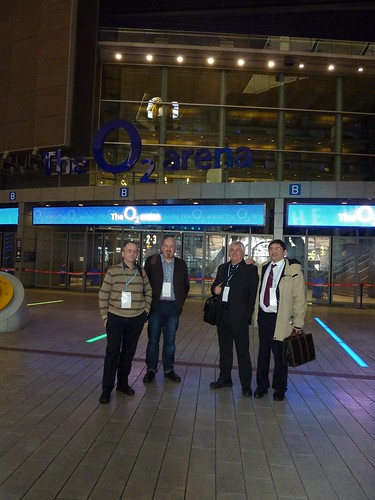
Yesterday I attended the 140 Character Conference in London, where I met up with Bill Gibbon, Neil Adam and Bill Lord.

From left to right: Neil Adam, Bill Lord, Bill Gibbon, Terry Freedman

Here are 18 highlights, any one of which could be the start of a rich conversation. I think if you take the volume and variety of the presentations overall, you would have to conclude that any schooling which does not address matters such as etiquette in, and use of, Twitter and other social media is not really a fully rounded education at all. Anyway, here are my ‘takeaways’.

I love the idea of Buy A Credit. Donate £1 and you get to have your name listed on the credits of a film. The money goes towards financing said film. What an ingenious idea. @buyacredit.

In the eracism slot, Kyra Gaunt told us that racism gives us the opportunity to be courageous.

Apparently, one fifth of businesses in the UK are on Twitter.

Several people, such as Stephen Fry and the lady from SB Buzz reminded us that Twitter is a relationship channel, not a sales channel.

Alex Bellinger told the story of a high street florist which engages its customers with Twitter. The plasma screen in its shop, displaying Twitter conversations, attracts curiosity, and then converts. This would probably be a good tactic to adopt in a school setting, both as a way of engaging other teachers and, on open days, parents.

I liked hearing from Dean Landsman and Dean Meyers that an augmented reality system tried out in New York provided the information that, in a particular direction, the nearest tube was 3,000 miles away. This is almost science fiction: think of the great creative writing you would see if you used this anecdote as a starting point.

In the musicians’ slot, Manny Norte started a sentence with the words, “M and M comes from an age…”  That was only 5 years ago! He went on to say that if M and M were starting out now, he would almost certainly use Twitter to engage with fans, as part of the marketing strategy.

I have to say that, in the ‘brands’ session, talk of ‘humanising the brand’ all sounded very cynical to me. Why not just be upfront and admit that Twitter is part of the marketing mix and be done with it?

JP Rangaswami, chief scientist at BT, asked why we couldn’t subscribe to a car park’s Twitter feed. Brilliant idea: you’d know which car parks are full in advance. After all, Tower Bridge has a Twitter feed and sends out alerts when the bridge is about to go up.

Josie Fraser gave an excellent talk about retweets, followed by some fake stats. I didn’t realise: RTs are a rarity apparently.

If you’re a consultant, maybe you miss the buzz and gossip of the office? Federico Grosso suggested that Twitter is actually a gigantic water cooler. Nice idea! Does that mean, then, that home-working is now not only technically possible, but feasible from a ‘human’ point of view too? A question for business studies students perhaps?

Some of the more ‘switched-on’ police forces, both here and abroad, have used Twitter to find missing persons and murder witnesses. Chief Inspector Mark Payne explained how using Twitter as a two-way information stream allowed the police to be deployed in the most efficient way during demonstrations, and to keep the public informed of what they were doing, and why. Question for citizenship students: is this a step towards policing with people rather than the policing of people?

The education session was interesting. James Clay stated the obvious (which is often necessary) when he said that “We need to get educational leaders to understand the value of social media.”

I was impressed by Ruth Barnett, of Sky, who emphasised the need for integrity when quoting from sources like the ‘Twitterverse’. For example, when covering the recent troubles in Iran, Sky apparently did its best to ensure that the tweeters it obtained information from were people who had already been reporting on it before it became the hot topic.

I also thought what she said about the challenges of networking with China was very interesting: they use a different character set and different networks. I’d also add that they probably have a profoundly different world view. All cultures differ, of course, which is what makes all this so interesting and, ultimately, rewarding.

Vikki Chowney made the point that, at the G20 conference, live blogging was difficult because of the volume of data being thrown at the audience. Twitter became, in effect, a tool for live blogging. That’s exactly what goes on at many conferences these days, of course.

She said that Twitter closed the gap between politics and people.

Finally, the author Thembisa Mshaka listed the differences between celebrity and stardom; for instance, a star has a tireless work ethic. She said, in a way reminiscent of Malcolm McLaren’s talk at the Handheld Learning Conference, that mediocrity becomes the order of the day because it is so easy to get away with.


Web 2.0 Project: Bill Lord's work

Name: Bill  Lord

Project title: Virtual Balloon Race

Application type: Twitter

Age range: 5-7 years

Description of project

Three KS1 classes (aged 5-7 years) will be using Twitter to microblog daily as one of a range of strategies to develop writing.

They will also seek to use Twitter to make contact with schools across the world.

They will also use Skype later in the year.

I met Bill today at the 140 Characters Conference, and his excitement about this project was palpable! Follow Bill on Twitter, where is username is @joga5.

Benefits of using Web 2.0

Motivation,Participation,Collaboration,International links

URL: Follow the project on Twitter: @giraffeclass

Are you doing interesting work with Web 2.0 applications in your school or college? If so, why not contribute to a new ebook containing ideas that other teachers can pick up and use? Further information is right here:

http://www.ictineducation.org/home-page/2009/10/14/web-20-projects-book-deadline-extended.html


Web 2.0 Project: Chris Leach's work

Here is a thumbnail sketch of some interesting work that Chris Leach is doing with Web 2.0. It is taken from the forthcoming second edition of the free Web 2.0 projects Book which was published last year -- over 11,000 copies downloaded! The book itself will contain even more information, so look out for that early in 2010! 

First name: Chris

Surname: Leach

Title of Project: Gunpowder Plot

Application Type: Social networking

Age range: 9-11 years

Brief description of Project

 Creating a twitter account for Robert catesby, leader of the Gunpowder Plot. Children researched the events after Fawkes's capture and then scheduled tweets using Hootsuite. He gained over 60 followers.

URL of project: http://www.twitter.com/LCS_RCatesby

Are you doing interesting work with Web 2.0 applications in your school or college? If so, why not contribute to a new ebook containing ideas that other teachers can pick up and use? Further information is right here:

http://www.ictineducation.org/home-page/2009/10/14/web-20-projects-book-deadline-extended.html

Web 2.0 Project: Silvia Tolisano's work

Here is a thumbnail sketch of some interesting work that Silvia Tolisano is doing with Web 2.0. It is taken from the forthcoming second edition of the free Web 2.0 projects Book which was published last year -- over 11,000 copies downloaded! The book itself will contain even more information, so look out for that early in 2010!

Name: Silvia Tolisano

Application type: Around The World with 80 Schools, Video Conferencing

Age range: All age groups

Description of project

Schools connect with other schools around the world through a short 5 minute video conference call.Students introduce themselves, share something special about their location or culture and ask a data collecting question.Over 200 schools are participating

Benefits of using Web 2.0

Motivation,Participation,Collaboration,Global Connections & Collaboration

URL: http://aroundtheworldwith80schools.wikispaces.com/ 

Are you doing interesting work with Web 2.0 applications in your school or college? If so, why not contribute to a new ebook containing ideas that other teachers can pick up and use? Further information is right here:

http://www.ictineducation.org/home-page/2009/10/14/web-20-projects-book-deadline-extended.html


Web 2.0 Project: Paula Naugle's work

Here is a thumbnail sketch of some interesting work that Paula Naugle is doing with Web 2.0. It is taken from the forthcoming second edition of the free Web 2.0 projects Book which was published last year -- over 11,000 copies downloaded! The book itself will contain even more information, so look out for that early in 2010!

Name: Paula Naugle

Application type: Cloudy with a Chance of Meatballs Skype Call, Skype call

Age range: 9-11 years

Description of project

My 4th graders in Louisiana and Jan Wells' 4th graders in Kansas read the book Cloudy with a Chance of Meatballs together via a Skype video call. Both classes practiced their reading fluency and voice before performing for each others' class.

Benefits of using Web 2.0

Motivation,Participation,Variety of means of expression,Ownership,Attention to detail,Peer assessment,Forms of literacy,Collaboration

URL: http://pnaugle.blogspot.com/2009/09/cloudy-with.html 

Are you doing interesting work with Web 2.0 applications in your school or college? If so, why not contribute to a new ebook containing ideas that other teachers can pick up and use? Further information is right here:

http://www.ictineducation.org/home-page/2009/10/14/web-20-projects-book-deadline-extended.html


Web 2.0 Project: Damian Maher's Work

Here is a thumbnail sketch of some interesting work that Damian Maher is doing with Web 2.0. It is taken from the forthcoming second edition of the free Web 2.0 projects Book which was published last year -- over 11,000 copies downloaded! The book itself will contain even more information, so look out for that early in 2010!

Name: Damian Maher

Application type: Using Google maps to support an excursion.

Age range: 9-11 years

Description of project

Using Google Maps, students are orientated to a place they are going to for an excursion, for example a river.  Students are able to examine the types of uses for the river by following it along its length. Fits well with direction (mathematics)

Benefits of using Web 2.0

Anywhere

URL: http://maps.google.com/ 

Are you doing interesting work with Web 2.0 applications in your school or college? If so, why not contribute to a new ebook containing ideas that other teachers can pick up and use? Further information is right here:

http://www.ictineducation.org/home-page/2009/10/14/web-20-projects-book-deadline-extended.html


10 things to do when someone follows you in Twitter


If someone follows you in Twitter, the polite thing to do is reciprocate, right? Well, maybe so, but I think it needs a little more thought than that. Here is a list of the steps I take when someone follows me.

Incidentally, the same techniques, with a bit of adjustment, work for any social network situation where people can become your "friend".


#1: What's in it for you?


As a general rule, I think about what I hope to gain from the relationship. Relationship? Yes: as soon as you follow someone, or they follow you, you have a relationship of sorts, whenever you want it or not and regardless of whether you pay it any attention. The only way to avoid it whilst remaining within your Twitter network is by blocking that person.

Now, my primary reason for wanting to link with anyone online is my interest in educational ICT. I have a secondary interest, that of business, because I run my own business. I am also interested in writing and journalism. And that is pretty much it. Unless you have the most amazing powers of persuasion, chances are that I won't be your friend or follower unless you come into one of those categories. Yes, there are the odd exceptions, such as connecting with someone who likes the same sort of music as I do, but even there it is almost certainly the case that I already "know" or know of the person through one of the other spheres I have just mentioned.

This is very much linked to my main website, of course. The focus of that is ICT in education. There may be a great, newsworthy article just begging to be written -- but if it's not to do with ICT in education it probably won't be me writing it, and if I do, it won't be on that website.

What it comes down to is this: I don't want to populate my Twitter network with people who have little or nothing to do with my main interests, because that will only make it more likely that I will miss something important from the people who do. That's why I don't agree with the people who advocate following as many people as possible: I think one needs to be more discriminating than that.

In summary: decide in advance what sort of people you're happy to follow, ie the ones from whom you're likely to benefit from following.

That's the backdrop against which I take all of the steps that follow.


#2: Check the tweets


When I receive an email to say that someone is following me, I click on the link to their Twitter page. I then check look to see what they've been tweeting about. If it's mainly technology or education-related, that's a good start.

If it's about what they had for breakfast over the last week and a half, that's a real turn-off but not a "deal-breaker".

If their tweets are all along the lines of "Great investment opportunity: make $5,000 a week for 5 minutes' work", I will block them straight away.

If they haven't tweeted yet, go straight to #5.


#3: Check the numbers


The next thing I do is check how many people they follow, and who follow them. If they have 3 followers and are following 5,000 people, I probably won't follow them. I would just assume that they're a sort of Twitter groupie and are following everyone in sight. I like to think that they want to follow me because they like what I write about, not to boost their numbers. But I won't dismiss them just yet -- you can't say I'm not fair!

If they have 5,000 followers and follow nobody, that seems on the face of it a bit egotistical and a bit pointless. But I still won't dismiss them just yet!

If they follow 5,000 people and have 5,000 followers, they're probably some sort of spammer. I almost certainly won't follow them. In fact, I may even block them, because this sort of thing usually goes hand-in-hand with the third type of tweet mentioned in #2.


#4: Who's who?


I like to check who the followers are, and who the followees (is there such a word?) are. If I recognise some names I respect, I'm usually happy to set aside my doubts for a while.


#5: Check their profile


If it is blank, or says that they're a professional goof-offer, or that they manage a real estate company and enjoy engineering in their spare time, I won't follow them. I have nothing against real estate workers or engineers, but I don't see what any of that has to do with me. See #1.


#6: Check if they have a website


If they don't, I almost certainly won't follow them unless I'm reasonably satisfied according to points 2, 3, 4 and 5. The existence of a website tells me they're (probably) serious. It also gives me a chance to find out more about them.

#7: Look at their website URL

If they have a website, but it's URL is www.goofingoff.com, I won't follow them. If it's some generic website that I can't check, like www.blogger.com, I won't follow them.

#8: Check their website

If we've made it this far, I'll check their website. In other words, unless I have been totally put off according to some of the earlier criteria, and if they do have a genuine-sounding website, I will look at it. If it's interesting then I will probably bookmark it or subscribe to its RSS feed even if I don't wish to follow them in Twitter (just yet).

#9: Check their profile or About page

If they have a website, I'll try and find out a little more about them there as well. Bottom line: are they who they purport to be, or some sort of scam artist or pornbroker (no, that wasn't a spelling error)?

#10: Home at last!

If all the previous nine hoops have been jumped through satisfactorily, I click on "Follow"!

Conclusion

I suppose all of that makes me sound like some sort of prima donna or intellectual snob, or as if I'm paranoid. I'm not, though I suppose you'll have to take my word for it. But if you think about it, these 10 steps are not a bad blueprint for how students should evaluate requests for online friendship. And although it all seems like a long and drawn out process, the whole thing from start to finish takes me 5 minutes at the outside. The reason I often keep people waiting for a response when they follow me is not that the process takes a long time, but because I usually end up trying to process lots of "follows" in one go, a couple of months after receiving the notification. (But I'm trying to improve in that department!)

I'd be interested to hear what you think of these steps, and how you respond when people follow you in Twitter or other social networks.


Web 2.0 Project: Kim Munoz's work

Here’s a thumbnail sketch of some interesting work that Kim Munoz is doing with Web 2.0. It is taken from the forthcoming second edition of the free Web 2.0 projects Book which was published last year -- over 11,000 copies downloaded! The book itself will contain even more information, so look out for that early in 2010!

Name: Kim Munoz

Application type: Live Blogging, Blog,Social networking

Age range: 11-14 years

Description of project

During Pres. Obama's speech to students, I took the opportunity to use Cover It Live. A live blogging app that allows you to embed the shared blogging space into a webpage. This allowed the students to interact during the speech and reflect on the speech

Benefits of using Web 2.0

Motivation,Participation,Variety of means of expression,Anywhere,Multi-tasking

URL: http://techmunoz.edublogs.org/2009/09/07/obamas-speech/ 

Are you doing interesting work with Web 2.0 applications in your school or college? If so, why not contribute to a new ebook containing ideas that other teachers can pick up and use? Further information is right here:

http://www.ictineducation.org/home-page/2009/10/14/web-20-projects-book-deadline-extended.html


Web 2.0 Project: Dorothy Burt's Work

Here’s a thumbnail sketch of some interesting work that Dorothy Burt is doing with Web 2.0. It is taken from the forthcoming second edition of the free Web 2.0 projects Book which was published last year -- over 11,000 copies downloaded! The book itself will contain even more information, so look out for that early in 2010!

Name: Dorothy Burt

Application type: Korero Pt England - KPE, Podcast

Age range: 9-11 years

Description of project

Students from Pt England School in Auckland, New Zealand podcast short reviews of New Zealand children's books. They aim to let their global audience know a little about life in NZ. KPE is available on iTunes and on their blog, http://kpetv.blogspot.com

Benefits of using Web 2.0

Motivation,Participation,Variety of means of expression,Any time,Anywhere,Forms of literacy,Creativity

URL: http://www.ptengland.school.nz/index.php?family=1,871,11746 

Are you doing interesting work with Web 2.0 applications in your school or college? If so, why not contribute to a new ebook containing ideas that other teachers can pick up and use? Further information is right here:

http://www.ictineducation.org/home-page/2009/10/14/web-20-projects-book-deadline-extended.html


Web 2.0 Project: Nancy Raff's work

Here’s a thumbnail sketch of some interesting work that Nancy Raff is doing with Web 2.0. It is taken from the forthcoming second edition of the free Web 2.0 projects Book which was published last year -- over 11,000 copies downloaded! The book itself will contain even more information, so look out for that early in 2010!

Name: Nancy Raff

Application type: Planetfesto, Photography,Social bookmarking,Social networking,writing

Age range: 7-18+

Description of project

We're creating a virtual ribbon of 6 pieces with a photo showing why a student loves the earth and a statement of why they love it and what they will do to protect it. Many schools have joined this project and people from 59 countries. Spans all grades.

Benefits of using Web 2.0

Motivation,Participation,Variety of means of expression,Any time,Anywhere,Ownership,Forms of literacy,Collaboration,Creativity

URL: http://www.planetfesto.org 

Are you doing interesting work with Web 2.0 applications in your school or college? If so, why not contribute to a new ebook containing ideas that other teachers can pick up and use? Further information is right here:

http://www.ictineducation.org/home-page/2009/10/14/web-20-projects-book-deadline-extended.html


Web 2.0 Project: Nicole Luongo's work

Here’s a thumbnail sketch of some interesting work that Nicole Luongo is doing with Web 2.0. It is taken from the forthcoming second edition of the free Web 2.0 projects Book which was published last year -- over 11,000 copies downloaded! The book itself will contain even more information, so look out for that early in 2010!

Name: Nicole Luongo

Application type: Podcasting in the Elementary Reading Classroom, Podcast,Blog

Age range: 5-7 years

Description of project

Pre-service students at St. Peter's College in Jersey City, NJ learn how to use podcasting in their future K-5 classrooms. They will use Podomatic to read stories, which will be shared with parents and other students via a blog on Blogger.

Benefits of using Web 2.0

Motivation,Participation,Variety of means of expression,Any time,Anywhere,Ownership,Forms of literacy,Collaboration,Creativity

URL: http://professorluongo.blogspot.com/ 

Are you doing interesting work with Web 2.0 applications in your school or college? If so, why not contribute to a new ebook containing ideas that other teachers can pick up and use? Further information is right here:

http://www.ictineducation.org/home-page/2009/10/14/web-20-projects-book-deadline-extended.html

Web 2.0 Project: Jennifer Wagner's work

Here’s a thumbnail sketch of some interesting work that Jennifer Wagner is doing with Web 2.0. It is taken from the forthcoming second edition of the free Web 2.0 projects Book which was published last year -- over 11,000 copies downloaded! The book itself will contain even more information, so look out for that early in 2010!

Name: Jennifer Wagner

Application type: Jenuinetech.com, Wiki,Presentation

Age range: PreK - 6th

Description of project

Jenuinetech.com hosts a variety of projects throughout the year.  Most projects provide creative ways of teaching math, language, history, art, and science in your classroom.  Projects usually run between 2 and 4 weeks.

Benefits of using Web 2.0

Motivation,Participation,Any time,Anywhere,Forms of literacy,Collaboration,Creativity

URL: http://www.jenuinetech.com 

Are you doing interesting work with Web 2.0 applications in your school or college? If so, why not contribute to a new ebook containing ideas that other teachers can pick up and use? Further information is right here:

http://www.ictineducation.org/home-page/2009/10/14/web-20-projects-book-deadline-extended.html


10 Reasons to use Diigo

Diigo is a social bookmark service. A social bookmark service is like the Favorites in Internet Explorer, or Bookmarks in other web browsers, like Firefox. However, instead of saving a URL to your computer, you save it on the internet.

This has a number of advantages:

Firstly, you're less likely to lose all your bookmarks in the event of a hard drive meltdown: you just move on to a different computer.

Secondly, you don't have the hassle of trying to remember which URLs you saved on which computer.

Thirdly, a corollary to the above is that you don't have the annoying situation of finding yourself at work wishing you could remember the URL you saved on your home computer, or vice versa.

Fourthly, and this is where the 'social' comes in, by saving your bookmarks on the web, suitably tagged, other people will be able to see your bookmarks on a particular topic, and you will be able to see theirs. This makes for a very rich experience, and helps you to expand your horizons. It's basically a very practical demonstration of the old adage: Many hands make light work.

Think of how you might use that with your colleagues, or with your students.

Diigo is one of several social bookmarking applications that are available, and I like it for the following reasons.

  • It's very intuitive to use. In this sense, it's not that different from the others available.
  • It's also free. Ditto.
  • You can publish a bookmark straight to your blog. This is a very nice feature. It means that you can, in effect, use the Diigo description text box as a surrogate blogging platform: very handy if you're out and about, and you come across a website you'd like to draw others' attention to, but don't have the time to write a blog about it, or to repeat what you have already said in the Diigo text box.
  • If you prefer, you could send the link to Twitter instead.
  • You can also organise your bookmarks into lists. I have to say that I have not yet tried this myself, but it seems like the kind of feature you'd find useful.
  • For the time being at least, I've decided to make use of the Groups feature. You can join (or apply to join) groups within your area of interest. Doing so will mean that you can be notified of any new bookmarks that other people in your niche have made. It's like doing research, or having continuing professional development, without actually doing much apart from checking your email now and again.
  • You can also create your own groups. I've created a group called Education Technology - ICT in Education. From a sharing point of view, it doesn't really cover anything more than several other ICT-related groups already do. But I created it as a way of easily storing bookmarks I have referenced, or may wish to reference, in my own articles.
  • Remember my point about being able to publish a bookmark to a blog? Well, the feature that makes Diigo stand out for me is the facility of being able to set up an autoblog post. What that means is that I can set it up to post my bookmarks at particular times and intervals. You can set conditions too. Thus I have set it up to automatically publish, twice a day (although I may change this to once a day or even once a week), any bookmarks in the group I have created. So, if I bookmark something now, it will miraculously appear on my blog at 9 pm today. If I discover and bookmark stuff after that, it will automatically publish it tomorrow morning at 9 am.
  • Think of how you could use this in school. For example, you could require your students to join a particular group and bookmark useful sites there, and have that published once a week, say. So their weekly homework would be to check the blog every week to see what's new, and to explore the freshly-bookmarked sites.
  • As with other social bookmarking sites, you don't have to share all of your URLs with the world: you can mark them as private if you prefer.

But as I think you'll agree, the educational possibilities of using the various (non-private) facilities of Diigo are vast.