Web 2.0 For Rookies: Music While You Work

When I was a teacher I used to play music in the background, whilst the students were working. Not House, or Funk or whatever the current fad happened to be, but baroque music such as, and especially, Vivaldi.

I found that the music calmed the students down if they were a bit 'hyper', and they also worked better, and for longer. I didn't know it at the time, but there is, apparently, some research which shows that this was not a figment of my imagination. Listening to baroque music is not only soothing but it also, or so I've read, makes the brain waves more coherent, ie work together, like meditation.

If you think about it, that is, counter-intuitively perhaps, exactly what one needs when working on a highly logical problem such as the ones encountered in ICT.

Notwithstanding such benefits of this type of music, was I abusing my position of authority by not allowing the students to listen to the music they liked? I don't think so, because the purpose of the exercise was not for me to enjoy 'my' music, but to create a calm, ordered atmosphere in which we all get on with our work. Much as like the deep bass drum, hi-hat and general 'groove' of House music, I have never heard anyone argue the case for its being conducive to quiet, serious work.

If I were teaching now, I would involve the kids more, simply because the technology allows it. For example, I might ask them to compile playlists based on users' preferences. That would entail compiling a questionnaire, collating and analysing the results, coming up with a solution (or set of solutions) and then  seeking client feedback. It would also entail examining copyright issues, an whether it's worthwhile paying for advertisement-free versions of services like Spotify, rather than make do with the no-cost version.

In short, I would be able to integrate the use of background music into the ICT curriculum in a way which would not have worked as well when the selection was confined to my CD selection. How come? Because ultimately, whatever solution my students would have come up with would have been unfeasible unless I happened to have those CDs in my collection, and we had the time to record, mix and compile a physical playlist – illegally. In fact, unless I had the CDs in my possession, or the local library had an extensive selection, even sampling different sorts of music or artist would have been far too cumbersome a process to be viable.

With Spotify or Last.FM or similar services, you can easily find different types of music, find out what others rate as worth listening to, try out different combinations of tracks (another example of modelling) and come up with a draft solution to run by the client.

And at the end of the whole process, the whole class can work with their own playlist going on in the background.

If that isn't an incentive to approach the work seriously, I don't know what is!

Web 2.0 For Rookies: Projects to Try Out

So far in this series we've looked at various types of application that fall under the Web 2.0 umbrella. But what does a Web 2.0 activity actually look like, and how can you go about setting one up?

Those were the kinds of questions I set out to answer when I embarked on the Amazing Web 2.0 Projects Book activity. Previously, I had compiled a list of around 60 projects that teachers had undertaken, using Web 2.0 applications. That proved to be quite popular, and it met my aim of wanting to spread ideas and practice.

A truly amazing collection of project ideasNotice that I didn't say 'spread good practice'. Clearly, it is not my intention to spread bad practice, or even mediocre practice. But it seems to me that the very terms 'good practice' and 'best practice' are value-laden. What I, in my circumstances, may regard as 'good' may, given your students and school set-up, be fairly pedestrian as far as you're concerned.

So, this updated collection of projects are largely self-selected. I invited contributions, and    quite a few came in. I asked would-be contributors for answers to specific questions, such as 'What challenges did you face in introducing this project into your school, and how did you overcome them?'

Where necessary, I emailed people individually to obtain further information. I was very clear in my mind that I wanted the projects to be replicable. So, even if providing a website for people to look was out of the question for safety reasons, I made sure that the description of the project, preferably with accompanying screenshots, made it possible for the reader to get a very good idea of what it was about, and what it looked like.

Although the book is arranged in order of student age, starting with All Ages and then from  Primary to Adult, I believe that any project can be used at any age, with a bit of tweaking obviously.

Certainly, the challenges people faced, the concerns people had, and the contributors' recommendations are not differentiated by age group.

I hope you will find this resource useful. If nothing else, it will give you a good idea of how some of the applications we've looked at in an abstract sort of way have been put to use by real teachers, in real classrooms, with real kids.

Enjoy!

You can find out more about this free resource by going to our Free Stuff page, from where you may download it.

Stop Press! At the time of writing this, the Amazing Web 2.0 Projects Book has been downloaded by 2,142 people.


Web 2.0 For Rookies: Mashups

A mashup is the combining of two or more sources of data to form a new data set. In principle, there is not really any difference between a mashup and the situation in which you trawl a few websites for data, paste the data you find into a spreadsheet, and insert some formulae to work on the data to yield different, and potentially more interesting and revealing, results.

The kind of mashup we're talking about here is (usually) on the web, and is updated automatically in real time.
A kind of low-level mashup is, I would say, inserting an rss feed into your home page so that people can see what you've been saying on Twitter, or the comments people have been making about your articles. If you think about it, that meets the criteria for a mashup which I have just outlined: it's on the web, it combines one set of data (the comments) with another (your blog's front page) to yield information that is updated in real time, ie immediately.

You could argue that this isn't a real mashup in the sense that it doesn't reveal anything new, and certainly doesn't give you anything you could not have found anyway. However, by adding the comments to the front page of your blog, it provides the visitor with a richer experience and, furthermore, saves you and them time: why go looking for the data if if you can have it delivered.

More adventurous mashups combine data from sources you may not know exists, or does so a lot faster than you could without assistance.

Take Trendsmap, for example. This takes Twitter trends and places them on a world map. Want to see what's hot news in British Columbia right now? Look no further. Is this a solution looking for a problem? Not if you're a journalist or a blogger wishing to write about the latest news on everyone's lips.

It should be obvious by now that this sort of application does not merely present you with two or more sets of data. By combining the data sets in new ways, the information you obtain is itself different to what would otherwise have been the case. Anyone who has ever used a pivot table in Excel will know exactly what I'm talking about: by mashing up the data, you start to see patterns that were hitherto hidden.

This has business and social applications too. The UK government has recently made publicly available sets of data in ways that techies can use them to create mashups, as described in Hacking For Good Reasons. Mashups which let you see what jobs are available locally without having to stir from your kitchen table, or which tell you which areas of your town are safest, or what was in the news when your local politicians were waxing lyrical to the press -- all these things matter to real people.

As far as business is concerned, mashups can form an essential component of a company's data-gathering armoury. The real-time characteristic of mashups can even be put to use for defence purposes.
An interesting exercise for students might be to ask them to come up with ideas for mashups. They can explain why they think the mashup would be useful, and who for, and what data sets they would need in order for it to work. They would not necessarily have to create the mashups, although as part of a unit on sequencing (programming), or in an after-school club, such an exercise could be very interesting indeed. The idea would definitely fit in with the section in the National Curriculum (in England and Wales) which looks at the effects of technology in Society and the importance of client feedback. Other curricular include similar demands.

In many respects, mashups are among the most exciting of Web 2.0 applications -- not least because they are all different from each other.

Hacking For Good Reasons

We tend to think of hacking as bad, and hackers as evil. But as well as the ones wearing white hats, ie the ones who are on our side and checking out vulnerabilities that others might exploit, there are the techno-geeks who are all dressed up and with nowhere to go.

Until now.

On the 11th March, the UK's Home Office, Cabinet Office and Ministry of Justice opened their doors to 10 technical experts from http://www.rewiredstate.com who used data.gov.uk and the web to develop tools and services that help people.

I've had a look and these are mash-ups -- the combining of two or more services -- with a difference: they are actually useful to people in helping them deal with important life issues.

At the moment, not all of the newly-created projects are working, but we are promised that they will be by the 13th March. Hmm. An IT project delivered on time? Let's see!

Some of them look very useful indeed. For example, One Click Organisations will make it possible for you to generate, at the click of a mouse, the following:

  • A constitution written in plain English
  • An official legal structure so your group can open a bank account
  • A list of group members that’s automatically kept up to date
  • A voting system to help make group decisions
  • A record of every decision that’s been made
  • Easy ways to modify the constitution as your group develops

Just those first two items alone would make it worthwhile using this app, although I think I would still want to have the legal stuff double-checked, just in case.

Moving There and other sites will prove useful to anyone looking to move into an area, in order to check crime and other stats, whilst Job Centre Pro Plus helps you find jobs in your locale. Several apps are concerned with transparency in various contexts. I especially like the sound of Voxpomp, which will collate statements made by MPs during Parliamentary debate and cross-reference them with news stories of the time. The Companies Open House ("Open 24/7, unlike Companies House") works well, allowing you to look up the details of a company unrestricted by the time of day.

There are also fun applications, such as Crime and Punishment 1707 versus 2007, described as "A slight but delightful project mashing up "The Old Bailey online - 1674-1913" and "Ministry of Justice Quarterly sentencing statistics" to compare sentencing for various types of crime." Can't wait for that one, as it will give grumpy old men like me, who think that criminals are given 32 ways of being let off, something else to rant about.

There are more of these 'Hack Days' coming up. In the meantime, to look at the apps I've mentioned in this article, and other examples of what the 'semantic web' might look like, check out the Rewired State website.

Cool Tools For Ed Tech Leaders: Spreadsheets

No, wait! Don't stop reading just yet! I know that spreadsheets sound boring, but they really aren't. Used properly, they can be essential tools in your planning toolbox, because they have three brilliant features.

Brilliant feature #1: The sort facility

Using this, you can re-order the spreadsheet by deadline, to see what's coming up, or by  person, to see who is meant to be doing what, or by area of work, to see if everything is being covered. Using the sort feature is easy, as long as you have designed the spreadsheet sensibly. That means, having a separate cell for each attribute of each task, ie date for completion, area, person responsible, and so on.

One tip: format the dates as yyyy-mm-dd (or, in USA, yyyy-dd-mm). Why? Because that's the only way you can make sure everything is listed in chronological order, if that's what you need.

Brilliant feature #2: Sumif

This is a great feature that's available in Excel, Google Spreadsheet and in OpenOffice's Calc. What it lets you do very easily is to perform the following kind of calculation:

If this item comes into category A, add it to the total, otherwise don't.

You can use Sumif to find out what you're spending money on, or where your team's income is coming from. For example, you may have categories like software, hardware, printing, and so on. Using Sumif, I once determined that 60% of my department's spending was going on photocopying worksheets. I asked my team to print off multiple copies instead (if they needed print-outs at all), which resulted in savings of hundreds of pounds over the year.

Brilliant feature #3: Conditional formatting

Use this to create the traffic light system: green for 'yes, done that', amber for 'we're getting there', and red for 'there's been a glitch'. The traffic light system gives you an instant visual summary of how you're doing as far as meeting targets is concerned.

Conditional formatting can work on either numerical values or text, or a formula. For example, you could have a column called Progress, and set up the conditional formatting to turn a cell red if it contains the word 'no', green if it contains the word ';yes' or amber if it contains the word 'partly'. Or you could set it up based on a formula 'today's date minus target date'. If the answer is less than zero, the cell goes red, and so on.

The spreadsheet was one of the first applications developed for the personal computer, and it's more than just a glorified calculator. Pretty it ain't, but boy is it useful!

Web 2.0 For Rookies: Photo-sharing

"Upload your photos and share them with friends and family!" That's how photo-sharing websites such as Flickr are often promoted. But in education, there is a more serious side: photo-sharing sites make available a huge repository of pictures.

Pupils like to illustrate their work, but unfortunately all too frequently neither they nor their teachers seem to fully appreciate the concept of copyright.

Here's the deal: whoever owns a photo owns the copyright in  it. Just because they allow anyone to see it, does not mean they allow anyone to use it. Just because it's available through Google, doesn't mean you're free to use it. Bottom line: if in any doubt whatsoever, assume that you can't use it, and you should be legally safe. Do not be tempted to use something you have no legal right to. Not only might you get caught, it also sets a bad example to your students.

So at the very least you must look at the licence terms next to the photo you want to use. If it says 'All rights reserved', it means you can't use it unless you write the owner a very nice email and they take pity on you. Even better, find a photo that is free to use, usually for non-commercial purposes, and as long as you give credit to the owner.

My tools of choice are Flickr for the pictures, and the Creative Commons search engine for finding pictures with the right licence terms.

When you find a picture you like, if it has the legend "Some rights reserved", click on the text and see what you're allowed -- and not allowed -- to do. You will see something like the Creative Commons licence agreement shown in the illustration.

Find out what you're allowed to doRegardless of whether you make use of other people's pictures, I would always encourage schools to create their own repositories. After all, it's highly unlikely that other people will have taken photos of your street, your school or your neighbourhood. And even if they have, they may not be exactly right for your purposes. Flickr is free, or a modest amount for an unlimited amount of space, or you could use a dedicated hard disk or server in-house. Think about it: if each class spent one lesson a term taking photos for the school repository, by the end of the year you'd have hundreds, possibly thousands, of pictures that anyone in the school could use to illustrate their work.

You can even build in curriculum work. Depending on your subject and students' age group, have a session taking photos on the theme of shapes, or the colour green, or weather, or ... well, you get the picture.

If you do use Flickr, there are 3rd party applications which allow you to do more with your photos than simply share them with others. For example, you can create mosaics, or posters, or magazine covers. One of my favourites is Flickr Toys.

If you like the idea of making more use of photos, you know what to do: start snapping!

My photos on Flickr may be found here.

5 Minute Tip: Having a Backup Plan

Anyone who has been using computers for a while knows that as far as something going wrong is concerned, it's not a matter of if, but when. To acknowledge that is, I think, to be realistic rather than pessimistic (though there is frequently little distinction between the two). And the sooner 'newbies' realise that, the better it will be not only for their students, but for themselves as well.

Why? Because teachers who have just started using computers and related technology almost invariably blame themselves when things go awry. If you do nothing else, tell them that it's par for the course, that all of us experience glitches for no apparent reason, and when least expected.

A different kind of technology: still usefulIt makes sense, therefore, to always have a backup plan. The beauty of having a standby activity is that when your carefully-crafted lesson begins to go pear-shaped, you can put plan B into action before panic sets in. Panic stops you thinking clearly. Having a plan B means you don't really have to.

Types of Plan B

There are several things you can do in the situation, in addition to calling for some technical support, but they all fall into one of the following categories:

  • Category A: Paper-based work related to the work in progress.
  • Category B: Oral work related to the work in progress.
  • Category C: Paper-based work not related to the work in progress.
  • Category D: Oral work not related to the work in progress.
  • Category E: No work at all.

Let's dismiss Category E straight away. I don't see why a technical hold-up should mean that students are effectively given a free lesson. Here are ideas about the sort of thing I have in mind for the the others.

Category A

  • Problem-solving exercises.
  • Tests.
  • Word games based on the relevant terminology.

Category B

  • Class-based Q & A session in which students ask about things they don't understand, and you and the rest of the class attempt to help them out.
  • Discussion about issues related to the topic.
  • Quick-fire Q & A session in which you ask individual students to answer your questions.

Categories C and D are similar, but just not based on the topic in hand.

Generating the contingency work

It's a good idea to plan for the lean times during the times of plenty. In this context, that means preparing one or two extra sets of notes or worksheets when you're planning a topic. If you are part of a team that makes it easy to generate quite a bit of extra stuff very quickly. When I was head of ICT in a school, I asked my team members to produce one contingency lesson plan and resource for every 'real' one. (Each 'one' was actually a unit of work comprising material for six lessons; what I did was ask them to plan for seven lessons instead.) Within a very short period of time we had a drawer-ful of contingency resources, some of which could also be used by cover teachers.

It may be hard to predict when the technology is going to let you down. It should always be predictable that the students will carry on working regardless.

Learning Platform or Virtual Learning Environment?

What's in a name? I mean, does it matter if you call a learning platform a learning platform, or  a VLE? I have to say that until I visited Grays Infants School a few days ago, I tended to use the term 'Virtual Learning Environment' on the purely lazy grounds that (it seems to me) more lay people have heard of that term than the term 'learning platform', meaning that there was less explaining to do.

The Learning Platform is central to the school's activitiesBut Christine Terrey, Headteacher, had the very firm opinion right from the start of the school's virtual journey that the term 'learning platform' had to be used. Why?

"Because we wanted to retain the focus on 'learning'.", she says.

What we saw was a very good implementation of a learning platform. Paradoxically, what made it good was that the emphasis is not on the learning platform itself, but on its role in supporting and adding value to the work the school is doing anyway.

I recently started a series about change management, and three of the essential ingredients, which will each form the basis of an entire article, are putting learning first, collaborating with other staff and putting support in place.

Grays school exemplifies each of these aspects. Firstly, the learning platform hosts activities which the children do in real life, not just on-screen. Secondly, the staff have a monthly meeting in which they work on and share stuff for the VLE. Thirdly, the support staff have time built into their timetable for learning platform-related work.

Grays has even Nursery children, ie 3-4 years old, logging on with their own password, using icons, which affords the opportunity for the adult to discuss shapes. One big problem with schools that prepare their children really well for their digital lives is that all too often the children are let down at the next stage in their schooling. Doug Woods, in a recent comment on this website, vividly drew attention to this, citing the views of children as young as Year 6 (10-11 year olds).

The Headteacher at Grays has sought to avert this situation by working closely with the local Junior school, which uses the same type of Learning Platform.

The Learning Platform at Grays is clearly a central component of what the school does. As well as hosting the podcasts which the children make, it serves as a repository for summer holiday activities, and a meeting place, in the forums, for children, staff and parents alike. Parents are not only able to see their children's work, but are encouraged to comment on it through the wiki tool provided.

It was clear from meeting the parents that the learning platform, along with the children being able to take home internet-enabled netbooks, has made a huge difference to everyone. Not least, it has encouraged parents to get involved in their children's education in a way that the dry-as-dust term 'online reporting' could never suggest. Indeed, I suggested to Ray Tolley, who is organising a Think Tank for Naace on the subject of parental engagement, that he invite Mrs Terrey along as a speaker. He told me he already had.

The school is doing some great work, and a video of the visit will form part of Becta's collection of Next Generation Learning vignettes designed to inspire and suggest ideas to others. I will let you know when it's available: you will not want to miss it.

General Impressions of ICT in Singapore

#iCTLT2010 If I were asked to give a one-phrase description of education in Singapore, I should have to say that the overriding impression is one of faith and trust. Faith in the ability of the child to rise to challenges that we might consider beyond their years. Trust in the ability of the teacher to guide the youngsters and nurture their talents and abilities.

Faith and trust also in their ability to look at what other countries have done and experiment and come up with solutions all their own.

I am not naive. I understand that when one visits a foreign country, one will be shown the best, not the worst or even the mediocre. But seeing the best is actually what should happen: we need to see what our own students might aspire to given the right circumstances and ingredients.

Two mottos struck me as especially noteworthy. One is the Ministry of Education's ideal that teachers should teach less in order that students may learn more. Teach Less, Learn More, or TLLM, appears to be another way of stating the 'guide on the side' idea, but it seems to me to run deeper. The TLLM philosophy is not simply to leave the students to it, but to encourage and guide them in asking important questions, and then seeking the answers.

A great sentimentThe other motto is 'Every Child Ready for the World'. This strikes me as so much more positive than our own, unfortunately necessary, Every Child Matters. One of the strengths of our education system is that it considers the whole child; school is not only an educational (in the narrow sense) establishment, but the hub of the community and the locus for all sorts of services – police, social, medical – that may impinge on the individual child.

But that is also its weakness. As Michael Gove has pointed out, there is no official body in England that is solely concerned with excellence in school. We do not have a ministry of education, we have a department for children, schools and families. Even Ofsted, the inspection body, is not exclusively focused on schools, but in everything ranging from childcare provision to old age homes.

I'm not familiar enough with the Singaporean education system to be able to say whether they have cracked this dilemma, of striking the right balance between the academic and the social and emotional aspects of the child's experience. But certainly what we saw was impressive: students, even as young as 8, who were articulate about what they have done, and why; students who have worked with mentors in further education in extended projects; students who are able to work well with each other.

I don't think they have completely got it right. A teacher who has been doing very innovative work in science gives her class a pencil and paper test every six weeks. There is no slot on the curriculum for ICT, which is embedded in other subjects across the curriculum. Many will agree with this philosophically, but in my experience it's quite difficult to make it work.

Despite such doubts, for me the real issue is not whether Singaporean children are ready for the world, but whether the world is ready for them. 

The Tyranny Of Relevance

IMG_0836

#BloggersCircle In a recent address called 'What is education for?' to the Royal Society of Arts, Michael Gove bemoaned the fact that there is no government department in the UK whose sole remit is the pursuit of educational standards.

According to Gove, education is not regarded as a good enough end in itself, but as something which can help to achieve some other goal.

In his exposition of his views in favour of liberal education, he used the term 'the tyranny of relevance'. Although he wasn’t talking about Information and Communications Technology (ICT), this phrase did strike a chord with me. In the continuing debate over whether ICT should be taught as a subject in its own right, is there perhaps too much store set by 'relevance'?

I’ve noticed (although, curiously, I’d never consciously noticed it before) that whenever people tell me that they think ICT should be taught through the context of other subjects, they always cite 'relevance' as a factor. They almost always throw in a reference to kids having to suffer boring lessons on spreadsheets and databases. They seem to think that having lots of lessons on e-safety and plenty of opportunities to use blogs, Google and Wikipedia will somehow turn out youngsters who can use their knowledge of technology and ability to transfer their skills to excel in subjects right across the board.

Perhaps I have overstated my case slightly – but only slightly. Like Gove, I happen to think that the best kind of education is one in which students develop a deep knowledge of subjects. I like the idea of cross-curricular themes, and of making subjects 'relevant' both to each other and a wide range of issues and circumstances. However, I do not think you can achieve that without mastering individual subjects. To summarise, I regard the following statements (which are mine, not Gove’s) as axiomatic:

     
  1. It is important for students to gain a deep knowledge of ICT, because only by understanding key issues (such as the difference between data and information) can they protect themselves against some forms of hype.    
       
    More positively, an understanding of how ICT can be used for 'provisional' activities, such as drafting and modelling, and an ability to appreciate the importance of precision in language (as required, for example, in 'sequencing' or programming, is essential for being able to avoid being subservient to a computer system’s apparent will.    
       
    However, even this is falling into the trap of looking for 'relevance'. Why can't ICT be studied and enjoyed for its own sake?
  2.  
  3. Far from being boring, spreadsheets and databases can be extremely interesting, even beautiful. I don’t mean just to look at, but in their design and construction.
  4.  
  5. Any teacher who makes spreadsheet or database lessons boring either has not had the time to develop interesting lessons, or does not really have a deep grasp of, and appreciation for, these areas themselves.
  6.  
  7. What we need are teachers who have a deep love of ICT. I think to achieve that we have to encourage teachers to join communities in which important subject-related (not necessarily education-related) issues are debated (such as the RSA or British Computer Society).
  8.  
  9. To help promote #4 we need to ensure that teachers have the time, and the authority, to develop teaching resources of their own.
  10.  
  11. As part of that, teachers should have the flexibility to be able to teach topics they have a deep interest in.When I started teaching economics, something I was especially interested in was road pricing. I usually spent around 2 weeks on that topic alone, but in doing so I was able to touch on a whole plethora of concepts that I knew would prove relevant throughout the rest of the course.
  12.  
  13. Finally, there needs to be an entitlement for top quality professional development, and the funds to back it up. For example, why shouldn’t teachers be able to apply for a ‘scholarship’ to attend national or even international conferences about educational technology?

I strongly believe that if we are to tackle the oft-cited lack of computer programming courses, say, or the sometimes perceived 'dumbing down' of ICT as a subject in its own right, we have to address the 'tyranny of relevance'.

The video of Michael Gove’s talk may be viewed on the RSA website.

This article was first published on 2nd July 2009.

Web 2.0 For Rookies: Instant Messaging

Instant messaging, or IM, is the name given to communicating with someone else, via a keyboard, when that other person is online at the same time, as you can see in the screenshot below. In this respect it differs from emailing, tweeting or texting, where the other person may pick up your message later -- when perhaps you are offline.

IM is great for sharing informationWhen IM first appeared on the scene it achieved notoriety because of the way some people conducted themselves in chat rooms in Yahoo!, MSN and other providers. In fact, in the teen rooms especially, but also in 'adult' rooms, some people would use IM for writing sexually explicit content. I found that the sensible rooms were sometimes quite useful, as there were rooms for all different interests, but because it was always a bit hit and miss as to who was going to be online at the same time, these were never as good as today's communities and the ability to 'friend' or 'follow' someone.

There was also the ever-present danger that, because IM is text-based, you could never be certain that the person you were speaking to really was who they purported to be. Not that that particular danger has gone away, as the recent Facebook murder story sadly illustrates. However, there are ways of teaching youngsters about this sort of thing, as Dughall McCormick illustrated in Computers in Classrooms last April.

Today, many of the original chat rooms have disappeared, and those that remain seem to be overrun by spam. However, IM has entered the mainstream, insofar as anything Web 2.0 may be termed 'mainstream'. You will find it in applications such as Skype, streaming video, Facebook, Google Wave.

The reason is that IM is a brilliant way of communicating with someone else instantly. You can quickly share an opinion, ask for a file, give them a useful URL. Used sensibly, IM can provide a rich extra dimension of communication whilst engaged in another activity such as taking part in a discussion or watching a video.

Like anything else, such as text messaging, just because IM has been abused, does not mean it should be abandoned all together.


Conversation is sometimes better than reading

At six am on the morning of my second Spotlight presentation in Singapore, I opened my hotel door slowly and gingerly put my head out. The corridor was empty. Excellent. Creeping to the lift, and walking in the shadows, I was able to get right into the dining area, have a bowl of cereal and a glass of orange juice, unseen and unspoken to. Wonderful! I took out my presentation notes and started to read.

It was then that I made the mistake (or so I thought at the time) of glancing up, because I spotted Junko Yamamoto, whom I had been talking to with David Warlick the previous evening, at a networking reception. I am nothing if not a gentleman, and I offered to join her. She accepted.

In a very short time, I was as delighted as I had previously been disappointed to find myself in company rather than alone. Although I had not been able to read over my notes one last  time, the conversation, on the relevant topic of '21st century skills’ was so stimulating as to make such last-minute revision unnecessary. There is no doubt that the talk I gave was enriched by this unplanned exchange.

I was not alone in being thus affected. Junko, who arrived 15 minutes late for the morning’s keynote address, explained to me afterwards that she had been so stimulated by our conversation that she had to rush back to her room and start writing a paper.

You sometimes hear of all sorts of goings-on at conferences. I think that if the effect I have on women is to make them want to race off and write an academic treatise, my wife has nothing to worry about!


5 Minute Tip: Using Your Phone As An E-Reader

How can you read stuff digitally on the move if you don't have an e-reader and don't want to use a laptop?

I have just returned from Singapore, where I was invited by the Ministry of Education to give two Spotlight presentations at the ICTLT2010 Conference, on the subjects of introducing Web 2.0 into your classroom, and into your school. Because of weight restrictions and for the sake of convenience, I didn't want to take reams of paper with me, and I didn't want to have to read everything on a laptop either, as the one I took with was a fairly large one.

The solution? I used my phone instead.

Who needs an e-reader?

I have a smartphone, meaning that I can synchronise appointments and contact details with my computer. It also comes with a suite of applications like Word, and Acrobat Reader. I found that trying to read documents on the small screen is a challenge: you either need microsopic vision, or not mind scrolling furiously every few words.

However, I found that reading my presentation slides in pdf format worked very well indeed. The file was much smaller than the original PowerPoint version, and was perfectly clear, as you can see in the illustration. It meant that I was able to look at my slides very easily and without any fuss, whilst in situations like drinking a coffee in the airport lounge. I would highly recommend this.

Here's what I did (I'm using Office 2007).

  1. In PowerPoint, go to Save As -> PDF or XPS.
  2. Select the Minimal Size (Publish online) option.
  3. Connect the phone to the computer, via a USB cable.
  4. When asked what sort of connection, select ActivSynch.
  5. Create a suitably-named folder in My Documents on the phone.
  6. Copy the file across from the computer to the phone in the usual fashion.
  7. View the file on the phone by going to Program -> File Explorer and then navigating your way to the file.

I shall be doing a lot more of this from now on!

Ebooks: No Need For Publishers To Worry?

Still safe?Are ebooks merely a footnote to publishing? I attended a Society of Authors' conference yesterday afternoon, and the panelists seemed to take that view. Apparently, according to the latest stats, ebooks in the UK account for only about 2% of the published output, and next year it's not predicted to rise to much above 3%. From this, the panelists concluded that the book industry was unlikely to go the way of the music industry.

Far be it from me to question the experts, but it seems to me that a few things are not being considered here.

Firstly, it's generally the case that when there is a sudden transformation, it's almost impossible to predict that it's going to happen. There's even a theory to help explain such changes: catastrophe theory. A good example is boiling water: until the last second, there is almost no indication that anything dramatic is about to happen to the state of the water.

So, just because only two or three percent of published books are in the form of ebooks should not, in itself, give any comfort to publishers at all.

Secondly, it is now technically feasible to sell books in single chapters. It used to be the case that you had to buy an album, and hope that most of the tracks were OK. Now you can buy only the tracks you want. By the same token, why should I have to buy a whole book, when there may only be one or two chapters that are relevant to my needs? One of the things preventing this may be that there are not good enough micropayment systems around (I say 'may' because there wasn't the last time I looked; there may be now).

Thirdly, when it comes to niche publishing, the situation may be different. I wonder, for example, what the proportion is in educational publishing or, even more specialised, ICT in education?

Fourthly, and this was actually stated by the panellists present, it is essential these days that if you're going to publish a book, you have to make sure there is an e version. This advice probably comes naturally to those of us have been experimenting with print-on-demand.

Like a lot of people, I like the feel of a 'real' book, and I like being able to put physical bookmarks and post-it notes in it, and to annotate it (in pencil, of course). But given ebooks' convenience and lack of weight, and the growing ubiquity of devices on which to read them, I think the panellists were perhaps being more optimistic than may have been justified.

Are You Only Teaching Kids To Drill Holes?

Drilling holes? What’s that got to do with ICT? Possibly quite a bit….

A perfect hole. But what's it for?You can always rely on Niel McLean of Becta to come up with a fresh insight, and his talk at the Naace 2009 Conference proved to be no exception. I can’t recall the exact details of the story, but Niel related a conversation which took place at a parents’ open day:

Parent: What’s this machine for?

Design & Technology Teacher: It’s for drilling holes.

Parent: So why would you want to use it?

Teacher: To drill holes.

Parent: Yes, but why teach the kids how to use it?

Teacher: So they can drill holes.

People don’t always express themselves very well, and this is a case in point. What the parent was really asking was: Why would anyone want to drill holes?

The issue is, how far do we fall into the same trap?

Q: Why use SlideShare?

A: To create slides.

Q: Why use Audacity?

A: So we can edit a podcast.

Q: Why use a spreadsheet?

A: So we can do calculations.

We need to make sure that we have a rather better set of answers!

This is #16 in a series of 25 reflections on the Naace 2009 Conference. It was first published on 28th May 2009.


Efficiency? Don't Make Me Laugh!

One of the reasons always advocated for adopting technology is that it leads to efficiency gains. In other words, it (supposedly) helps you do what you already were doing, but faster, cheaper or easier.

I wonder if this is actually true, as opposed to a convenient white lie with which we console ourselves? Has anybody undertaken a Total Cost of Ownership type of analysis which looks not only at the financial costs of ownership but also the social and economic costs? If anybody were to do so, I imagine we would have to re-evaluate our investment in time, energy and money into technology.

This may sound an odd way to open an article by an educational ICT specialist (and one who loves technology). But I think these issues should be addressed.

Take three examples. Firstly, I've been working on a couple of presentations. Each presentation will last an hour. I have to allow ten minutes for questions, so once I've allowed for five minutes at the start being introduced and saying 'Good Morning', I'm left with 45 minutes to fill. That is, a total of an hour and a half.

So far, preparing for these presentations has taken nearly three days.

Part of the reason is that I like to be well-prepared. As the old saying goes, you don't get a second chance to make a first impression, so I always like to have the problem of trying to pack in as much as I can rather than the opposite one of hoping that nobody will notice if I start talking incredibly slowly in order to drag it out.
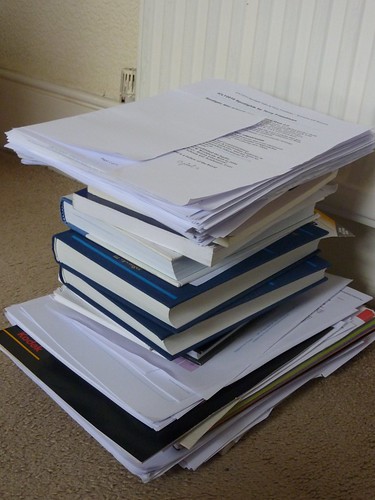
A little light reading...But another part of the reason is that it is now so easy to keep finding new sources of information to read and consider. The photograph represents the amount of reading I've done so far. Admittedly, this includes a few books, but the rest of it is, by and large, printed from the internet. In  fact, only this morning I accidently came across yet another article I think I ought to read.

Now, if I'd had to do all this research in my local library, as I used to before the web was invented, I would have stopped long ago. There comes a point where the likely benefit of reading one more article is outweighed by the cost (however measured) of acquiring it. That point is reached much sooner when you have to physically move from your home to a library (and possibly cart a load of stuff home afterwards).

What we have here is a modern manifestation of Say's Law, which states that supply creates its own demand. The reason I'm acquiring all this reading material is that it's so easily available. Perhaps too easily available.

Another example is in the field of writing. It is so easy to rewrite stuff that it's almost impossible to exercise the self-discipline required to say "That is now good enough." When trying a different turn of phrase, or looking up a nice quotation, or finding an appropriate illustration (or, in my case for this article, actually creating one) is so easy, the temptation is to keep on and on tweaking in the vain hope of achieving perfection.

Thirdly, lesson preparation has been made far more time-consuming now than it ever used to be, for all the reasons I've rehearsed so far. Worksheets and other resources tend to be more interactive, colourful, neat and engaging than ever. But I wonder if the gains in terms of students' learning are enough to justify the huge increase in person-hours that computer availability has led to?

(I'm sure I won't be the only person to be able to recount that some of my best lessons were the ones I thought of on the way in to work or even, sometimes, the ones in which I allowed a chance comment or question by a student dictate the content of the entire lesson, because the moment was there and had to be seized.)

Being able to answer such questions does not mean advocating a return to the steam age. But it strikes me that it would represent a much more honest appraisal of the relative costs and benefits of access to computer technology.

This is important, for two sets of people: teachers, because it's a workload issue, and students, who need to learn how to evaluate the effectiveness of technology. They should understand such matters both because it's all part of being digitally literate, and because otherwise it will become a workload issue for them too.

What all this boils down to is an economics argument. We tend to work, especially in education, on the basis of the well-known saying, 'If a job is worth doing, it's worth doing properly.'

This is almost never the case.

Think of it in terms of exam grades. If you advise your students to work as hard as they can to attain a grade A in your subject, the extra hours they spend doing so could mean their obtaining a lower grade in other subjects. Looked at from a higher perspective, what's better: one grade A and four grade Gs, or two grade Bs and three grade Cs?

Think of it in terms of lesson preparation. If you prepare one group's lessons absolutely perfectly, at the cost of being almost completely unprepared for all the others, would that be acceptable?

At the risk of sounding as if I'm advocating low standards (which I most definitely am not), I think we have to try to develop, and inculcate into students, the idea of 'good enough'. It's OK for things to be 'good enough': they don't have to be perfect.

Being a techno-addict (a boy who likes his toys), I imagine a technological solution. Perhaps a macro that will actually prevent you from working on a document any longer once a particular length of time has been spent on it. It would be easy to write.

Indeed, there is a free text editor that does something similar. Write or Die seeks to cure writer's block or slow writing by becoming more and more noisy and unpleasant as time limps on. It's almost impossible to continue in the circumstances it creates.

A technological solution to a problem caused by our inability to exercise self-discipline in our use of technology? I like it!



Web 2.0 For Rookies: Commenting

If there is one thing which really characterises Web 2.0, it’s the ability to comment on people’s work. Commenting is what can, or at least should, make a conversation possible. In this article I’d like to look at comments from both an educational and an etiquette point of view.

Educational

I’ve been to several presentations in which the speaker shows a screenshot of someone’s MySpace page indicating that they’ve received 1500 comments about something they’ve posted. My take on this is as follows:

  • How can anyone read, let alone respond to, 1500 comments?
  • If most of the comments are ‘Wow’, or ‘Cool’, how does that benefit the originator of the post, except for giving them an ego boost?

A more important, but more difficult to measure, criterion is how much influence your post has. Shelly Terrell made the following observation in a response to one of my articles:

I have used these posts at various times so just because I'm not commenting on them doesn't necessarily mean they weren't useful.

I’ve sometimes had people say to me, months after I’ve written an article that nobody commented on, that they found it useful.

Also, it’s now possible to read an article in one place and comment about it in another. I typically see comments about my articles on othert blogs, in Twitter and on Facebook. It’s possible, through the magic of RSS feeds, to collate various streams into one place and display it on your website. I find that looks a bit too messy for my liking.

Something I have done in order to keep track of when I or my articles are mentioned anywhere is to set up a Google Alert and a Twitter alert. These let me know, by email, whenever my name is mentioned on the internet.

It seems to me that used wisely, comments on students’ work could form part of your assessment for learning approach. The key to success in this respect is as follows:

  • Be aware of when comments are posted.
  • Discuss the comments, and what might be learnt from them.
  • Work out suitable responses whilst taking into account e-safety and time management issues.

Etiquette

I have set myself the following rules:

  • I always try to respond to comments. If someone has gone to the trouble of making a comment, the least I can do is acknowledge it.
  • I never post anything which is likely to offend people, such as swear words.
  • If someone makes a sensible-sounding comment, but has a website like ‘easyescorts.com’, I won’t publish it.
  • If someone tries to advertise their services in a comment, when the service has nothing to do with the subject in hand, I won’t publish it. Sometimes, I’ll even report it as spam.
  • I never respond to trolls, which is the name given to people who are just plain nasty. They have no interest in furthering the conversation, and usually hide behind a wall of anonymity. If you get targetted by a troll, it’s a compliment in a way because these people only attack those who are patently better than themselves, ie more educated or more informed. The common advice is: don’t feed the trolls. That is, don’t give them any attention. Here is a great post on this subject:

Trolls, meatheads and my mom

I like this video too:

Don’t feed the trolls

That video is a good thing to show to pupils to convey the effects of cyberbullying (because that’s what trollism is) on people.

I also love this feisty response to troll comments. Go to the YouTube site itself for the lyrics.


I found this on the Grammar Girl site about making comments online. It’s a great post and you should definitely read it with your students.

I’d love to know what you think of my comments on comments – but nice ones only please!


The 30 Goals Challenge

#30goals When a long-time subscriber to my newsletter, Computers in Classrooms, emailed me to ask if I could recommend a blogger she should follow, I had no hesitation: Shelly Terrell, without a doubt.

Seemingly indefatigable, Shelly writes an amazing amount of stuff, all of which is high quality. Following her on Twitter is good for one’s professional development in itself, but her blog, Teacher Reboot Camp, is definitely worth a visit.

And worth subscribing to.

At the moment, Shelly is writing a series in which she is setting a new challenge every day for 30 days. Known as the Goals 2010 Challenge Series, this is an excellent set of posts that are:

  • Challenging
  • Replete with resources
  • Well-written

The upbeat tone of the articles, together with their good advice and questioning, serve to remind us of the sheer excitement of working in education.

I have to say I find some of the posts a bit long, so I tend to speed-read them much of the time. That’s not a criticism actually. I prefer long posts sometimes because I like something I can get my teeth into. Besides, Shelly often formats her articles in such a way (ie with bullet points and suchlike) that reading them quickly is not difficult.

I love her challenge about causing a ripple. In fact, I love the idea of this sort of series, and will be starting one myself soon, on a different topic. I’ve been intending to do it for ages, but have been waiting for the right time. Inspired by Shelly, I’ve now decided to start writing it while I’m waiting for the right time!

Another series you might like is Steve Dembo’s 30 Days to be a better blogger.

But check Shelly’s out first ;-)


Web 2.0 For Rookies: Presenting

I can't think of any course in ICT, apart froma  few very specific application-centred ones, that does not require students at some stage to present their findings, views or designs to the rest of the class. The good news is that there are a few applications online which make it very easy to create presentations, share them, and invite comments. Here are four which you might like to explore.

Slideshare

This is like an online version of PowerPoint. Indeed, you can uipload your PowerPoint presentation to form a SlideShare version. Unlike PowerPoint presentations, SlideShare ones can actually be embedded in your blog post or web page.

http://www.slideshare.net

VoiceThread

This enables you to create a presentation from your photos or other pictures, and add a soundtrack (music or commentary) to them. Nothing unusual here, you might say, except that viewers are able to leave their own audio comments on each slide.

The fascinating thing is that once the comments start to build up, unlike the case with some applications, they seem to become an integral part of the presentation. In other words, they enrich the original upload. Great for letting kids collaborate in an easy way!

http://voicethread.com/

Glogster

One does not often associate the word 'fun' with presentations, but it comes naturally when referring to Glogster. Imagine a poster that can contain not only text and graphics, but sound and video too, and that's Glogster.

It's supremely easy to use. The real challenge is ensuring that your 'glog' tells a story: with all those wonderful options available, cacophony is never far away!

http://edu.glogster.com/

Animoto

Last but not least, Animoto, as the name implies, makes it easy to create a video from still pictures. LOad the pics, select some music, add text if you like, and Animoto does the rest, creating an animated display of your 'slides', synchronised with the music. It's a good way of creating a dynamic presentation without needing very much technical know-how. The skill lies in deciding whcih photos to use, and what music to choose to accompany them.

http://animoto.com/

Go on, give these applications a whirl! Get the kids to try them out. Unlike PowerPoint, these don't tend to channel you into creating lots of bullet points -- well, apart from SlideShare I suppose, but then that would have come from the priginal PowerPoint anyway!

If you enjoyed this article, check out the others in this series.

Games-Based Learning: 3 Things You Need To Know About

If Games-Based Learning is something you’re interested in, or something you don’t know much about but would like to explore, you’ll be interested in these 3 events.

The Games-Based Learning Conference 2010

The first one I’d like to mention is the Games-Based Learning Conference in London. This takes place on the 29th and 30th March, and I would say it’s essential to attend, for the following reasons.

  • I think – and have always thought – that games have tremendous potential for education, as you can see from my case study. It’s great to have a conference dedicated to this subject.
  • I attended the conference last year, and found it extremely stimulating. I met or attended sessions by people who are not on my radar at all.

    For example, I attended a short presentation by someone developing a so-called ‘serious game’ (I thought all games were serious; but what’s wrong with having fun anyway?) for a particular organisation at the time. As I had already arranged a visit by a group of teachers to the company to look at their IT systems, I was able to ask our host for a special detour to find out more about the simulations it had commissioned.

    I also attended one or two talks by academics, some of whom came from abroad. These talks brought an extra dimension to my understanding and knowledge of games-based learning.
  • Like the Handheld Learning Conference, which is also organised by Graham Brown-Martin, the GBL Conference has a very vibrant, upbeat, celebratory atmosphere. At the end of the Handheld Learning Conference in October 2009 I scribbled one word on my notepad: ‘exhilarating’. The GBL Conference is similar.
  • The organisers have been sensible enough to invite Derek Robertson of Scotland to give one of the talks. They’re doing brilliant things in Scotland – so much so that, having attended a Scotland-centred session at the Handheld Learning Conference, half of us were ready to emigrate there and then!

There’s an early bird discount if you book by the 31st January. The cost will be £345 + VAT, a saving of around £250. In addition to a fully inclusive 2 day conference, there is a social networking evening with drinks and the choice of an additional workshop hosted during 2010 in London by Playgen. Also, every ‘early bird’ will receive a FREE digital camcorder so that they can record parts of the conference that interest them. Hopefully this will encourage some video blogging and uploads to YouTube, etc, which should make an interesting addition to the usual Twitter stream and the more official Blip TV videos of the keynotes. There are also two newsletters available at:

General: http://bit.ly/57jJuG

Trade: http://bit.ly/5e4Zr2

To find out more about the conference programme and to register, go to the conference’s home page. And don’t forget: Early Bird registration ends on the 31st January.

Computer games, learning and the curriculum: uneasy bedfellows?

Another, very different, event you might like to attend is the Mirandamod event on the 9th March at the Institute of Education. Run under the auspices of Mirandanet, an academic group founded by Christina Preston, these typically take the form of a seminar at which two or three guest speakers give a presentation and the rest of us chip in, followed by a debate. What makes the experience quite rewarding is the following:

  • Unlike a conference, the atmosphere is a bit more intimate. I’m not talking about candlelit dinners intimate, but with a smallish number (around 20 or so) it’s easy to get to talk to most people there.
  • The event is live-streamed, so we receive comments and questions via Twitter and through the FlashMeeting videoconferencing system.
  • There’s a nice variety of speakers and attendees. This time, for example, Handheld Learning Award winner Dawn Halleybone will speak, as will Colin Harrison, Professor of Literacy Studies at the University of Nottingham, and Dominic Preston (Christina Preston’s son), who will talk about marketing issues.

I will be chairing this event, and look forward to meeting you in person or seeing you online. To find out more about it, read the details, and register, online.

Computers in Classrooms Games in Education Special Edition

The final ‘event’ is the publication of a special Games-Based Learning edition of Computers in Classrooms, my free e-newsletter. I have invited a number of guest writers to give their perspectives on games in education, and there will be reviews as well a prize draw for an award-winning game. Only subscribers will be entered into the draw, and as a subscription doesn’t cost any money, what are you waiting for?

If you have experience of using educational games, or of games in an educational setting, or views, why not share them with your fellow travellers on this road to enlightenment? I can accept articles ranging from ultra short (140 characters), to almost ultra short (50 words) to average (600 words) to rather detailed (1500 words). But get in touch to pitch me your idea first!

If discursive writing isn’t your thing, do have a look at my 50 Ways To Contribute To A Website. There’s sure to be something there to appeal to you!

That edition will be coming out in April, after the Easter break. There are some other great issues planned as well, including a post-BETT special. If you’d like to look at past issues and sign up (did I mention that it’s free?), just go straight here:

http://www.ictineducation.org/newsletter/