Computing at School

Last night I attended the Owers Lecture on the subject of "Can we reverse the decline in schools' computing, especially with girls?" (I'll report on this in due course.) As the group called Computing at School was mentioned a lot, I thought I'd reproduce the following article from the April 2009 issue of Computers in Classrooms. The conference mentioned has, obviously, been and gone, but I think it's worth retaining that information for the links and because the agenda is interesting in itself.

The group has recently produced a glossy magazine (insofar as a pdf can be described as 'glossy'!) and some teaching materials, which I intend to review.

My own interest in this (as it's now de rigeur to declare one's interest, however slight) is that I love messing about with programming, having dabbled in Visual Basic and Visual Basic for Applications. Indeed, my chapter in the Year 8 book in the ICT 4 Life series is all about addressing the sequencing aspects of the National Curriculum through the use of VBA in a  spreadsheet.

There is a looming crisis in the world of computing, says Roger Davies.

As the speed of technological developments increases and with it the need for ever greater rdaviesthumbnail1numbers of computer scientists, researchers and technologists the numbers opting to study computing in higher education have halved in the last ten years. There are many reasons; the image of the discipline, the lack of a coherent study pathway in secondary education, limited exposure to any computing before 16 to name just a few. Post 16 the numbers studying Computing are small. As a result, Computing teachers often feel isolated and face difficulties keeping up-to-date.

It is ironic that as ICT becomes increasingly ubiquitous, fewer children are being taught the fundamentals of computing, in particular programming. Bright students, of the kind who might make a career in computing, often progress in spite of, not because of, their school education.

Yet many children are curious about the technology we take for granted. They want to know how Google finds so many hits so quickly, and how it ranks them. How does an email get to its correct destination? How does file compression work? It is computing that gets i-tunes onto their mobiles, allows them to stream videos from across the world and buy things safely online.

In recent years, diverse groups of enthusiasts have sought to bring these concepts to life in a way that is understandable for children. For example Queen Mary College produce CS4Fn – a magazine aimed at secondary age pupils with a wonderful supporting website. Based at Glasgow University, Computer Science Inside have worked with teachers to develop a growing number of resources and in New Zealand the Computer Science Unplugged team have produced a marvellous collection of classroom activities to demonstrate computing concepts without the need for a computer.

If the thought of programming conjures up visions of blank faces staring at incomprehensible lines code it is time to rethink. There are many exciting resources that aim to introduce children to programming in enjoyable and engaging ways. GameMaker (developed at Utrecht University), Greenfoot, (Kent University), Scratch (MIT) and Alice from Carnegie Mellon are just some of the excellent free tools finding their way into schools.

The recent revision of the National Curriculum, with a new, welcome focus on sequencing provides an opportunity to replant the computing flag within our Key Stage 3 (11-14 years old) ICT provision. Computing has a rich and deep tradition and it is time for teachers to rediscover it. Programming teaches children the skills to dissect problems, understand the logic and sequences that lie behind solutions and be able to construct those solutions so a computer can execute them. These foundations provide generic and extendable skills that have value in many spheres beyond IT. As Nicolas Negroponte (architect of the OLC project) commented:

"Computer programming is a powerful tool for children to 'learn learning,' that is, to learn the skills of thinking and problem-solving... Children who engage in programming transfer that kind of learning to other things."

There is something special in pupils being able to get a computer to dance to their own tune. In my experience computing projects are highly motivational because of their capacity to make pupils think and stretch them. But above all else, they can be fun. One of my Year 9 (14-15 year old) pupils observed, on completing a unit using GameMaker:

“That was great. You normally teach the boring bits of my Mum’s job”.

‘Computing At School’ is an open, informal working group of enthusiasts that aims to promote Computing at school. Its membership is broad including teachers, examiners, parents, LEA advisors, university faculty, and employers. CAS was born out of our excitement with the discipline; a key goal being to put the fun back into teaching computing.

We would like to invite fellow teachers to an inaugural conference at Birmingham University on June 19th. Speakers will include Tim Bell (http://csunplugged.org/), Paul Curzon (http://www.cs4fn.org/), Michael Kölling (http://www.greenfoot.org) and Quintin Cutts (http://csi.dcs.gla.ac.uk/) amongst others. We hope this free event will provide an excellent opportunity to explore new ways to bring computing into our classrooms.

We hope the conference will provide a basis for creating an organization similar to the American Computer Science Teachers Association which has done much work to support teachers and promote a passion for computing. Please come and join us.

Further details about the conference and booking details can be found at http://computingatschool.org.uk/files/CAS_Conference_2009.pdf or by mailing conf2009@computingatschool.org.uk

Roger is Director of ICT, Queen Elizabeth School, Kirkby Lonsdale, Cumbria. He started the social network http://aqacomputing.ning.com/ which aims to provide a self help group for teachers involved in A Level Computing. He is a member of the CAS Working Group.

How good is the teaching of ICT? An interview with Edith, an English teenager

EdithWe're always interested in hearing the views of young people, so it was with great pleasure that Elaine and I interviewed Edith. Edith is a teenager living in England, and has some definite views about the teaching of information and communications studies (ICT).

I saw her, not for the first time, at a recent Teachmeet and was struck by her statement that she, and her peers, were being 'under-taught'. This ties in with what I reported in a recent newsletter:

"It's been found recently , by Ofsted, that teachers tend to teach ICT up to the limit of their own knowledge, and that this effectively holds children back."


In this interview we explore this and other issues. The podcast lasts just over 19 minutes.


The music after the introduction and at the end is Simple Soulman by The Groovebusters, and is under a Creative Commons licence. Hear the band at:  

http://www.garageband.com/song?|pe1|S8LTM0LdsaSkYFexYGE

Edith is 14 and attends school in England. She has spoken at Teachmeet events, such as the North London Teachmeet in 2009.

To respond to Edith, please submit a comment in the comments area below, or send me an email.

If you enjoyed listening to Edith's views you may also like our interview with Miller, an American teenager. That will be posted here on the 11th December 2009.

And you will probably enjoy the following: What are your kids learning while you're not looking?

That was the title of a presentation that Miles Berry and I did at the BETT Show 2009. Based on original research, it made it very clear that teachers make life more difficult for themselves, and less than interesting for their students, by ignoring what their students can already do.

For more information, including a link to Miles' blog on the subject and a slide show, see my article on What are your kids learning while you're not looking?  There is also a more up-to-date article I wrote for the IFIP newsletter, which is based in India.


21st century skills do not exist; here are 9 skills that do

Guest blogger Derek Blunt suggests what the real 21st century skills are.

Has there ever been such a frenzy of thinking and activity over a concept which does not even exist? I am referring, of course, to the ridiculous notion of so-called '21st century skills'.

Bloggers, teachers, employer organisations and even governments have fallen over themselves to produce documents 'proving' that 21st century skills are essential in the 21st century. Papers have been written. Rubrics have been created. In England the National Curriculum itself has been perverted from its course to include 'Personal Learning and Training Skills' (aptly pronounced, generally, as 'pelts').

I am surprised that I've yet to see jobs advertised: "Wanted: Dynamic Director of 21st Century Skills"; "Needed as soon as possible: 21st century skills co-ordinator."

The truth of the matter is that there are no such things as 21st century skills, only the skills that have always enabled people to get on in their lives since time immemorial.

Think about it for a second: 21st century skills can't include technical ability, because technology is changing so rapidly that what is far more useful is an ability to learn, and an ability to be flexible. Since when was that not the case?

Before the Industrial Revolution, people had to learn to be flexible when the harvest failed, or when the local squire decided to hog all the produce for himself.

During the Industrial Revolution, people had to learn new skills, and almost certainly didn't finish their working lives using the same skills as they started with.

Perhaps the pace of change was slower, in which case perhaps a candidate for the title '21st century skill' might be the ability to cope with change taking place at a breakneck speed. I haven't seen that on any syllabus or rubric.

So what are the skills which are essential to every young person? They're certainly not the wishy-washy 'soft skills' like 'being a good team member', which is not even something you can measure. No. Any decent educational system will make sure that young people leave school being proficient in the following:

  1. Ability to size people up instantly. We don't have time to mess around with people who are going to mess us about or, worse, rip us off. An ability to spot charlatans and other ne'er-do-wells instantly and to act accordingly is essential.
  2. Aye, and there's the rub: to act accordingly. Too often we don't, choosing instead to ignore first impressions and intuition and to give the miscreant the benefit of the doubt. Malcolm Gladwell, in Blink, has convincingly shown us that making near-instant judgements is natural and normal. A good education system will teach youngsters to listen to that inner voice, regardless of what their reason is telling them.
  3. Next, an ability to network is crucial. What matters in the 21st century is being connected, both offline and online. All young people should have to take some form of Enterprise education in order to develop their networking abilities.
  4. A corollary of this is that a good school will ensure that every member of staff and every pupil belongs to a social network. It can be a closed (Ning) network if Facebook is felt to be too risky. People have to learn how to behave in such environments, which are becoming part of the normal work and leisure landscape in modern societies.
  5. Manners. We seem to have reared a generation of young people who feel that the world owes them a living and that grunting and snarling are appropriate forms of behaviour. You only have to look at the behaviour of the people who are rejected early on in shows like the X Factor or American Pop Idol. How many of them say, "Thank you, panel. That is a really useful piece of free advice given by three experts at the top of their game."
    Not a bit of it. What you see instead is the all-too-familiar curl of the lip and the barely decipherable mumble along the lines of "You'll be sorry you missed this opportunity when I'm famous!"
  6. An ability to write. I have no issue with text-speak. Used in the proper context it's fine. But I expect to see apostrophes used correctly, and not see a comma when a semi-colon should have been used.
  7. Skill in making small talk. Schools should run simulated parties in which pupils learn key skills like how to hold a glass of wine, how to make light conversation, and to how to talk without spraying their audience with the mushroom vol-au-vent they've just put into their mouth.
  8. An ability to change course almost at the drop of a hat.
  9. Finally, how to think, and how to put a logical and coherent argument together are absolutely critical. To this end I would make Computer Programming compulsory from the first grade of primary school to the final grade.

Twenty-first skills? On the contrary: what we need is a return to the basics which have served people well for as long as anyone can recall.


Derek Blunt: Blunt by name, blunt by nature.

The Case for Print-On-Demand

Terry Freedman's PoD books

The article below was first published on 20 December 2006. It still stacks up now, but I have one or two additional comments to make at the end.

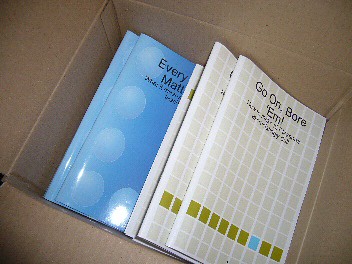
What could be better than receiving a box of books? Receiving a box of books that you wrote, of course! Is there a place for self-publishing in schools?

The books I refer to are the two booklets I wrote, on Every Child Matters and Boring ICT lessons. These were produced by print-on-demand, through Lulu, but published by, an therefore assigned an ISBN number by, Terry Freedman Ltd.

I ordered 10 copies of each in order to be able to comply with the UK requirement to send 6 copies of a newly-published books to various libraries and agencies. And that, of course, leaves 4 copies of each for me to send to reviewers and casually leave lying about when guests come to the house....

But isn't this just a case of vanity publishing? Well, yes and no. "Yes", in the sense that you pay the costs of having it printed and bound, whereas in mainstream publishing those costs are borne by the publisher. And "Yes" in the sense that if it's a niche product it would be hard to find a mainstream publisher that will take it on, which leaves doing it yourself as the only option. But "No" in the sense that if, as in my case, you have been approached by mainstream publishers and declined their advances and therefore made a free choice about whom you want to publish your book. And also "No" if the book has virtually no market at all (cf The Long Tail), which is what I should like to consider now.

Print on demand is a very good option when you need  very few, perhaps even just one, copy of a book. The origination costs, ie the fixed costs of setting up the book, are not spread over a large number, and so the fixed cost per book is relatively high. On the other hand, you don't have the twin problems of trying to find (a) start-up capital and (b) room to store hundreds of copies. In the case of Lulu, it's easy to amend the text of your book very quickly too, which in education, and especially the educational technology field, is a must these days.

So, what does all this mean for the ICT (Educational Technology) leader in a school?

I have long believed that if you want people to take something seriously and treat it with respect, it has to look good. What can look better than a publication which looks like it just came from a bookstore? Most schools do not have the facilities to be able to even begin to compete.

So, if I were a Head of Department or subject leader in a school now, I would use Lulu for a number of purposes:

  • The staff handbook
  • The 3 year strategic plan
  • Information about assessment
  • A year planner or calendar with important internal events (like report deadlines, term dates) and external events (like conferences) pre-filled in.
  • Students' completed projects (added Dec 09)
  • Students' leaving portfolios (added Dec 09)


If you wanted to produce your own textbook to distribute to all your students, it may be better, because cheaper, to go down a more traditional self-publishing route. That means, finding a printer who does short print runs, ie 500 or 1000. The biggest barrier to this avenue is the advance cost.

I'm not convinced that such a strategy would be cost-effective: On the one hand traditionally-published books are much cheaper as a rule. On the other hand, it's hard to beat the cost of a ring-binder and handouts or, of course, an online collection of resources.

But for the purposes of boosting your team's morale and creating a great impression with inspectors, having a dozen each of a few publications printed is hard to beat.

Reflections, two years on

Having read this article again, two years after I wrote it, the question arises: do I still agree with it? Broadly speaking, the answer is 'yes', but it's not quite as simple as that.

It is definitely the case that print-on-demand works out more expensive per copy than going to a short-run publisher. However, the issue for me would be: how many copies are required, or are you likely to sell? In other words, the more narrow the niche, the more attractive becomes print-on-demand. So if, say, you want enough copies for your ICT team and perhaps a few more to hand around, I would think that print-on-demand is the way to go.

However, I would not recommend print-on-demand for fiction writing if you can possibly avoid it. Self-published fiction is still associated with rubbish that is not good enough for mainstream publishers to bother with. I think that perception is slowly changing, because most new writers simply do not get a look in these days, and there have been some notable self-published successes. (Update: I accidentally referred to 'non-fiction' in this paragraph in the original version; I have corrected this, although hopefully the context, and the following paragraphs, will have indicated that I'd made the error, which was a slip of the pen as it were.)

In fact, if you have the stamina and the time, there is probably a case for saying that the best thing you can do is self-publish your novel (say) and market it incessantly in the hope that it will come to the attention of a mainstream publisher. But don't count on that happening, not least because you will be hard-pressed to even get it reviewed.

There's another caveat here. The CEO of Lulu didn't do anyone any favours when he said earlier this year that Lulu publishes the worst collection of poetry in the history of mankind. (See this article for a report on that by Angela Hoy, and this article for a follow-up.) I should not go so far as to say that he did a Ratner, because everyone knows that Lulu does not edit manuscripts (you'd have to purchase that service as an extra), and that many, probably most, self-publishers have received 'critical' acclaim from nobody other than themselves and their families and friends, who for the most part are too caring and too polite to say, "Sorry, but you just can't write. Take up painting instead."

Even so, I don't think comments like that help the general perception, based on a bygone era which possibly never existed, in which manuscripts were either eagerly snapped up by publishers willing to invest money and time into them, or were taken to a vanity press.

People's perception of self-publishing is better in non-fiction, certainly in the UK, possibly because people recognise that a lot of non-fiction would not be commercially viable for a mainstream publisher. Also, if you are recognised as an expert within your field, people in the same field are almost certainly not going to be deterred by your book's self-published status.

Of course, these days you can easily avoid physical books altogether and go down the ebook route. But why not do both?

I'd be interested in hearing about your views and experiences in these areas.


My BETT 2010 Seminars

I have been invited to give some talks. Two of them will be at the BETT Show in January 2010. Here are the details of the presentations I will be giving, in case you would like to book for them online at the BETT Show:

Amazing Web 2.0 Projects

What are ordinary teachers doing in ordinary classrooms with ordinary kids to raise their achievement in and with ICT? This presentation will give an overview of projects which have used Web 2.0 tools to bring excitement back into the classroom!

Date: Saturday 16 January 2009

Time: 12:30

Duration (mins): 45

Room: Club

Venue: London Olympia

Session Code: CL43

Click here for details of how to book this seminar.

Driving Your ICT Vision: what can advanced motoring techniques teach us about achieving our goals?

People talk about vision and strategy in relation to ICT, but how do you go about achieving what you want to? Ideas developed in the field of advanced motoring can provide a practical way to lead ICT in today’s schools.

Date: Friday 15 January 2009

Time: 13:15

Duration (mins): 45

Room: Club

Venue: London Olympia

Session Code: CL33


Click here to see how to book this one, and here’s a challenge. A large part of advanced motoring is being able to spot and anticipate hazards. A hazard is defined as anything that is actually or potentially dangerous. Have a look at this photo, and see how many hazards you can spot.


Now check your answers against the annotated version of this photo.


The European Pedagogical ICT Licence (EPICT) Course

Neil Howie describes this course and how it differs from the one it is often confused with, the European Computer Driving Licence, and discusses its potential usefulness for the ICT teacher.
I have started to undertake the European Pedagogical ICT licence (EPICT) course, and am finding it very useful in bringing back to the fore things that I should be using in my teaching yet, for one reason or another, don’t always.

There is a series of modules that are aimed at assisting teachers to develop their pedagogical approach to using ICT within the classroom. It is not about developing one’s skills with software or keeping up to date with the latest happenings in the hardware or software market. Too often, once we’re in the job we focus on what’s the newest piece of kit and how to stay abreast of what’s going on in the real world and bring this to the classroom. Whilst this is important, (for example, my article in this issue of Computers in Classrooms, ‘Learning new software – Adobe CS4’ demonstrates some of the techniques that I use for this), it’s the pedagogical use of these new innovations that we often don’t take time to consider.

This is why this course is both excellent and different. I’ve been told that it can be confused with the European Computer Driving Licence (ECDL), presumably because two words are the same and they both relate to ICT. They are however completely different. Having passed all the ECDL a few years ago in one day, it is a skills based course in the likes of word processing, spreadsheets and databases that I would see as now aimed at good KS3 students, weak KS4 students, or those adults who are just starting out with computers. The EPICT is aimed at educational professionals who wish to further develop (or if you are an ICT teacher, re-visit) their approach to using ICT in a classroom setting.


For those in the UK they can register through a provider with a list at the EPICT UK website . Being in international education I am using a newly formed organisation ‘your WITS’, run by an experienced and very qualified ICT teacher, Peter Napthine from his base in Brazil. YourWITS has set up fifteen EPICT modules using a moodle based system, from which registered users can access all the materials needed for the course, as well as forums for each module (and general forums).

What I think is great, and often is forgotten when using any online course, is the response time, and appropriateness of the response. Whilst it is great to be able to access materials over the internet whenever one wishes, the real value of such a course is when the tutor/facilitator (and other course members if appropriate) gives prompt and useful advice and/or positive criticism. This is certainly the case with yourWITS, and makes taking the courses feel that one is both learning/re-learning, as well enjoying the experience of it.

To highlight what is on offer here is a list of the modules available through yourWITS:

  • Locating and Incorporating On-line Resources
  • Electronic Communication & Collaboration
  • Creating and Using Interactive Resources
  • ICT and Special Needs; Effective Use of VLEs
  • E-Assessment; Presentation Technology, IWBs and Interactivity
  • Literacy and ICT; Numeracy and ICT; ICT and Creativity
  • Publishing on the Web; Digital Images
  • Spreadsheet Models
  • E-Safety
  • Games and Edutainment; and ICT and Strategic Innovation.

The first three, and last are compulsory for the Gold Award, with the remaining optional. In order to attain the Bronze award one has to complete 3 modules (including at least one compulsory module), the Silver award if after completing 6 modules (with at least 2 compulsory) and the full EPICT licence (Gold Award) is achieved after successfully completing 8 modules (4 compulsory and 4 optional).

As an ICT teacher I have started this course in order to both directly facilitate non-ICT teachers with their use of ICT, and act as support for them should they wish to further develop their ICT skills.. Whilst this is still the overall aim, I have been pleasantly surprised at how it has made me think about the pedagogical aspects of my lessons, which I may have taken my knowledge for granted for too long. If you have the opportunity then studying for the EPICT is I feel a worthwhile investment of one’s time and money.

Websites:

http://www.epict.co.uk – EPICT in the UK

http://www.yourwits.com – EPICT for the British International Schools market

Neil Howie is Deputy Principal at the British International School, Belgrade, Serbia. He has been teaching ICT for over ten years in the UK, Nigeria, Serbia and Austria. He is an Adobe Education Leader, Microsoft Master Instructor, and Member of the Institute of IT Training. His latest blog is at http://nhowie.co.uk; he can be contacted via greenmars (at) g (dot) ho (dot) st.

This article originally appeared in Computers in Classrooms, the free ezine.

A Visit to Oakington Manor Primary School

I was recently invited by Becta to a round table discussion about the use of technology. (Becta is the agency that is responsible for implementing the educational ICT strategy in England and Wales.)

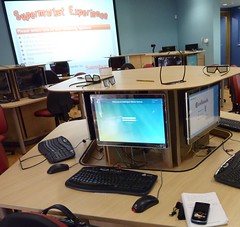
Note the 3D glasses!Shopping was never like this!It was nice to be invited to that, but what especially caught my attention was the information that the primary (elementary) school in which the meeting was due to take place is using 3D technology in its ICT suite. That sounded fascinating, so I asked if I'd be able to interview some of the children and their teacher afterwards. Nina House of Shiny Red, Becta's PR company, asked on my behalf, and Ophelia Vanderpuye, the school's ICT Co-ordinator and Advanced Skills Teacher for ICT agreed.

In terms of technology, there is much to talk about: the computers that rise out of the desks at the touch of a button, the enormous interactive whiteboard which doubles as a movie screen, the natural air conditioning, the low-heat computers. And, of course, the 3D films for which you need special glasses -- unless you watch them on the smaller interactive whiteboard at the back of the room, in which case you don't.

But I think what is even more interesting as you listen to Ophelia and the children talking are the vision and planning that lies behind all of these developments.

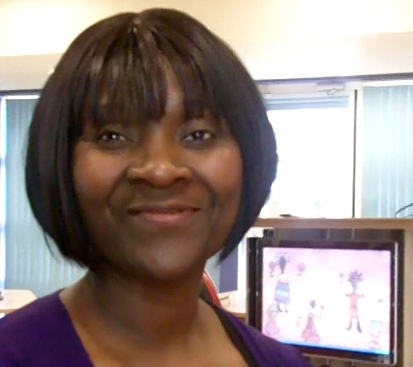
Ophelia Vanderpuye

The event was filmed, and the result should be appearing on the Becta website in due course.Lights, camera, action!

Oakington Manor welcomes visits from educators. I said in a recent article that to be an innovative teacher you need to see what other schools are doing. If at all possible, I should add Oakington to your 'must visit' list. To arrange a visit, phone the school on +44 (0) 208 902 2871.

The discussion with Ophelia lasts around 15 minutes, and that's followed by a chat with the children of around the same length of time.

Acknowledgements

Thanks to Ophelia, the children and the school, Becta for inviting me, and Nina Howse for expediting my interview request and for chatting to the children with me.

The jingle on the podcast was produced by Hanson Radio. Read about my visit to John Hanson School for the full story behind it.

The music is Simple Soulman by the Groovechasers, and is podsafe music. Listen to the full version on the GarageBand website.

The photos were taken by myself and may be viewed on Flickr.


Using New Technologies To Enhance Learning Experiences

Kevin Mc Laughlin discusses his reasons for using four (free!) applications – Audacity, Edmodo, Animoto and Voicethread. In this article, he assesses their usefulness from an educational standpoint.

 

I have always used technological tools to enhance my teaching, create enthusiasm and raise standards in my classroom and I am constantly reviewing the effectiveness of the tools I find, or am pointed to by followers on Twitter. However I need to ask myself a very important question before using them.

Why would I want to use this tool for teaching?

I will focus my answer on my use of Audacity (open source sound editor) and three online tools - Edmodo, Animoto and Voicethread.

Using Edmodo

Edmodo is described as ‘a private communication platform built for students and teachers’. With it you can set up a secure, private class account and share files, links and notes, post assignments and send alerts, and grade students’ work. It took me no longer than a few minutes to set up my class and then demonstrate to them how to use it and what we were going to use it for. I use it for posting homework, spellings and details of upcoming school events and my class use it for collaborative project work and sharing ideas and links to resources. I can also respond to their questions and guide them in their learning through the site’s Twitter-like message service.

Using Edmodo has helped raise standards in ICT in my class as I post mainly technology-related assignments such as Science PowerPoint presentations and video animation projects for Literacy. It has also helped my class to practice their English skills as my students will not use their first language (Spanish) to message me or each other.

Edmodo is incredibly useful and another teacher in my school has recently started using it effectively with her class. I have also received a lot of positive feedback from parents who find it helpful as they can see what homework their child has and when it has to be handed in.

Using Animoto with Audacity and Movie editing software

Animoto is a fantastic slideshow presentation tool that I have used with my class during a recent Literacy topic. I wanted to use this for the specific purpose of enhancing creative writing skills through a spoken presentation, the tool itself would provide part of the platform for the children to present their work.

Animoto is quick to set up and within minutes your class can be uploading their images and watching their results. It allows you to use provided background music or if you wish your own music or sounds.

Another tool I use regularly with my class is Audacity, a free sound file editor, and we have used this to create podcasts, and sound effects for school assemblies. It is incredibly useful and no school should be without it. The children in my class are quite adept at using it and after writing and editing their presentations they recorded their ‘voice-overs’ using audacity.

After they had done so and their work was saved I transferred it to a movie editing tool (such as Windows Movie Maker or iMovie if you have a Mac) to create their final video presentations.


Voicethread

Voicethread is another tool that I have only recently started using but wished I had discovered earlier in the year. I would describe it as a collaborative documentation tool that has many uses in the classroom. We used it to document a school excursion and I asked my class to create the documented story in Spanish so that the Spanish tutors in school could use it. Again it is easy to set up and takes no time to learn how to use it. There is a growing list for its use in the classroom on this site. 

I have mentioned only four tools I use with my class although I use many more. Each tool has a place in my classroom and each achieves a purpose I have thought carefully about. I want my class to learn how to use these tools because I understand the effectiveness each can bring to their learning and creative thinking.

After using them in class I am convinced of their validity in the classroom to enhance learning and teaching.

Kevin has started work in his new school as a Primary Teacher this month. He has a great interest in using technology (tools) to enhance his teaching and the learning of his students. He can be contacted through


http://twitter.com/kvnmcl 

http://www.kevinmclaughlin.wordpress.com 

kevindmclaughlin@gmail.com

This article was originally published in Computers in Classrooms.


My Nominations for the 2009 Edublog Awards

Here are my nominations for the 2009 Edublog Awards.

Best individual blog

This is an easy choice; Shelly Terrell’s Teacher Reboot Camp. With interesting articles, the ‘month in review’ series, challenges and guest bloggers, the site is always interesting and thought-provoking.

Best individual tweeter

Well, I’d like to nominate Shelly for this as well, on the grounds that she retweets incessantly. This sharing is what the Web is all about these days, and Shelly exemplifies the principle brilliantly.

I’d also like to nominate Neil Adam. Neil is absolutely brilliant to have at a conference, because he live blogs keynote talks in the form of tweets. I often use his twitter stream to double-check my own notes!

Best educational use of video

My nomination in this category is for Leon Cych, who publishes the Learn for Life blog. Whenever there is a conference going on in Britain, there’s a fair chance that Leon will be there live streaming or recording it. The results are of a very high, professional standard, and his recordings of events such as Mirandamod discussions are forming an important archive that will be useful for years to come.

Best group blog

I quite like the Technology and Learning Blog. I suppose I have to declare an interest, which is that I write for it every other Tuesday, but in fact I’d nominate it even if I didn’t. There’s a good bunch of writers there, and the result is quite a rich reading experience.

Best educational use of a social networking service

My nomination here is for the Digiteen Ning, set up by Julie Lindsay and Vicki Davis. The posts, mostly by teenagers, are usually incredibly thoughtful. Anyone who bemoans ‘the youth of today’ needs to visit this site.


Why Subscribe to Blogs? 8 Things to Consider

So many blogs, so little time. What with all the 101 other things you have to do in your life, you can't afford to waste time on blogs that won't benefit you in any way. Or, to be more accurate, in which the benefits are exceeded by the cost, ie the time spent.

So what kind of things might you take into account when deciding whether or not to subscribe to a blog's RSS feed? Here is what I look for.

  1. I will usually have discovered a blog through a reference to one particular article. The obvious thing to check out, then, is whether all or most of the articles on the blog look interesting, or whether the one I came across was the exception to the rule.
  2. Are the articles engaging? Ideally, I prefer to read stuff that is well-written. Not just well-written from a technical point of view, but in a way that's engaging, that reels me in. I want to have to drag myself away because I have other things to do, not force myself to read it because I think it might be good for me.
  3. OK, not everyone can be a great writer, so is it informative at least? Am I going to learn stuff that I may not otherwise come across, or not packaged in as succinct a manner?
  4. Is it newsworthy? I find it hard to keep up with news, despite, or possibly because of, the dozens of sources I rely on. If there's a blog that consistently mentions the latest news, be it technical or educational or otherwise, I'm interested.
  5. Is it humorous? Even if it's none of the things mentioned so far, if it makes me smile or laugh that is a big plus.
  6. Is it provocative? A blog should make you think, or react.
  7. Once it's made it through the hurdles presented so far, a blog has to show that its owner is serious about it. The issue here is: has it been updated regularly? If it's been more than a month since the last post, that is a real turn-off for me.
    Yes, I know that people are busy, but I think it's a matter of priorities. I have blogs that I haven't updated in months. But this one, ICT in Education, gets updated on average at least once a day during the week, and sometimes more, and sometimes at the weekends and on holidays too. And let me tell you: I am busy!
    That does raise another issue, of course: is a blog updated too frequently? That doesn't bother me in the slightest. I figure that someone can update their blog every 15 minutes if they want to, but I don't have to read it all. But I mention it here because I have recently had one person unsubscribe from my RSS feed because he thought that I update my blog too often.
  8. Finally, is it easy to subscribe? I have a Google toolbar which enables me to subscribe to a blog by clicking on a button labelled 'Subscribe'. If I get a message saying 'Feed not found', I become slightly miffed, because it is pretty easy to avoid that,m and people with slick-looking websites ought to know that. All you have to do is insert the following code within the HEAD part of your Index page:

    "<link rel="alternate" type="application/rss+xml"
    title="RSS Feed for ictineducation.org"
    href="http://www.ictineducation.org/home-page/rss.xml" »",

    substituting your RSS feed and title for mine, or course.

If clicking on Subscribe doesn't work, I'll click on an RSS feed icon or similar. If have to hunt around for that, I'll probably give up, especially if the decision to subscribe was touch and go anyway.

Total time for this whole process? I would say no more than 5 minutes, and most of that will be taken up with #1.

I'd be interested in hearing about what makes you decide to subscribe to an RSS feed or not, so please either comment below or complete the survey on the subject; it will take you just two or three minutes, and I'll publish the results soon.

A Visit to John Hanson Community School

"We come up here in break times or in lesson times"
"Here being where?"
"Here."
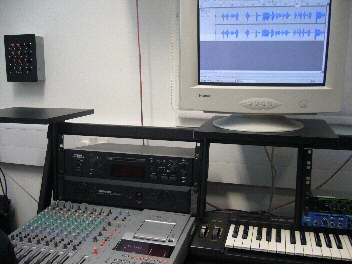
The radio studio at John HansonSuch is the impeccable logic of 14 year olds! As it happens, the "here" in question was the music room, and the recording studio, of John Hanson Community School in Andover, Hampshire, in the south-eastern part of England. I spent a most pleasant morning there a while ago, meeting staff and students, especially those who were working on a podcast for me.

A couple of years ago I wrote in my newsletter, Computers in Classrooms, that while I enjoyed making podcasts, I didn't really have the time or the inclination to devote the time required to make them as polished as I should like. I wondered aloud whether there was a school that would be willing to work with me. The benefits for me would be obvious, and hopefully the students would benefit from having an opportunity to work with a real client, and, if required, a reference or testimonial from me to go into their eportfolio. And, for the school, some extra publicity.

This item was picked up by Hampshire Consultant and newsletter subscriber Colin McQueen, who works for the Hampshire Inspection & Advisory Service. He passed it on to Mike Adams, Assistant Headteacher at the school and, as it turns out, one of the driving forces behind Hanson Radio. As soon as I heard one of their podcasts, I was entranced by the quality and the professionalism (as you will be: give it a whirl).

Up till the visit, communication had been via email, my website, and the school's VLE. I'd been sending recordings, and Mike sent me some original music, which I commented on. Then I visited the school and met Mike and Colin for the first time, some of Mike's colleagues -- including Alastair Johnston, Head of Performing Arts, who was also heavily involved with this project -- and some of his students.

I was impressed with what I saw and heard:

The pupils were not only confident users of some music-creating software (eJay DJ Mix Station 2.0, which appears to have been discontinued), but were confident in playing for me and the class the results of their efforts. They had every reason to be confident, because their compositions sounded great. (And just for the record, I'm not easily satisfied.) In fact, not only did it sound nice, it also satisfied the brief, which was to produce some upbeat music with a jazz funk feel. They had also responded well to the feedback I gave on the first one they produced.

In English National Curriculum terms, taking into account user feedback is Level 7, and taking users' needs into account is Level 8. Don't get me wrong: I'm not suggesting for a moment that taking part in this activity has propelled the students to the dizzy heights of Level 8, but it does serve to illustrate the fact that if you want your students to be able to work at those levels, you have to provide opportunities for them to do so.

Two pupils who have been working on one of the sections played me what they'd done and showed me how they'd achieved the miracle of making me sound fluid and coherent! They seemed very comfortable working with Audacity in the music studio.

Terry on airI was then interviewed by four students, Sophie, Ruby, Alan and Steven, who had prepared some thoughtful questions and who agreed to be interviewed by me in turn. It was in that context that we had the discussion about where "here" was. Their interview of me was featured in a Hanson Radio podcast (which appears to be part of an archive now), and in the one they did for me, as was my interview of them. You can listen to these interviews and the whole Hanson Radio treatment in this podcast.

(In looking up the URL for this episode, I realised with horror that Paul Harrington had left a comment about it, which I hadn't realised! Paul said:


Terry, I have just spent a very entertaining 45 minutes listening to the podcast, excellent work - could you pass on my congratulations for their professional job ( you weren't bad either -lol). The tips on BETT made me instantly rush off and print some business cards in order to save me writing - so thank you very much for that. Regards Paul

So I hope this is a case of better late than never!)

Mike has also had a couple of great jingles made for me, and sought and obtained permission to use the original works of a living composer, Kevin MacLeod.

As it turned out, we didn't get to make another podcast together. I suppose we're all busy people, and doing something like this is a pretty big time commitment. But it was a great experience, and I still use the jingle they created for me!

I was delighted that  a year later the school was awarded the ICT Mark. From what I saw, it was very richly deserved.

You Need To Set a Good Example

If you want students to be good learners and users of technology, you have to set a good example. That is basically the message of Shelly Terrell's latest post, Most Teachers Don't Live There. Shelly asks:

Shelly Terrell

If we are knowledge sharers, shouldn’t we continue to fill ourselves with knowledge?

If we want to inspire students to continue learning throughout their lives, then shouldn’t we continue to learn throughout our lives?

If we want motivated students who see learning as a journey, then shouldn’t we continue our journey?

If we want to motivate students to be the best in their fields, then shouldn’t we be the best in our fields?

If we want other educators to listen to our ideas, then shouldn’t we read about their ideas?

If we want support from our colleges, then shouldn’t we support their workshops and projects?

If we want students to use digital media responsibly, then shouldn’t we give them access and show them how?

If we want student to not let technology overtake their lives, then shouldn’t we teach them how to balance themselves?

How can we teach balance, if we don’t have any social media in our diet?

These are great questions, and they are spot on. Whether you work in a school, a Local Authority or for a company or for yourself, if you do nothing else you must at least be an excellent role model in your appraoch to education in general and to educational technology in particular.

In fact, I would go further than Shelly has, and say it's not only about setting a good example to our students, but to our colleagues as well.

Of course, some of Shelly's challenges are hard to meet, like the ones about balance. Recently we watched a programme called "Email is ruining my life", which looked at someone who sleeps with her Blackberry next her in case an email comes through in the middle of the night, checks emails in the bathroom, checks them whilst having dinner.... I am not that bad, but I must be heading in that direction because at the end of the programme Elaine said to me:

"Recognise anyone you know?"

I tried to plead the 5th, but that doesn't cut much ice in England.

It reminds me of this story:

A woman takes her little boy to see a Holy Man. She says, "Please tell my son to stop eating sugar."

He replies: "Certainly. Bring your son to me in three days' time."

Three days later, she returns with her son, and the Holy Man says to him, "Stop eating sugar."

The woman says, "Why couldn't you have told him that three days ago?"

"Because", he says, "Three days ago I had not stopped eating sugar."

Shelly's post is very challenging, I think, and she finishes it with a great challenge to the reader. Do head on over there to read her post in full.

ICT in the Rose Review of the National Curriculum

I wrote this document in May 2009. Since then, the proposed Level Descriptions have been changed. Here is a summary of the differences between this document and the revised changes, not in terms of the descriptors themselves, but my comments on them. Basically I have taken the view that a difference is only a difference if it makes a difference, so if the proposed level descriptor has changed, but its import hasn't, I haven't commented on it. In fact, as far as I can tell only two of the level descriptors have changed, and then only slightly.

Although this post is clearly aimed primarily at colleagues in England and Wales, it may be of interest to teachers from other countries too, as it shows what we're expecting young people to be able to do at different ages.

Also, it covers the whole of the programme of study for ICT, not just primary.

Anyway, here is a summary of the changes:

Level Changes in New Descriptor? Comments on Changes
1 Yes - shorter None
2 Yes - shorter None
3 Yes - the reference to editing and formatting has been removed It's now quicker to read, but I think it has lost some of its clarity
4 No Not applicable
5 No Not applicable
6 No Not applicable
7 No Not applicable
8 No Not applicable
Exceptional Performance No Not applicable

The level descriptors are © 2009 QCDA Copyright. I have reproduced them here in accordance with the QCDA's terms.


Teaching Yourself Chinese Through the Internet: Honourable Mentions

In this series, taken from the Computers in Classrooms newsletter, Adrienne Blaser has been evaluating websites designed to help people learn Mandarin. In this final article she lists other sites which are worth exploring.

http://mandarintube.com

http://www.choosechinese.com/

http://www.mangolanguages.com/ -- check your local library to see if they are registered

http://www.guavatalk.com

http://www.chinese-tools.com/learn/chinese

http://www.bpchinese.com/

http://www.nciku.com/ --- this site is a great dictionary Chinese to English and English to Chinese -- helpful for extra studying

Adrienne Blaser is 14 years old. She plays tennis, the violin and loves to read. She one day hopes to learn many languages, hopefully one being Chinese, which she is currently teaching herself.

If you have enjoyed reading this series, please leave a note for Adrienne to that effect. Thanks!

The other articles in the series 

Teaching Yourself Chinese Through the Internet - LiveMocha

Teaching Yourself Chinese Through the Internet: ChinesePod

Teaching Yourself Chinese Through the Internet: Zon


Who Ya Gonna Call? Results of My 'Experts' Poll

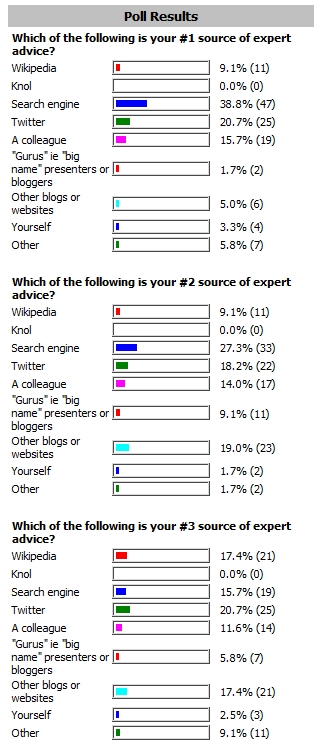
A while ago I conducted a survey to find out who or where people turn to for expert help. Here is a quick snapshot of the results:

Who you turn to for answersIn a forthcoming issue of Computers in Classrooms I'll be adding more detail, such as what people suggested in the 'Other' category. Thanks to everyone who took part in the survey.


Teaching Yourself Chinese Through the Internet: Zon

In this series, Adrienne Blaser has been evaluating some websites for teaching yourself the language.


My final choice for one of my favourite Mandarin Chinese learning sites is extremely different from those previously looked at. Zon, is an educational learning site made for kids in school. As in a virtual community, you make your own avatar arriving as a tourist in “China”, with only the bare essentials.

When you are still a tourist you learn about Chinese myths and legends. From there you must navigate your way through the airport (that is just as painful as the one in reality) and to a hotel. Along the way you meet other people who may be just like you, having a hard time understanding how to get out, to experts working at their job. As you progress through the site you learn about Chinese language, customs, and even how to separate currency. Although it may take you days, eventually your avatar will be promoted to Resident or even Citizen where you can buy a car, rent an apartment, or own a business.

Basically, it’s like you are living on the other side of the world without your parents, while sitting in front of your computer at home. Zon isn’t only used at home, many schools use Zon for students to learn about Chinese language and culture in a fun and educational way. This site explains how to navigate through the game, and once you read how, the way is clear. There is a news blog that keeps you updated on changes and problems going on, and the community forum helps build friendships and answer questions. The animation showed real architecture from China and it truly felt like you were there.

I think that this site is really important for younger kids learning Chinese because when you’re young, sitting down and listening or having to concentrate really hard isn’t exciting or motivating. But working towards a goal like buying your first car is. Some improvement could be that the how-to is explained as you go along in case getting lost becomes a reality.

Web address: http://enterzon.com/

Rating: 4

Adrienne Blaser is 14 years old. She plays tennis, the violin and loves to read. She one day hopes to learn many languages, hopefully one being Chinese, which she is currently teaching herself.

This article first appeared in Computers in Classrooms.

Teaching Yourself Chinese Through the Internet: ChinesePod

Schoolgirl Adrienne Blaser continues her series on teaching yourself Chinese, in which she reviews relevant websites. Yesterday she reviewed LiveMocha.

Another distinct site for learning Mandarin Chinese is ChinesePod. This site is more based on individual study because of its many podcasts. Personally, I find podcasts to be an extreme help in learning. The great thing about podcasts is that they go where you want to go and you don’t need internet access to do it.

ChinesePod has a variety of levels, ranging from Newbie, to Advanced. You can sign up for the level you think suitable and download the lessons of your choice. Most of these podcasts include conversations, in which helpful teachers like Jenny and John explain what individual words mean and how they are put together. Since most people can’t just learn by ear, each podcast comes with the dialogue from the lesson and notes, which includes pinyin, character, English meaning, and extra vocabulary.

Back on the website ChinesePoders can join a study group, like Chinese short texts, or watch a video channel like Pinyin Program for more practice.

Even though I love the thought of podcasts I wish that Chinese pod had a little more on their website, like follow up lessons or more grammar. They do have a glossary section and grammar guide with a pinyin chart, to help with pronunciation. On ChinesePod there is a conversation help thread where you can talk to your fellow learners and ask questions. Overall on this site there is minimal advertising and everything is basically clear and uncluttered. ChinesePod does cost money after your first seven day trial. The Basic plan with free podcasts costs $9 a month, but I remember when everything was free on ChinesePod. The highest plan, which includes ten minutes daily phone conversation with a teacher, customized study plan, and a personal needs analysis, cost a whopping $199. ChinesePod still has a way to go until I pay nine dollars a month, but I am still loving the podcasts from my seven day trial, which are very helpful. For the beginner, ChinesePod is more a site for picking up phrases in a conversation being able to understand it and respond correctly than starting from scratch and learning proper writing grammar.

Web address: http://chinesepod.com

Rating: 4

Adrienne Blaser is 14 years old. She plays tennis, the violin and loves to read. She one day hopes to learn many languages, hopefully one being Chinese, which she is currently teaching herself.

Teaching Yourself Chinese Through the Internet

We are all aware that the “sleeping dragon” has awoken, and that in the foreseeable future people and businesses will have much more interaction with their Chinese counterparts. It will then be sensible – perhaps even necessary – for Mandarin to be one of the Modern Languages studied in school. In the meantime, over the next few days Adrienne Blaser evaluates some websites for teaching yourself the language. These reviews were originally published in Computers in Classrooms.

With various parts of the world changing, language has become a vital exchange between cultures. Bilingualism, the ability to speak two languages, is becoming a common trend. Although many say that Mandarin Chinese is a difficult language, truly the biggest challenge is finding the right place to learn. Since there are so many great sites out there to learn Mandarin, picking the select few was definitely a challenge.

Livemocha

Livemocha has become one of my quick favourites as a free site unless you decide to buy one of their Travel Crash Courses.

When you first come onto the site, its warm coffee colours greet you. Livemocha is simple, clear, and without advertisement for other sites or products. What makes this site special is that it doesn’t just teach you one language; it’s a site for multiples such as Japanese, Korean, English, Spanish, and Portuguese and each having at least a 101 (beginner) and 102 (intermediate) program. Not only are they brain testers, but each course consists of 3 units with 5 or 6 lesson in each unit. That might sound easy, but in a single lesson you must learn phrases, including the pinyin (pinyin is the name for the system that makes it possible to read and write Mandarin Chinese without characters, by using the Roman alphabet), characters, proper pronunciation, and the English meanings, review them, write them, and then speak them.

Speak you say? Yes, this site expects you to practice speaking, by recording it on your computer microphone, then putting it out to the Livemocha public for reviewing. Sure, it might seem like no big deal but once you get a bad review about your tones, you go right back to the lesson to review each sentence, and then do it again.

What truly helps besides seeing the language in its different forms is the pictures. Each phrase has a picture, or in some cases pictures with bubbles to show who is speaking. I find that overall this site is for those starting from scratch who don’t want to be babied and plan to work diligently to learn their selected language. It takes lots of time and hard work because really this is like a college course, you don’t start out from numbers and colours, instead you start from nouns and go to negatives.  

Adrienne explained what this meant, in an email to me. Unfortunately I was unable to reproduce the Chinese characters in HTML, so I have taken a screenshot of her explanation instead:


For each lesson besides the required exercises, there are optional exercises for even more practice. In case you’re still looking for options to study, you can make your own flashcards or use ones made by others. Livemocha also offers chatting between language learners, with a handy dandy translator conveniently located on the side. Making friends comes with learning a new language, cultures are blended and bonds are made. I don’t know if I’ll ever meet any of my friends face to face but I can still say that I have friends that live across the world.

This site takes all the methods of learning and puts them together in a manageable way, and I know they are still expanding their site. The opportunity to teach is planned to be going to be available soon. Not only will future teachers be able to practice but they could earn credits or money. Although you must be invited to become a Livemocha teacher, consistently leaving instructive reviews or making helpful flashcard sets boost your teaching score and increase your chances.

Web address: http://www.livemocha.com/

Rating: 5

Adrienne Blaser is 14 years old. She plays tennis, the violin and loves to read. She one day hopes to learn many languages, hopefully one being Chinese, which she is currently teaching herself.

Delete: The Virtue of Forgetting in the Digital Age

In "Sketches Among The Ruins of My Mind", Philip José Farmer depicts a nightmare scenario in which an object suddenly appears in our skies, and proceeds to remove everyone's memories, four days at a time. Gradually, people regress through their chronological age, ending up drooling like babies, and forgetting all their relationships and skills. As people realise what is happening, they resort to leaving themselves notes and tape recordings by which to tell or remind themselves, on waking up in the morning, what's been going on.

That's an extreme description of what might happen if we were unable, unaided, to remember anything about the last three days, but humankind has always tried to find ways of remembering.

John Mack, in "The Museum of the Mind", looks at how different people in different times and places have used artefacts such as paintings and sculptures to help them remember, a story he tells through the collections in the British Museum.

We have always been afraid of forgetting which, as Viktor Mayer-Schönberger has pointed out in a recent lecture, is the "default setting" for human beings. However, we have now entered a digital age in which this balance between remembering and forgetting has been reversed. In other words, the default setting is now remembering, and we as a society have perfect memory.

A good thing? In some respects, of course; but Mayer-Schönberger fears that we have not fully considered the negative implications of perfect memory.

One of the sources he draws upon is the Argentinian writer, Borges. In “Funes, The Memorious”, Borges provides us with a startlingly accurate insight into what a curse perfect memory would be for an individual person. “Startlingly accurate”? Yes, because decades after he wrote this we have discovered a handful of people in the world who have this rare ability affliction.

And the societal perspective on this?

As Mayer-Schönberger points out, a society that never forgets, may stop forgiving. That unfortunate photo of yourself, or that article you wrote whilst a student, may come back to haunt you years, even decades, later.

Such a situation leads people to self-censor, not just in the here and now, but with one eye on the future. It reminds me of a science fiction story I read in which crime was effectively eradicated because the police used cameras that could go back in time to record actual events instead of people's recollections of them. The story centred on one man's attempt to commit the perfect murder: he had to engineer the situation to cause his victim to have a fatal heart attack, so that when the inevitable cameras came, they would record that he had caused the person no physical harm.

Mayer-Schönberger's suggestion is that we should remember to forget. Technology can help us by prompting us to specify expiration dates for the data we store.

It was a fascinating talk, which you can listen to. I am now in the process of reading his book, 'Delete: The Virtue of Forgetting in the Digital Age', and will review it due course.

In the meantime, perhaps this is a topic that would make for a good discussion in ICT and even Citizenship lessons.

The books mentioned in this article are featured on my Amazon page, where they can be purchased, thereby providing me with a (very) modest additional income. Also mentioned on the page are Fictions, a collection of short stories by Borges that includes Funes, The Memorious. Although nothing to do with ICT in education as such, these stories make you think. And one, The Library of Babel, really does have echoes in the Web 2.0 world, as I described in this article about collaboration.

Also featured is Google Bomb, which covers similar ground, but looked at through the lens of online defamation and cyber-attacks.

Although I have yet to review them, I will say now that these books deserve a central place in your educational technology library.


Collaborative Approaches To Learning: Always A Good Thing?

Collaborative approaches to learning certainly have their place -- but not at the expense of the facts!

This is an updated version of an article which first appeared on Wed, 7 Sep 2005.That sounds like a long time ago, but I think the issues I was describing then are still relevant today. But I'd value your opinion on this matter. It's a longish article: go grab yourself a cup of tea.

In March 1923, in an interview with The New York Times, the British mountaineer George Leigh Mallory was asked why he wanted to climb Mount Everest, and replied, 'Because it's there'. That seems to be exactly the attitude of some educationalists when it comes to recent developments such as blogging, podcasting and wikis. That is to say, they use them purely and simply  because they are there.

I'm all in favour of pioneering and trailblazing, but the downside is that evangelistic fervour can sometimes outweigh, or cloud over, any objective judgement. In my view, what we educationalists should be aiming for is not to get our students and colleagues to use technology, but to use appropriate technology appropriately. Unfortunately, that message sometimes seems to get lost in the hubbub.

I am thinking in particular of the apparently increasing adulation of, and reliance on, collaborative tools for the purpose of research, especially blogs, podcasts and wikis (the most well-known of the last is, of course, Wikipedia). In case you are new to all this, blogs are online journals, podcasts are recordings, usually in MP3 format, and wikis are web pages which can be edited live on the internet, either by anybody or by people who have subscribed to the group concerned. Wikipedia is an online encyclopaedia which features articles which can be published, then edited and counter-edited.

Is ‘truth’ relative or absolute?

Wikipedia in particular is often hailed as a fantastic resource, and one which has grown through collaboration by ordinary people. It is, if you will, a perfect example of democracy in action -- apparently, at least. The question we need to ask, however, is whether this and similar enterprises are actually useful.

For most people, and societies, the ultimate goal is absolute truth, not relativism. This isn't only a religious quest: in the field of finance, one of the main attributes of money is that it should be a measure of value which does not, in itself, change value. Hence, in modern societies, the attempts to fix a currency's value by pegging it to gold or to another, more stable, currency. Trying to measure the value of something if the value of money is constantly changing is like trying to measure the length of something with a ruler whose length keeps changing.

Is collaboration always a good thing?If relativism is not ok in our religious or economic lives, why should it be ok in our intellectual life? We all know that knowledge and understanding are constantly evolving, and that the self-evident "truths" of yesteryear are sometimes found to be wrong in the light of new evidence. That is disconcerting, to say the least, but at least it's a process that happens over years rather than overnight.

It's also a process that happens with the involvement of experts in their field. Now, I am not so naive as to not understand that viewpoints which do not fit into the convention wisdom of the age are unlikely to be heard. You only have to look at the experiences of Freud, Darwin and, in our own age, homeopaths and others to realise that. And the economist J M Keynes, when asked why he had failed his Economics examination at university, said that it was because he knew more about Economics than his tutors.

Nevertheless, you can't have an article published in a scientific journal or the Encyclopedia Britannica unless it has been scrutinised and vetted by another expert. This is in contrast to wikis, where for the most part anybody can come along and change an article without knowing the first thing about the subject area.

Two cheers for democracy*

Now, this may seem like a very anti-democratic point of view, and that's because it is -- in this context. If that sounds arrogant, consider this: if you are the world's leading expert in a particular area, do you really want some virtual passer-by to "improve" your work by chopping bits out or adding bits in? Of course not! But even if you are an ordinary expert, as distinct from a world one, you will still not want someone correcting you. At least, not in that way. You might enjoy a good debate, and be open to have your views challenged, and may even change your views through that process, but that, I would contend, is a very different situation.

Even more important, though, is the potential confusion it creates for students. Imagine finding a great fact to put in an essay, and then double-checking it the next day, only to find that it's disappeared. Does that means it was incorrect, or that someone didn't like it? The only thing the student can do is to seek verification from another source. That's good practice, but the question is: what kind of source?

When I asked Limor Garcia, the inventor of Cellphedia** (a kind of mobile phone version of Wikipedia), how she would advise students to check the truth of the information they find, she said that people would be able to correct each other's answers, but also that they could check the answer in Google. That seems to me to beg the questions: (a) if you are going to check the answer in Google, why use Cellphedia? and (b) how would you know if the information you found in Google is correct?

The Library of Babel

Searching, searching...Interestingly, these kind of paradoxes are not new. In a story called "The Library of Babel", written in 1941, the Argentinean writer Jorge Luis Borges describes a vast library in which there is not only a copy of every book ever written, but every book which could be written. There is, for example, a library catalogue, and an infinite number of variations of it. There is a marvellous passage in which he describes the quest for the "master" book:

"In some shelf of some hexagon, men reasoned, there must exist a book which is the cipher and perfect compendium of all the rest: some librarian has perused it, and it is analogous to a god. Vestiges of the worship of that remote functionary still persists in the language of this zone. Many pilgrimages have sought Him out. For a century they trod the most diverse routes in vain. How to locate the secret hexagon which harboured it? Someone proposed a regressive approach: in order to locate book A, first consult book B which will indicate the location of book A; in order to locate book B, first consult book C, and so on ad infinitum."

(J L Borges, The Library of Babel, in "Fictions", which is featured on our Amazon page)

 The worrying development for me is not the invention and expansion of tools such as Wikipedia and Cellphedia. I actually think they have vast potential and are, in fact, tremendously exciting. From the point of view of the learning process, taking part in such collaboration is bound to engage or re-engage a lot of learners.

What I am more concerned about is the often uncritical stance of some educationalists in relation to these tools. For example, I have read articles which favourably compare Wikipedia to traditional encyclopaedias on the basis of weight, its ability to constantly change, its democratic ethos, and other characteristics. Surely the most important yardstick is accuracy? And a couple of months ago I met the Head of ICT at an independent secondary school who said, quite seriously, "We don't need to teach kids how to search the internet; they use Google and Wikipedia all the time at home."

Essential skills for users of ICT in education

We need to teach our students a number of skills or approaches when it comes to verifying information:

  • a questioning approach rather than a willingness to accept things at face value;
  • triangulation, which is the cross-checking of supposed facts with other sources of information;
  • in triangulation, the use of different types or sources of evidence; for example, there is no sense in cross-checking the accuracy of the comments I've made here by looking at other comments I've made: you should look in other sources; otherwise,it all becomes self-referential.

Above all, we educationalists should not fall into the trap of using a new technology in every situation just because it is there.

Conclusions

So what does this mean in terms of the educational benefits of services like Wikipedia, Cellphedia and, in a wider context, blogs and podcasts? Does it mean we should reject them entirely? The answer is that we need to treat them in the same way as we would encourage our students to treat any other source of information: with caution and, as stated above, to cross-check the information found using them.

We should also recognise that these new tools have some distinct advantages: they are fresh, they allow "breaking news" in academic fields to be published with a lower burden of proof required, meaning that a debate can be entered into at an earlier stage and by more people. They also enable the ordinary person and the maverick to have their say. Finally, they can also have profound benefits in a social context, especially mobile phone-based services like Cellphedia (the need for which has, I would suggest, been superceded by the wonderful mobile phone apps that are available these days) : imagine being able to go to a new area and find out where other people would recommend eating or staying (there are apps for exactly this).

Finally, taking part in such projects can be very useful for students, because it involves the skills of research, writing, collaboration and editing. It is easy enough to set up your own blog, podcast or wiki, as you will know if you've looked at the Web 2.0 Projects book .

In conclusion, we need to steer a fine line between using something in all situations, regardless of how appropriate it is, and rejecting it out of hand. I'm sure that the line is a wavy one as we continue to grapple with and debate these issues.

Postscript: The Demise of Wikipedia?

According to the London Evening Standard, editors are leaving Wikipedia in droves. Apparently, they don’t like the recently changed rules which, supposedly, make it harder to get away with writing rubbish or deleting good stuff. Read the comments too. Kate, for example, got fed up with her expert postings being deleted by some nameless and faceless person who decided that she hadn’t cited enough references. That sounds reasonable, but for me, having your work commented upon and rejected by someone who won’t or can’t even give you their name is unacceptable.

* Apologies to E M Forster.

** Unfortunately, at the time of writing the Cellphedia website seems to be unavailable.