Oh, Sir, You are too kind

Reading through people's blogs, especially those of educators, one thing that strikes me is what a nice bunch we are. Even David Warlick's rant is, essentially, nice. Jeff Utecht's recent blog about fear is, essentially, kind. Everything they say and everything others say about barriers to implementing the use of educational technology across the school  is correct, but I also believe that part of the problem is our willingness to make allowances.

It is usually at this point that people who know me call me a grumpy old man, but in my mind I am an angry young man! Surely there are some things which we must regard as simply unacceptable? Period?

Here is a personal example of what I find unacceptable. One of my relatives asked me last Sunday if I could create a Word document for her so that she could type a list of dates. She has been teaching, I believe, for over 20 years, and is in a senior position in her school. Why has she been allowed to get away with such a basic lack of knowledge for so long?

In this particular instance it doesn't have any direct effect on the children she teaches, or the staff she manages. Or does it? I am a firm believer in what has been called the "hidden curriculum", in which what you teach and what the kids learn may be rather different. What are her children and staff learning from her behaviour? I would say the following:

1. Technology is relatively unimportant, otherwise she would have learnt how to use it to some extent (I even had to show her how to get from column one in the table to column two, and how to save her work).

2. That it's OK to let people know that your are technologically illiterate.

3. That, from the point of view of one's employer, it is OK to be technologically illiterate.

4. That if you appear helpless enough someone will help you.

I think that although that list is based on just one personal incident, we can extrapolate from it and reasonably conclude that it probably applies more generally. So here is my "wish" list for education, which I think we should adopt as a baseline set of standards.

Before I give my list, I should like to say this. The first step in establishing a standard is to state what that standard is, and/or what it is not. Just because you may not know how to go about achieving it is certainly no reason not to state it. For example, in my classes I always had expectations in terms of acceptable behaviour. It would sometimes take me three months to achieve them, desoite teaching them every single day, but that's besides the point.

Here is my list:

1. All educators must achieve a basic level of technological capability.

2. People who do not meet the criterion of #1 should be embarrassed, not proud, to say so in public.

3. We should finally drop the myth of digital natives and digital immigrants. As I said in my blog, in the context of issuing guidance to parents about e-safety:

"I'm sorry, but I don't go for all this digital natives and immigrants stuff when it comes to this: I don't know anything about the internal combustion engine, but I know it's pretty dangerous to wander about on the road, so I've learnt to handle myself safely when I need to get from one side of the road to the other."

The phrase may have been useful to start with, but it's been over-used for a long time now. In any case, after immigrants have been in a country for a while, they become natives. We've had personal computers for 30 years, and I was using computers in my teaching back in 1975. How long does it take for someone to wake up to the fact that technology is part of life, not an add-on?

4. Headteachers and Principals who have staff who are technologically-illiterate should be held to account.

5. School inspectors who are technologically illiterate should be encouraged to find alternative employment.

6. Schools, Universities and Teacher training courses who turn out students who are technologically illiterate should have their right to a licence and/or funding questioned.

7. We should stop being so nice. After all, we've got our qualifications and jobs, and we don't have the moral right to sit placidly on the sidelines whilst some educators are potentially jeopardising the chances of our youngsters.
What are your kids learning while you're not looking?

This was the title of a seminar which Miles Berry and I presented at the 2009 BETT show. The more I think about it, the more important it seems to me that teachers know about what their students can do.

Soon after the BETT show I had occasion to give a presentation in Rotterdam, on the subject of the potential of ICT in education. Again, I did some research and discovered, perhaps not surprisingly, that what young people do and can do in terms of technology is pretty much the same in The Netherlands as it is in the UK as it is in Europe as a whole as it is in the USA.


What do young people do online at home?

This is very much a broad-brush picture, but from the research and reading we have done, it would be true to say the following.

  • It may be politically incorrect to say so, but boys and girls tend to conform to gender stereotypes online as well as offline. For example, boys prefer playing games to writing blogs.

  • Youngsters really do multitask, because the percentage of their time spent on various activities adds up to a lot more than 100%.

  • Despite the emphasis on creativity at the moment, youngsters aren't really all that creative, in the sense of creating stuff, compared to other things they do online.

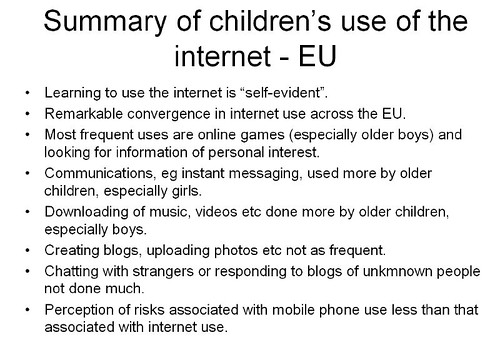
  • Summary from http://ec.europa.eu/information_society/activities/sip/docs/eurobarometer/qualitative_study_2007/summary_report_en.pdf

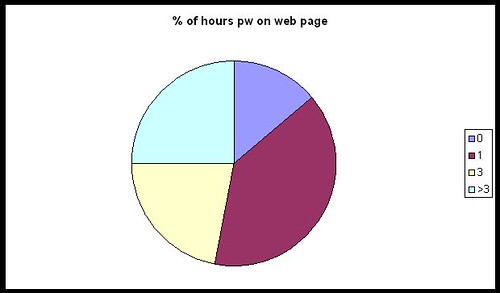
    I find it interesting that youngsters are still mainly consumers of content than creators of content. Mind you, it depends on who you ask, of course. In Larry Rosen's Me, MySpace and I, nearly everyone surveyed spent a lot of time tweaking their web page. How surprising is that?

    myspacepiechart

  • From their responses, it would seem that young people use the web mainly for "sensible" things, like communicating with friends and doing homework.

  • Well the chatting to friends I can believe, but homework? I am not completely convinced by that, and I think what we may have here is evidence of some sort of experimenter effect. I wonder if the results would be different were the same surveys to be conducted by young people?

    If it is  true, I personally think that's something to be concerned about rather than something to celebrate. Kids should be enjoying themselves, not using every spare moment to better their grades.

  • The overall impression one gains from all the research is that technology is indeed very much a part of young people's lives. They spend an inordinate amount of time using it, and have a facility for grasping how to use it, at least in a superficial or immediate sort of way.

    Whether they are able to easily delve deeper into an application or device, or use it in ways for which perhaps it may not have been intended, is an interesting question. 

Like I said, a very broad picture. If you'd like more detail, take a look at the slides from our presentation at Miles' blog. We hope to have the audio accompaniment soon.

Why is this important?

I think we would all agree that it's good practice to base our teaching on what our students already know, understand and can do. If you don't, you run the risk of alienating through boredom and lack of challenge, or through setting work which they find impossible. (These were two of the ten causes of ICT lessons being boring that I identified in my seminal work, Go On, Bore 'Em: How to make ICT lessons excruciatingly dull.)

What this research shows, I think, is that you cannot simply go by what you know they can do from what they have done in school. You also need to find out what they do when they are not in school.


What can you do about it?


The obvious answer is: find out what they can do! You could set up a survey using Google Docs (Go to New-->Form). The results end up in a spreadsheet, making analysis relatively straightforward.

If you include questions like what primary school they went to, if you're in a secondary, that in itself may yield some interesting results. You will need to include age and gender, of course.

If you decide to ask students to give their names, you will need to respect their privacy and not pass that information on. That would be my position, anyway, but you may be in a different situation. In my opinion, it's probably a lot easier to either say that names are optional or simply not to include a field for it. Much more pertinent would be information like the class or registration or option group the students are in.


Feel free to "steal" the questionnaires used by Miles and myself: you'll find the links here.

None of this is intended to be a piece of academic research; rather, it is intended to give you a good basis for deciding on what to teach and where to pitch it.

At least one person left our seminar with the intention of running his own survey within his school, and both Miles and I have said we would be interested in the results of his findings.  We'd be interested in yours too, if you decide to do something like this.

One last word, about presenting the results. Miles used Wordle to generate word clouds from the answers to some of the questions. The results, which are very interesting, are here.


What makes a good teacher as far as technology is concerned?

Path in a forestI'm interested in exploring this question,  which I have phrased very carefully. I think whether you're a teacher of information and communications technology, or someone who teaches with educational technology, there are some common denominators of what makes the teaching good. These are all my ideas and conjectures; I have stated them as though they are facts purely in order to avoid clumsy circumlocutions.

The first requirement is a willingness to experiment and take chances. You never really know whether something is going to work until you try it. A piece of software may be great when used by an individual, but not scale up very well when used with a class.

For example, I came across a program a few years ago which made commenting on a student's work very easy: it was possible to give comprehensive feedback in only 5 minutes by clicking various buttons. But that would mean 150 minutes for a class of 30 students, and a day's work for four or five classes.

Clearly, it was the sort of 'solution' you may wish to use with one or two special case students, but not with whole classes. But you wouldn't know that until you had sat down with the software and spent time using it and thinking about it.

Not everything is within the individual teacher's control. I am thinking in particular of my next requirement: the opportunity to experiment. Too many schools, in England and Wales at any rate, are so frightened of being named and shamed for not having achieved the requisite number of A*-C passes at GCSE that it takes a very brave, stupid or fortunate teacher to feel that they have the time and the support to be able to try things out, especially given the amount of stuff that has to be covered in the curriculum. I admire all those who do, and the colleagues who enable them to do so.

A third requirement is for intellectual honesty. I think one of the most difficult things to do is to admit to oneself, let alone one's colleagues, that as far as achieving X is concerned, the last 3 weeks have been less successful than one would have liked. But there are a few counters to this way of looking at things:

Firstly, adopt the scientific view: an experiment is only a failure if it yields no results at all, ie you find out nothing from it. If you get negative results, you've learnt something which will be useful to both yourself and your colleagues.

Secondly, take a cost-benefit approach. Basically, even if the experiment looks like having been a waste of time, if the benefits outweigh the costs, than it hasn't been. This is all a bit subjective, of course, but let's consider an example. Suppose the use of a website or application has added nothing to the knowledge of 29 of the students in your class, meaning that you wasted a few hours preparing the lessons based on it, and those 29 pupils have wasted the one or two lessons they spent on it. But at the same time, one student, who was thinking of quitting the course, and who has already mentally opted out, is suddenly fired up by the experience and really starts to 'get it'. It's arguable that the net gain has outweighed the net cost.

Thirdly -- and this leads on nicely from the point just made -- it may be that your success criteria need to be changed. In the example of 29 students gaining nothing in terms of learning anything new, if I was the teacher I would ask them to analyse why they gained nothing, and how the resource (or my use and teaching of it) could have been improved.

Also, academic achievement has to be balanced by other kinds of development. If the website or program added nothing to their knowledge or technical skill set, but facilitated critical thinking or collaborative working -- even though they may not have been the intended outcomes -- then I would suggest the whole thing has been very worthwhile.

A fourth requirement for good teaching is a love of the technology. That does not necessarily mean being a geek, but having a love of what the technology can enable you to do. For example, I love my digital camera. It's not good enough for professional photography, but it's good enough for me. I can slip it in my pocket or briefcase, and I use it to take shots which are either interesting in themselves, and which I could therefore use as stimulus material, or to illustrate articles.

Also, call me 'sad' and perhaps needing to get out more, but unlike a lot of people I do not find spreadsheets boring. On the contrary, I think a well-constructed spreadsheet is a thing of beauty, to be marvelled at! (I'm being serious: when I have more time I will explain myself in this regard!)

A fifth requirement is a willingness to not know everything. I think that when it comes to technology, there is every chance that at least one student, and probably all of them, will know more about at least one aspect of it than you do. That's why I have no hesitation in asking teenagers I know how you do certain things in Facebook or Blog TV. They know things I don't. I also know things they don't. What's so threatening about exchanging knowledge and ideas as equals?

Does this mean that I go along with the old chestnut about teachers being a 'guide on the side' rather than a 'sage on the stage'? No, because I think that is a false analogy or an abrogation of responsibility. I see no point in spending an inordinate amount of time encouraging kids to discover something that you could have told them in 5 seconds, so the guide on the side thing is not appropriate in all circumstances anyway.

I don't have a catchy phrase to express this idea, but the way I see it, the class is like a group of walkers going on a guided ramble. You have the leader, who knows the terrain and knows what to look out for and to point out. But at the same time each person on the walk is making sense of it all in their own individual way, and discovering other delights that the leader has not pointed out. That sounds to me more like the guide at the front than the guide on the side. I told you it wasn't very catchy.

There are other factors which make for good teaching. My fifth one is the opportunity to have excellent professional development. Note that I use the word 'development', not training. I am not sure how, in most cases, spending a day being bombarded by bullet points, which they then give you in a pack anyway, can be as useful as having an opportunity to explore and discuss ideas of your own choosing in depth. In fact, as far as feedback is concerned, the most successful training I ever provided consisted of doing absolutely nothing except provide a room, some software, and myself and a technician, to enable a group of teachers to develop their area of the school's website.

My final factor is an amalgam of what good teaching is all about anyway: a love of one's subject, a love of exploring new avenues with other people, a love of being with young people and helping them along the path, a fanatical insistence that each person achieves their own personal best, and a willingness and ability to employ a whole range of techniques, such as questioning, facilitating group work and giving meaningful and useful feedback.

I'd be interested to hear your views about what makes a good technology teacher.

Reblog this post [with Zemanta]

10 things to do when someone follows you in Twitter


If someone follows you in Twitter, the polite thing to do is reciprocate, right? Well, maybe so, but I think it needs a little more thought than that. Here is a list of the steps I take when someone follows me.

Incidentally, the same techniques, with a bit of adjustment, work for any social network situation where people can become your "friend".


#1: What's in it for you?


As a general rule, I think about what I hope to gain from the relationship. Relationship? Yes: as soon as you follow someone, or they follow you, you have a relationship of sorts, whenever you want it or not and regardless of whether you pay it any attention. The only way to avoid it whilst remaining within your Twitter network is by blocking that person.

Now, my primary reason for wanting to link with anyone online is my interest in educational ICT. I have a secondary interest, that of business, because I run my own business. I am also interested in writing and journalism. And that is pretty much it. Unless you have the most amazing powers of persuasion, chances are that I won't be your friend or follower unless you come into one of those categories. Yes, there are the odd exceptions, such as connecting with someone who likes the same sort of music as I do, but even there it is almost certainly the case that I already "know" or know of the person through one of the other spheres I have just mentioned.

This is very much linked to my main website, of course. The focus of that is ICT in education. There may be a great, newsworthy article just begging to be written -- but if it's not to do with ICT in education it probably won't be me writing it, and if I do, it won't be on that website.

What it comes down to is this: I don't want to populate my Twitter network with people who have little or nothing to do with my main interests, because that will only make it more likely that I will miss something important from the people who do. That's why I don't agree with the people who advocate following as many people as possible: I think one needs to be more discriminating than that.

In summary: decide in advance what sort of people you're happy to follow, ie the ones from whom you're likely to benefit from following.

That's the backdrop against which I take all of the steps that follow.


#2: Check the tweets


When I receive an email to say that someone is following me, I click on the link to their Twitter page. I then check look to see what they've been tweeting about. If it's mainly technology or education-related, that's a good start.

If it's about what they had for breakfast over the last week and a half, that's a real turn-off but not a "deal-breaker".

If their tweets are all along the lines of "Great investment opportunity: make $5,000 a week for 5 minutes' work", I will block them straight away.

If they haven't tweeted yet, go straight to #5.


#3: Check the numbers


The next thing I do is check how many people they follow, and who follow them. If they have 3 followers and are following 5,000 people, I probably won't follow them. I would just assume that they're a sort of Twitter groupie and are following everyone in sight. I like to think that they want to follow me because they like what I write about, not to boost their numbers. But I won't dismiss them just yet -- you can't say I'm not fair!

If they have 5,000 followers and follow nobody, that seems on the face of it a bit egotistical and a bit pointless. But I still won't dismiss them just yet!

If they follow 5,000 people and have 5,000 followers, they're probably some sort of spammer. I almost certainly won't follow them. In fact, I may even block them, because this sort of thing usually goes hand-in-hand with the third type of tweet mentioned in #2.


#4: Who's who?


I like to check who the followers are, and who the followees (is there such a word?) are. If I recognise some names I respect, I'm usually happy to set aside my doubts for a while.


#5: Check their profile


If it is blank, or says that they're a professional goof-offer, or that they manage a real estate company and enjoy engineering in their spare time, I won't follow them. I have nothing against real estate workers or engineers, but I don't see what any of that has to do with me. See #1.


#6: Check if they have a website


If they don't, I almost certainly won't follow them unless I'm reasonably satisfied according to points 2, 3, 4 and 5. The existence of a website tells me they're (probably) serious. It also gives me a chance to find out more about them.

#7: Look at their website URL

If they have a website, but it's URL is www.goofingoff.com, I won't follow them. If it's some generic website that I can't check, like www.blogger.com, I won't follow them.

#8: Check their website

If we've made it this far, I'll check their website. In other words, unless I have been totally put off according to some of the earlier criteria, and if they do have a genuine-sounding website, I will look at it. If it's interesting then I will probably bookmark it or subscribe to its RSS feed even if I don't wish to follow them in Twitter (just yet).

#9: Check their profile or About page

If they have a website, I'll try and find out a little more about them there as well. Bottom line: are they who they purport to be, or some sort of scam artist or pornbroker (no, that wasn't a spelling error)?

#10: Home at last!

If all the previous nine hoops have been jumped through satisfactorily, I click on "Follow"!

Conclusion

I suppose all of that makes me sound like some sort of prima donna or intellectual snob, or as if I'm paranoid. I'm not, though I suppose you'll have to take my word for it. But if you think about it, these 10 steps are not a bad blueprint for how students should evaluate requests for online friendship. And although it all seems like a long and drawn out process, the whole thing from start to finish takes me 5 minutes at the outside. The reason I often keep people waiting for a response when they follow me is not that the process takes a long time, but because I usually end up trying to process lots of "follows" in one go, a couple of months after receiving the notification. (But I'm trying to improve in that department!)

I'd be interested to hear what you think of these steps, and how you respond when people follow you in Twitter or other social networks.


Web 2.0 Project: Kim Munoz's work

Here’s a thumbnail sketch of some interesting work that Kim Munoz is doing with Web 2.0. It is taken from the forthcoming second edition of the free Web 2.0 projects Book which was published last year -- over 11,000 copies downloaded! The book itself will contain even more information, so look out for that early in 2010!

Name: Kim Munoz

Application type: Live Blogging, Blog,Social networking

Age range: 11-14 years

Description of project

During Pres. Obama's speech to students, I took the opportunity to use Cover It Live. A live blogging app that allows you to embed the shared blogging space into a webpage. This allowed the students to interact during the speech and reflect on the speech

Benefits of using Web 2.0

Motivation,Participation,Variety of means of expression,Anywhere,Multi-tasking

URL: http://techmunoz.edublogs.org/2009/09/07/obamas-speech/ 

Are you doing interesting work with Web 2.0 applications in your school or college? If so, why not contribute to a new ebook containing ideas that other teachers can pick up and use? Further information is right here:

http://www.ictineducation.org/home-page/2009/10/14/web-20-projects-book-deadline-extended.html


Web 2.0 Project: Dorothy Burt's Work

Here’s a thumbnail sketch of some interesting work that Dorothy Burt is doing with Web 2.0. It is taken from the forthcoming second edition of the free Web 2.0 projects Book which was published last year -- over 11,000 copies downloaded! The book itself will contain even more information, so look out for that early in 2010!

Name: Dorothy Burt

Application type: Korero Pt England - KPE, Podcast

Age range: 9-11 years

Description of project

Students from Pt England School in Auckland, New Zealand podcast short reviews of New Zealand children's books. They aim to let their global audience know a little about life in NZ. KPE is available on iTunes and on their blog, http://kpetv.blogspot.com

Benefits of using Web 2.0

Motivation,Participation,Variety of means of expression,Any time,Anywhere,Forms of literacy,Creativity

URL: http://www.ptengland.school.nz/index.php?family=1,871,11746 

Are you doing interesting work with Web 2.0 applications in your school or college? If so, why not contribute to a new ebook containing ideas that other teachers can pick up and use? Further information is right here:

http://www.ictineducation.org/home-page/2009/10/14/web-20-projects-book-deadline-extended.html


Web 2.0 Project: Nancy Raff's work

Here’s a thumbnail sketch of some interesting work that Nancy Raff is doing with Web 2.0. It is taken from the forthcoming second edition of the free Web 2.0 projects Book which was published last year -- over 11,000 copies downloaded! The book itself will contain even more information, so look out for that early in 2010!

Name: Nancy Raff

Application type: Planetfesto, Photography,Social bookmarking,Social networking,writing

Age range: 7-18+

Description of project

We're creating a virtual ribbon of 6 pieces with a photo showing why a student loves the earth and a statement of why they love it and what they will do to protect it. Many schools have joined this project and people from 59 countries. Spans all grades.

Benefits of using Web 2.0

Motivation,Participation,Variety of means of expression,Any time,Anywhere,Ownership,Forms of literacy,Collaboration,Creativity

URL: http://www.planetfesto.org 

Are you doing interesting work with Web 2.0 applications in your school or college? If so, why not contribute to a new ebook containing ideas that other teachers can pick up and use? Further information is right here:

http://www.ictineducation.org/home-page/2009/10/14/web-20-projects-book-deadline-extended.html


Web 2.0 Project: Nicole Luongo's work

Here’s a thumbnail sketch of some interesting work that Nicole Luongo is doing with Web 2.0. It is taken from the forthcoming second edition of the free Web 2.0 projects Book which was published last year -- over 11,000 copies downloaded! The book itself will contain even more information, so look out for that early in 2010!

Name: Nicole Luongo

Application type: Podcasting in the Elementary Reading Classroom, Podcast,Blog

Age range: 5-7 years

Description of project

Pre-service students at St. Peter's College in Jersey City, NJ learn how to use podcasting in their future K-5 classrooms. They will use Podomatic to read stories, which will be shared with parents and other students via a blog on Blogger.

Benefits of using Web 2.0

Motivation,Participation,Variety of means of expression,Any time,Anywhere,Ownership,Forms of literacy,Collaboration,Creativity

URL: http://professorluongo.blogspot.com/ 

Are you doing interesting work with Web 2.0 applications in your school or college? If so, why not contribute to a new ebook containing ideas that other teachers can pick up and use? Further information is right here:

http://www.ictineducation.org/home-page/2009/10/14/web-20-projects-book-deadline-extended.html

Web 2.0 Project: Jennifer Wagner's work

Here’s a thumbnail sketch of some interesting work that Jennifer Wagner is doing with Web 2.0. It is taken from the forthcoming second edition of the free Web 2.0 projects Book which was published last year -- over 11,000 copies downloaded! The book itself will contain even more information, so look out for that early in 2010!

Name: Jennifer Wagner

Application type: Jenuinetech.com, Wiki,Presentation

Age range: PreK - 6th

Description of project

Jenuinetech.com hosts a variety of projects throughout the year.  Most projects provide creative ways of teaching math, language, history, art, and science in your classroom.  Projects usually run between 2 and 4 weeks.

Benefits of using Web 2.0

Motivation,Participation,Any time,Anywhere,Forms of literacy,Collaboration,Creativity

URL: http://www.jenuinetech.com 

Are you doing interesting work with Web 2.0 applications in your school or college? If so, why not contribute to a new ebook containing ideas that other teachers can pick up and use? Further information is right here:

http://www.ictineducation.org/home-page/2009/10/14/web-20-projects-book-deadline-extended.html


10 Reasons to use Diigo

Diigo is a social bookmark service. A social bookmark service is like the Favorites in Internet Explorer, or Bookmarks in other web browsers, like Firefox. However, instead of saving a URL to your computer, you save it on the internet.

This has a number of advantages:

Firstly, you're less likely to lose all your bookmarks in the event of a hard drive meltdown: you just move on to a different computer.

Secondly, you don't have the hassle of trying to remember which URLs you saved on which computer.

Thirdly, a corollary to the above is that you don't have the annoying situation of finding yourself at work wishing you could remember the URL you saved on your home computer, or vice versa.

Fourthly, and this is where the 'social' comes in, by saving your bookmarks on the web, suitably tagged, other people will be able to see your bookmarks on a particular topic, and you will be able to see theirs. This makes for a very rich experience, and helps you to expand your horizons. It's basically a very practical demonstration of the old adage: Many hands make light work.

Think of how you might use that with your colleagues, or with your students.

Diigo is one of several social bookmarking applications that are available, and I like it for the following reasons.

  • It's very intuitive to use. In this sense, it's not that different from the others available.
  • It's also free. Ditto.
  • You can publish a bookmark straight to your blog. This is a very nice feature. It means that you can, in effect, use the Diigo description text box as a surrogate blogging platform: very handy if you're out and about, and you come across a website you'd like to draw others' attention to, but don't have the time to write a blog about it, or to repeat what you have already said in the Diigo text box.
  • If you prefer, you could send the link to Twitter instead.
  • You can also organise your bookmarks into lists. I have to say that I have not yet tried this myself, but it seems like the kind of feature you'd find useful.
  • For the time being at least, I've decided to make use of the Groups feature. You can join (or apply to join) groups within your area of interest. Doing so will mean that you can be notified of any new bookmarks that other people in your niche have made. It's like doing research, or having continuing professional development, without actually doing much apart from checking your email now and again.
  • You can also create your own groups. I've created a group called Education Technology - ICT in Education. From a sharing point of view, it doesn't really cover anything more than several other ICT-related groups already do. But I created it as a way of easily storing bookmarks I have referenced, or may wish to reference, in my own articles.
  • Remember my point about being able to publish a bookmark to a blog? Well, the feature that makes Diigo stand out for me is the facility of being able to set up an autoblog post. What that means is that I can set it up to post my bookmarks at particular times and intervals. You can set conditions too. Thus I have set it up to automatically publish, twice a day (although I may change this to once a day or even once a week), any bookmarks in the group I have created. So, if I bookmark something now, it will miraculously appear on my blog at 9 pm today. If I discover and bookmark stuff after that, it will automatically publish it tomorrow morning at 9 am.
  • Think of how you could use this in school. For example, you could require your students to join a particular group and bookmark useful sites there, and have that published once a week, say. So their weekly homework would be to check the blog every week to see what's new, and to explore the freshly-bookmarked sites.
  • As with other social bookmarking sites, you don't have to share all of your URLs with the world: you can mark them as private if you prefer.

But as I think you'll agree, the educational possibilities of using the various (non-private) facilities of Diigo are vast.


Life without the internet?

I just happened to come across this video, which I think is wonderful. I remember life before the internet, and I am not sure how I got anything done! (Mind you, I also don't know how I get anything done now, because of the distractions of the internet!)

I think this would be a great video to use as a starter for discussion on the importance of internet, and encourage students to respond with a video or podcast or even (shudder) an essay!

Would love to hear what you think of it.

Web 2.0 Project: Marina Alfonso's work

Here’s a thumbnail sketch of some interesting work that Marina Alfonso is doing with Web 2.0. It is taken from the forthcoming second edition of the free Web 2.0 projects Book which was published last year -- over 11,000 copies downloaded! The book itself will contain even more information, so look out for that early in 2010!

Name: Marina Alfonso

Application type: 21st Century Learning, Blog

Age range: 14-16 years

Description of project

These teenagers had never used computers in language learning. We started with a class blog where I posted activities;passed to individual blogs, where they publish videos, podcasts, etc.We'll also work on a collaborative project with students from Brazil

Benefits of using Web 2.0

Motivation,Participation,Variety of means of expression,Any time,Anywhere,Ownership,Peer assessment,Forms of literacy,Collaboration,Creativity

URL: http://santarosa2nd.blogspot.com 

Are you doing interesting work with Web 2.0 applications in your school or college? If so, why not contribute to a new ebook containing ideas that other teachers can pick up and use? Further information is right here:

http://www.ictineducation.org/home-page/2009/10/14/web-20-projects-book-deadline-extended.html

Look out for more 'thumbnail sketches' next week.


12 factors to consider when evaluating books and other paper resources

ICT is not just about using computers, and it is useful to have teaching resources such as books from which you can set work. Unfortunately, ICT is still very much in its infancy in this context, compared with other subjects such as Mathematics, Science and English. Nevertheless, there are books out there, and there seem to be more and more titles coming out all the time.

Obtain inspection copies where possible, and ask other ICT teachers what they think of the books or resources you are interested in purchasing. (In the interests of not making life difficult or more expensive for others in the long run, please buy or return inspection copies, and only ask for them in the first place if you are both genuinely interested and have an influence on purchasing.)

  • Will users be able to understand it?
  • What is the layout like? Is it confusing?
  • Is it accurate?
  • Does it meet the National Curriculum requirements?
  • Where appropriate, is it suitable for the examination?
  • Is it suitable for the scheme of work being followed?
  • How easy is it to use for finding information?
  • Is it interesting?
  • Is it challenging?
  • Does it have non-computer based exercises?
  • Are the tasks realistic for the people in your class?
  • Is it good value for money? (It may be cheaper in the long run to buy sets of photocopiable resources than sets of textbooks.)

If you enjoyed reading this article, why not read "23 Factors to consider when evaluating digital resources
"?


Web 2.0 Project: Alan Perkins' work

Here’s a thumbnail sketch of some interesting work that Alan Perkins is doing with Web 2.0. It is taken from the forthcoming second edition of the free Web 2.0 projects Book which was published last year -- over 11,000 copies downloaded! The book itself will contain even more information, so look out for that early in 2010!

Name: Alan Perkins

Application type: Techbribe, Podcast,Video/Video Podcast,Blog

Age range: 14-16 years

Description of project

The Techbribe is a weblog to enable students to publish work related to their IT projects in MYP Technology. It enables students to share knowledge, ideas and much more in order to fully understand collaborative principles within the Design Cycle.

Benefits of using Web 2.0

Participation,Variety of means of expression,Any time,Anywhere,Collaboration,Creativity

URL: http://www.techbribe.com 

Are you doing interesting work with Web 2.0 applications in your school or college? If so, why not contribute to a new ebook containing ideas that other teachers can pick up and use? Further information is right here:

http://www.ictineducation.org/home-page/2009/10/14/web-20-projects-book-deadline-extended.html

Look out for another 'thumbnail sketch' this time tomorrow.


23 factors to consider when evaluating digital resources

This article has been superseded by an updated version.

Ask the questions below, perhaps on a form devised for the purpose. Ask other staff and, where appropriate, pupils to do the same. Obtain an evaluation copy if possible, and seek the views of the Local Authority or other advisory person or organisation, and other teachers.

1. What is the name of the resource?

2. What category does it fall into, eg Word Processing, Games?

3. Which computer systems will it work on?

4. How much is it?

5. Where appropriate, how much is a site licence?

6. Is it available via LGfL or another (cheaper) route?

7. What is the printed documentation like? Will users be able to understand it?

8. Is the on-line help good? Will pupils be able to understand it?

9. Do the graphics enhance the program, or distract one's attention?

10. Is the colour scheme too dull, too garish? Is it suitable for sight-impaired pupils?

11. Is the layout good, ie uncluttered, clear?

12. What print options are available?

13. How suitable is it for the classes you want it for?

14. Does it allow access by people with Special Educational Needs?

15. Does it meet the National Curriculum requirements?

16. Where appropriate, is it suitable for the examination in question, such as SATs?

17. Is it suitable for the scheme of work being followed?

18. How easy is it to use?

19. Does it make good use of the computer?

20. Will it attract pupils' interest in the short-term?

21. Will it be able to maintain pupils' interest in the long-term, eg through differentiated tasks?

22. Is it good value for money, taking into account things like the site licence cost?

23. Will it enhance your existing software resources?

Note that most of these questions apply even to free software, because of the opportunity costs involved.

Tomorrow: factors to consider when evaluating books.

Paperless office?

Your newsletter editor is hard at work sifting through the submissions for Digital Education, the free newsletter for education professionals. Have you subscribed yet?

Read more about it, and subscribe, on the Newsletter page of the ICT in Education website.

We use a double opt-in system, and you won’t get spammed.

A text editor with a difference

I love the idea of being 'punished' for having writer's block. After all, this is a condition that simply does not exist. I mean, be honest: if you really have so-called writer's block, all you need to do is write about that. Hardly a difficult task.

Writer's Block? There's a technological solution!Writing against the clock for fear of losing anything you have managed to write would, I should think, be another effective antidote: nothing like a mild panic to get the mind into gear!

If all else fails, you could always stand up, take a deep breath, and talk about the first random topic you come to in a dictionary or encyclopaedia and see where that gets you. (Locked up would be a distinct possibility if you tried that in public, so don't!)

I've just written this using the online version of Write Or Die at http://writeordie.drwicked.com. There's a desktop version too, for $10. So what does the application do? Apparently, the desktop version won't let you save anything until you've reached your target word count. There's even a setting for making it delete what you have already written if you're not quick enough off the mark.

A great idea; a great, darkly humorous, use of technology. There are myriad possible applications in a school setting. Discipline problems? What discipline problems? The kids are too busy trying to beat the clock.

Here's a badge I 'earned' while trying out the online version of the program for this article:

And here is a video about the product:


<object width="425" height="344"><param name="movie" value="http://www.youtube.com/v/WtdVJF4PiF0&color1=0xb1b1b1&color2=0xcfcfcf&hl=en&feature=player_embedded&fs=1"></param><param name="allowFullScreen" value="true"></param><param name="allowScriptAccess" value="always"></param><embed src="http://www.youtube.com/v/WtdVJF4PiF0&color1=0xb1b1b1&color2=0xcfcfcf&hl=en&feature=player_embedded&fs=1" type="application/x-shockwave-flash" allowfullscreen="true" allowScriptAccess="always" width="425" height="344"></embed></object>

Web 2.0 Project: Sharon Peters' work

Here’s a thumbnail sketch of some interesting work that Sharon Peters is doing with Web 2.0. It is taken from the forthcoming second edition of the free Web 2.0 projects Book which was published last year -- over 11,000 copies downloaded! The book itself will contain even more information, so look out for that early in 2010!

Name: Sharon Peters

Application type: Take2 Videos, Video/Video Podcast,Social networking

Age range: 14-16 years

Description of project

National Geographic Photojournalist, Karin Muller, embeds herself in areas of global conflict to take HD footage which she releases to students so they can create meaningful documentaries. Last year, she released footage from Darfur, this year, Cuba.

Benefits of using Web 2.0

Motivation,Participation,Variety of means of expression,Any time,Anywhere,Ownership,Forms of literacy,Collaboration,Creativity

URL: http://take2videos.ning.com/

Are you doing interesting work with Web 2.0 applications in your school or college? If so, why not contribute to a new ebook containing ideas that other teachers can pick up and use? Further information is right here:

http://www.ictineducation.org/home-page/2009/10/14/web-20-projects-book-deadline-extended.html

Look at for another 'thumbnail sketch' this time tomorrow.

Interesting embeddable widget I discovered on Wesley Fryer's blog. It shows how many blog posts etc there have been since you loaded the widget, in real time.

I'm not actually sure how valuable or even how valid such information is. There is no doubt, however, that using it in a presentation, as Fryer intended to do, would be a good way of grabbing people's attention right from the start.

Perhaps it would work well in a classroom setting too, as a starting point for a discussion about what such statistics mean, in a 'real' sense.

You can obtain the widget, and more information about it, from Gary Hayes' website.

Video choice: 10/28/2009

Warren Etheredge – The Art of the Interview (Or How to Grill a Star) ~ Chris Pirillo

This video has nothing to do with educational technology as such. However, I decided to bookmark it because it contains some important lessons for would-be student media stars:

  • Do your research
  • Only prepare the first question
  • Above all, LISTEN.
  •  

    Definitely worth watching with your class and then discussing.

    tags: video


    Posted from Diigo. The rest of my favorite links are here.