
I’m a firm believer in helping youngsters (and colleagues) to become as self-sufficient as possible. As well as being healthy, in my opinion, it is also a requirement of some examination courses. It also ties in with Freedman’s Five Minute Rule, which stipulates that someone should be able walk into an ICT suite, pick up a digital camera, open a laptop – whatever the technology happens to be – and complete a basic task within five minutes. (See 7 rules for ICT teachers, co-ordinators and leaders for other useful rules.)
The photo below illustrates this philosophy being put into practice.
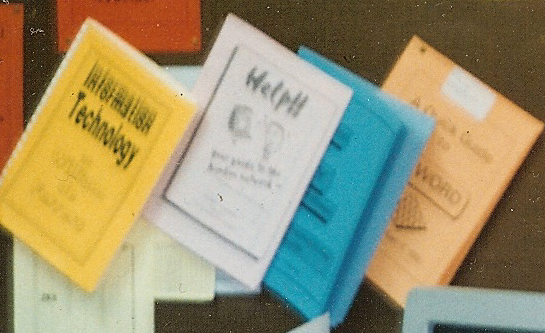 Manual labourIt’s not as clear as it might be, but the photo shows 4 booklets pinned to the wall of a computer room. From left to right they were:
- A list of the facilities and software available, and how to access them. How can you expect colleagues or students to use stuff if they don’t know it is available? (See 6 Possible Reasons Your Educational Technology is Underused.) This booklet was available for staff to peruse whilst they were in the room anyway, but there was also a copy in the staffroom.
- A series of “quick start” guides for each of the most-used applications on the computer network. These set out, on one side of A4, how to start a program, how to save, how to print and so on, plus any helpful suggestions to prevent easily-avoidable grief.
- A more detailed manual for the database we used.
- A more detailed manual for the word processor we used.
There were also manuals for the spreadsheet application we used and the desktop publishing application we used. Each of these manuals was written from a teacher’s or student’s point of view. The technical manuals that came with the programs were available for anyone who was either a masochist or who wanted to delve a bit deeper into the more arcane features of each programme.
Regard this photo as a stimulus for asking yourself the following questions:
- Do your staff and students know what ed tech facilities are available? For example, do they know they could borrow a set of laptops/netbooks/ipads/pocket camcorders/digital cameras? Do they know who to ask or where to go?
- How easy is it for them to use your ed tech facilities? I was in a meeting with a school IT technician once and a teacher came in and asked if he could quickly show her how to use the digital camera she’d borrowed. That shouldn’t have happened: there should have been a sheet (note the singular: nobody has time to read War and Peace) explaining each step. The manuals that come with cameras are full of weird and wonderful things, but most teachers just want to point and shoot, so the help sheet should tell them how to get on with it as quickly and effortlessly as possible.
- What help guides are waiting to be written?
- Could anyone else write them or some of them to help you out. You will need to provide some guidance though: I once had a teacher present me with a handwritten manual on how to use the word processing program. It was very good, but I couldn’t use it. Unfortunately, the teacher concerned was unable to see the inherent contradiction of having a handwritten manual for word processing. Remember: anything done in your name is a reflection of you and your team (if you have one); it is of paramount importance that the only impression people have is one of excellence.
If you found this article useful, why not check out the Friday Photo series too?
