
People often regard me as something of a prolific writer (which I think is another way of saying I need to get a life!). Anyway, in case you’re wondering what I use to write my blogs, here is the lowdown.
What do you require in order to blog? Obviously, the list will be depend on what device you use, and its operating system, but here is the set of tools which I find invaluable. Bear in mind that I blog every day as far as I am able, and for at least two different blogs, and I don’t receive payment for either of them. In other words, I blog in addition to doing my day job, so I don’t have time to waste on stuff that doesn’t work or is clunky.
My main device is a PC, a computer that uses Windows. Here’s the list of software I use, all of which is free.
The blog editor
Top of the list is Windows Live Writer. I have tried loads of blog editors, including trial versions of non-free ones, and none of them even come close. This is easy to set up, even if you have several blogs, and there’s loads you can do with it. In fact, if there is something missing, odds are that someone has written a free plugin to cover it. (Try WLW Plugins or, even better, the Plugins Gallery. Unfortunately, some appear to be no longer there, but it’s still a great collection.)
Screenshots
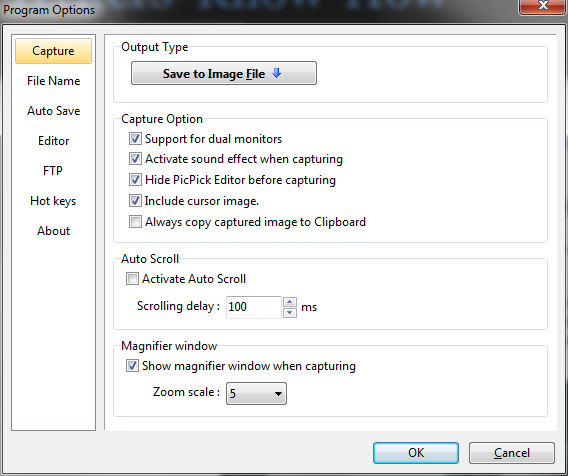
I often include screenshots of applications in my posts, and I have found nothing more fully-featured and easier to use than PickPick. It has tons of screen capture options as you can see in this screenshot – made, appropriately enough, with PickPick!
 PickPick has a myriad of screen capture optionsPicture editing
Although you can use PickPick for picture editing, I prefer Paint.net. It has many more features than I know what to do with.
Flickr
I like to take, store, and use my own photos, so I have a Flickr account. The basic one, which lets you store quite a lot of photos, is free.
Further reading
We all recognise that it’s a great idea to give your blog even more value by inserting links to related articles, but that takes a lot of time if you have to do the research yourself. I use a free service called Zemanta, which integrates seamlessly with Live Writer.
I’ve found that you can’t rely completely on Zemanta: it picks up on key words in the article, and sometimes gets the wrong end of the stick, so you have to read the articles it recommends and not just “OK” them blindly. But it does a more than passable job.
Conclusion
I don't know how well these tools would work on a school network, so I'm not sure how feasible they would be for use by students. Zemanta and Flickr should be fine (one version of Zemanta works with Firefox). But if you're a blogging teacher, these should fit the bill nicely.
Have I missed anything out of my toolkit? If I have, please leave a comment to let me know!
A slightly different version of this article was first published on the Writers’ Know-How website.
